Delete an out-of-stock product page, or keep it? The type of treatment doesn't settle the answer. What settles it is whether the visitors who came in through that page are still buying other products. This article covers how to narrow the decision down to landing revenue alone, and what to do when you keep a page and when you remove one.
Contents
TL;DR#
-
Lining up four treatments and comparing them produces no answer
The difference between 404, 410, 301 and noindex is how you tell search engines, and that says nothing about whether you can afford to lose the page
-
What settles it is landing revenue. If an out-of-stock page still has landing revenue, other products are selling
That product can no longer be bought, so the amount left standing belongs to some other product
-
If stock is coming back, keep the page and mark it out of stock; if it isn't, split by landing revenue
Choosing the treatment is the work that comes after answering those two questions
-
Search clicks falling doesn't mean the page has finished its job
Tried on our own site, about 20% of the pages judged to have decaying search traffic still had visits arriving via AI
1. What Happens When You Delete an Out-of-Stock Page#
Delete it, and the search traffic that page was receiving does not come back. It sounds obvious, but the fact that the decision to delete cannot be undone is the most important thing about this decision.
For removal there are two treatments: 404 (not found) and 410 (gone). Google does not use content from URLs that return a 4xx. A URL that was previously indexed and starts returning a 4xx gets removed from the index[1], and crawl frequency gradually drops as well[1].
You will also see it said that "410 disappears faster," but the official documentation doesn't say that. Google states explicitly that it treats all 4xx errors except 429 the same way[1]. In other words, choosing between 404 and 410 is not a lever that changes how fast the page disappears.
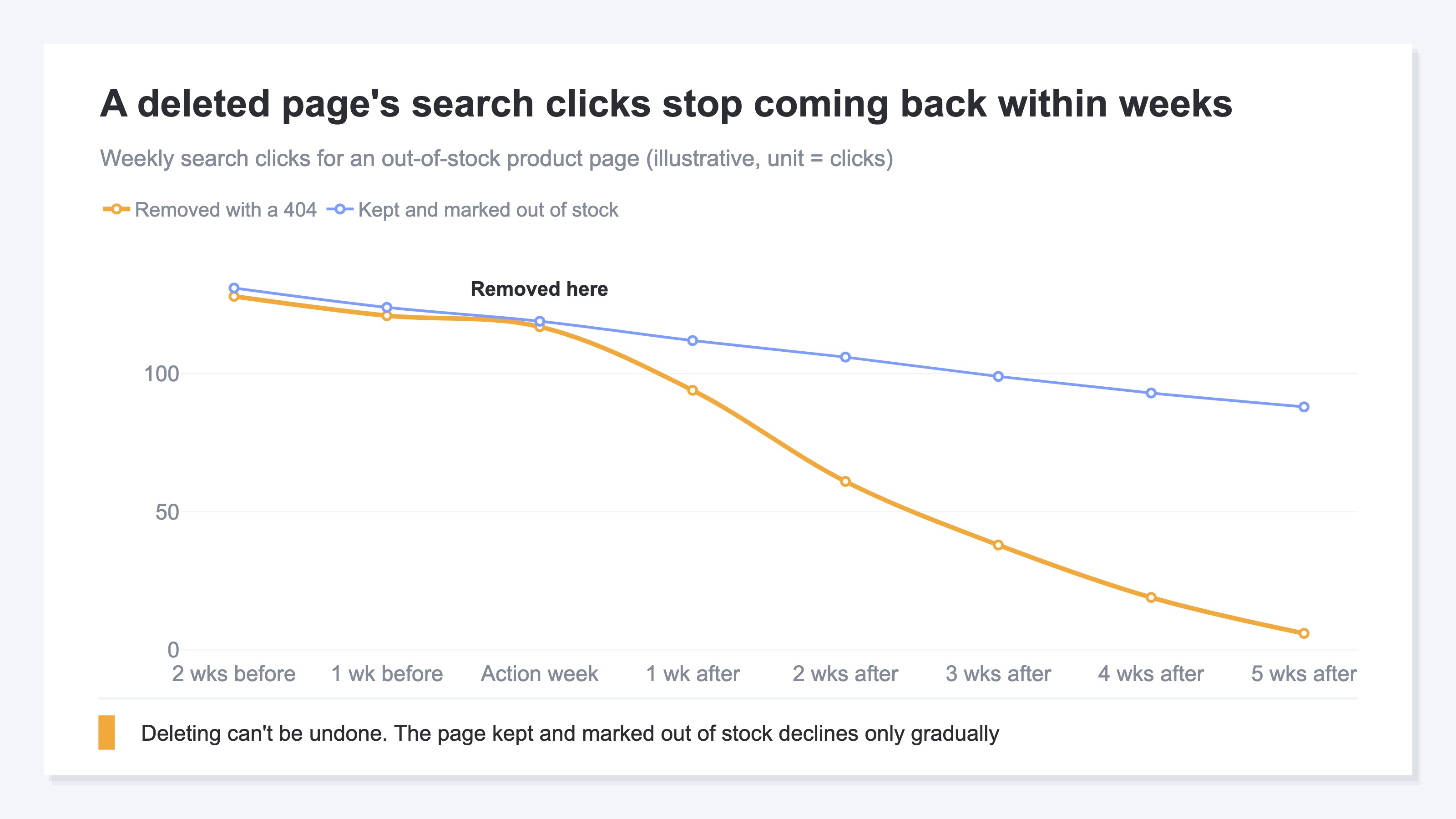
Search clicks to a deleted page fade out over several weeks. If you realize partway through that "that page was the entry point for other products," there is no way back.
We checked whether pages with falling search clicks can safely be deleted by applying the question to our own site. revenuescope.jp, which we measure with RevenueScope, is an owned media site that publishes articles, not an EC site. Even so, the shape of the question is the same. Sorting all 457 pages into five states, the ones judged to have decaying search traffic came to about 3% of the total. About 20% of those still had visits arriving through answers in ChatGPT and Gemini. Pages that appear in search results yet get zero clicks came to about 13% of the total. Had we treated pages in bulk on search clicks alone, that path would have gone with them. What sits behind clicks falling while rankings hold is covered in why clicks drop even when rankings don't.
2. Why the Keep-or-Delete Question Has No Answer#
Lining up four treatments and comparing them doesn't settle anything, because none of the four tells you the same thing.
All four are correct treatments. When four correct treatments are sitting in front of you and you still can't decide, the problem isn't how you're choosing. 404, 410, 301 and noindex only decide how you tell search engines, and none of them says anything at all about whether you can afford to lose the page. What has to be decided isn't the type of treatment — it's the one question that sits in front of it.
What makes out-of-stock awkward is that it isn't a one-time event. Seasonal products, limited colors, made-to-order items, gaps from supply timing: run an EC site and it happens week after week, and each time it needs a decision on that product. Let a few pile up at a time and the decision gets pushed back, until hundreds have accumulated and you treat them in one batch and lose revenue. A case where something similar happened through a site rebuild is collected in pages lost in a redesign, found by revenue.
One note: this is a separate problem from sorting out cannibalization, where your own pages eat each other on the same keyword. With cannibalization both pages are alive, and you decide which one to consolidate the split evaluation into. This is about how to treat a page after the product can no longer be bought. How to decide on the cannibalization side is covered in decide which page to keep by revenue.
3. The Deciding Axis Is Landing Revenue#
One number is enough to look at: the revenue generated by visits that came in through that page, which is landing revenue.
Landing revenue is the total revenue that sessions entering through a page eventually generate. The portion where the visitor moved around and bought on a different page is also credited back to the entry page. That is what makes it decisive for out-of-stock decisions. On an out-of-stock page, the product itself can no longer be bought. So if landing revenue remains, by definition that session bought some other product. Without pulling out a per-product breakdown, the mere fact that an amount remains tells you that other products are selling.
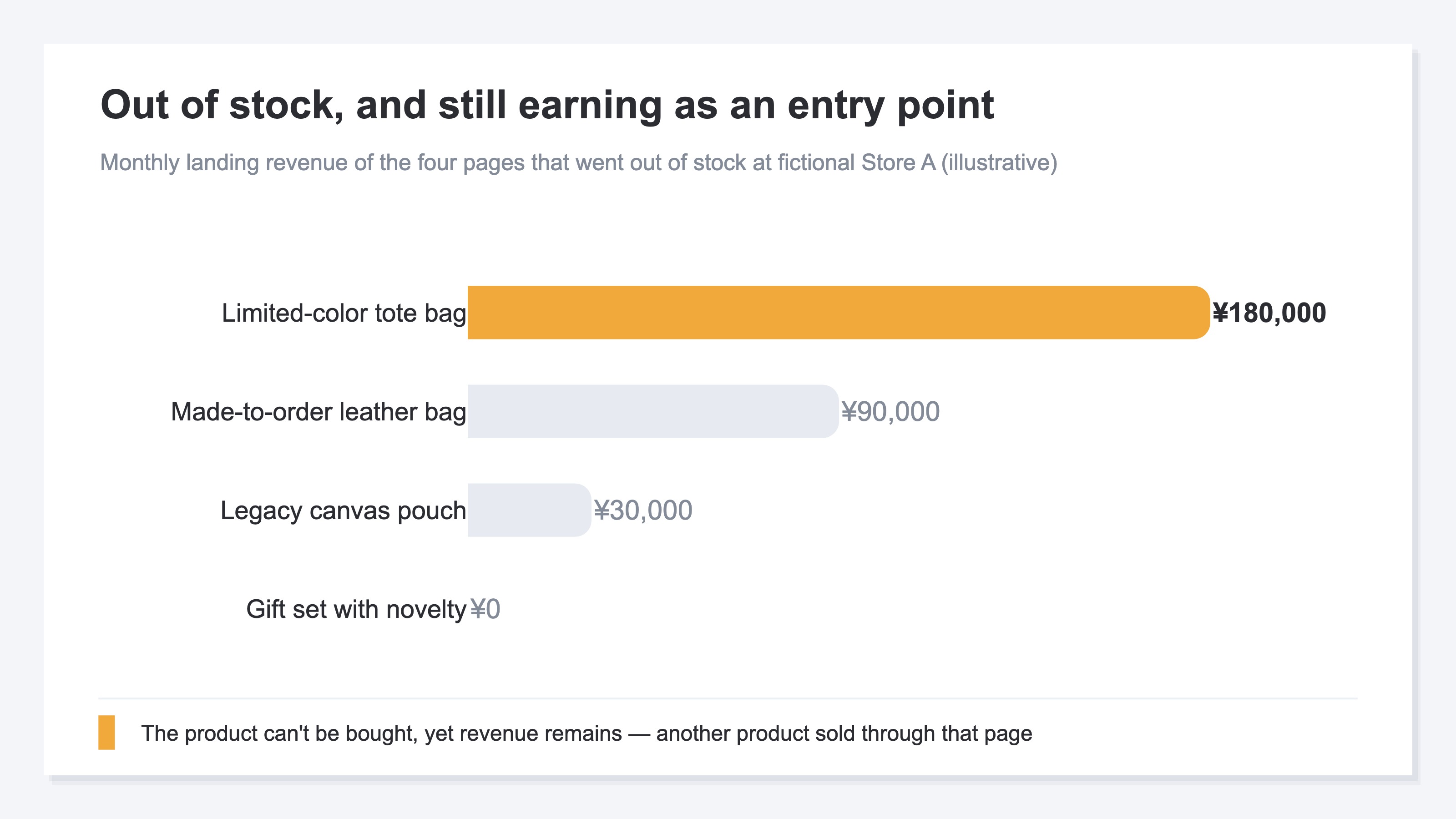
Monthly landing revenue for the four pages that went out of stock at fictional Store A split widely: ¥180,000, ¥90,000, ¥30,000 and ¥0. Look at the amounts alone and there is no reason to delete the top two.
Divide the top two by visits, though, and the picture changes. The tote bag is ¥180,000 a month over 2,000 sessions, which is ¥90. The leather bag is ¥90,000 a month over 1,000 sessions, which is also ¥90.
Fictional Store A's order data, broken down for the two out-of-stock pages (illustrative)
| Entry page | Purchase rate | Average order value | Landing revenue per visit |
|---|---|---|---|
| Limited-color tote bag | 2.5% | ¥3,600 | ¥90 |
| Made-to-order leather bag | 0.6% | ¥15,000 | ¥90 |
This breakdown was calculated by hand from the order data on the cart side.
Per visit both come to ¥90, but the contents are different things. On the tote bag, 2.5% of visits go through to a purchase at ¥3,600 each. On the leather bag only 0.6% go through to a purchase, but the visits that do buy come in at ¥15,000. On the tote bag side a flow of buying a substitute product is already in place, and the room to grow is in order value — cross-sells and paths to higher-tier products. On the leather bag side most visitors leave without buying, so what works is a back-in-stock notification. The number is ¥90 on both, but the place you touch next week doesn't overlap. How purchase rate and landing revenue come apart is covered in read articles by landing revenue, not CVR.
4. What to Do When You Keep and When You Delete#
Two questions are enough to branch on. Is stock planned to come back, and does that page still have landing revenue?
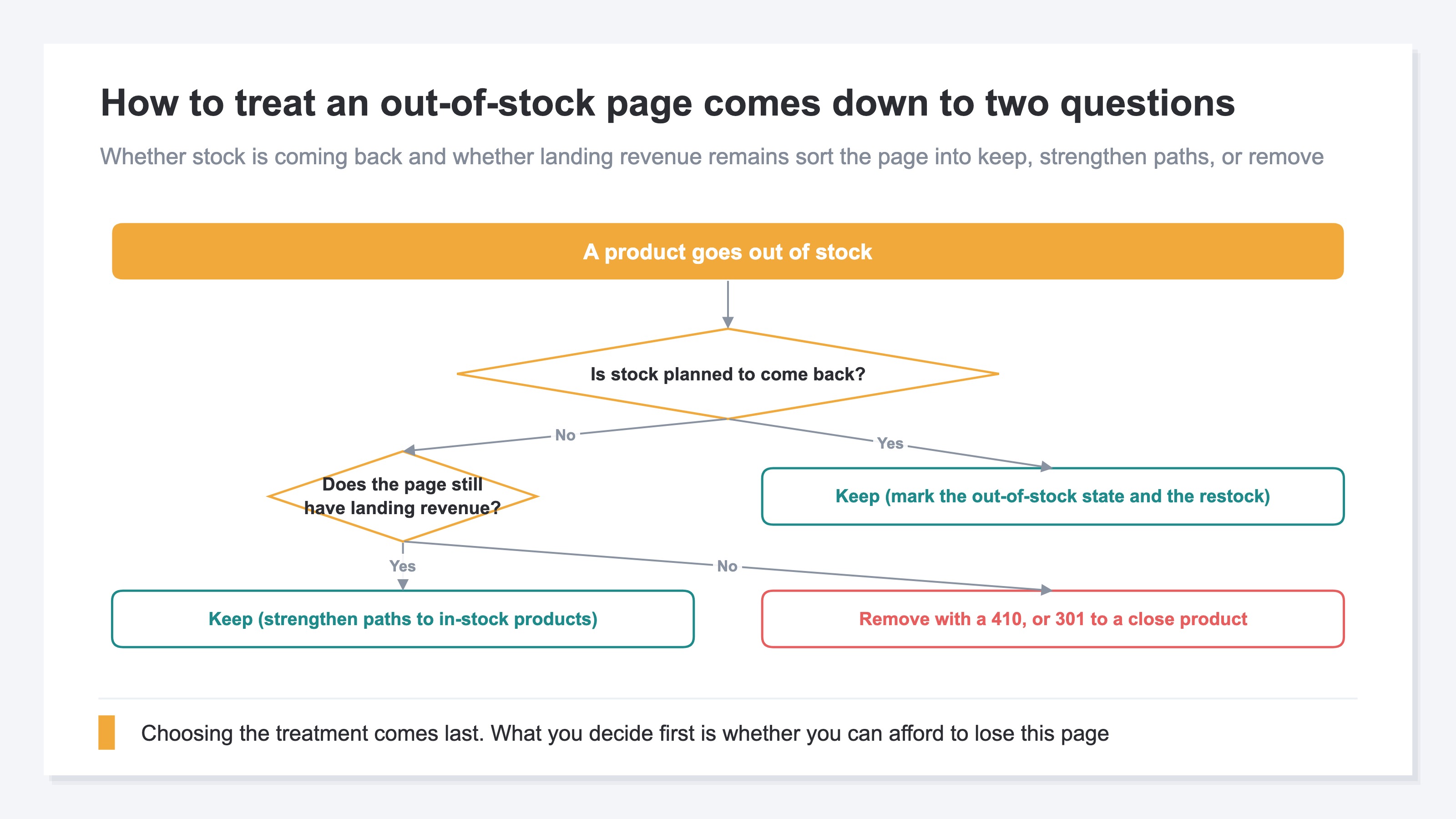
If it is coming back, keep the page. Availability can be supplied through product structured data, and shoppers can grasp availability at the search results stage[3]. On the page itself, put the expected restock date and a sign-up for back-in-stock notifications. Applying a permanent redirect here is a poor fit, because a permanent redirect tells Google to show the new redirect target in search results[2]. With a temporary redirect the source of the redirect is what appears in search results[2], so that is the better fit when a short sell-out has you pointing visitors at another page for a while.
When stock isn't coming back but landing revenue remains, keep the page as well. It means visits that entered there are buying other products, so there is no reason to close the entrance. The move is not removal but strengthening the paths to products that are in stock.
Stock isn't coming back, and there is no landing revenue either. Only here do you start considering removal or a redirect. Google writes that redirects are useful when you remove a page and want to send users to a new one[2]. A permanent redirect is treated as a signal that the redirect target is the canonical version[2]. If the target isn't a close product, it is simpler to skip forcing a 301 and remove the page with a 410. There is also noindex. That, however, is a mechanism that removes a page from search results completely once Googlebot detects the tag or the header[4], and nothing takes effect until the page is crawled again. How to run the inventory pass itself is collected in should you delete old articles?.
The material for following these branches is already recorded, split across three places. Search clicks live in Google Search Console, revenue by entry page in GA4's landing page report, and stock status in the cart admin screen. What's missing isn't the data — it's a way to join those three onto one line for the same URL.
RevenueScope solution
The material for deciding how to treat an out-of-stock page came to two things: search clicks and landing revenue. RevenueScope shows both of them, per page, on the same screen.
The content improvement suggestions in RevenueScope sort a site's content pages into five states against the prior period. Out-of-stock pages tend to land in stalling or low-click; the rest are headroom, rising and steady. For each page it shows the period-over-period change in search clicks together with the landing revenue for visits that entered through that page. Landing revenue is the amount those visits ultimately generated, added up onto the entry page, with visits judged to be bots not counted. GA4 is indispensable as a whole-site health check, and RevenueScope complements it rather than replacing it. What it takes on is the part where the change on the search side and revenue by entry page are compared at the same page level.
Fictional Store A's out-of-stock pages, asked of RevenueScope (illustrative)
| Page | State | Search clicks (vs. prior period) | Landing revenue |
|---|---|---|---|
| Limited-color tote bag | Stalling | 40 → 12 | ¥180,000 |
| Made-to-order leather bag | Stalling | 22 → 9 | ¥90,000 |
| Legacy canvas pouch | Low-click | 2 → 0 | ¥30,000 |
| Gift set with novelty | Low-click | 1 → 0 | ¥0 |
Note: the table above is a teaching example built for this explanation. The demo screen is displayed with the sample store's sample data, refreshed daily, so both the product names and the amounts there will differ from the ones shown here.
The top two pages have seen search clicks fall by more than half and are judged to be stalling. Even so, ¥180,000 and ¥90,000 of landing revenue remain. The products themselves can't be bought, so those amounts are what visits entering through those pages spent on other products. The canvas pouch has almost no search clicks left either, but it has ¥30,000 in landing revenue and still functions as an entrance. The gift set, with neither search clicks nor landing revenue, is the one that moves on to considering a treatment. The next moves are to add paths to in-stock products on the three pages you keep, and to redirect the gift set to a close product. With the material for the decision on one screen, this sorting can be run every time something goes out of stock.
FAQ#
Frequently asked questions#
Q. Do 404 and 410 differ in how fast the page disappears?
A. Google states explicitly that it treats all 4xx errors except 429 the same way[1]. With either one, an indexed URL is removed and crawl frequency gradually drops[1]. What differs is how you tell search engines, which doesn't work as a deciding axis.
Q. What should I do with a page for a product that's scheduled to come back in stock?
A. Keep it. A permanent redirect tells Google to show the new redirect target in search results[2], so it is a poor fit for a page you plan to bring back. Availability can be supplied through product structured data, and shoppers can grasp it at the search results stage[3].
Q. If I set noindex, does the page disappear from search results right away?
A. Not right away. noindex is a mechanism that removes a page from search results completely at the point Googlebot crawls the page and detects the tag or the header[4]. Depending on how important the page is, the return visit may be months away[4]. And if the page is blocked in robots.txt, the rule isn't recognized in the first place[4].
Q. Can I decide that a page with zero search clicks is safe to delete?
A. No. Across 30 days on our own site, about 20% of the pages judged to have decaying search traffic still had visits arriving through answers in ChatGPT and Gemini. Pages that appear in results yet get zero clicks came to about 13% of the total. Decide treatments on search clicks alone and those paths go with them.
Summary#
For a product page that has gone out of stock, thinking first about which of 404, 410, 301 and noindex to choose settles nothing. The difference between the four is how you tell search engines, and that says nothing about whether you can afford to lose the page.
What settles it is landing revenue. Landing revenue is the revenue that visits entering through a page ultimately generated, and on an out-of-stock page the product itself can't be bought. So if an amount remains, it means other products are selling. Without pulling out a per-product breakdown, that single point decides how the page is treated.
It also matters not to read falling search clicks as proof, by itself, that a page has finished its job. Across 30 days on our own site, pages judged to have decaying search traffic came to about 3% of the total. About 20% of those still had visits arriving via AI assistants. The tally comes from the content improvement suggestions in RevenueScope, the period is the most recent 30 days (July 2 to August 1, 2026), dates are JST and bots are excluded. The denominator is the 457 pages that had impressions in Google search.
If stock is coming back, keep the page and mark both the out-of-stock state and the restock. If it isn't, split by landing revenue. Answering those two requires comparing search clicks and revenue by entry page at the same page level. For the pages that went out of stock this week, could you check right away how much landing revenue is left on each?
See which ads actually drive revenue, at a glance
Free up to 5,000 sessions/month, AI connection included. No credit card required. Up and running in 5 minutes.
References#
- [1] Google Crawling Infrastructure "How HTTP Status Codes Affect Google's Crawlers" (2026)
- [2] Google Search Central "Redirects and Google Search" (2026)
- [3] Google Search Central "Intro to Product Structured Data on Google" (2025)
- [4] Google Search Central "Block Search Indexing with noindex" (2025)