As old articles pile up, you get stuck on "should I delete this, fix it, or keep it?" A common rule is to pick the pages with zero search clicks and delete them. But judging on that alone can sweep away pages that were quietly carrying revenue or AI-referred traffic. This article organizes deletion decisions around three conditions — search traffic, landing revenue, and AI citations — sorting pages into keep, consolidate, or delete, using real data from our own site.
Contents
TL;DR#
-
Deciding on "zero clicks, so delete it" alone can erase assets that were quietly working
Deletion is irreversible. A page with zero search clicks may still get visits from non-search sources, or drive revenue via AI answers
-
Judge deletion by three conditions together: search traffic, landing revenue, and AI citations
Don't decide on one metric. Line up three angles for the same page. If any is alive, it's too early to delete
-
The branches are keep, consolidate, delete. If any of the three is alive, don't delete
Only pages where all three are essentially absent are the first candidates to consolidate or cut
-
In GA4 and GSC the three conditions live on separate screens. Overlay them, then let a human decide
Cross-checking by hopping between screens is heavy. Making them visible in one place first is the shortcut
1. Stop Before You Delete an Old Article#
Bottom line: Judging on "zero search clicks, so delete it" alone causes accidents, because some zero-click pages are still getting visits from non-search sources.
Old articles lose strength for many reasons: rankings slipped, the topic aged, or similar articles now cannibalize each other. Such pages appear in search results but get almost no clicks. That does not make them safe to sweep into a delete list. Deletion can't be undone, and when you remove a page that was quietly working, you may not even notice the loss.
When we counted the pages on our own site that had zero search clicks, the breakdown was not uniform.
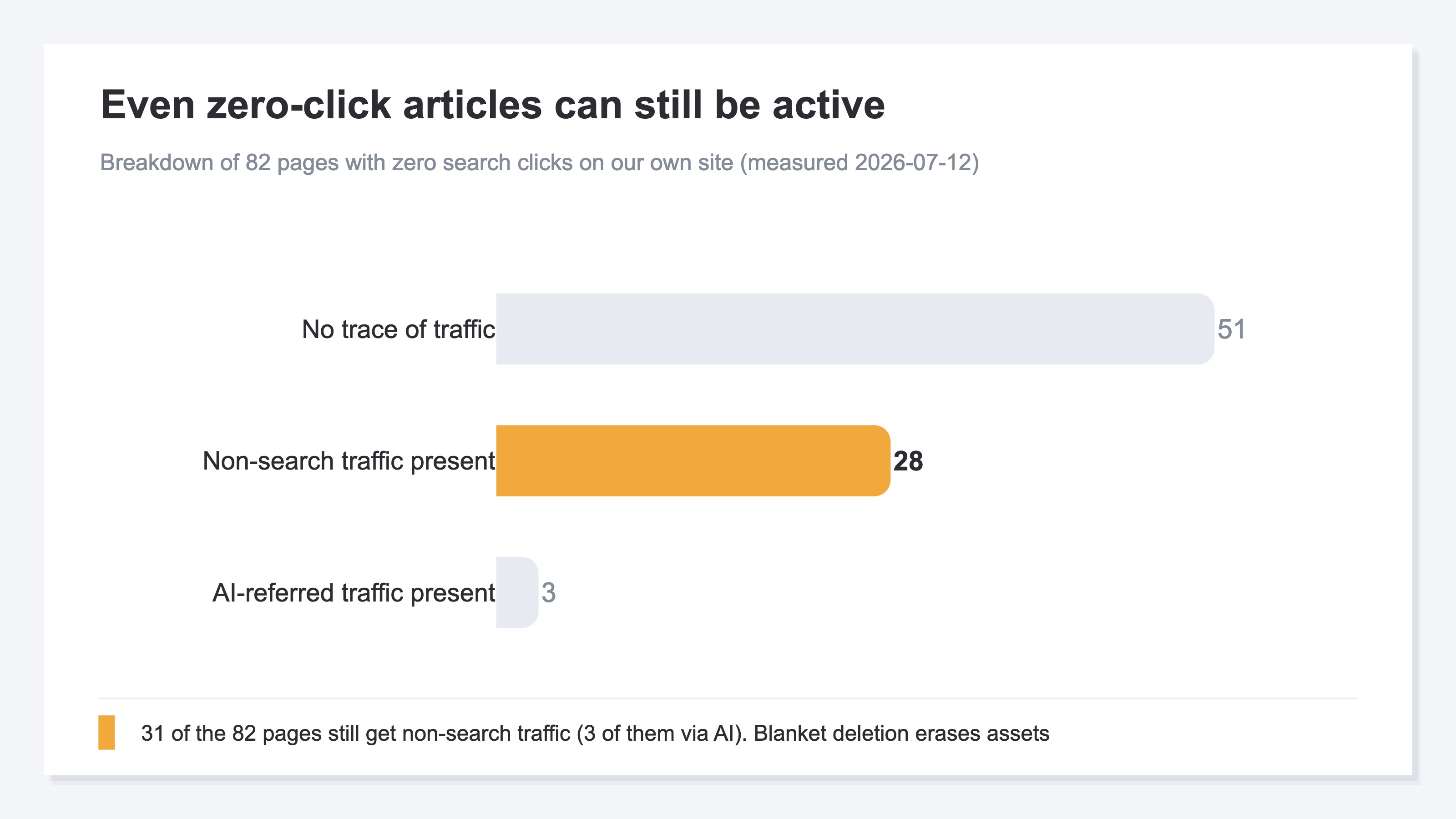
Of the 82 pages with zero search clicks, 31 still get non-search traffic, and 3 of those arrive via AI answers. Had we deleted all 82 on the "zero clicks" rule, those 31 would have gone with them. When rankings hold but clicks fall, sometimes an AI answer is substituting for the click — we cover how to tell in why clicks drop while your ranking holds.
2. Three Conditions to Check Before Deleting#
Bottom line: When judging deletion, don't use one metric. Line up three conditions for the same page: search traffic, landing revenue, and AI citations.
First, search traffic: are clicks still coming from search or not. Second, landing revenue: do people who land on the page end up buying. Here, landing revenue means attributing a purchase to the page where that session first entered (last-touch entry-page attribution), so purchases made after browsing to another page are credited to the entry page. It doesn't go as far as per-page conversion rate — it's a rough read of "how much did people who entered on this page buy." We cover how to read landing revenue itself in how much organic search contributes to revenue. Third, AI citations: are people arriving via answers from ChatGPT, Gemini, and the like. A page can be zero in search yet cited inside AI answers, with traffic still flowing from there. How to find pages that could be cited but are being missed is covered in articles buried and missed by AI.
On a site with no revenue yet, landing revenue is zero for every page. In that case, hold the revenue condition as "cannot judge," and decide provisionally on search traffic and AI citations. Not reading a revenue of zero as "proof of no value" is where honest operation is decided.
3. How to Sort: Delete, Keep, or Consolidate#
Bottom line: Follow the three conditions in order and each page sorts into keep, consolidate, or delete. If any of the three is alive, don't delete.
The sorting is a short chain of questions. First, if there is non-search landing traffic or revenue, keep it — deleting would lose that traffic and revenue. If not, check whether there is AI-referred traffic or citations. If yes, keep it; there's no need to sever a path coming from AI answers. If not, check whether there is another article that overlaps in content. If so, consolidate the two into one. Scattered similar content is worse than one merged page, and Google itself recommends consolidating duplicate URLs into one[1]. And only pages that fit none of these — no traffic, no AI citations, no overlap — become the first candidates to delete.
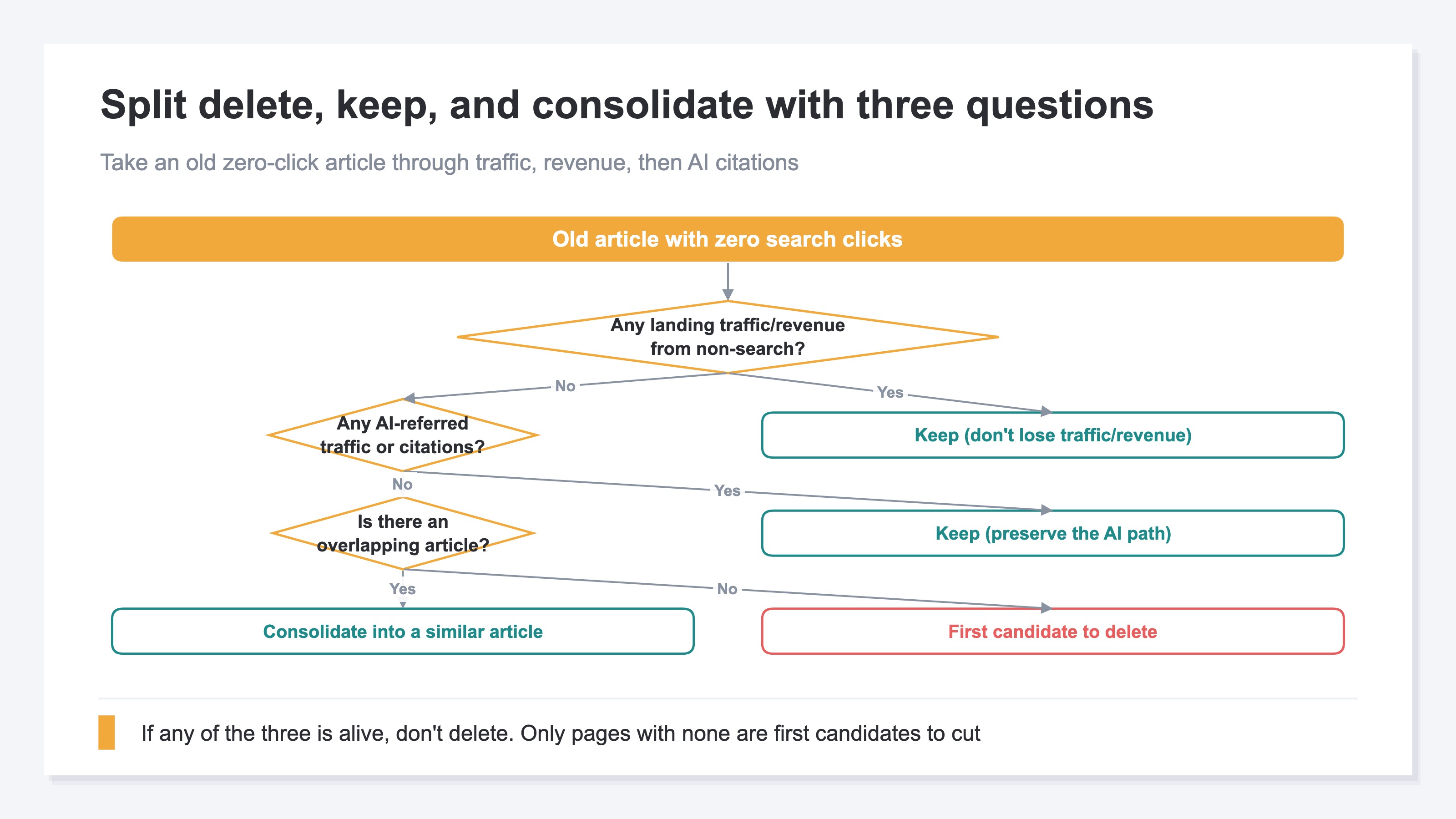
Among the pages you decide to keep, those with room to climb in rank or content are candidates for a rewrite, not deletion. Which articles to fix first for revenue is covered in which articles to rewrite first. Note that this branching only assembles the material for a decision; whoever decides to delete or consolidate is a human. Google's stance of "improve or remove" thin or unhelpful content[2] also assumes a person judges, not a machine deleting automatically.
4. GA4 and GSC Scatter It Across Three Screens#
Bottom line: In GA4 and GSC, the three conditions scatter across separate screens. Cross-checking by hopping between them is heavy to repeat every time.
Search traffic lives in GSC, landing revenue in GA4, and AI-referred traffic has to be pulled yet another way. Judging one page means opening three screens and reconciling the numbers. On top of that, AI-referred traffic falls into Direct or unknown in GA4 when the referrer isn't passed, so manual work inevitably misses some. Last-touch landing revenue is also fiddly to assemble by hand. The idea is simple, but keeping it running by hand is heavy — that is where it makes sense to hand off to a machine.
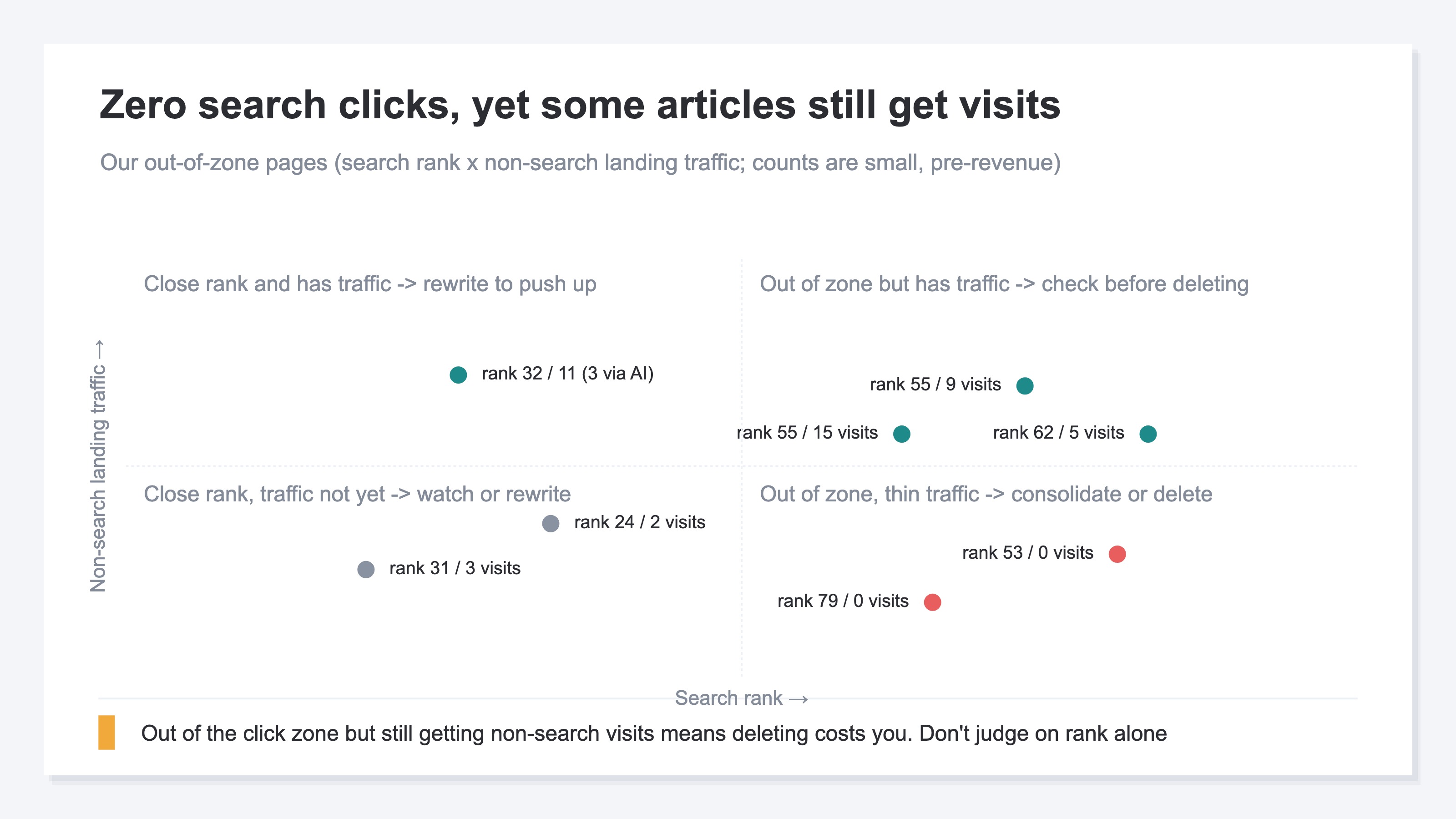
When we lay out our out-of-zone pages by search rank and non-search landing traffic, pages that are out of zone yet still get visits separate clearly from pages that are out of zone with thin traffic. The former are pages to check before deleting; the latter are the consolidate or delete candidates. With this map, you get a first read on which to cut and which to protect without inspecting all 82 pages by hand. The weekly rhythm of audits and fixes is also covered in where to fix your site this week.
RevenueScope helps
Bottom line: RevenueScope overlays search traffic, landing revenue, and AI citations for each page on one screen. Without hopping between GA4 and GSC, you get an at-a-glance read on which pages are safe to delete and which to protect.
RevenueScope's get_content_actions classifies every content page into five states versus the prior window, and lines up the ones that "show but get almost no clicks" as out-of-zone (dormant). Each page carries not only search clicks but also landing revenue (last-touch entry-page attribution) and AI-referred traffic and revenue, side by side. GA4 is indispensable as a whole-site health check, and RevenueScope complements rather than replaces it. But in GA4 the three conditions scatter across screens and AI traffic hides inside Direct. That is what we bring onto one screen.
Here is how it looks, using sample-EC data.
Asking the sample EC about "pages with zero search clicks" (sample data)
| Page | Search clicks | Landing revenue | AI-referred traffic | Read |
|---|---|---|---|---|
| Bamboo toothbrush set (product) | 0 | ¥43,745 | 0 | Zero in search but has landing revenue → keep |
| How to care for linen (blog) | 0 | ¥42,866 | 34 (¥21,049 of it) | Zero in search but revenue via AI → keep |
Figures are from a fictional sample-data EC (RevenueScope demo). Landing revenue is the sum of revenue for sessions that entered on the page (last-touch), read at the entry-page level. AI-referred traffic is classified from referrers.
Judged on GSC clicks alone, both pages look like deletion candidates. But overlay landing revenue and they are each carrying tens of thousands of yen while at zero search clicks, and one earns via AI answers. Only by overlaying all three on one screen do you see the "pages that break if deleted."
RevenueScope lines up the three conditions — search traffic, landing revenue, and AI citations — for each page on one screen. The last-touch landing-revenue tally and AI-referred traffic and revenue all read on the same row, without hopping between GA4 and GSC. Because AI-referred traffic captures every visit that carries a referrer, the number reads as a floor: at least this many are arriving. RevenueScope brings these three conditions onto one screen so you can tell deletable pages from ones to protect at a glance.
FAQ#
Q. Can I delete all old articles with zero search clicks in bulk?
A. Not recommended. Even at zero search clicks, some pages still get visits from non-search sources or drive revenue via AI answers. First check the three conditions — search traffic, landing revenue, and AI citations — for the same page, and only make pages where none is alive into deletion candidates.
Q. On a site with no revenue yet, how should I treat the landing-revenue condition?
A. On a pre-revenue site, landing revenue is zero for every page. In that case, hold the revenue condition as "cannot judge" and decide provisionally on search traffic and AI-referred traffic. The key is not to read a revenue of zero as "proof of no value."
Q. Are the pages I decide to keep fine as they are?
A. Deciding to keep only means "don't delete," which is separate from "don't touch." Pages with room to climb in rank or content are candidates for a rewrite. Pages with scattered similar content are easier to strengthen when consolidated into one. Which article to fix first is best driven by a separate priority order.
Summary#
Whether to delete an old article can't be decided on the single move of "zero search clicks or not." Even at zero clicks, some pages get visits from non-search sources or drive revenue via AI answers. Judge deletion by overlaying three conditions — search traffic, landing revenue, and AI citations — for the same page, and sort into keep, consolidate, or delete. If any of the three is alive, don't delete. Only pages where all are essentially absent are first candidates to consolidate or cut. Because the three conditions scatter across GA4 and GSC, make them visible on one screen first, and let a human make the final call. This order prevents the accident of erasing an asset that was quietly working.
See which ads actually drive revenue, at a glance
Free up to 2,000 sessions/month, AI connection included. No credit card required. Up and running in 5 minutes.