
When a page gets many impressions but few clicks, how do you choose the search keyword to target in its title?
Start with revenue by page—the last-touch revenue attributed to the page where the final visit before a purchase began. A purchase made after browsing other pages remains attributed to that first page. Select the page to investigate, compare impressions, CTR and position across its search keywords, then inspect the live results for competing pages and mismatched intent.
Contents
TL;DR#
- Compare revenue by page and start with the page that has the largest amount
- Compare only the search keywords for which that page is the top page
- Treat impressions, CTR and position as separate signals instead of deciding from one metric
- Finish by inspecting the live SERP for AI Overviews and mismatched search intent
1. High impressions alone do not determine the priority keyword#
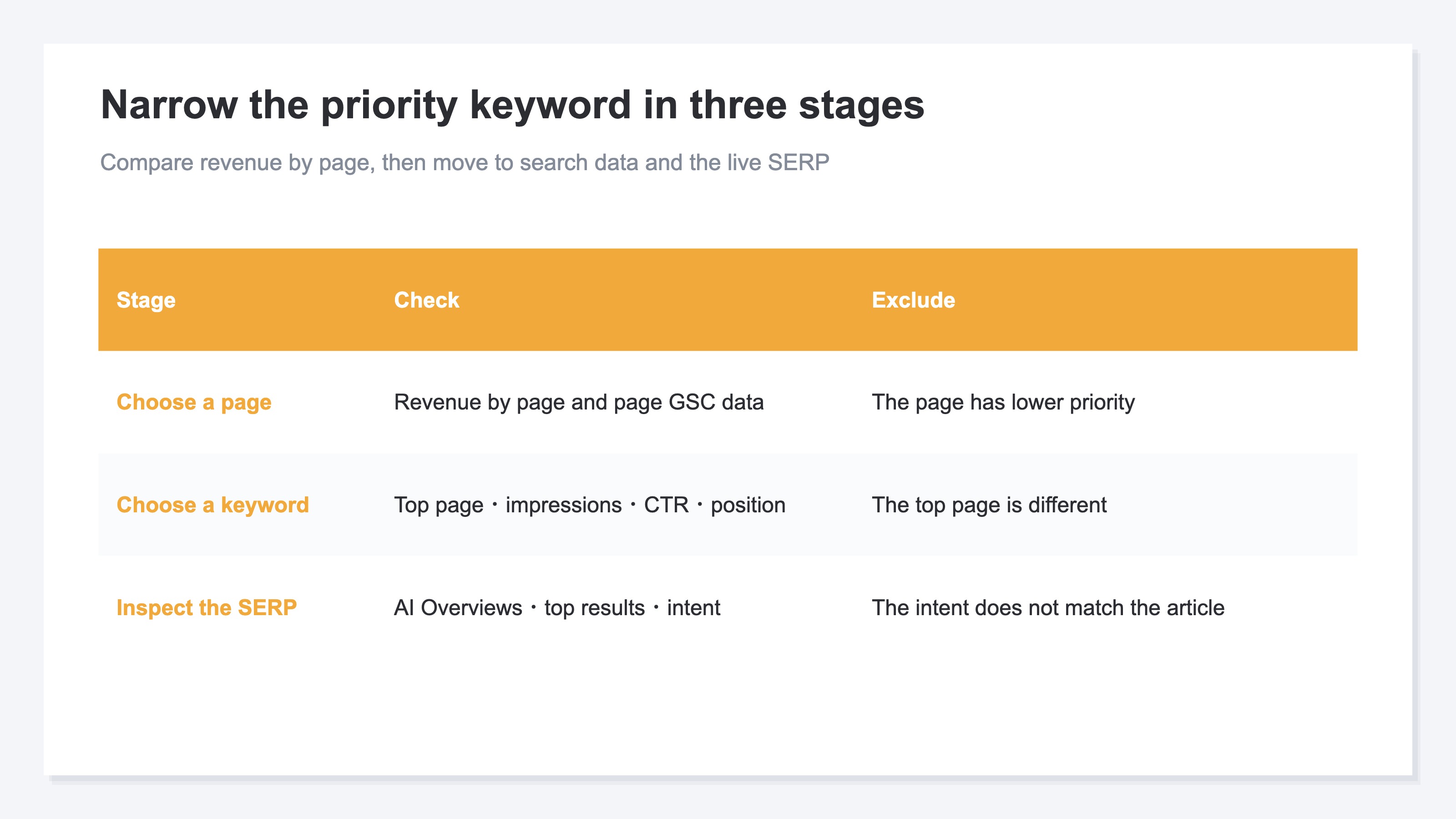
Choose the priority search keyword in three distinct stages: the page, the search keyword and the live search result.
Even when a candidate has many impressions and few clicks, no single metric settles the decision. First, compare revenue by page. Next, see whether the title matches the search keyword. An AI Overview may already answer the question within the search results. The priority and the right response depend on which of these situations applies.
Google Search Console's Performance report lets you view search keywords and pages separately. Its primary metrics include clicks, impressions, CTR and average position[1]. CTR is clicks divided by impressions[2]. Impressions alone tell you neither how often searchers chose the page nor why they did not choose it.
The first place to look is the page. If you start with search keywords, high-impression candidates tend to capture your attention. Yet the top page for that keyword may contribute little revenue. Checking revenue by page first lets you investigate where the potential revenue impact is larger.
After choosing a page, move to the search-keyword level. This is where impressions, CTR and average position come in. Keep revenue by page separate from search performance at the keyword level.
You cannot know confirmed revenue for a specific search keyword. Google Search Console records search exposure and clicks, but it does not connect each search keyword through to a purchase. The limits of connecting search keywords to revenue explains this boundary in more detail.
2. Compare revenue by page, then choose a page and search keywords#
The process has three stages: choose a page, choose a search keyword, then inspect the live search result.
In the first stage, compare revenue by page. This figure does not measure the selling power of a page alone.
The purpose of this stage is not to choose a search keyword. It is to choose the page you will investigate. Review revenue by page alongside search clicks, impressions and average position. For the method used to decide which article to work on first, see how to prioritize article rewrites using revenue by page.
In the second stage, limit the data to search keywords for which the selected page is the top page. Google Search Console lets you inspect data for each search keyword while filtering by page[1]. Without this condition, your candidate list can include keywords that surface a different page.
Suppose you find a search keyword with 80 impressions. If another article is the top page, exclude it. Those 80 impressions do not belong to the page you selected. Adding that keyword to the title based only on its impression count would make two pages target the same search keyword.
This article covers how to narrow the search keywords for one selected page. Once you have the candidates, the guide to choosing between body copy and title changes explains which part to change.
3. Narrow the title candidates using impressions, CTR and position#
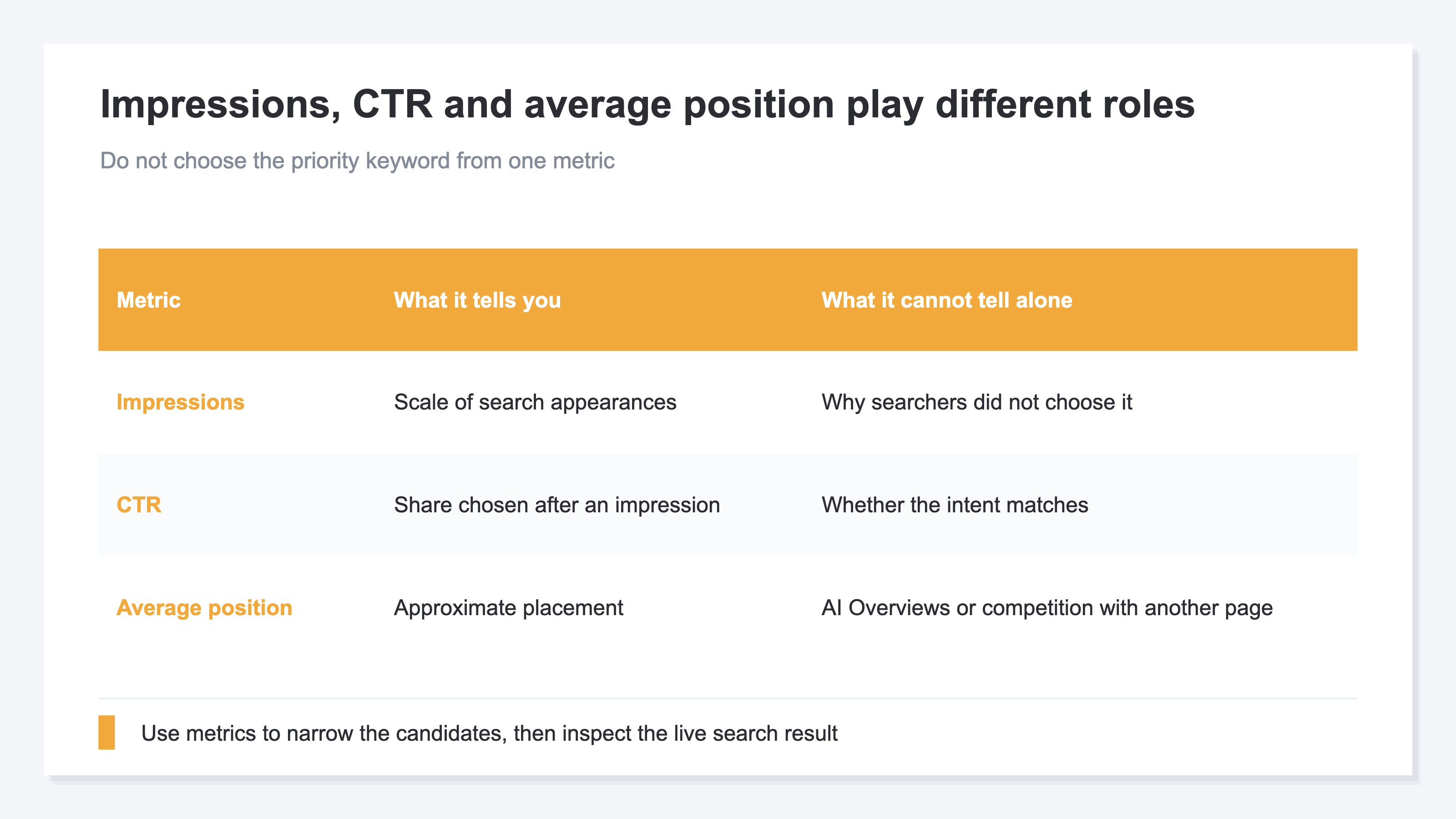
Compare search keywords using impressions, CTR and average position together.
Impressions show the scale at which the page appeared in search results for a keyword. When the number is small, even a 0% CTR may not provide enough evidence for a decision. When impressions are high and CTR is low, the page is appearing but searchers are not choosing it.
CTR is the share of impressions that produce a click. Two keywords can have the same number of clicks but different CTRs if their impressions differ. Do not compare clicks on their own; read them alongside impressions[2].
Average position helps you judge whether the keyword offered a realistic chance to earn clicks. A low-ranking keyword may remain rarely seen even after a title change. Between positions 4 and 20, inspect both the content gap with higher-ranking results and how the page appears in the SERP. Do not prioritize a keyword from position alone; pair it with impressions and CTR.
Review candidates in this order:
- Does the top page match the page you selected?
- Are there enough impressions to support a decision?
- Is CTR low relative to those impressions?
- Does average position suggest that searchers can actually see the page?
- Are the differences between multiple search keywords meaningful?
You do not need to settle a close comparison by the decimal places in CTR. If impressions and positions are also similar, compare the live search results. The metrics are there to narrow the candidate list.
4. Inspect the live SERP to exclude mismatched intent and AI Overviews#
Finally, search each candidate yourself. Keep the ones where the page's answer matches what the live results show people need.
Candidates that look similar in the data can lead to very different search results. If product listings and comparison pages dominate the SERP, changing the title of an explanatory article will not make it the type of page searchers want. If tutorials and explanations of causes dominate instead, the title can state why someone should choose your explanatory article.
When an AI Overview appears, inspect it on the live results page. If it already resolves the question, a title change alone is unlikely to generate many more clicks. Consider whether the page can offer an answer the results do not, such as proprietary data or a decision grounded in ecommerce operations.
A title link is not determined only by the page's <title>. Google may also use the main visual title, headings and other prominent text on the page[3]. If you change only the title while leaving the body focused on another topic, Google may not show the title link you intended.
The description shown in search is not fixed either. Google primarily creates snippets from page content and may show a different description for each search keyword[4]. Put the same answer in the lead and headings as well as in the title and description.
Check these four points in the live search results:
- Does an AI Overview already resolve the searcher's question?
- Do the top results focus on products, comparisons, instructions or definitions?
- What do your current title link and snippet communicate?
- Can your page offer an answer that is distinct and relevant to the candidate keyword?
Exclude candidates whose search intent does not fit the page. Put the remaining search keyword in the first half of the title. Use the second half to state the answer only this page can provide.
RevenueScope helps
RevenueScope supports the first two stages: comparing revenue by page, choosing a page and checking its search keywords.
Without it, you first review revenue by page, then specify the target URL in Google Search Console. You copy the performance metrics for each search keyword and check whether the top page matches. You still need to open the live results for every candidate, so the same work repeats as the number of target pages grows.
In RevenueScope, start by selecting a page from the content optimization suggestions. The following table is one fictional ecommerce example. Revenue by page appears separately from the page's search metrics.
| Page | Status | Impressions | CTR | Avg. position | Revenue by page |
|---|---|---|---|---|---|
| Pricing comparison guide | Low clicks | 4,200 | 1.4% | 8.6 | 480,000 JPY |
| Setup guide | Opportunity | 3,900 | 1.6% | 9.1 | 460,000 JPY |
| Glossary | Stable | 8,700 | 3.8% | 5.2 | 120,000 JPY |
These three page rows are fixed fictional examples. The sample-store data updates daily.
The pricing comparison guide and setup guide are close when you compare revenue by page. The glossary has the most page impressions but much less revenue. At this stage, select the pricing comparison guide as the page to investigate.
Next, inspect only the search keywords for which the pricing comparison guide is the top page. The table below shows search performance. It does not assign revenue to individual search keywords.
| Search keyword | Impressions | Clicks | CTR | Avg. position | Top page |
|---|---|---|---|---|---|
| ecommerce analytics tool comparison | 1,120 | 18 | 1.6% | 7.8 | Pricing comparison guide |
| ecommerce revenue analytics comparison | 980 | 17 | 1.7% | 8.1 | Pricing comparison guide |
| web analytics comparison | 1,050 | 32 | 3.0% | 6.9 | Another comparison article |
These three keyword rows are also fictional examples and differ from the sample store's current values.
The first two keywords have similar CTRs and positions, so the data alone cannot settle their priority. Inspect the live SERP manually and choose the one that matches the page's content. Exclude the third keyword because its top page is different.
RevenueScope supports the first two stages: compare revenue by page to select the page, then examine its search performance. It does not rank search keywords by confirmed revenue. You must manually inspect the live SERP and retain the search keyword whose intent matches the page.
FAQ#
Frequently asked questions#
Q. Should I always change the title when impressions are high and CTR is low?
A. No. When average position is low, the title may not be the main cause. Check whether the top page matches and inspect the live SERP. Keep the keyword as a candidate only when its search intent fits the page.
Q. Why not prioritize the search keyword with the most impressions?
A. Impressions alone are not enough. If another page is the top page, those impressions do not represent the page you selected. First compare revenue by page and choose the page with the largest amount, then compare impressions, CTR and average position only for that page.
Q. Can I see revenue for each search keyword?
A. You cannot see confirmed revenue for each keyword. RevenueScope's estimated revenue by search keyword is also an approximation calculated from organic-search RPS and clicks. This method does not prioritize that estimate. It keeps revenue by page separate from keyword-level search performance.
Summary#
When a page gets many impressions but few clicks, impressions alone do not determine the priority search keyword. Start by comparing revenue by page and choosing the page with the largest amount. Then limit the candidates to search keywords for which that page is the top page.
Compare search keywords using impressions, CTR and average position together. If the candidates remain close, inspect the live SERP manually. Review AI Overviews, the types of pages that rank, and your current title link and snippet, then exclude keywords that do not match the page's content.
This order prevents you from mistaking another page's impressions for the selected page's performance. It also avoids guessing confirmed revenue or purchase intent for individual search keywords. Compare revenue by page to choose the page, narrow the keyword candidates using search performance, and decide from the live SERP. That is how to prioritize work on a low-click article.
See which ads actually drive revenue, at a glance
Free up to 5,000 sessions/month, AI connection included. No credit card required. Up and running in 5 minutes.
References#
- [1] Google Search Console Help, "Performance report (Search)" (2026)
- [2] Google Search Console Help, "Impressions, position, and clicks" (2026)
- [3] Google Search Central, "Influencing your title links in search results" (2026)
- [4] Google Search Central, "Control your snippets in search results" (2026)