
The revenue showing on the GA4 screen and the revenue accounting closes the month with do not agree. Before you set out to make the amounts match, the thing worth checking is whether the two are calling the same thing revenue. This article breaks the gap down into what it is made of, and settles which number goes to which decision.
Contents
TL;DR#
- Under the same word, revenue, the GA4 screen and the accounting ledger are counting different things
- GA4's revenue metrics are calculated from the amount sent in the purchase event, and returns are deducted only when a refund event is sent
- refund is a recommended event that does not occur automatically; sending it takes implementation plus a hookup on the cart side
- Under Japan's consumption tax, the adjustment for a return is made in the period the return occurred, not the period of the original sale
- Rather than chasing a match, it is faster to assign the roles: accounting for the settled figure you publish outside the company, measurement data for next month's allocation
1. The Word Revenue Covers Two Different Amounts#
Under the same word, revenue, the GA4 screen and the accounting ledger are totaling different amounts.
Ask what last month's revenue was, and the amount you get back changes with who you ask. What GA4 totals is the declared amount sent at the moment checkout completed. What accounting totals is the settled amount, after returns and cancellations have been worked through. The gap is exactly as designed, and what to settle first is which of the two definitions you are speaking in right now.
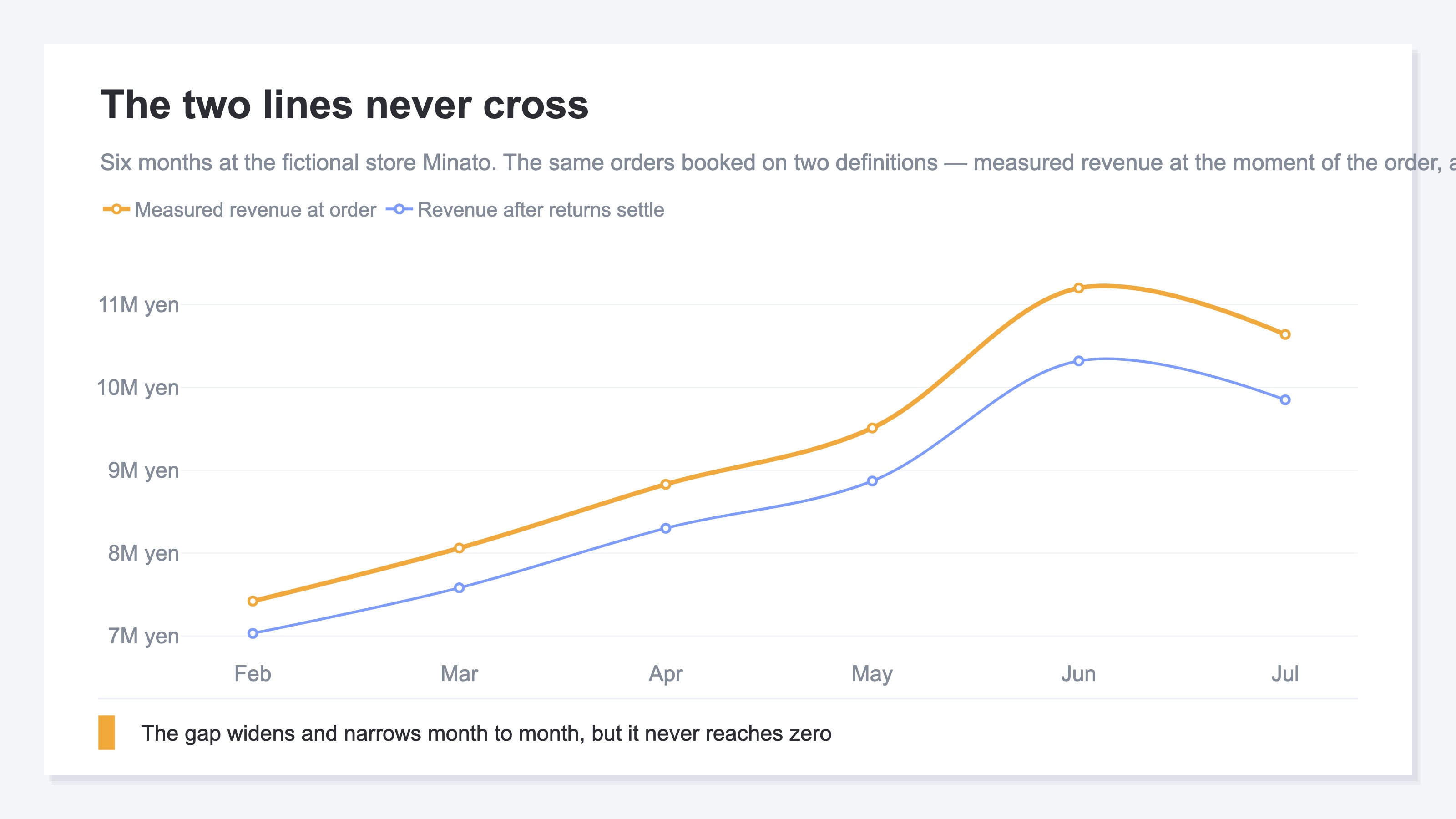
Above is six months at a fictional store. The two lines are looking at the same orders, but the upper line books the full amount in the month the order arrived, while the lower line subtracts what came back afterwards. The lines never cross. And the size of the gap widens and narrows from month to month.
Look at the mechanism on the GA4 side and the reason for that shape is plain. GA4's revenue metrics are calculated from the value parameter sent with the purchase event[4]. That is an amount sent the instant checkout finishes, and whether the goods came back afterwards has no way of entering that event.
The means of reflecting returns does exist. GA4 has an event called refund; send it with the ID of the refunded transaction and the items, and it is recorded as a refund amount[2]. The metrics split in two as well: gross purchase revenue is the sum of purchases, in-app purchases and subscriptions, while purchase revenue is that figure with refunds deducted[3]. Showing revenue net of returns inside GA4 is, in itself, possible.
This path comes with conditions attached, though. refund is not an event that occurs automatically; it is classified as a recommended event that you send yourself[1]. It is not something a switch in the admin screen takes care of, it is work that adds code to the site. The return itself is handled on the cart or the order management side, so you also need a mechanism that receives the refund information from there and sends the event. And even after you implement it, the amounts do not line up to the last yen. Event-level revenue comes from the value parameter, while item-level revenue is calculated as price times quantity, and the latter does not include tax or shipping[3][4]. Which of the two you call revenue produces yet another difference.
Separating out where cart-side amounts and GA4 amounts disagree is covered in why GA4 revenue doesn't match Shopify.
2. Where the Gap Comes From#
What the gap is made of is not returns alone.
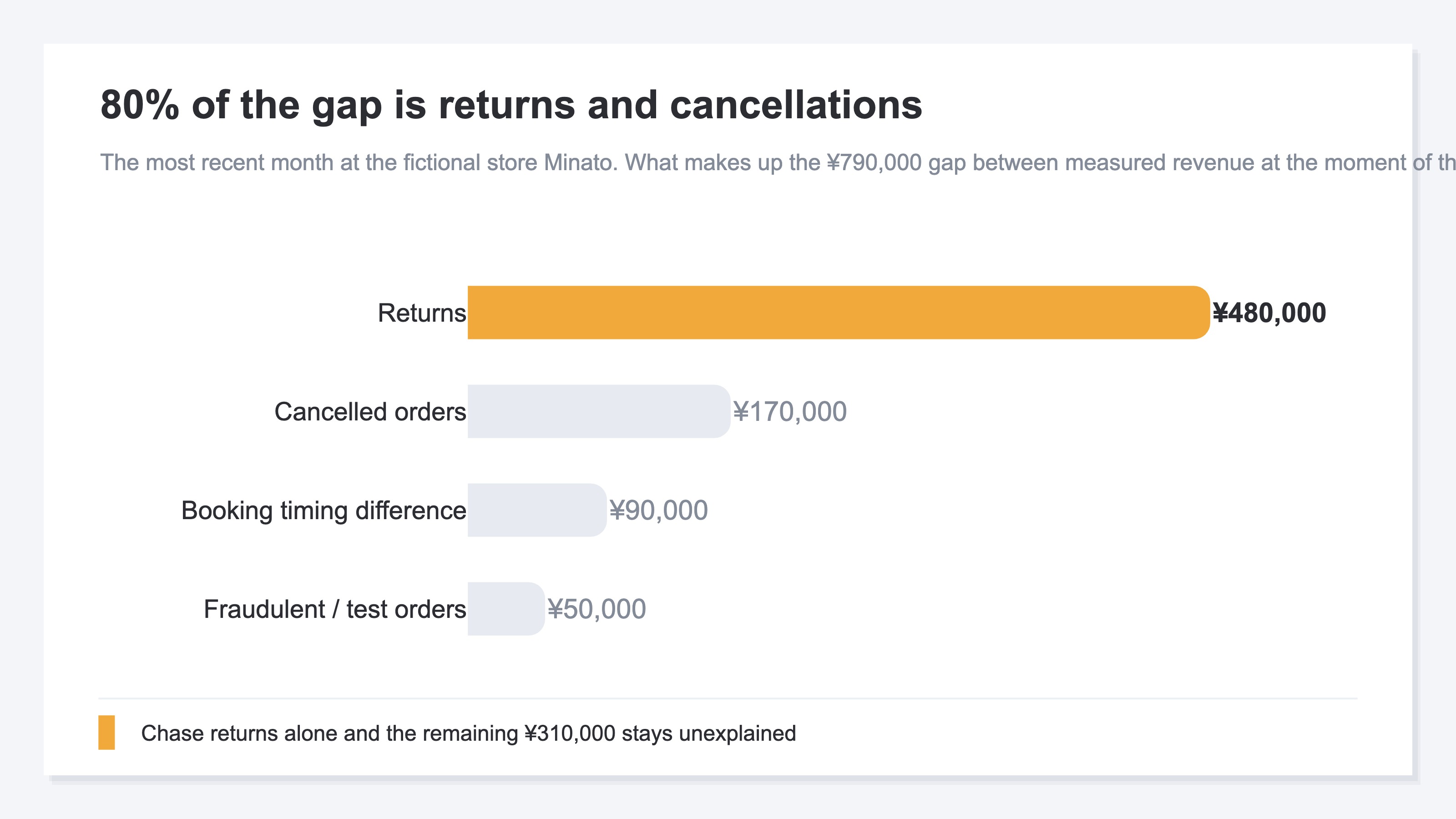
Above is the most recent month at the same fictional store. Of the ¥790,000 gap, returns are the largest at ¥480,000, but the remaining ¥310,000 comes from other causes.
A return has already completed checkout, so the purchase record is sent. The goods come back after that, and the amount is not settled until the refund goes through. A cancelled order is called off before shipping, and here too the purchase record has already been sent. These two account for 80% of the gap.
The difference in when revenue is booked arises when an order that arrived at the end of the month comes back as a return in the following month. Under Japan's consumption tax, the adjustment for a return is made in the taxable period in which the return was made, not the taxable period in which the original sale was made[5]. The month the revenue is booked and the month it comes back are different months. Cut out a single month and compare the two numbers, and this portion always remains.
Fraudulent and test orders are the ones cancelled after payment went through, plus purchases put through in-house to confirm things work. Small as an amount, but the purchase event was sent, so they stay on the measurement side.
Get this far and it starts to look as though you should just read the accounting figure, but that side has scenes where it cannot be used either. The settled amount firms up only after the monthly close is done, and it is not in hand at the point you decide next month's allocation. On top of that, the settled amount arrives as a total, so it is not split by which channel or which campaign the revenue came from. With no channel breakdown, it cannot be used for the allocation decision.
3. Stop Trying to Match Them and Decide Which to Use Where#
Deciding which of the two goes to which decision comes before the work of making them agree.
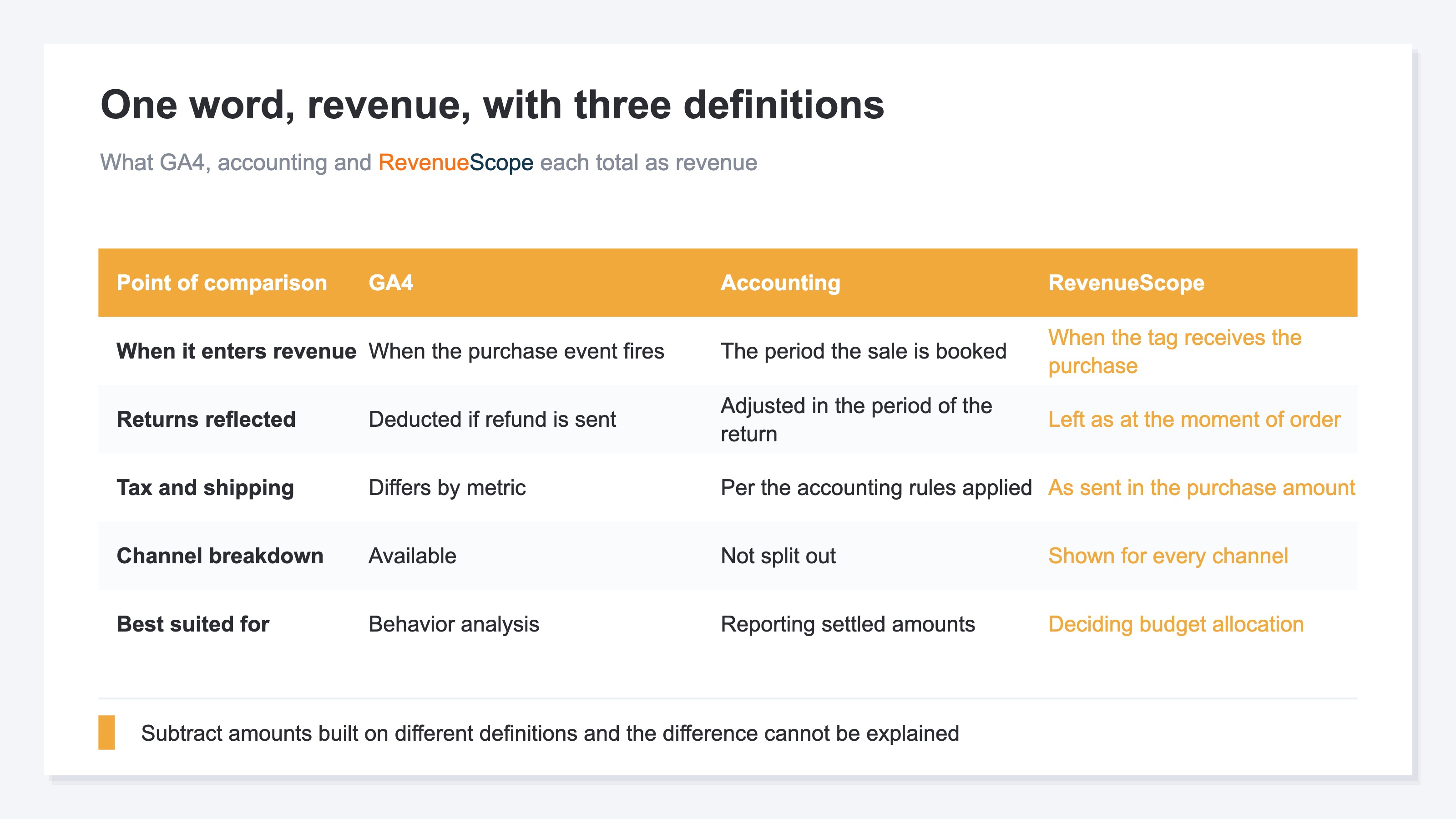
The three differ in when an amount enters revenue, in how returns are handled, and in how tax and shipping are handled. Put amounts built on different definitions into the same frame and subtract, and you can no longer explain what the difference you got represents.
The basis for using them separately is clear. For the figures that go into closing the books and paying tax, and for the settled amount you publish outside the company, the accounting side is authoritative. When you decide which channel to shift ad spend toward next month, or which campaign to stop, the measurement-side revenue is authoritative. Accounting is accurate but takes time to settle; the measurement side is fast, at the price of being a pre-settlement amount. It is not a question of which is better. Whether the decision can wait for the closing date or not is what changes which one you reach for.
What to do monthly is not the work of closing the gap between the two. It is to note down the share of revenue that the gap accounts for. If the divergence that sat around 6% through last month is 14% this month alone, either returns went up or measurement broke. That share moves before the amount itself does.
When deciding allocation, there is a habit of dividing accounting's settled revenue by ad spend. But settled revenue is a monthly amount with returns worked through, while ad spend is a daily amount from the moment it was placed. One is a figure from after the close, the other from before it, and the division is being carried out with the units left unaligned. The numbers you use for a decision have to be fixed to units where the division holds.
RevenueScope solution
Fix the revenue you use for decisions to a single definition and that division holds. RevenueScope revenue is the measured revenue the site tag received at the moment a purchase occurred. That one definition runs through every channel and every campaign on display, so the units stay aligned whether you add across rows or subtract.
To an AI assistant such as ChatGPT connected to RevenueScope over MCP, you ask in plain English: what is revenue and RPS by channel for the last 30 days? What comes back is the table below. RPS (revenue per session) shows how much revenue one visit turned into.
| Channel | Sessions | Revenue | RPS |
|---|---|---|---|
| Google search | 6,000 | ¥2,100,000 | ¥350 |
| Google Ads | 4,000 | ¥1,200,000 | ¥300 |
| Direct | 3,000 | ¥900,000 | ¥300 |
| Meta | 2,500 | ¥500,000 | ¥200 |
Note: what the demo screen reads is the sample store's sample data (refreshed daily). The table above is separate from that — one example at the fictional store Minato, built for explanation (illustrative), with the amounts rounded.
At the top is Google search. It leads on sessions, revenue and RPS alike, so the order does not change across the three ways of looking. What is lined up here is measured revenue at the moment of the order, so once returns settle the actual amount comes in below this. When a return occurs at this store, the row you match first against accounting's settled amount is Google search as well. When you check what the gap is made of, working down from the largest row widens the explainable range first.
The breakdown for Google Ads is displayed at campaign level too.
| Campaign | Revenue | RPS | AOV | CVR |
|---|---|---|---|---|
| summer_sale | ¥700,000 | ¥350 | ¥7,000 | 5.0% |
| SummerSale | ¥100,000 | ¥250 | ¥10,000 | 2.5% |
| (none) | ¥400,000 | ¥250 | ¥10,000 | 2.5% |
Note: one example from the same fictional store Minato (illustrative). AOV is the average amount per order, and CVR is the share of sessions that reached a purchase.
summer_sale and SummerSale are strings written with the same sale in mind that got recorded separately. RevenueScope displays them as they were recorded, as separate campaigns. RPS reads ¥350 and ¥250, with ¥100 of daylight between them. A string that differs by even one character is recorded as a separate row, so the two rows will not merge unless the notation is aligned. Traffic where campaign is not set is displayed as (none), in the same shape as any other campaign.
Every number in the tables is calculated from the same definition: measured revenue at the moment of the order. Because the definition is fixed to one, this spread can be read as a difference in the campaigns themselves.
FAQ#
Frequently asked questions#
Q. If we add the refund event to GA4, will it match accounting?
A. Returns can be reflected on the GA4 side as well. But refund is a recommended event that does not occur automatically, and it takes implementation to send it plus a mechanism that receives information from the cart or order management handling the return[1][2]. Even once it is in, event-level revenue and item-level revenue handle tax and shipping differently[3][4], and for tax purposes the adjustment for a return falls in the period the return occurred[5]. Rather than setting a match as the goal, splitting the roles — accounting for the settled amount, measurement data for the allocation decision — finishes faster.
Q. How large a gap still counts as normal?
A. Return rates differ by industry and by what you sell, so no shared benchmark can be set. Write out your own divergence rate over the past several months and use that band as the standard. Months that land inside the band need no investigating. Only for months outside it do you look from the three directions of returns, cancellations and measurement.
Q. Is it wrong to decide the ad budget on accounting's numbers alone?
A. It is not that they cannot be used, but the timing does not line up. The settled amounts come together after the monthly close, while next month's allocation is usually decided in the same week or before it. On top of that, the settled amount is not split by channel or by campaign, so it does not become material for deciding where to add and where to cut.
Q. Which number should go into an internal report?
A. Choose by purpose, and state the side you chose in one line. For reporting revenue results, accounting's settled amount; for evaluating a campaign, the measurement-side revenue. As long as it says either measured revenue at the moment of the order or the settled amount after returns, someone reading it later will not get confused matching it against a different figure.
Summary#
GA4 and accounting do not line up because the line for how much counts as revenue is drawn differently on the two sides. Add the refund event on the GA4 side and returns can be reflected[1][2], but it takes implementation and a hookup on the cart side, and a separate difference remains in how tax and shipping are handled[3][4].
The accounting side has mechanics of its own. Under Japan's consumption tax, the adjustment for a return is made in the taxable period in which the return was made rather than the taxable period in which the original sale was made, and that tax amount is calculated by multiplying the tax-included amount by 7.8/110 (6.24/108 for items subject to the reduced tax rate)[5]. It is built to reverse in the month the return occurred, so cut out a single month to compare and it will always be off.
The dividing line for the decision is what you use the number for. The accounting side if you are producing a settled amount to publish outside the company; the measurement side if you are deciding next month's allocation. Once that is decided, keep the numbers going into any one formula on one side. Mix the settled amount and the measurement-side revenue in a division and the ratio you get is a share of neither revenue.
See which ads actually drive revenue, at a glance
Free up to 5,000 sessions/month, AI connection included. No credit card required. Up and running in 5 minutes.
References#
- [1] Google Analytics Help "[GA4] Recommended events" (2026)
- [2] Google for Developers "Measure ecommerce" (2026)
- [3] Google Analytics Help "Analytics dimensions and metrics" (2026)
- [4] Google Analytics Help "Fix missing revenue data" (2026)
- [5] National Tax Agency "No.6359 Adjusting the tax amount when a discount, return or rebate is made (return of consideration for sales)" (2025)