![[2026] How to Connect an MCP Server to Claude: No JSON Required](/_next/image?url=%2Fimages%2Fnews%2Fclaude-mcp-connect-2026.jpg&w=3840&q=75)
If "connect MCP to Claude" made you picture editing a config file, you can drop that worry. From the claude.ai screen you paste one server URL and it connects. In this article we connect a read-only server for real, and print the questions we asked and the answers that came back, exactly as they arrived.
Contents
TL;DR#
-
You write zero lines of config file
Open Customize > Connectors on claude.ai, paste the server URL, and press "Add" — that's it[1]
-
Five steps, and one field to fill in
Every field other than the server URL is optional, and you don't have to prepare OAuth credentials yourself[1]
-
The very first question after connecting comes back as a table
Asked for revenue by channel, and a 21-row table came straight back
-
The two places people get stuck are both in the adding step
The add button is nowhere to be found, or the URL is missing its tail
1. Five Steps to Connect Claude#
To put the conclusion first: the only thing you type is one server URL. The rest is done by pressing buttons.
Say a channel that wasn't selling until last month has started collecting orders this month. The CSV you shared with the AI, though, only covered through last month. The answer that comes back is coherent, and it goes straight into next quarter's budget. You notice the gap three months later. The cause is that the habit of handing over data by hand, every time, went unchanged for months.
MCP is an open standard for connecting AI apps to outside data and tools[3]. Once connected, the work of sharing files as attachments disappears entirely. Here we use RevenueScope's read-only server as the example and walk through the actual steps. The menu names below are the English labels from the official help[1]. If you have claude.ai set to another display language, look for the item in the same position.
- On claude.ai, open Customize > Connectors[1]
- Press "+" and choose Add custom connector[1]
- Enter
https://mcp.revenuescope.jp/api/mcpin the server URL field - You don't need to open Advanced settings. The OAuth Client ID and Secret are optional fields[1]
- Press Add to confirm[1]. The first tool call takes you through sign-in and consent
From right after you add it, Claude will call the server when you ask (verified 2026-08-05). If you want to separate the conversations that use it from the ones that don't, open "Connectors" from the "+" at the bottom left of the chat screen and toggle each connector on or off[1].
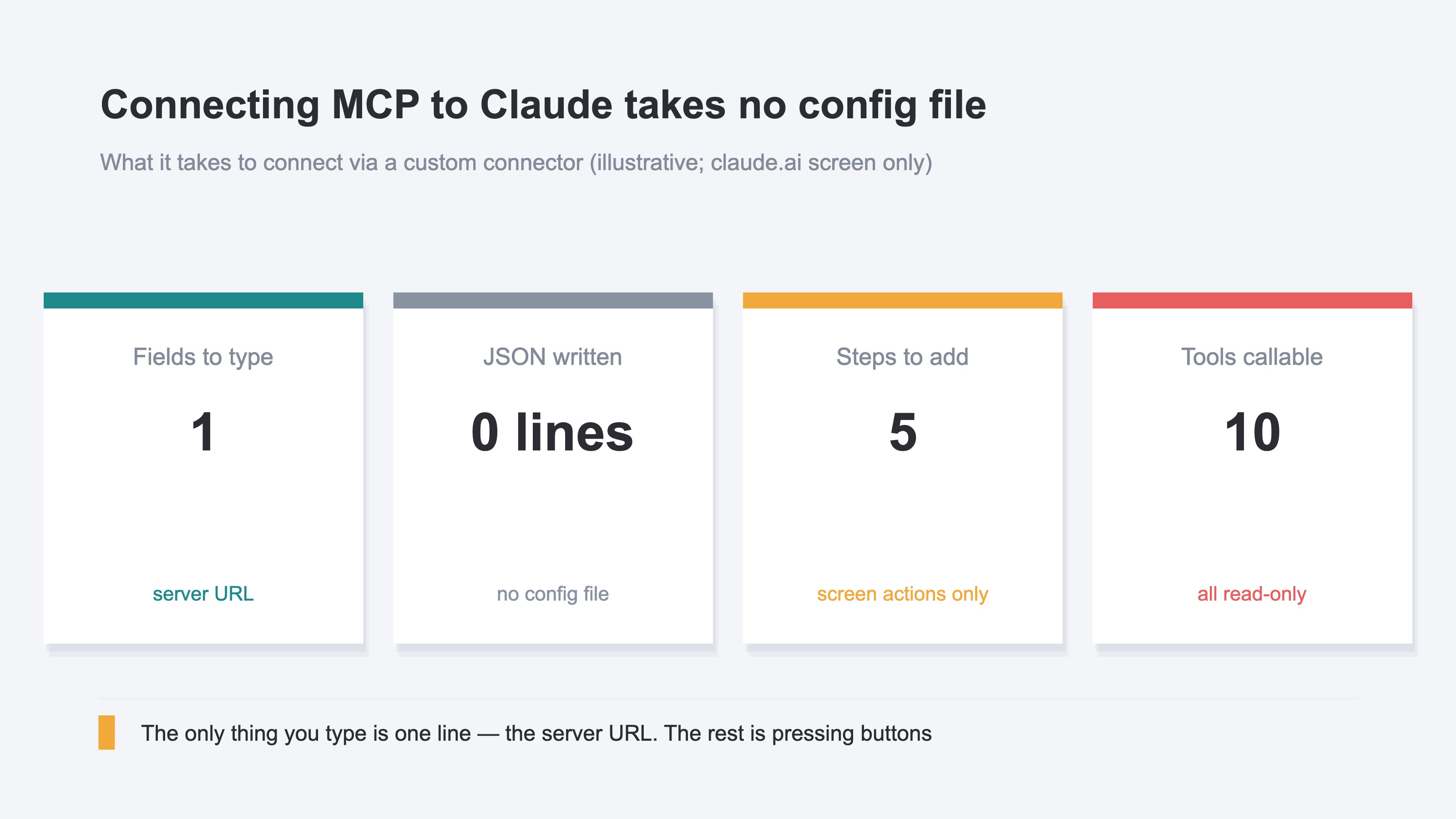
Up to here, not one line of JSON has been written. Editing a config file belongs to the other route — a local MCP server running on your own machine. The official help draws a clear line between the two, and says that route uses claude_desktop_config.json[1].
Custom connectors are available on the Free, Pro, Max, Team, and Enterprise plans, with the free plan limited to one custom connector[1]. Once connected, ten read-only tools line up for Claude to call on its own. How the same server looks across four different AI clients is laid out in one MCP server across four AI clients.
2. The Questions We Asked and the Answers That Came Back#
Here is the question we asked right after connecting.
For the sample EC site, show revenue and sessions by channel for the last 30 days, in descending order of revenue.
For this question Claude called get_breakdown. The arguments — the filters on the question — were dimension=channel and period=30d. What came back was a 21-row table. Twenty rows were channels, and the remaining row was Unattributed, the revenue that couldn't be tied to any channel. Here are the top eight rows.
Channel breakdown for the sample store (2026-07-06 to 2026-08-05)
| Channel | Sessions | Revenue | RPS |
|---|---|---|---|
| Gemini | 5 | ¥24,833 | ¥4,966 |
| Claude | 5 | ¥19,906 | ¥3,981 |
| 83 | ¥16,591 | ¥199 | |
| LINE | 68 | ¥10,613 | ¥156 |
| Google Ads | 38 | ¥10,160 | ¥267 |
| TikTok | 27 | ¥9,293 | ¥344 |
| Google Search | 44 | ¥6,841 | ¥155 |
| note | 8 | ¥5,317 | ¥664 |
The table above is sample data (refreshed daily) from the sample store — LUMIÈRE beauty, a fictional cosmetics shop. Ask the same question today and both the channel order and the amounts will differ from the above.
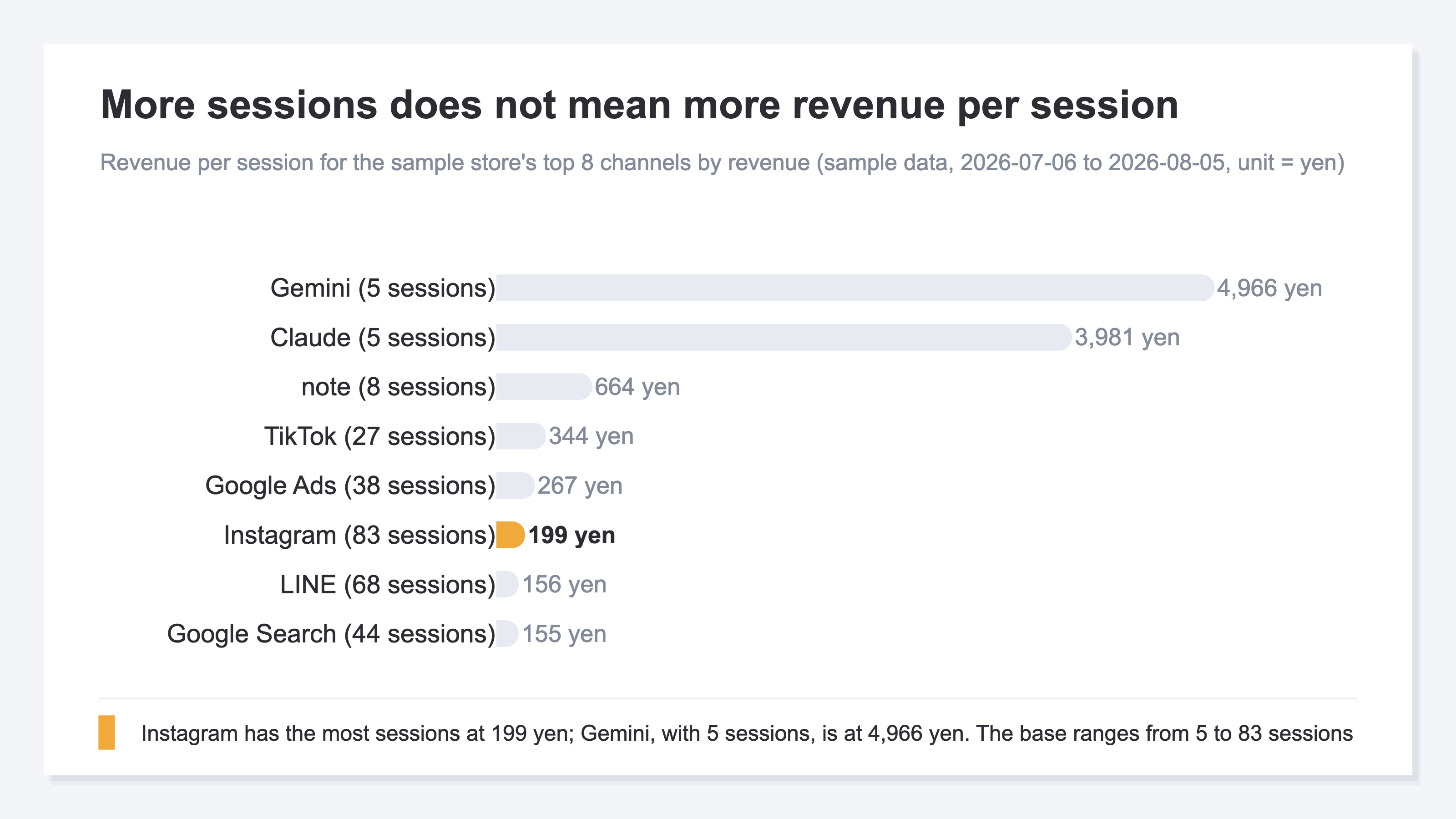
RPS is revenue per session — revenue divided by session count. The table is sorted by revenue, but the sessions column doesn't line up with that order. Instagram, with the most sessions at 83, sits at an RPS of ¥199. Gemini at the very top has 5 sessions and an RPS of ¥4,966, roughly 25 times higher.
That said, the two are an order of magnitude apart in session count. The same 21 rows also include ChatGPT, Perplexity, and Copilot, and those three had zero revenue. In this period, the AI assistant channels that carried revenue were two: Gemini and Claude.
The answer also carried a total for the whole period. Purchase revenue over the window was ¥143,733, and ¥26,602 of that isn't tied to any channel. That's about 18.5% of the whole. Those ¥26,602 came back as the 21st row, Unattributed, inside the same table as the other 20 channels.
3. Two Places People Get Stuck and How to Get Past Them#
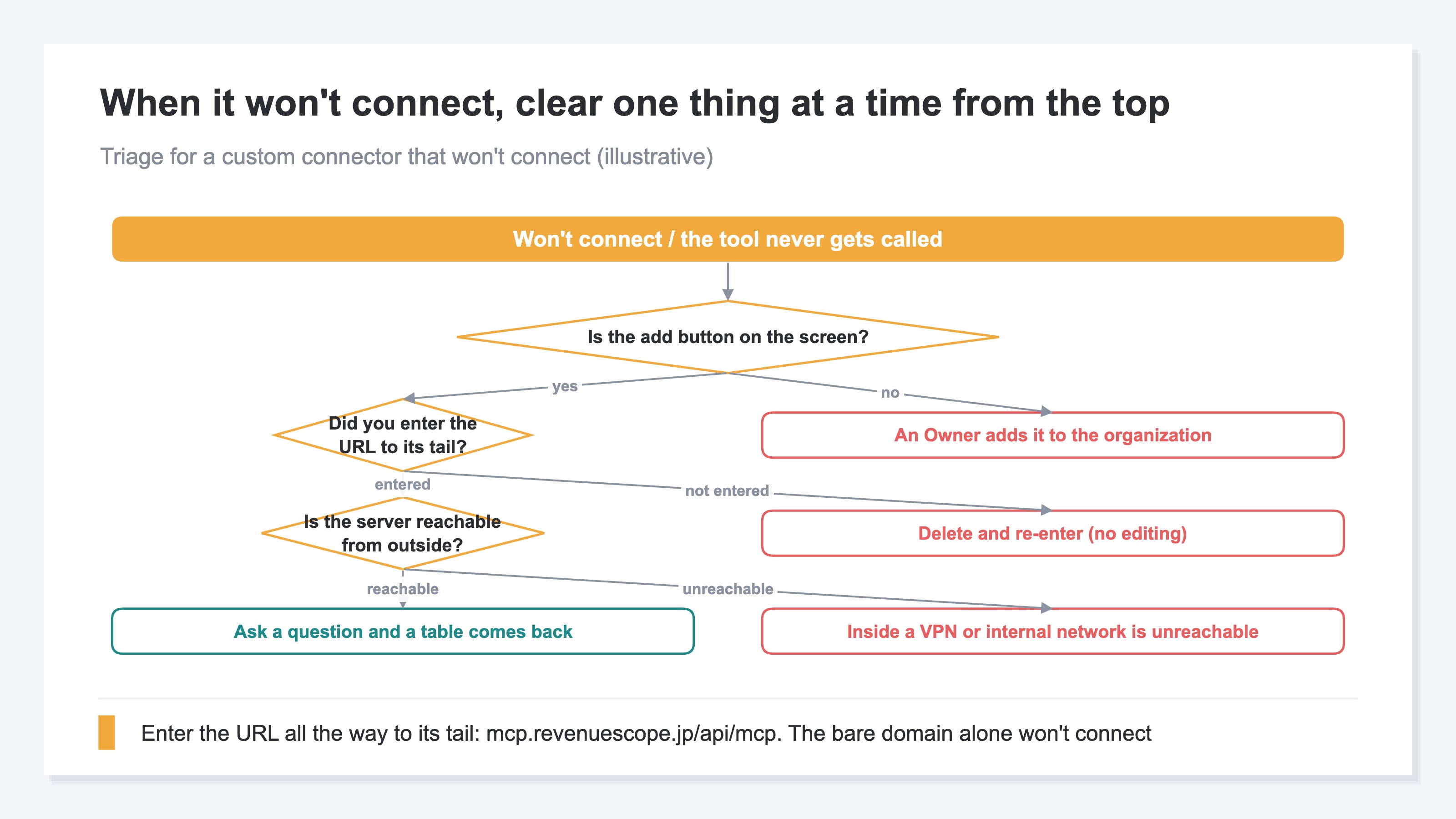
"Add custom connector" is nowhere on the screen. That's the first place.
The cause isn't the plan, it's permissions. On Team and Enterprise, only an Owner can add a custom connector to the organization[1]. After the Owner adds it, members pick that connector from the list under Customize > Connectors and press "Connect" to start using it[1]. On a personal Pro, Max, or Free plan you can add it yourself.
The second place is the URL. Pasting only https://mcp.revenuescope.jp won't connect. Hit the bare domain and you get a 404 (verified 2026-08-05). What you enter is the full path, https://mcp.revenuescope.jp/api/mcp. There's one more pitfall here if you're connecting a server of your own. Claude reaches the server from Anthropic's cloud, not from your machine[1]. A server sitting inside a corporate network or behind a VPN won't be reachable, even though you can see it from your own machine[1]. Also, there is no way to fix just the URL after adding a connector. You delete it and enter it again[1].
Authentication is almost never where people get stuck. The MCP specification states that authorization for servers communicating over HTTP follows a procedure built on OAuth 2.1[2]. The design has the client handle registration and authorization automatically, so there's no point at which a reader has to create an ID or secret by hand. Why a read-only server can be called safe is covered in is it safe to hand your business data to AI.
By the way — reading the 21-row table, could you have named the channel with the highest revenue per session? It's Gemini, with 5 sessions. If you're in the habit of sorting by visit count and opening channels from the top, Gemini sits at the bottom of the screen and never enters your field of view. It only caught the eye because revenue and sessions could be checked in a single table.
RevenueScope solution
What RevenueScope returns is the click count for each search keyword, together with the estimated revenue that keyword produced. Because clicks and money sit in one table, you can confirm which keywords are moving revenue in a single question.
Here is the second question we asked.
Break it down by search keyword and show clicks and estimated revenue. Top 15 keywords.
The tool called was get_keyword_performance, with arguments band=all, period=30d, limit=15. Of the 15 keywords that came back, 12 carried estimated revenue.
What RevenueScope answers for the sample store (top 8 keywords)
| Search keyword | Clicks | Impressions | Avg. position | Est. revenue |
|---|---|---|---|---|
| lumiere beauty | 429 | 1,052 | 1.3 | ¥79,392 |
| セラムブラン 口コミ | 224 | 1,718 | 2.6 | ¥41,454 |
| 美白美容液 おすすめ | 165 | 9,747 | 7.0 | ¥30,535 |
| スキンケア 順番 | 127 | 12,528 | 9.0 | ¥23,503 |
| モイストリペアクリーム | 103 | 1,013 | 1.6 | ¥19,061 |
| ビタミンc 美容液 効果 | 93 | 4,583 | 7.7 | ¥17,211 |
| リップセラム 色付き | 58 | 2,594 | 5.9 | ¥10,734 |
| スキンケア セット 通販 | 35 | 1,843 | 5.5 | ¥6,477 |
Sample data from the sample store (refreshed daily). The store is Japanese, so the keywords are Japanese search terms. Ask the same question today and both the keywords and the amounts will change. In this sample the Google Search Console side and the session side are generated separately, so estimated revenue and the search revenue in the channel table are not on the same scale.
How the estimated revenue is derived was written into the answer itself. It's RPS for search traffic over the period — about ¥185 — multiplied by the click count. Google Search sat at ¥155 in the channel table earlier, while this figure is about ¥185, because this unit value combines organic search across Google, Bing, Yahoo! Search, and DuckDuckGo. Since the unit value is the same for every keyword, the order of estimated revenue matches the order of clicks. What this table newly shows isn't the order — it's the composition.
Add up the estimated revenue of the 12 keywords and you get ¥237,436. The leader, "lumiere beauty," accounts for ¥79,392, about 33% of it. Add "セラムブラン 口コミ" and "モイストリペアクリーム" and you reach ¥139,907, about 59%. All three are either the brand name or a product name. That means close to six-tenths of the estimated revenue across the top 15 keywords comes from searches where the shop or the product was already known. Judged on the total alone this is a strong site, but only about four-tenths of it is being won on searches outside the brand.
Keywords carrying neither the shop name nor a product name have exposure, yet their ranks stall in the high single digits. "美白美容液 おすすめ" averages position 7.0 on 9,747 impressions; "スキンケア 順番" averages 9.0 on 12,528. Ask the same question again with band=striking — the band of keywords one step short of the top — and it returns the upside from pushing that band higher, ordered by the size of the estimated-revenue opportunity. The work of thickening the ground outside branded search can start from here.
FAQ#
Frequently asked questions#
Q. Can I connect without writing a config file (JSON)?
A. Yes. A custom connector on claude.ai is finished by entering the server URL and pressing "Add"[1]. Editing a config file belongs to the other route — a local MCP server running on your own machine. The official help states clearly that this route uses claude_desktop_config.json[1].
Q. Does it work on the free plan?
A. Yes. Custom connectors are available on Free, Pro, Max, Team, and Enterprise, with the free plan limited to one connector[1]. On Team and Enterprise, only an Owner can add one to the organization[1].
Q. Can I connect a server sitting on our internal network?
A. No. A custom connector reaches the server from Anthropic's cloud, not from your machine[1]. A server behind a VPN or firewall won't be reachable, even though you can see it from your own machine[1]. You need to make it reachable from outside, or allow Anthropic's address ranges[1].
Q. Can the AI I connect rewrite my data?
A. No. All ten tools RevenueScope publishes are read-only, and there is no write capability in them to begin with. That said, the custom connector mechanism itself is documented as being able to connect to services Anthropic has not verified[1]. Connect only servers from providers you trust[1].
Q. How does authentication work?
A. The MCP specification states that authorization for servers communicating over HTTP follows a procedure built on OAuth 2.1[2]. RevenueScope's server uses this method as well, taking you to sign-in and consent screens at the first tool call.
Summary#
Connecting an MCP server to Claude doesn't require a config file. Custom connectors work on Free, Pro, Max, Team, and Enterprise, with the free plan limited to one connector[1]. There are five steps, and the only one where you type anything is the single line of the server URL[1]. Editing a config file belongs to the local-server route, and the official help writes the two up as separate mechanisms[1].
Two places tripped people up. On Team and Enterprise, only an Owner can add a connector[1]; and the URL has to be entered all the way to its tail. Neither is about the difficulty of configuration — both are about where things sit.
We asked two questions after connecting, and got back 21 channel rows and 15 search keywords. The period was the 30 days from 2026-07-06 to 2026-08-05. Of the ¥237,436 total across the 12 keywords carrying estimated revenue, about 59% was taken up by three keywords made of the shop name and product names. Strong branded search isn't a weakness, but how thin things are outside it doesn't show until you work out the composition.
All that's left is to connect. Open Customize > Connectors and paste one line, https://mcp.revenuescope.jp/api/mcp. From there on, the work is just asking questions.
See which ads actually drive revenue, at a glance
Free up to 5,000 sessions/month, AI connection included. No credit card required. Up and running in 5 minutes.