"I want to put the AI I already use to work in my business. But to do that, I have to train it on my own data." That belief keeps plenty of people from ever getting started. Search around and what you find is development-first explanations — "RAG," "fine-tuning," "custom GPTs." The more you read, the heavier the whole thing feels. But if all you want is for AI to understand your own sales numbers, training is overkill. What you need isn't to train it, but to connect your numbers to the AI already at your fingertips. Connect it, and AI starts reading your own numbers to answer. The one job of this article is to break the assumption that "using AI means training it."
Contents
TL;DR#
-
Making AI "smarter" doesn't require training
If all you want is for it to understand your sales numbers, connecting is enough — no training. Heavy build-outs suit only certain uses.
-
Training methods (RAG and the like) suit uses like internal documents
What RAG and fine-tuning do well is searching across large document sets and reproducing a writing style. It's not better or worse — just a different use.
-
"Smarter" means letting it reference your own numbers
Not memorizing, not training. AI reads the latest numbers every time you ask — so it never drifts out of date.
-
"Just connect" only works when the other end opens up its numbers
Build that opening yourself and it ends up being development. Use an entry point that already opens your sales data to AI, and you can have it read them that same day.
1. How "Training" and "Connecting" Differ#
Bottom line: there are two roads to making AI smarter. One is to train AI on your own data; the other is to connect your own numbers to the AI already at hand. If all you want is for it to understand your sales figures, the second road — connecting — is enough on its own. Training is an option for when you actually need it.
When people hear "put AI to work for my business," most picture "making it memorize my data." That's exactly why words like RAG and fine-tuning are the first things they run into, and why they brace themselves, thinking "this is going to take development." But training and connecting are entirely different jobs. Training is prep work: you take data into the AI so it can answer based on what's inside it. Connecting, by contrast, is a setup that has AI read numbers sitting outside it, on the spot, each time you ask. Take it in, or read it from outside — that difference is what splits the effort and the freshness so widely.
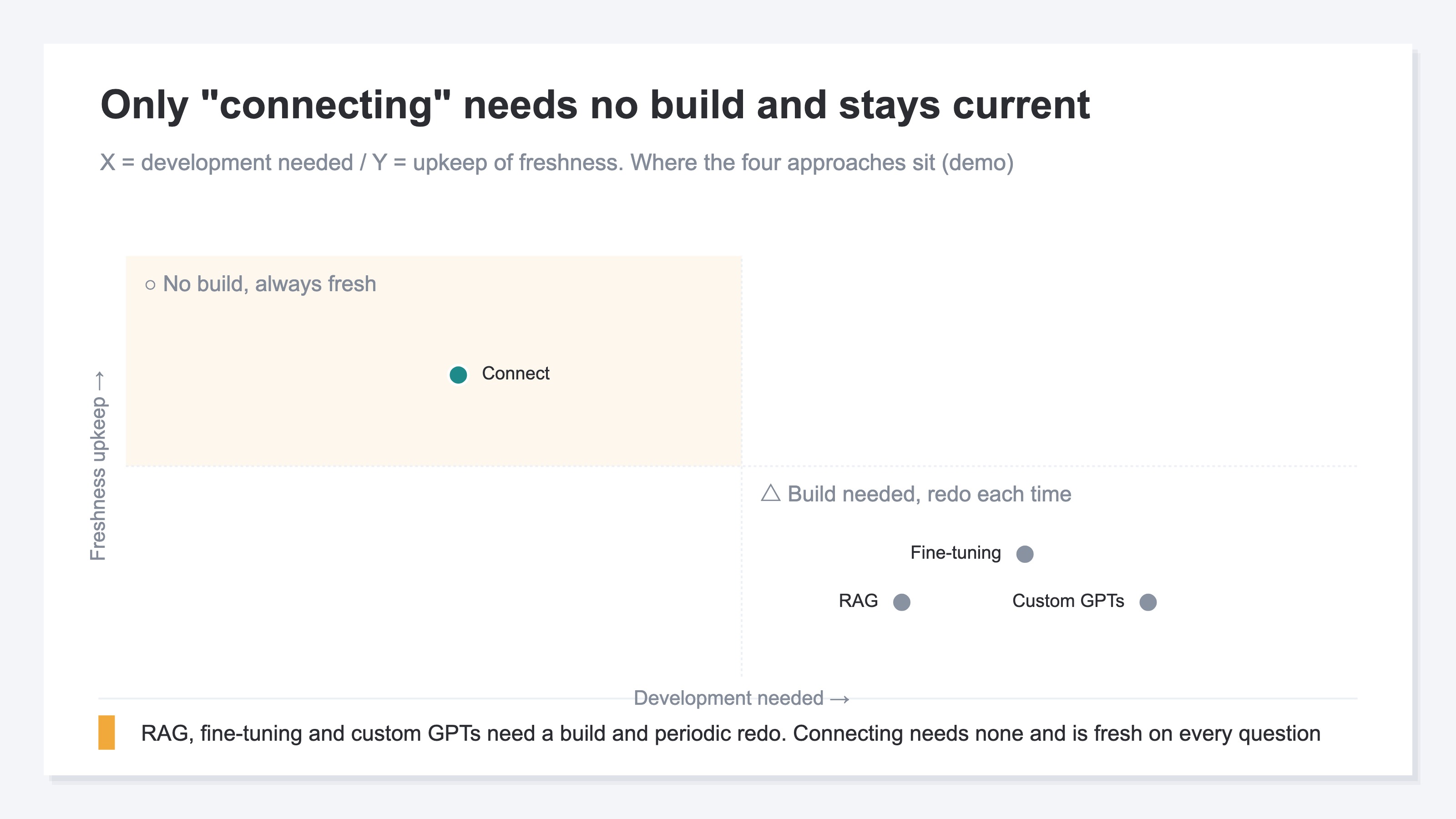
As the chart shows, all three training-side approaches involve development, and each time the data changes they cost you the effort of updating. Connecting, on the other hand, is set up once; after that, AI goes and reads the latest numbers each time. The reason AI hands back only generic advice in the first place is that it doesn't know your numbers. That reason is explored in a separate article (why AI's advice turns generic). The one thing to hold onto first is this: smarter does not equal trained.
2. What Training Methods (RAG, Fine-tuning, Custom GPTs) Are Good For#
Bottom line: RAG, fine-tuning, and custom GPTs each have a use they're clearly suited to. They work well for searching across large volumes of internal documents, or reproducing a fixed writing style or procedure. They aren't bad approaches — they're simply overkill for the job of reading your sales numbers.
Let's lay out what each is good at. RAG suits searching across large document sets — internal manuals, support histories — and pulling the grounds for an answer out of them. Fine-tuning works when you want AI to internalize a fixed phrasing or classification pattern. Custom GPTs are handy for presetting a particular role or tone. In short, for the work of memorizing or fitting to a template, the training-side approaches are the right answer. If you want AI to handle internal documents, RAG is in fact the first candidate.
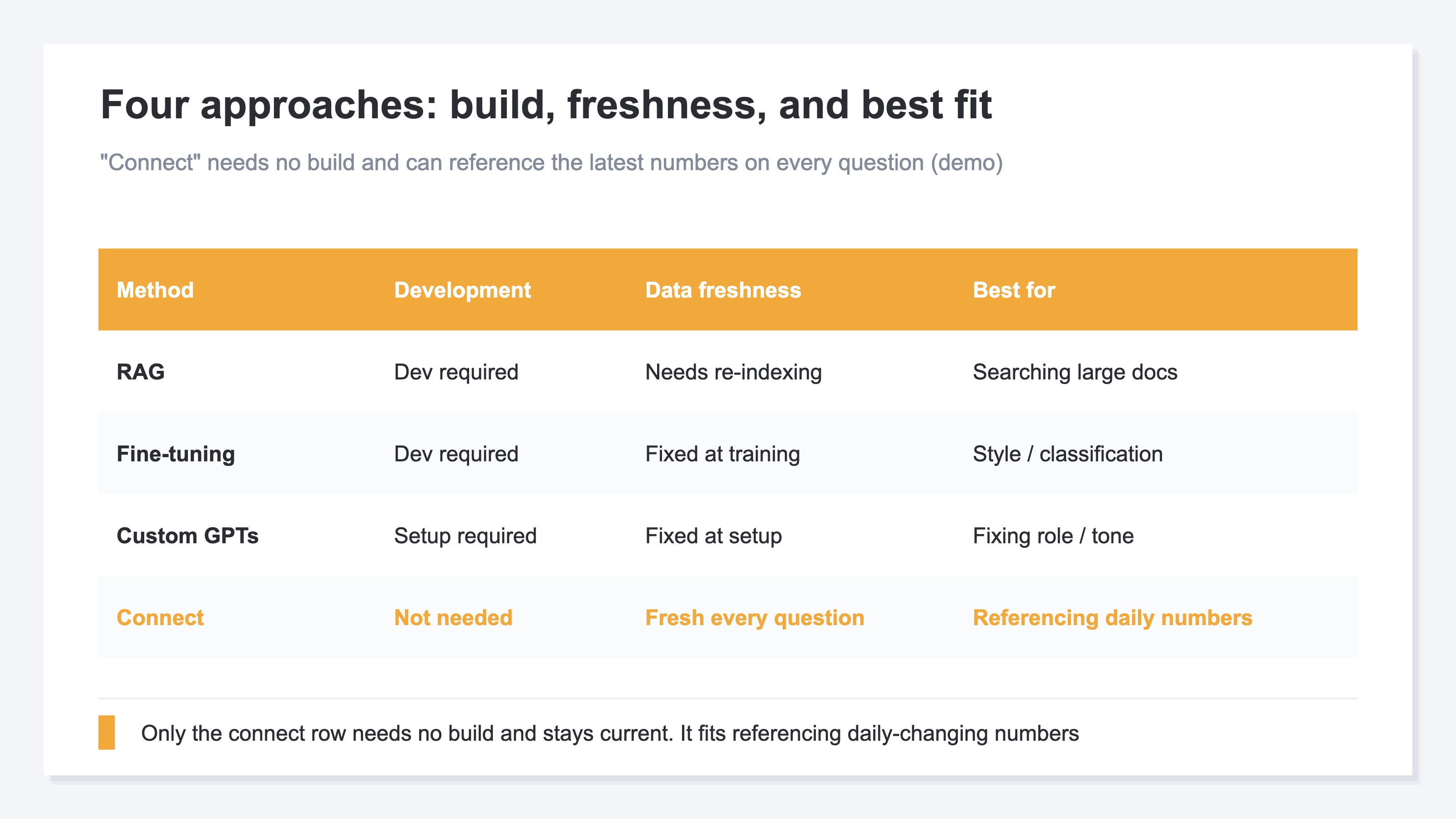
The catch is freshness. Trained data is a snapshot from the moment it was trained. Yesterday's orders, this morning's sales — none of it shows up unless you train it in again. So the moment you try to handle daily-moving numbers through training, every update needs building work, and worse, AI answers with full confidence off stale numbers (when AI confidently answers with the wrong numbers). Numbers that change every day, like sales, aren't something to memorize in the first place — they're something to read each time. Change the use, and the right tool changes with it.
3. Why Connecting Alone Is Enough When You Just Want Your Sales Numbers#
Bottom line: let me define the word as this article uses it. "Smarter" means neither memorizing nor training — it means letting AI reference your own numbers. If all you want is to know your sales, being able to reference them is enough. So no training is needed; connecting alone does the job.
Let's look at it concretely. Ask an AI with nothing connected, "Which traffic source is picking up for my EC store this month?", and back comes generic advice: "Check for seasonal factors," "Take a look at your analytics." Even an AI you'd trained once on last month's sales would give an answer frozen at that point, blind to this month's shift. Now connect your own numbers, and to the same question it answers, "Over the last few days, revenue per visit from Claude referrals has been climbing" — reading the latest numbers on the spot. (This way of letting AI read outside numbers is called MCP [1][2].) What matters is that AI hasn't memorized the numbers. Because it goes and reads the latest each time you ask, yesterday's orders and this morning's sales show up as they are, with no need to train them in again.
Unlike training, connecting needs no building work. No writing SQL, no assembling reports — you just ask in plain words, "Which channel is driving my revenue?" This freshness of "reading the latest every time" is the deciding factor when you're dealing with sales that move day to day. Training grows staler as time passes; the connected side updates each time you ask. What to connect first is laid out here for EC stores (the data an EC store should connect to AI first). And for how to use it at the stage where you want to grow traffic, this is worth a look too (how to start asking AI to grow your traffic).
RevenueScope's solution
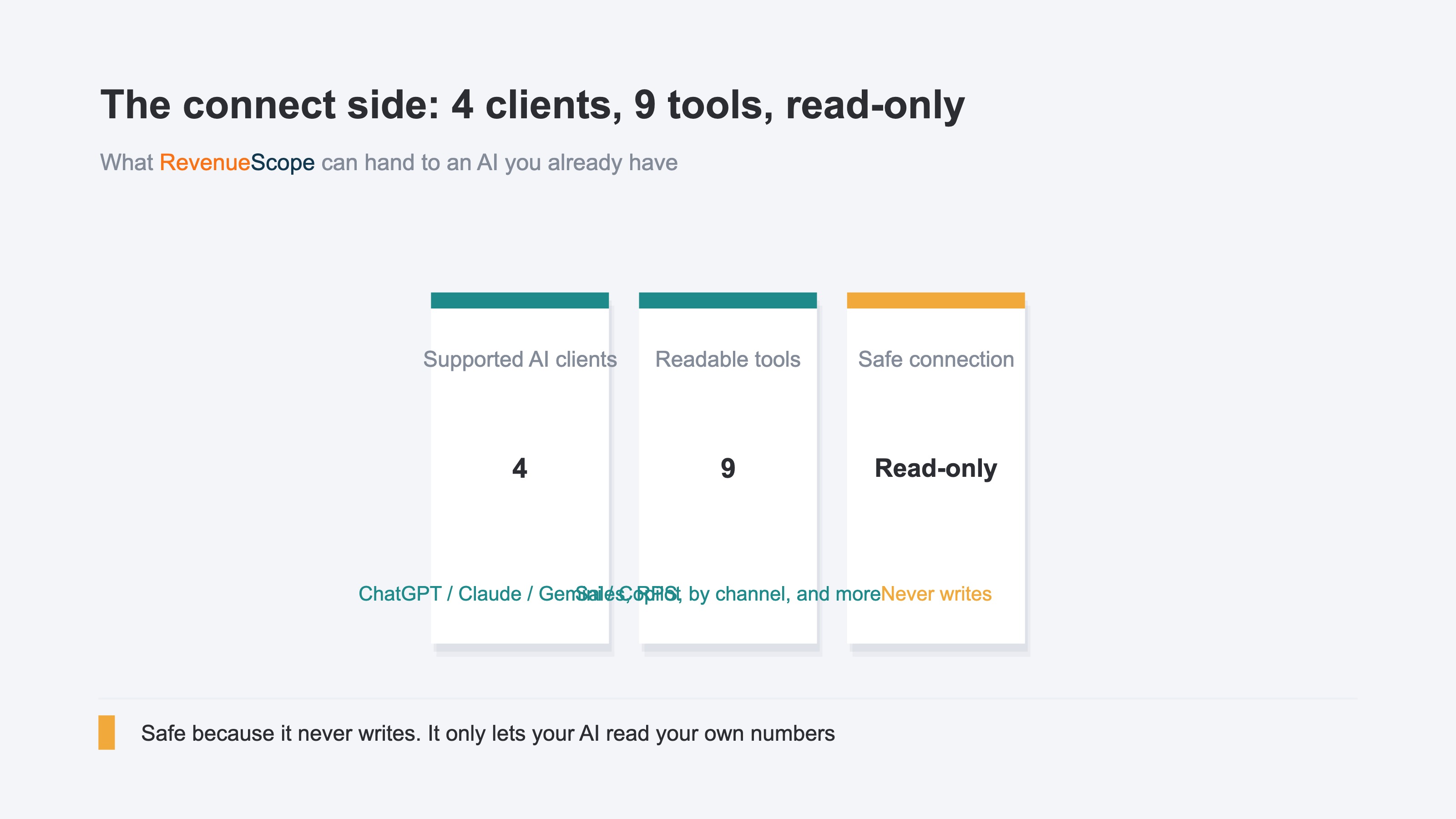
Bottom line: RevenueScope is an entry point that clears away the wall you hit before you even start — "it's useless unless you train it," "you'll need development in the end." Its sales data is already opened up to AI, so read-only, it connects straight to four AIs — ChatGPT, Claude, Gemini, and Microsoft Copilot [5]. With no training and no development, you can have AI read your own numbers and ask questions that same day.
"Just connect" only truly holds when the other end has opened up its numbers from the start. Try to build that opening yourself, and you're passing authentication and fixing it every time the spec changes — it becomes development in the end. RevenueScope has that opening built in from day one. So on the user's side, you skip both the work of preparing data for training and the work of building the connection point — you just "have it read and ask." What you hand over is a read-only range, permitted through a proper entry point (a mechanism called OAuth) [3][4]. All AI can do is read; it cannot rewrite an order or your inventory.
Here's how it actually looks, with sample-store data. Ask AI "Which AI referral is driving my revenue?" and it comes back like this, right down to RPS (revenue per visit).
Sample store (90 days): traffic and revenue by AI assistant
| AI | Sessions | Revenue (JPY) | RPS (JPY) |
|---|---|---|---|
| ChatGPT | 210 | 130,633 | 622 |
| Perplexity | 120 | 34,974 | 291 |
| Gemini | 77 | 33,188 | 431 |
| Copilot | 25 | 9,424 | 376 |
| Claude | 19 | 44,384 | 2,336 |
Figures from a fictional store with sample data (RevenueScope demo). This table measures AI-referred traffic, which is a separate matter from the AIs you connect your numbers to (ChatGPT, Claude, Gemini, Copilot).
Generic advice ends at "you should use AI." But connect it, and you can read, in your own numbers, exactly which AI referral sold how much. In this sample, for instance, the most sessions come from ChatGPT (210), yet on revenue per visit, Claude (2,336 yen) far outpaces ChatGPT (622 yen). Sheer volume of visits and how much each one bears out are entirely different measures. That said, RPS on a low-volume AI referral swings easily on a single order, so while the count is small, treat it as a trend to watch rather than something to conclude on. Which AI to put your effort into is something you can only judge once you line up your own numbers like this.
What RevenueScope reads is your revenue, sessions, RPS, AOV, and CVR — five sales-based KPIs — along with the breakdowns by channel and page, and revenue from AI referrals. Because it's read-only, it never rewrites your data. RevenueScope specializes in reading these sales-based numbers in your own figures. Set apart from the builder's technical comparison (how the major AI clients compare for MCP support), this article stays focused on making "the first day of letting AI read your numbers, without training it" as light as it can be.
You can touch the sample site with no sign-up. First, see for yourself how a connected AI answers (see the screen where AI reads your own numbers).
FAQ#
Q. Isn't "making AI smarter" just training it in the end?
A. No. "Smarter," in this article, means letting AI reference your own numbers — not memorizing, not training. Because it reads the latest numbers every time you ask, yesterday's orders and this morning's sales show up as they are, with no retraining. Numbers that change daily, like sales, are better read than memorized. If instead you want to handle static documents like an internal manual, that's where training-side approaches such as RAG become candidates.
Q. Is there a way to have AI read my numbers without spending money?
A. Copying your numbers and pasting them into AI costs nothing. But that's a stopgap. You have to re-paste every time, it's easy to forget, and you can't avoid the drift of answering off the stale data as of when you pasted. It doesn't suit any use where you want the latest read continuously. You could also build your own no-code setup, but that still leaves setup work. If you want your daily numbers read reliably, using an entry point that already supports it is the lightest choice.
Q. If I build the connection point (an MCP server) myself, won't it be free?
A. "Just connect" only holds when the other end has opened up its sales data from the start. Building that opening yourself means ongoing design, authentication, and keeping up with spec changes — it's development in the end. Free as it looks, it costs you the time to build and maintain it. Use an entry point that already opens your sales data to AI, and that work drops to zero — you can read and ask from day one.
Summary#
Making AI smarter with your own numbers doesn't require training. Without building anything through RAG or fine-tuning, if all you want is for it to understand your sales figures, connecting the AI at hand read-only is enough. "Smarter" here isn't memory or training — it's being able to reference your own numbers. Because it reads the latest every time you ask, there's no retraining to redo. That said, "just connect" only holds when the other end opens up its numbers. Since building that opening yourself ends up being development, the lightest first step is to use an entry point that already supports the major AIs and, on the sample site, experience how connecting changes the answer. One note: this kind of article is hard to gauge by search impressions — the real measure is whether people who've started using AI actually reach their own numbers.
See which ads actually drive revenue, at a glance
Free up to 5,000 sessions/month, AI connection included. No credit card required. Up and running in 5 minutes.
References#
- [1] Anthropic "Introducing the Model Context Protocol" (2024)
- [2] Model Context Protocol "What is the Model Context Protocol (MCP)?" (2026)
- [3] Model Context Protocol "Specification (2025-06-18)" (2025)
- [4] Anthropic Help Center "About Custom Integrations using Remote MCP" (2026)
- [5] Gemini CLI "MCP servers with the Gemini CLI" (2026)