Thirty, forty minutes on the month-end revenue analysis — and still the decision that matters, "where do we invest next," keeps getting pushed to later. It's a familiar way to get stuck. What eats the time isn't the math. It's the "reading work": gathering numbers out of GA4 and GSC and lining the periods up. This article walks through how to hand that reading work to AI and move past speed alone, all the way to the revenue decision — using real data from a sample EC store.
Contents
TL;DR#
-
Revenue analysis is heavy because the "reading work" is heavy, not the math
GA4 exports, GSC screenshots, URL matching — repeated across channels. In our own measurements it ran to roughly 35 minutes per pass, most of it lost to gathering.
-
Hand the reading work to AI, and representative questions come back around 5 to 20 times faster
Connect it to ChatGPT or Claude, and the AI reads your store's own numbers directly and answers. No hard setup, no SQL — and it's read-only, so there's no risk of it rewriting your data.
-
Speed is only the doorway. The real value is moving together all the way to the decision
A bare AI returns only generalities. What separates the two is whether it can read your actual numbers and work with you, in dialogue, toward "where should we invest next."
-
What you gain isn't spare time — it's the investment decision you kept deferring, made today
Split channel revenue by RPS, and a channel that's small in volume but strong per session comes into view. You can decide how to allocate investment with grounds behind it.
1. Analysis Takes 35 Minutes, Yet the Decision Keeps Slipping#
Bottom line: monthly revenue analysis is heavy not because the math is slow. Most of the time disappears into the "reading work" — pulling numbers out of GA4 and GSC, lining up the periods, and matching article URLs against revenue. So the analysis finishes, but the investment decision that matters keeps getting bumped to "next time."
When we measured it in running our own operation, getting a single month of channel revenue into a "readable" shape took about 35 minutes. Break it down, and the time went not to hard thinking but plainly to gathering. Open GA4's exploration report [1], set the period, and export channel revenue. Open GSC's search performance [2] on a separate screen and jot down each page's rank with a screenshot. Match article slugs (the tail of the URL) against revenue data one by one, then toggle between last month and this month to see the change. Only after all that do you arrive at the doorway of "so, where do we invest?"
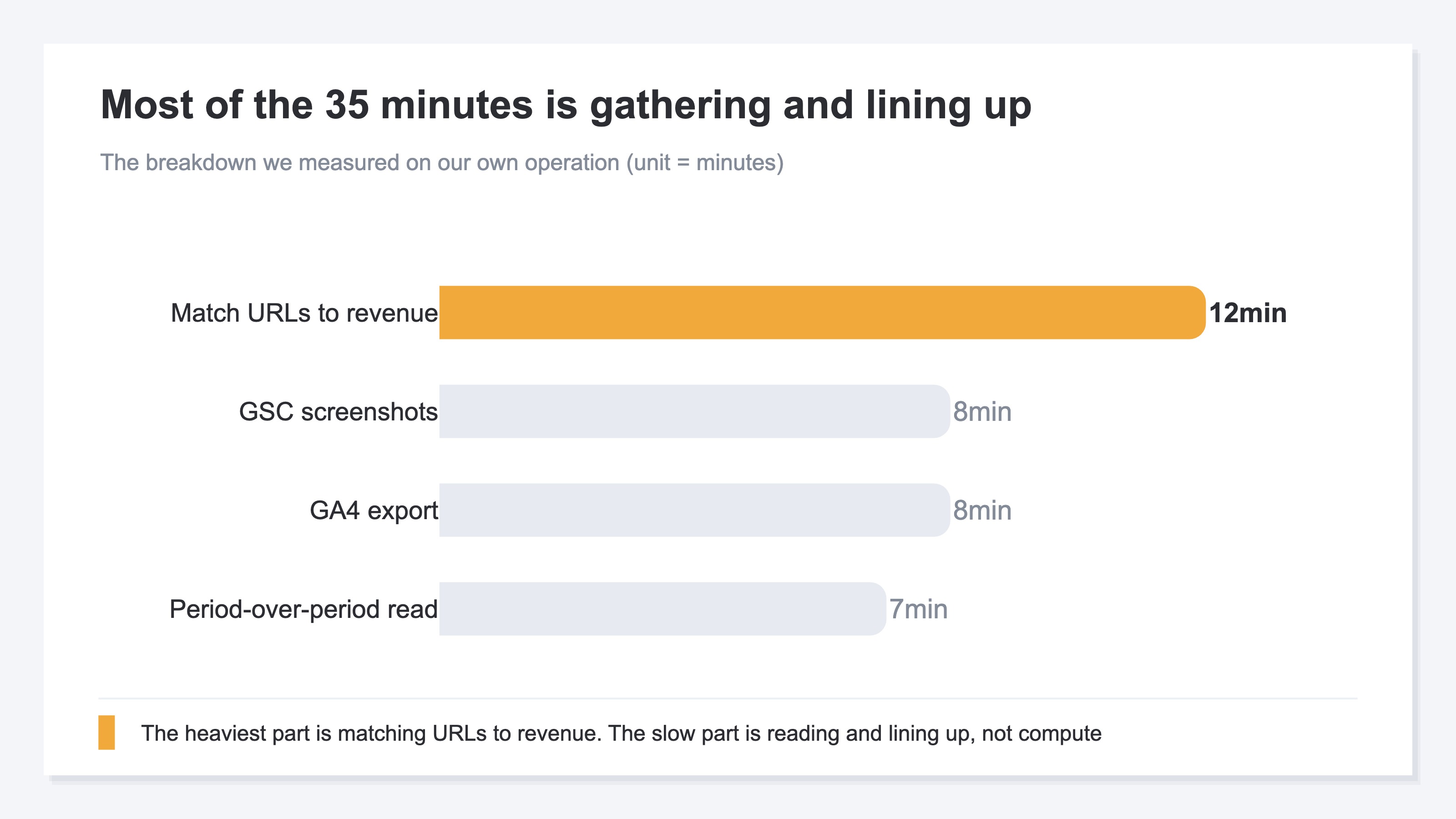
Of those 35 minutes, the genuine judgment — comparing last month and this month to think through "how did it move" — was about 7. The other 28 are spent hunting for numbers, exporting, aligning, and matching. It isn't that the thinking is hard. It's heavy because every month you repeat the same steps across channels. Ten articles you can stand, but as the pages and periods you handle grow, the gathering alone burns through the time. And once you've spent your energy on the reading work, the crucial "next move" gets put off.
2. What Changes When You Hand the Reading Work to AI#
Bottom line: the reading work can go to AI. Connect RevenueScope to ChatGPT or Claude, and the AI reads your store's own numbers directly and answers. No hard setup, no SQL. When we timed the same questions, a check that took 15 to 40 minutes by hand came back in a few minutes through AI. It varies by question, but for representative questions it's roughly 5 to 20 times faster.
Here's how it works. Connect RevenueScope to ChatGPT or Claude, and the AI reads your store's own numbers directly and answers. You just say, "which channel is driving our revenue?" There's no need for you to open GA4, export, and so on by hand. Because it's read-only, there's no worry about the AI rewriting your data on its own. Which AI clients you can connect through is laid out in four MCP clients compared side by side. The full picture of getting ready is in try it before you build the connection.
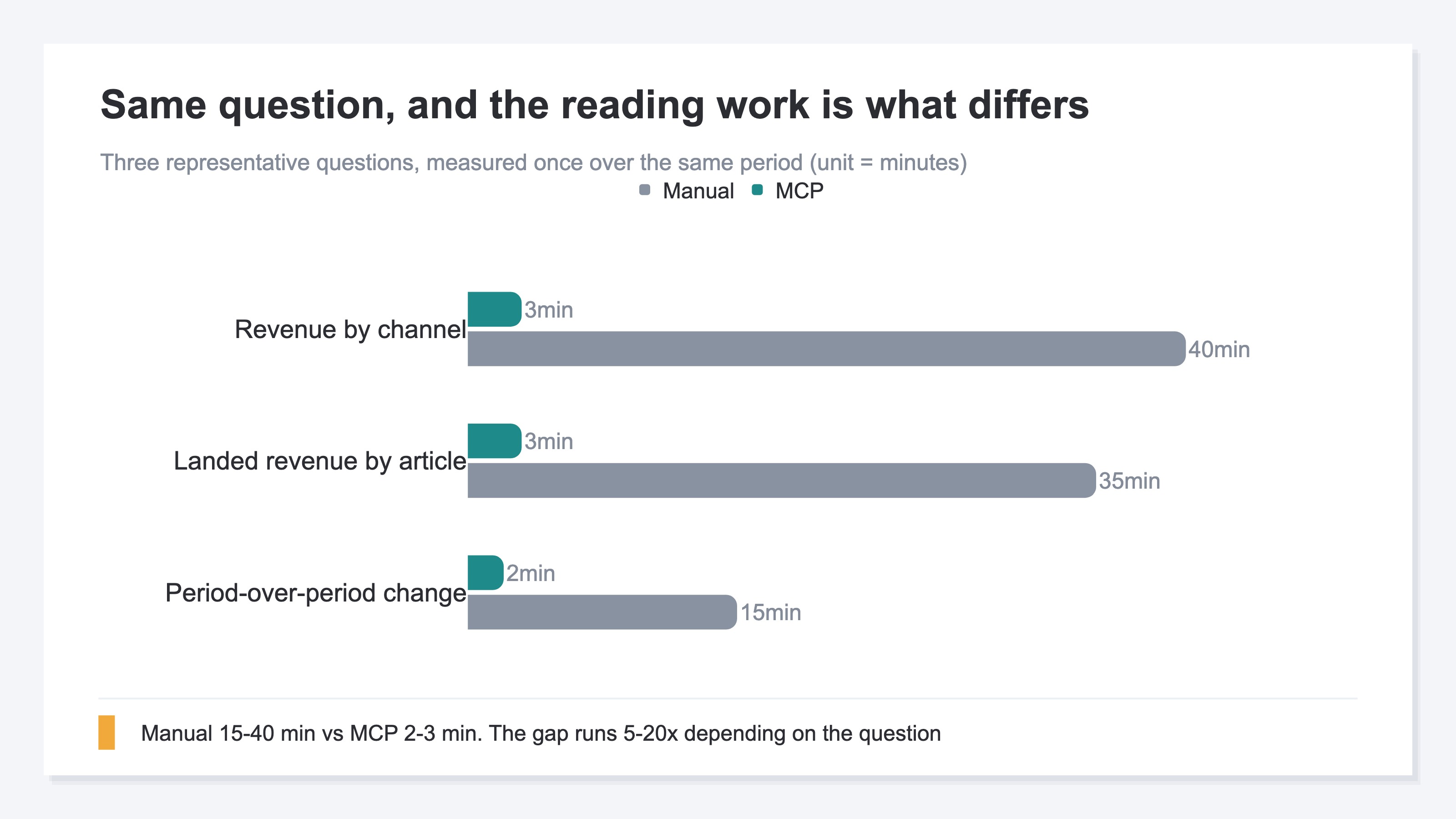
Let me be honest about where the numbers come from. The times above are single passes we measured, one each, on the same question and the same data period. Because it's a single measurement, we can't claim it's always ten times faster. A simple question runs around 5 times faster; a question with many gathering steps approaches 20 times — there's a range. For instance, "which channel is working this month" runs about 35 minutes by hand, from the GA4 export through the period comparison. Put the same question to the AI and it comes back as a table in about 3 minutes. The more a question pulls from — like "which pages are turning AI-referred traffic into revenue" — the wider the gap with manual work grows. More than the speed itself, the point is that being freed from the reading work leaves time to think. For examples of exactly how to ask, see just connect, and AI speaks in your store's numbers.
3. Fast Alone Isn't Enough — AI Moves With You to the Revenue Decision#
Bottom line: reading fast alone is just a time saver. RevenueScope's real value is that from the numbers it reads, it moves with you — in dialogue — to the judgment of "where should we invest next." A bare AI returns only generalities. What separates the two is whether it can read your actual numbers and come with you right up to the edge of the revenue decision.
Ask ChatGPT "how do I grow EC revenue?" and what comes back is generalities: "raise your browsing depth," "improve your CVR (conversion rate)." Not bad advice, but it's answering without knowing which channel you're actually earning on right now, so you can't turn it straight into a move. The gap between generalities and your own data is covered in detail in filling the AI's generalities with your own data.
An AI with RevenueScope connected is different here. Ask "compared with last month, which channel's RPS (revenue per session) grew?" and it reads your actual numbers and answers — and from there you can push on, in dialogue, to the next judgment: "then should we lean a little more into AI-referred traffic?" What you gain isn't spare time. It's the investment decision you kept deferring, made today.
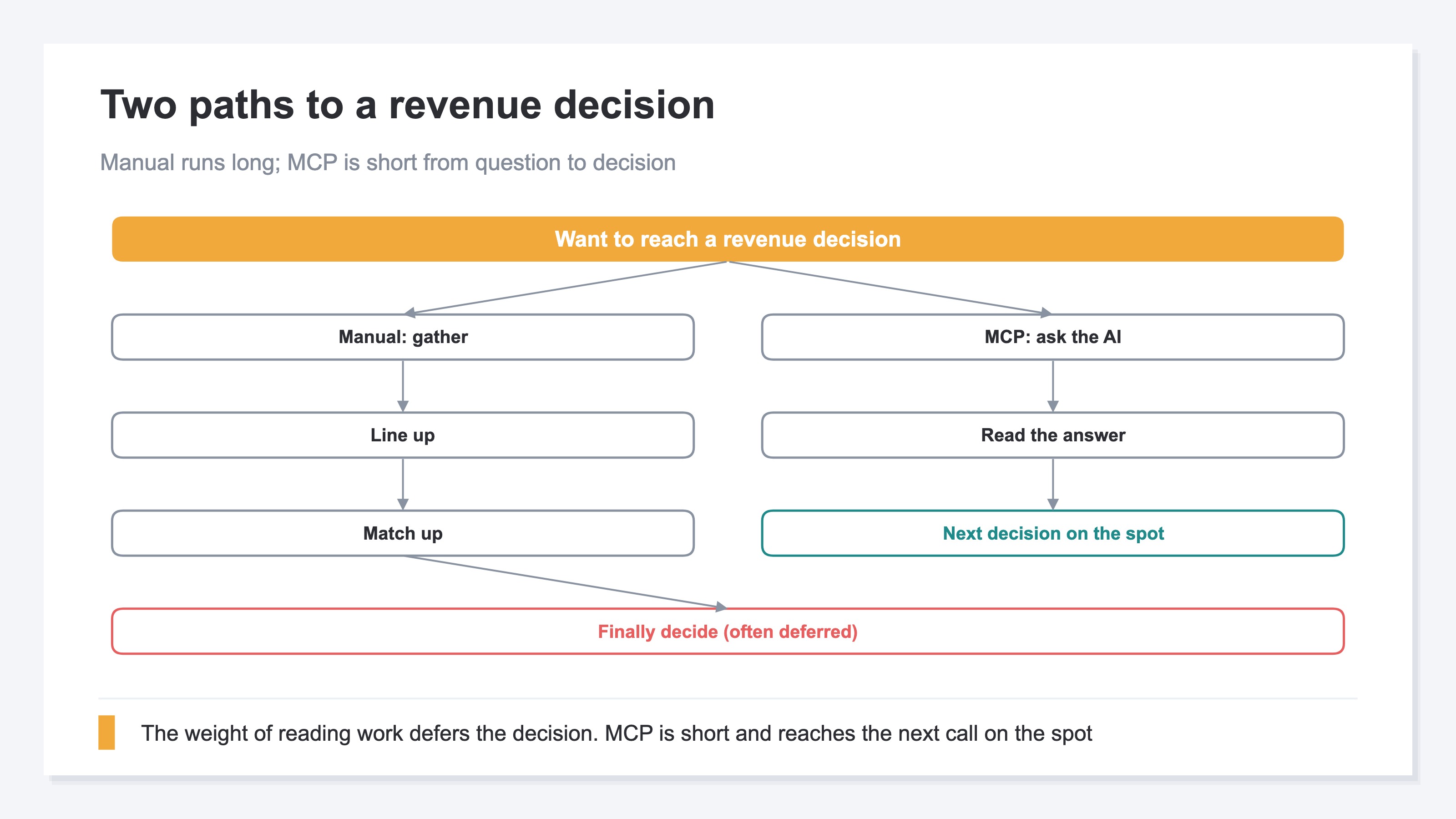
The important thing is that both paths start at the same doorway — the reading work. By hand, that reading work is too heavy, and you run out of energy before you reach the decision. Hand the reading work to AI, and from the same doorway you move to the decision in one continuous stretch.
RevenueScope helps
Bottom line: RevenueScope reads your store's numbers from ChatGPT or Claude — read-only — splits out channel revenue, RPS, and AOV, and lets you move in dialogue all the way to the judgment of "where should we invest next." Its job is not just to take over the reading work, but to break mixed traffic apart by revenue and put the material for the investment decision in front of you on the spot.
Connect RevenueScope to an AI client, and one line — "which channel is driving our revenue?" — brings back channel revenue, sessions, RPS, and AOV in a table. What matters here is the way you unwind the mixing of traffic by revenue. Look only at session counts, and the channel bringing the most people looks strongest. But look through RPS (revenue per session), and a channel that's small in volume yet high in revenue per session surfaces. AI-referred traffic especially can run a high RPS even when it's only a few percent of the whole. Only once you split this mixing apart can you decide, with grounds behind it, how to allocate investment between "channels to chase for volume" and "channels that pay off per session."
Let me show the actual view with sample-store data.
Sample EC store: revenue by channel (30 days)
| Channel | Sessions | Revenue (JPY) | RPS (JPY) | AOV (JPY) |
|---|---|---|---|---|
| Search (organic) | 1,240 | 214,800 | 173 | 9,320 |
| AI-referred | 210 | 96,400 | 459 | 12,050 |
| Ads | 680 | 88,300 | 130 | 8,900 |
| Social | 520 | 24,100 | 46 | 6,700 |
Figures from a fictional store with sample data (RevenueScope demo). RPS is revenue per session; AOV is the average order value, and RevenueScope specializes in the five revenue-based metrics (revenue, RPS, AOV, CVR, sessions).
What to read in this table is that volume and earning power don't line up. Search runs away with the session count, but by revenue per session (RPS) it's AI-referred that's highest, at 459 yen. Its volume is about one-sixth of search, yet it pays off per session. Show it split this far, and you can go on to consult the AI: "then let's think about moves to grow AI-referred traffic," right through to the next step. If GA4 is the checkup that tells you "what happened," RevenueScope is the prescription that tells you "where to invest" next. They complement each other — RevenueScope doesn't replace GA4.
What RevenueScope reads is the five revenue-based metrics (revenue, RPS, AOV, CVR, sessions) and the split by channel — it specializes in separating where revenue comes from, rather than gross margin or LTV. AI-referred traffic is classified by tracing the referrer, and splitting mixed traffic apart by revenue is something you can move on, in dialogue, starting today. This classification returns the same figures whether from the dashboard or from MCP (the way you let AI read your numbers).
FAQ#
Q. Handing numbers to AI sounds like it needs hard setup.
A. There's no hard setup and no SQL. Do the one-time initial setup to connect RevenueScope to ChatGPT or Claude, and after that you just say "which channel is driving our revenue?" Because it's read-only, the AI won't rewrite your data. Which AI clients you can use it with is laid out in four MCP clients compared side by side.
Q. Can I do the same thing by hand with GA4 and GSC?
A. You can get close by hand. Export channel revenue in GA4, check ranks in GSC, match article URLs against them, and you can form a rough read. The heavy part is repeating the same steps across channels every month. In our measurements it ran about 35 minutes per pass, most of it gathering. It's not that the thinking is hard — the repetition is heavy. Hand that to AI, and the time for judgment is what's left.
Q. So how much faster is it — is the gap always the same?
A. There's no fixed multiple. That's a single pass we measured on the same question and same period, and it varies by question. A question with few gathering steps runs around 5 times; one that pulls from many sources approaches 20 times. Read it as a range, not a single representative figure.
Summary#
Revenue analysis is heavy because the "reading work" is heavy, not the math. Repeat GA4 exports, GSC screenshots, and URL matching across channels, and in our measurements it ran to roughly 35 minutes per pass, most of it lost to gathering. Hand this reading work to AI, and representative questions come back around 5 to 20 times faster. But speed is only the doorway. What matters is moving with AI from the numbers you read all the way to "where do we invest next." What you gain isn't spare time — it's the investment decision you kept deferring, made today. For using AI to ask what to fix first, see letting AI pick your 3 for this week; for whether AI can read your site at all, see the face you show and the surface you hand over.
See which ads actually drive revenue, at a glance
Free up to 5,000 sessions/month, AI connection included. No credit card required. Up and running in 5 minutes.