
Connecting your store's data to ChatGPT or Claude makes analysis far faster. But a lot of people stop one step short. "If I connect it, could my data be rewritten or deleted?" "Could what I hand over be stored, or used for training?" These worries are natural.
Let me answer them honestly up front. The key is what you allow AI to do when you connect — in other words, the permission. With a read-only connection, all AI can do is read the numbers; it cannot rewrite or delete them, by design. The fear that "connecting means it gets erased" is not something you manage by being careful — it simply cannot happen, structurally.
This article is for anyone who finds it scary to give AI their own business data. It lays out what does and does not happen. It also states, honestly, the boundary that still remains: how the AI on the other end handles your data.
Contents
- Why "giving AI your data" feels scary
- Pasting vs a read-only connection: what changes
- "Read-only" is a design that answers the fear
- The boundary that remains: the AI side is each provider's rule
- How RevenueScope helps
FAQ / Summary / References / Related articles
TL;DR#
Here are the takeaways up front.
- The real fear in "giving AI your data" is not seeing what happens after — rewrite, delete, storage, training
- The key is permission. With a read-only connection, all AI can do is read; rewriting and deleting are impossible by design
- Pasting into plain AI means "hand over and freeze." A read-only connection just reads on the spot — a separate matter from what a pasted text gets stored as
- A boundary still remains: how the AI on the other end (ChatGPT, Claude, etc.) treats the data is each provider's policy, separate from how the connection is built
- Free tactics (don't paste what you don't need, turn off training) help but are heavy to repeat by hand. To hand it off with peace of mind, a read-only connection is the real answer
1. Why "giving AI your data" feels scary#
Bottom line: the real fear is not seeing what AI can do after you hand over the data.
Even knowing "AI would be faster," you freeze the moment it comes to connecting your actual sales or customer data. The reason is that you cannot see what AI can do after you hand it over. Could it be rewritten? Deleted? Stored somewhere and used for training? The less you can see, the bigger the worry grows.
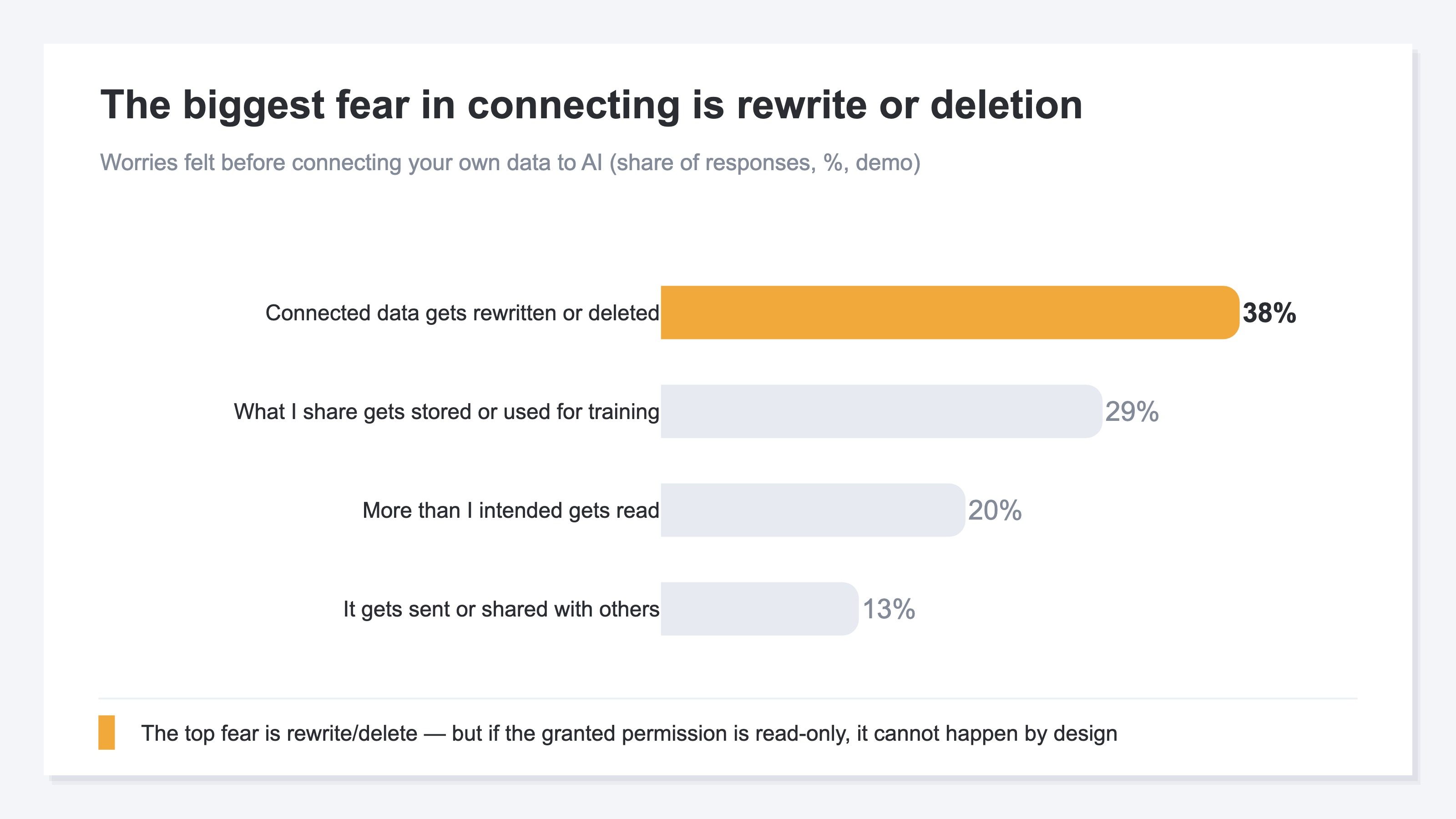
The biggest of these worries is likely "rewrite or delete." If your sales or order data could be changed at will, the business itself is shaken. Many also feel worried that data "gets stored or used for training," or that "more than intended gets read." All of them come from a single point: you cannot see what happens after you hand it over.
What matters here is not suppressing these worries with willpower ("it's fine if I'm careful"), but telling apart whether the thing simply cannot happen by design. Split the question by what you allow AI to do when you connect — the permission — and most of the fear can be sorted out. On a related note, when AI answers without seeing your real data, it can turn generic or get the numbers wrong, covered in why AI only speaks in generalities and why AI gets numbers wrong.
2. Pasting vs a read-only connection: what changes#
Bottom line: same "give it to AI," but pasting and connecting-to-read lead to completely different things.
There are broadly two ways to "give data to AI." One is pasting the data into plain AI (like ChatGPT). The other is connecting the data read-only and letting AI read it on the spot. The two look alike but differ a great deal inside.
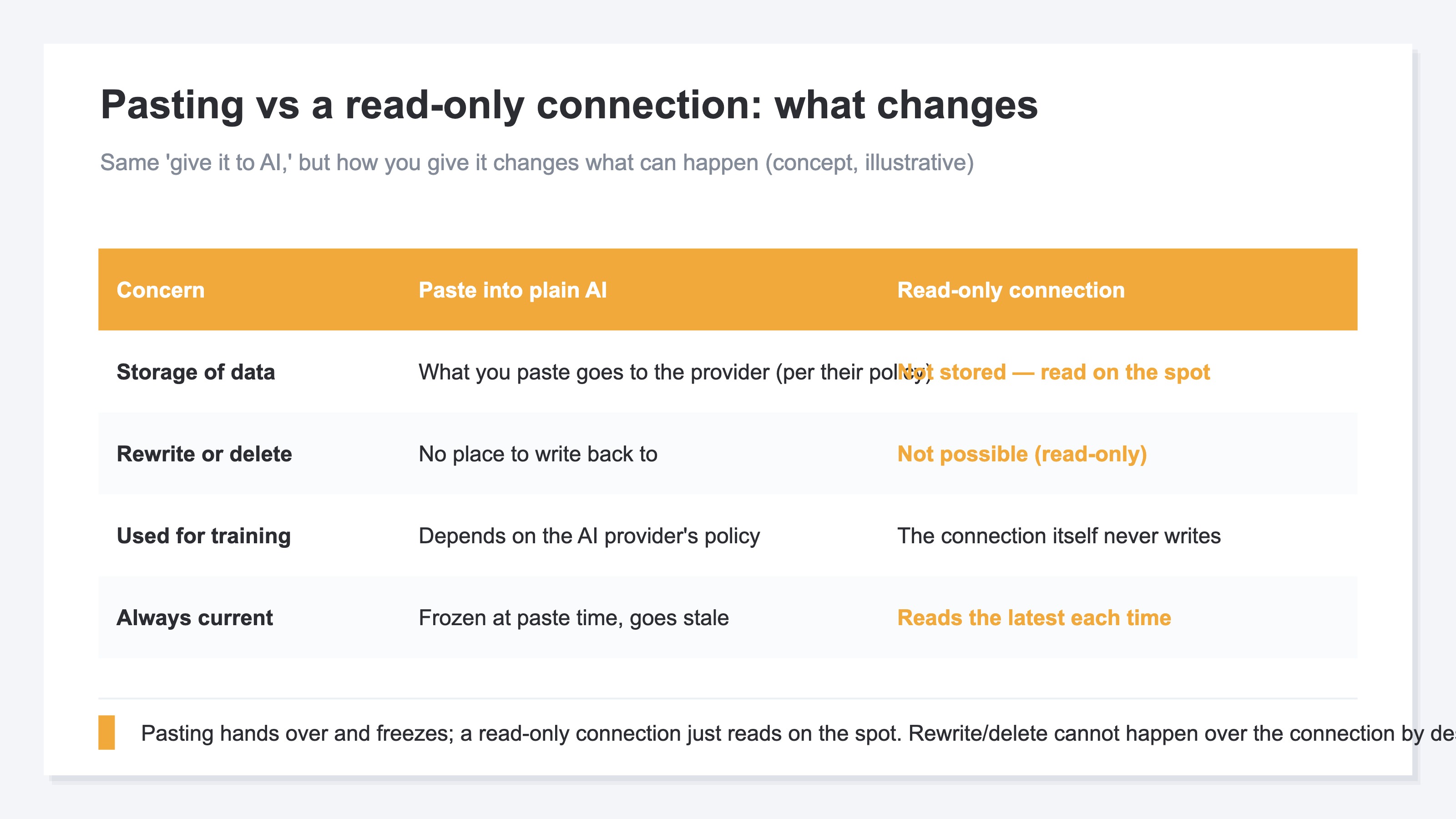
When you paste, that content goes to the AI provider, and whether it is stored or used for training depends on the provider's policy. It is also frozen at the moment you pasted, so the next time you want a fresh view, you paste again. How far this paste-in approach works and where it breaks is laid out in ChatGPT for ad analysis. A read-only connection, by contrast, does not hand data over and leave it sitting; it just reads on the spot when asked. Rewriting and deleting are not possible.
There are free ways to protect yourself too: don't paste data you don't need, turn off training in the AI you use. These help, but they require staying careful by hand every time, and that is quietly heavy. If you want to hand it off with peace of mind, making "the only possible operation read-only" is far easier at the root.
3. "Read-only" is a design that answers the fear#
Bottom line: with a read-only connection, all AI can do is read the numbers; rewrite and delete are impossible by design.
The answer to the fear lies in the connection's permission. Recent AI can read or write outside data only within the scope you log in and allow [1]. Keep this "allowed scope" read-only, and all AI can do is read. Rewrite, delete, and save operations were never granted, so they cannot run.
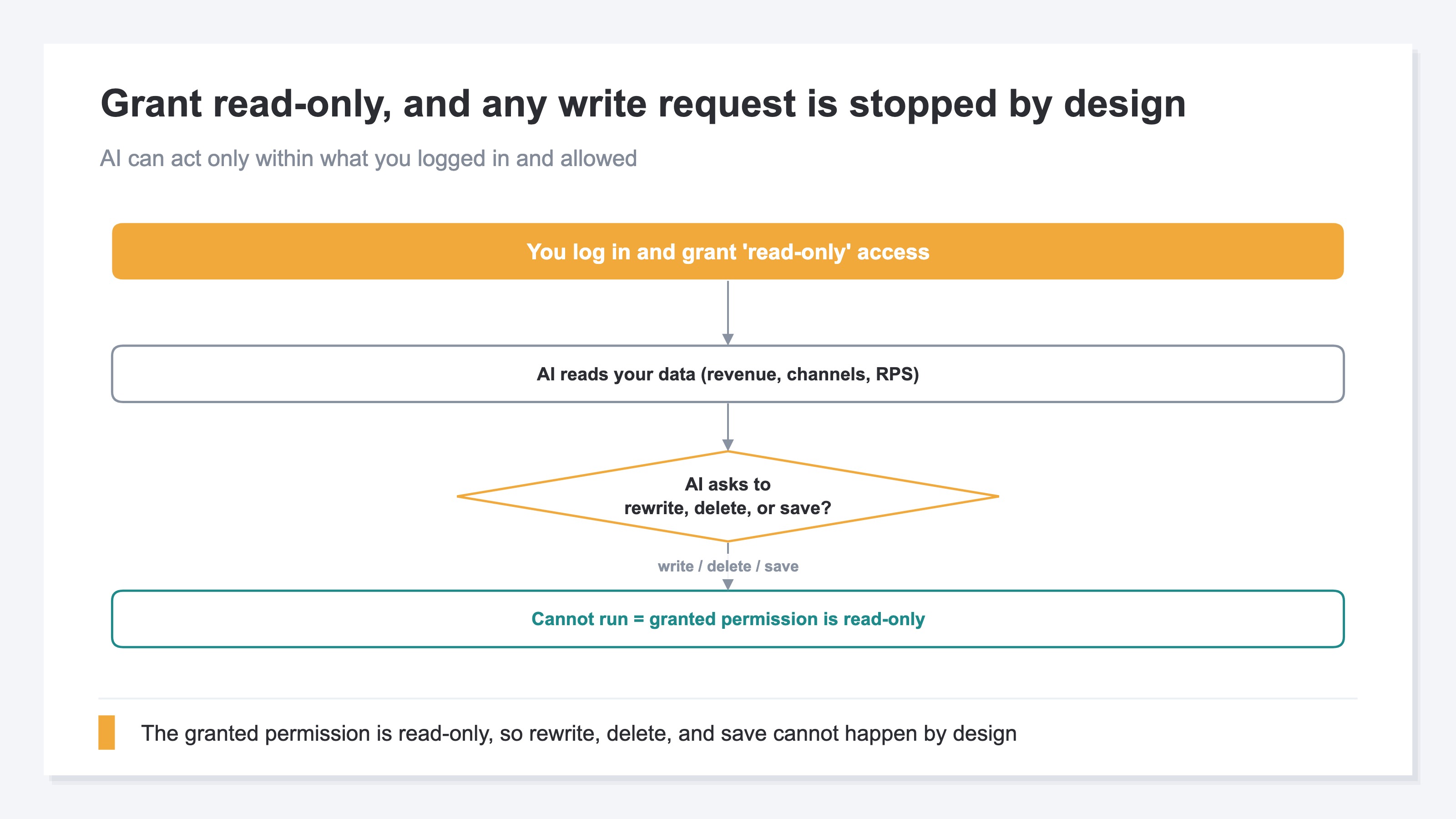
Seen as a flow, it goes like this. First you log in and grant "read-only." Then AI can read your data — revenue, channels, RPS (revenue per visit). If AI then asks to "rewrite this data" or "delete it," the granted permission is read-only, so it cannot run. It is not stopped by an operational rule; the possible operation is read-only from the start [2].
So the fear that "connecting means it gets erased or rewritten" does not happen over a read-only connection. It is not a matter of being careful — the possible operations are narrowed to reading only, from the very beginning. What to do next with the data you can now read is covered in grow traffic with zero marketing know-how.
4. The boundary that remains: the AI side is each provider's rule#
Bottom line: even with a read-only connection, how the AI on the other end treats the data is separate from how the connection is built.
What a read-only connection makes certain is the connection's nature: "the only operation AI has is reading = it cannot rewrite or delete." Beyond that, whether the AI that received the data (ChatGPT, Claude, etc.) stores it after answering, or uses it for training, is decided not by how the connection is built but by each provider's policy [3][4].
The point of this article is one thing: "with a read-only connection, rewriting and deleting cannot happen by design." If training worries you, you can check the AI side's settings (turning off training, data-retention handling) in each provider's policy.
RevenueScope solution
Bottom line: RevenueScope's connection is read-only and holds no write permission. So even when you hand it to AI, there is no worry of data being rewritten or deleted. And it is free to start.
What you have seen is that much of the connection fear comes down to how far you can narrow the possible operations. RevenueScope provides that connection part as read-only. Connect it to ChatGPT or Claude, and AI reads your store's numbers directly and answers. No hard setup or SQL is needed. Because it is read-only, all AI can do through RevenueScope is read — and RevenueScope itself holds no permission to rewrite your data.
| What you ask AI | What happens over the read-only connection |
|---|---|
| What's my revenue this month, which channel works? | Reads the sample site's data and returns revenue and RPS by channel |
| Delete / rewrite this data | Cannot run (the connection is read-only, no write permission) |
| How does it compare to last month? | Touches nothing stored; reads the latest on the spot and returns the change |
Ask RevenueScope's sample site, and it returns this (fictional site with sample data).
RevenueScope adds a revenue-first view on top of GA4 — a complementary role. The connection is read-only, so it creates a state where rewriting and deleting cannot happen by design. How the AI on the other end (ChatGPT, Claude, etc.) treats the data it read (storage, training) is decided by each provider's policy, so you can check that in the AI side's settings [3]. What RevenueScope does is remove the connection fear of "being rewritten or deleted" by design and get you to a state where you can let AI read your numbers with peace of mind. And RevenueScope starts from a free sign-up.
FAQ#
Q. If I connect, could my data be deleted or rewritten?
No. With a read-only connection, all AI can do is read; you have not granted write permission. So rewriting and deleting cannot happen — before being careful even enters into it. RevenueScope's connection is read-only too, and RevenueScope itself holds no write permission.
Q. Will the data I hand over be used for AI training?
That is decided not by RevenueScope's connection, but by the policy of the AI you use (ChatGPT, Claude, etc.). The read-only connection itself neither writes nor stores data. If training worries you, the sure move is to check the AI side's settings (turning off training, data-retention handling) in each provider's policy.
Q. Do I need hard setup or special knowledge?
No. You just log in and grant "read-only" — no SQL and no complex setup. You can first try the sample site (a fictional site with sample data) to see how it gets read.
Summary#
The feeling that "giving AI my own data is scary" comes from not seeing what happens after you hand it over, but splitting the question by the connection's permission sorts most of it out. With a read-only connection, all AI can do is read — rewriting and deleting do not happen, not because you are careful, but because they were never among the possible operations. The remaining boundary is how the AI on the other end treats the data, an each-provider policy matter you check in the AI side's settings. Start for free by trying the sample site read-only.
See which ads actually drive revenue, at a glance
Free up to 5,000 sessions/month, AI connection included. No credit card required. Up and running in 5 minutes.