"I'm running about the same ad spend as last month. New customers are coming in. And yet revenue feels like it's slowly sliding down." Run an ecommerce store long enough and this hard-to-explain feeling will sound familiar. More often than not, the culprit is churn — customers leaving.
Churn rate is the share of customers who left during a given period. This article lays out why churn stays hard to see even as new customers keep coming, the difference between voluntary churn and payment-failure churn, and the moves that help you notice the drift early — with charts and examples.
Table of Contents
Key Takeaways#
-
Churn rate = the share of customers who left during a period
Beyond subscription cancellations, in ecommerce we also include "repeat customers who never come back to buy again."
-
Churn hides behind incoming new customers
When inflow and outflow balance, customer count looks flat, and the quality erosion of revenue stays hidden.
-
There are two types of churn: voluntary and payment-failure
Voluntary churn, where customers leave on purpose, and payment-failure churn, where the transaction breaks before anyone notices.
-
Hard-to-see churn hides behind "averages" and "time lag"
Overall averages smooth it out, and there's a delay before the drift shows up in the numbers.
-
The first step to noticing it is tracking repeat-customer revenue separately, over time
Watch whether revenue from repeat customers has started to fall, not total revenue.
1. What Is Churn Rate: Customers Who Leave Without Ever Cancelling#
Bottom line: Churn rate measures "how many customers left during a given period."
Churn rate refers to the share of customers who stopped doing business with you over a set period. The idea behind the calculation is simple.
Churn rate = customers lost during the period ÷ customers at the start of the period
For example, if you start the month with 1,000 customers and 50 of them leave that month, your monthly churn rate is 5%.
In subscription services, a "cancellation" is churn outright, so it's easy to read. In ecommerce, it takes a little more care. Most ecommerce stores have no clear cancellation step. Customers simply stop coming back. Even without a cancel button — as on Shopify or BASE — this drift is happening for sure. So in this article, we treat "repeat customers who don't buy again even after a set period" as churn in the ecommerce sense, too.
Churn directly eats into LTV (customer lifetime value), the revenue a customer generates over their lifetime. The higher the churn, the sooner customers leave, and the smaller the cumulative revenue per person. That's exactly why curbing churn matters to revenue just as much as acquiring new customers.
2. Why Revenue Won't Grow Even as New Customers Keep Coming#
Bottom line: When new inflow balances churn outflow, customer count looks flat, the mix swaps out, and the quality of revenue declines.
New customers are coming in, yet revenue won't grow because new acquisition plugs the churn hole. When new inflow balances outflow, customer count looks flat, but the mix inside has been swapped out.
| Six months ago | Now | |
|---|---|---|
| Customer count | 1,000 | 1,000 |
| Of which, repeat customers of 1+ years | 600 | 350 |
| Of which, new customers this period | 100 | 350 |
| Average purchases per customer | 4.2 | 2.8 |
The count is the same 1,000, but long-standing repeat customers have dropped out and been replaced by new customers. Long-standing customers repeat more often and bring higher revenue per person, so when that layer leaves, the "quality" of revenue declines even with the same customer count. The same shows up in average revenue per user (ARPU / ARPPU): as repeat customers with more purchases thin out, the figure slides down. On top of that, acquiring new customers is said to cost more than retaining existing ones[1], so leaving the leak and constantly plugging it with new customers doesn't pay off.
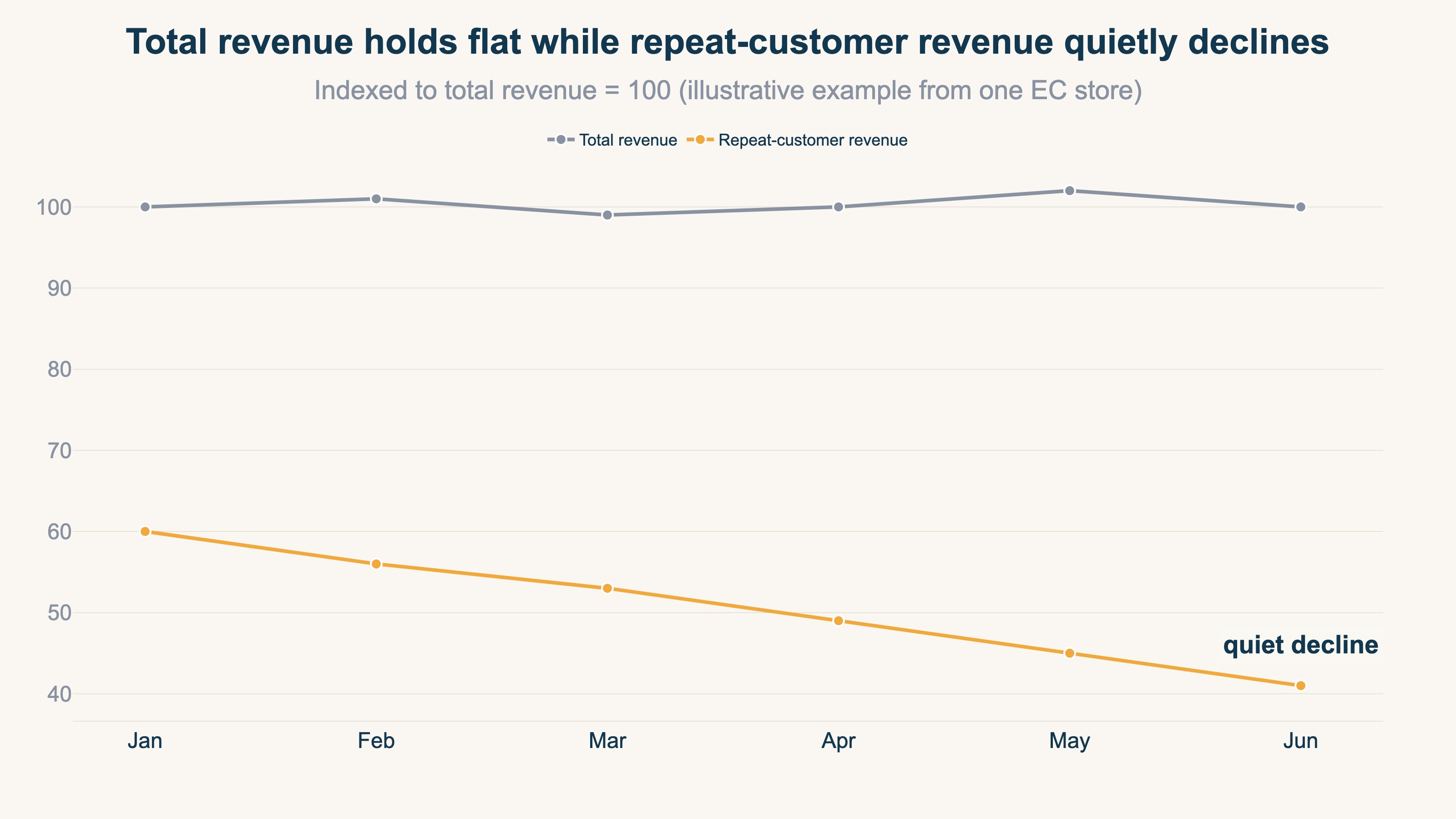
The tricky part is that this swap barely shows up in the totals. There are three main reasons churn is hard to see.
Reason 1: Overall averages smooth out the anomaly
Overall averages like "average purchase count" or "average order value" blend the healthy layer with the about-to-leave layer. Even if some customers are leaving, the dip gets diluted in the average and disappears from view.
Reason 2: Churn has a time lag before it shows in the numbers
Customers don't announce "I'm done buying" before they leave. They just gradually stop coming, and it shows up in the numbers months later. By the time you notice, months' worth of churn has already piled up.
Reason 3: Nobody tells you about payment failures
A payment that didn't go through is something even the customer may not notice. It doesn't appear in revenue reports as "lost revenue" either, so unless you actively check, it stays invisible.
When these three stack up, churn tends to be "too late by the time you notice." That's exactly why you need the habit of looking at the breakdown, not the totals.
3. The Two Types of Churn: Voluntary and Payment-Failure#
Bottom line: Churn splits into "voluntary churn," where customers leave on purpose, and "payment-failure churn," where the transaction breaks before anyone notices.
Churn is one word, but it splits into two by cause. The right moves are completely different, so it's important to treat them separately.
- Voluntary churn: The customer leaves of their own will — unhappy with the price, bored with the product, moved to a competitor, and so on. The reason sits on the customer's side.
- Payment-failure (involuntary) churn: The customer has no intention of leaving, but the payment doesn't go through — an expired card, insufficient balance, exceeding the credit limit — and the transaction stops as a result.
In subscriptions and recurring purchases, this payment-failure churn tends to be overlooked. Often the customer never decided to "quit"; their registered card info just went stale at renewal. Left alone, the transaction breaks before they even notice.
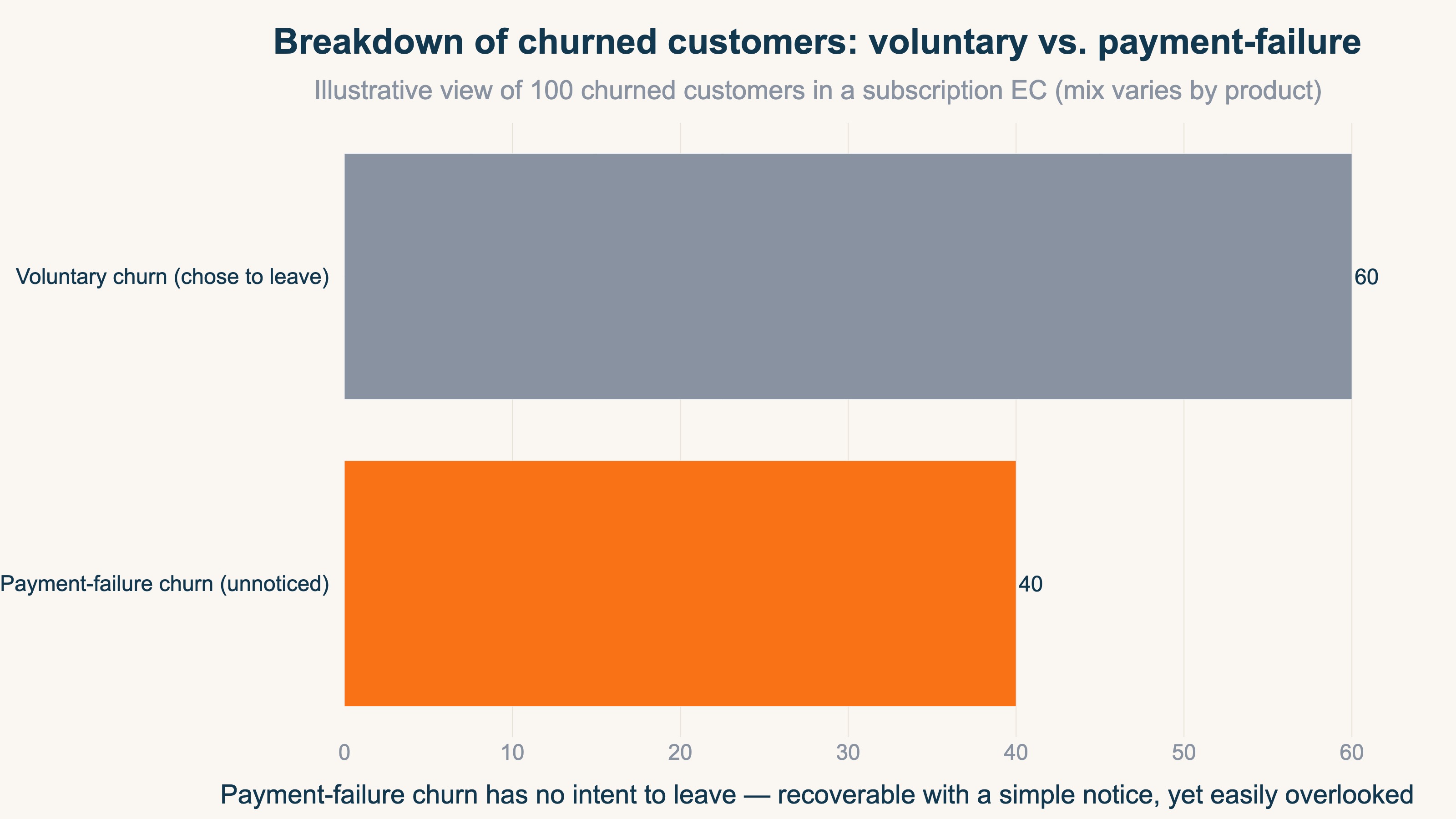
Voluntary churn is about improving "why they left," so it calls for a rethink of the product or service itself. Payment-failure churn, on the other hand, can often be recovered just by "noticing and reaching out." A clerical step — sending a card-update request, guiding customers whose payment failed to re-pay — can prevent it. Same churn, but one is product improvement and the other is building an outreach mechanism. Mix them up, and your countermeasures swing and miss.
4. Moves to Notice Churn: Read the Breakdown Over Time, Not the Total#
Bottom line: Surface the drift in three directions — track repeat-customer revenue separately over time, pull out the at-risk customers, and catch payment failures.
To notice hard-to-see churn, the basics are breaking down the totals and tracking the change over time. Here are three concrete moves.
Move 1: Track repeat-customer revenue separately, over time
Instead of total revenue, split "new-customer revenue" and "repeat-customer revenue" and compare them month by month. Even if total revenue is flat, if only repeat-customer revenue has started to fall, that's a sign of churn. The catch: rebuilding this breakdown by hand every month is a real burden. Judging new vs. repeat and re-aggregating per channel keeps getting pushed to later the longer you run it.
Move 2: Pull out the at-risk customers
Pull out customers who "used to buy a lot but haven't come back lately." RFM analysis helps here. You can catch valuable customers whose recency (R) has started to slip early, as "at-risk." That said, this means tracing purchase history per individual customer, so it assumes a system that can unify and manage customer data.
Move 3: Catch payment failures and reach out
Periodically check the list of customers whose payment didn't go through, and send a card-update notice. Unlike voluntary churn, this is revenue you can recover just by building the mechanism. That said, detecting payment failures depends on your payment gateway or subscription platform's dashboard. Sales data alone won't tell you "who failed to pay."
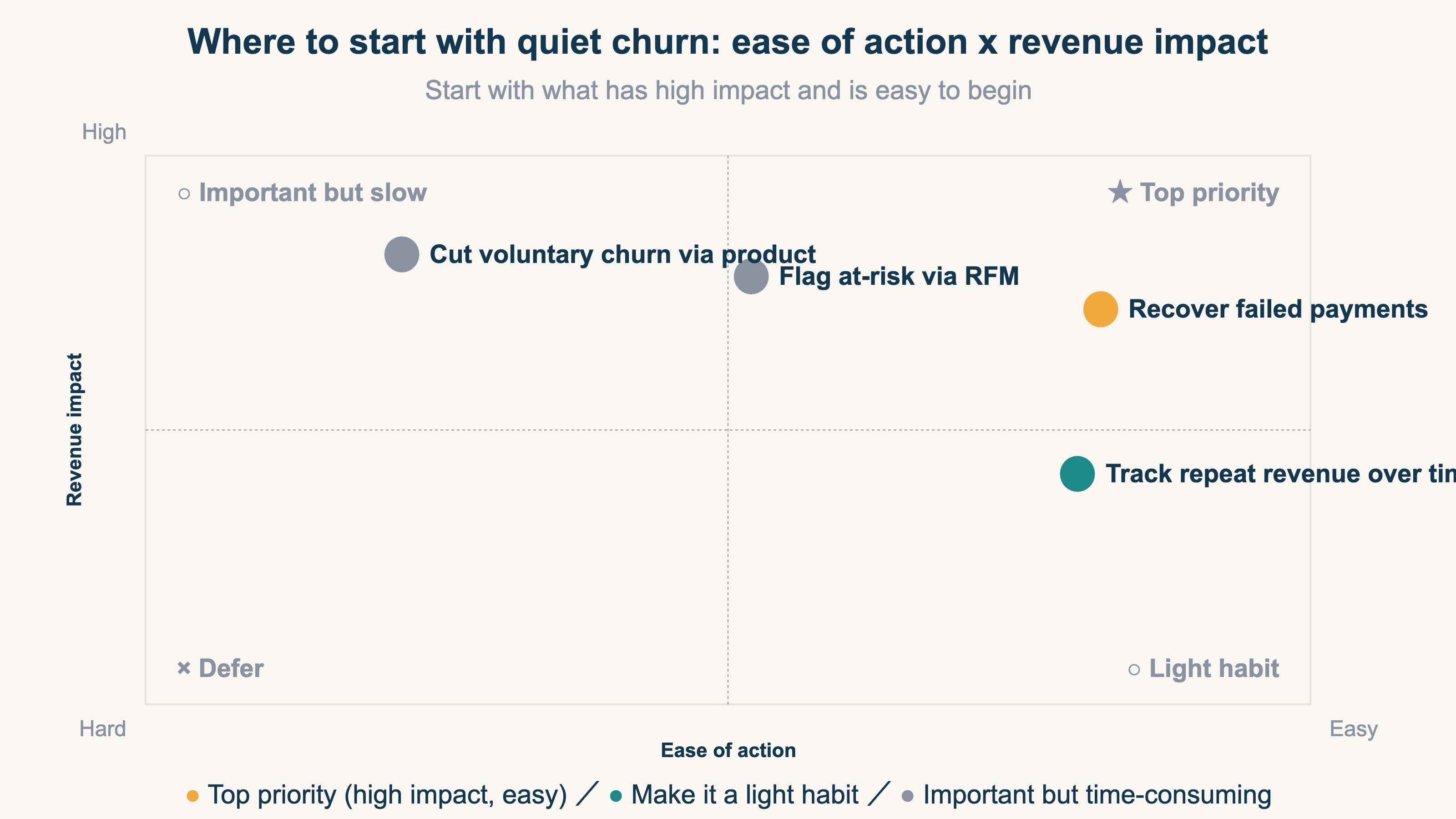
When you run these moves, it matters to confirm the effect in revenue. For instance, after guiding payment-failed customers to update their card, track how that layer's revenue recovered. Keeping yourself able to see the link between a tactic and revenue speeds up your decisions. The revenue-first way of looking at this is laid out in designing a revenue dashboard.
RevenueScope's solution
Bottom line: RevenueScope splits revenue by new/repeat and by channel onto one screen, so you can catch a drop in repeat revenue — the entrance to churn — early, from revenue.
Let's see how "surface the churn you can't see in the totals, through breakdown" actually looks. RevenueScope takes your GA4 and on-site sales data and brings revenue, split by channel and by new/repeat, onto one screen over time. Even if total revenue is flat, if only repeat-customer revenue has started to fall, that takes shape on the screen. New customers keep coming but revenue won't grow — you can catch that entrance, where existing customers are slipping away underneath, early and from revenue.
What RevenueScope specializes in is mapping revenue over time, split by new/repeat and by channel. Accurate per-customer churn rates and long-term LTV are handled by a CRM that tracks purchase history per person and the accounting setup that manages cancellations and billing. RevenueScope works one step ahead of that, focusing on catching the change in repeat revenue from your first-party sales data.
But what most ecommerce teams need first isn't "the decimal places of an accurate churn rate" — it's noticing the anomaly: "has repeat revenue started to fall?" Surfacing that from revenue as fast as possible is RevenueScope's role. After you notice, use RFM analysis to pull out the at-risk customers, run win-back tactics, and track how that revenue recovered. You can run "notice → act → confirm the effect in revenue" within one screen.
FAQ#
Q. For ecommerce, how many months without a purchase should count as "churned"?
It varies by product. For short-cycle goods like daily necessities or consumables, 2–3 months; for apparel or hobby-driven products, half a year — use your own average repurchase interval as the benchmark. A practical approach is to roughly decide "twice the usual purchase interval means at-risk," then adjust as you run it.
Q. Between churn rate and CAC (customer acquisition cost), which should I prioritize?
They're connected. When churn is high, customers leave early and disappear before you've recouped the acquisition cost you paid. Before ramping up acquisition, first check whether the hole (churn) is too big. Whether your acquisition investment pays off is decided by the size of churn.
Summary#
Churn rate is the share of customers who left during a given period. Even without a clear "cancellation" in ecommerce, the phenomenon of repeat customers thinning out is happening for sure. It's hard to see because new inflow offsets the hole, averages and time lag smooth out the anomaly, and nobody tells you about payment failures. When new customers keep coming but revenue won't grow, the first step to noticing it is tracking repeat-customer revenue separately over time — not total revenue.
See which ads actually drive revenue, at a glance
Free up to 5,000 sessions/month, AI analyst included. No credit card required. Up and running in 5 minutes.
References#
- [1] Bain & Company "Prescription for Cutting Costs: Loyalty-Based Management" (2001)
- [2] Harvard Business Review "The Value of Keeping the Right Customers" (2014)
- [3] Ministry of Economy, Trade and Industry (Japan) "FY2024 E-Commerce Market Survey" (2025)
- [4] Shopify "Customer Lifetime Value (CLV): What It Is and How to Calculate" (2024)
- [5] HubSpot "Customer Lifetime Value (CLV): How to Calculate & Improve It" (2024)