A GA4 bounce rate can drop to 0% from one day to the next. It can also pin at 100%. Neither is a fault on the site — both are the value showing what you marked as a key event in GA4. This article covers why the first screen to check differs between the 0% case and the 100% case, and what still remains after you revert the setting.
Contents
TL;DR#
-
Bounce rate is the flip side of engagement rate, not a metric that stands on its own
A key event firing is one of the conditions for an engaged session, so the value moves with the events you designate
-
The 0% side and the 100% side send you to different screens first
For 0% it is the list of designated key events; for 100% it is whether the events are arriving at all
-
Reverting the setting does not change that bounce rate is a metric the configuration moves
Revenue and its efficiency are unaffected by which events you designate as key events
1. A 0% Bounce Rate Is Not a GA4 Bug#
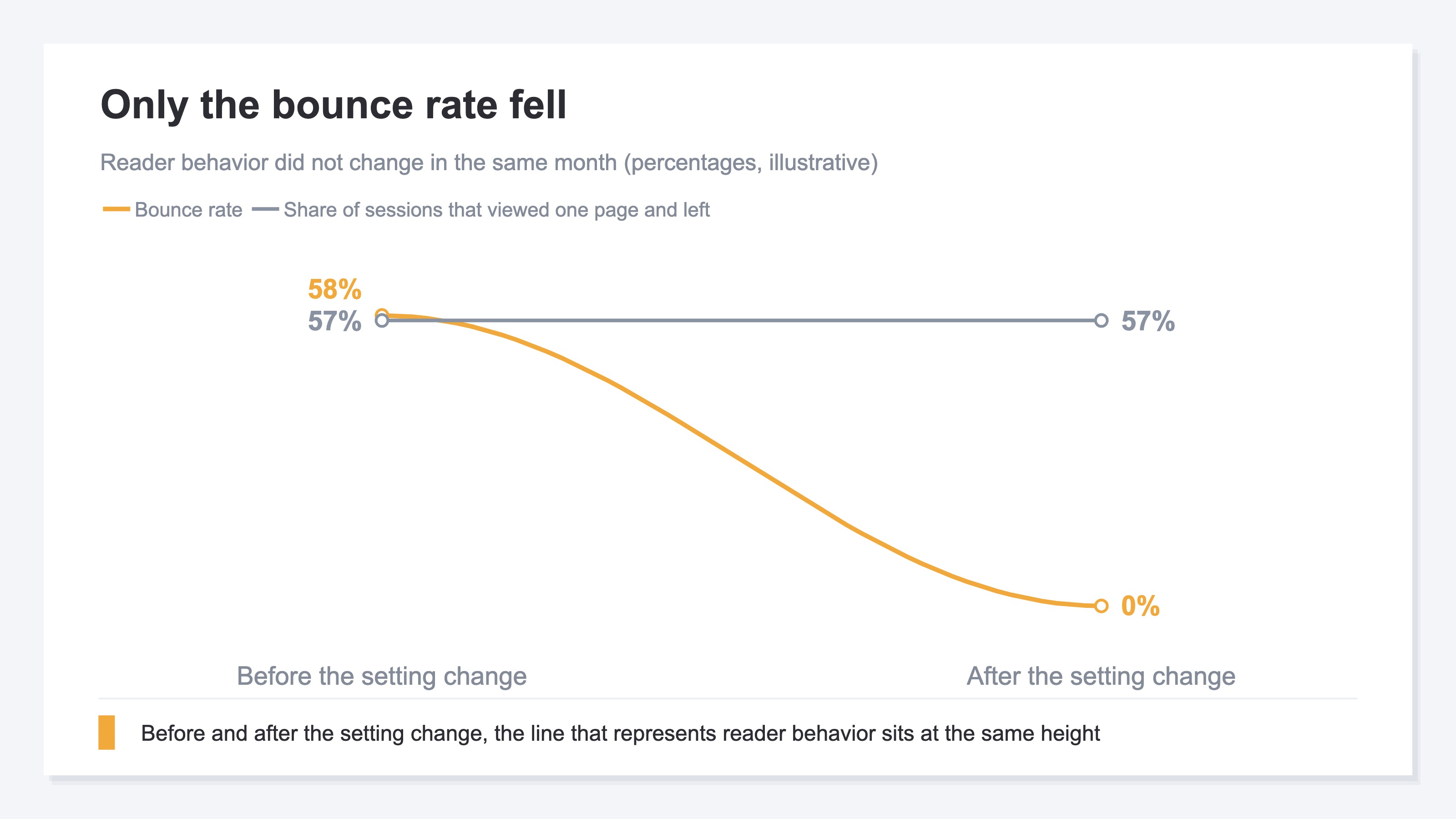
In the month the bounce rate went to 0%, readers behaved almost exactly as they had the month before. What changed is the condition GA4 judges by.
The suspicion usually splits two ways: Google changed the spec, or measurement on the site broke. It is neither. GA4 defines bounce rate as the percentage of sessions that were not engaged sessions[1]. It is the flip side of engagement rate, not a metric that stands on its own. The difference between the two rates that get confused here is covered in bounce rate vs exit rate.
An engaged session is established by any one of three conditions[1]. The session lasted longer than 10 seconds, a key event occurred, or there were two or more page views[1]. One of those three is something the site side gets to define. The term key event itself is explained in GA4 conversions vs key events.
The day you see 0%, what you usually open first is the measurement tag. Check the GTM triggers one by one, and when nothing turns up, try to reproduce it in a test property. Every one of those steps is necessary, and none of them is wrong. In that order, though, you spend days searching a place where the cause is not. Open the admin settings first; the code can wait.
2. The Events That Decide Whether a Session Counts as Engaged#
Whether a session is judged engaged changes with which events you designated as GA4 key events.
A GA4 key event is an event that measures an action especially important to your business[2]. Which ones get treated that way is decided on the site side. Designating one is an operation that marks an event[3], so choosing a completed purchase and choosing a scroll take the same number of steps.
Enhanced measurement sits on top of this. With it turned on, GA4 automatically collects scrolls, outbound clicks, site search, video engagement and file downloads[4]. A scroll is recorded the first time a visitor reaches 90% of the vertical depth of a page[4], and page views are collected automatically and cannot be turned off[4]. Events that fire on nearly every session are lined up and waiting the moment you designate one.
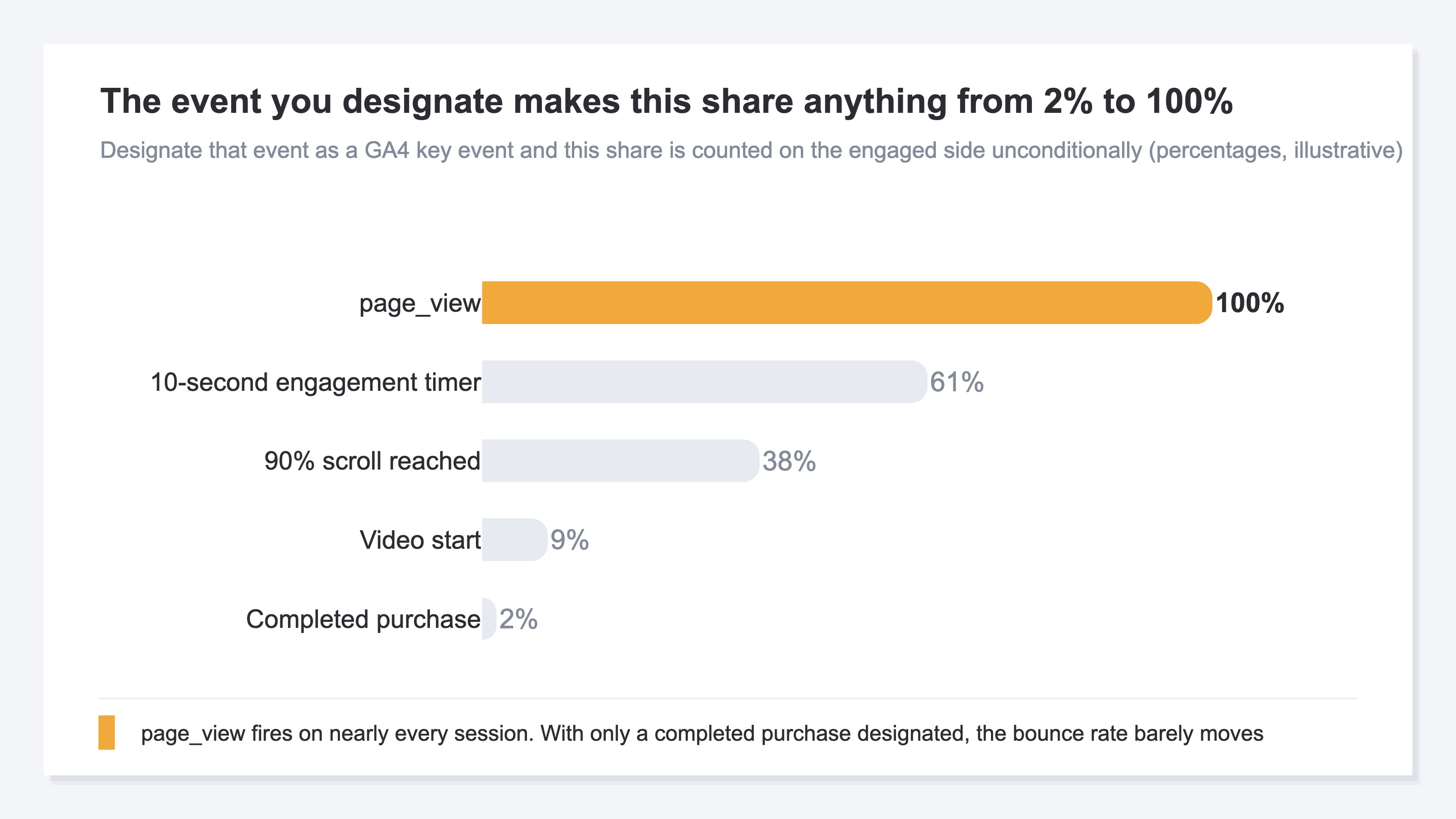
If a completed purchase is the only designated key event, the bounce rate barely moves. It fires on a few percent of the whole, and the rest is counted on the bounce side. Designate page_view and that share becomes 100%. Every session is included on the engaged side unconditionally, and the bounce rate is 0%.
Which event was designated, and when, is not something the official help can tell you. Opening the list of designations and seeing what is in there right now is more reliable. The specification behind engagement time is covered in why GA4 engagement time looks short.
3. 0% and 100% Send You to Different Screens First#
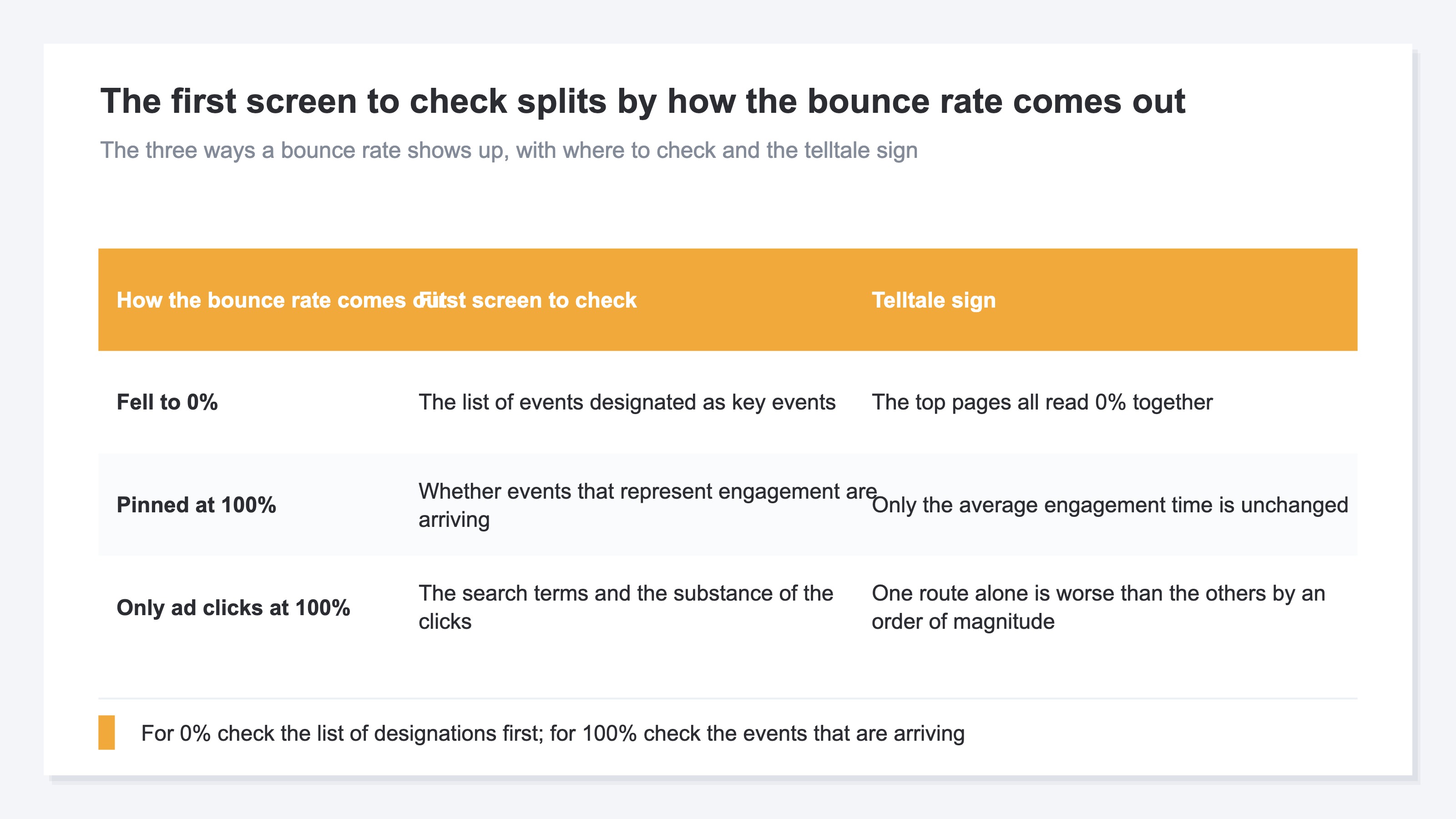
0% and 100% are not two sides of the same setting. The screen to check splits according to how the value comes out.
The 0% side is a state where too many sessions are being included on the engaged side. What you look at is the list of events designated as key events, checking whether page_view, a scroll or an engagement-time timer has found its way in. If the top pages are all at 0% together, you can isolate it as the setting rather than as something specific to a page.
The 100% side is the reverse: none of the conditions are being met any more. Look first at whether events that represent engagement are arriving. If only the average engagement time is unchanged from before, the substance of the visits has not changed and what changed is the kind of events arriving. The month a consent management setting was changed has the same shape.
When only ad clicks swing to 100%, the issue is on the traffic side rather than the setting. Look at the search terms and the quality of the clicks, and if one route in particular is worse by an order of magnitude, suspect the sessions themselves. That family of cases is covered in when GA4 sessions suddenly spike.
4. What Remains After You Revert the Setting#
Reverting the designation does not change that bounce rate is a metric the configuration moves.
There is something to confirm before you revert. Google Ads conversions can be created from GA4 key events[5][2]. It is a mechanism for reporting the same conversion count in both admin consoles[2]. Remove a designation to tidy up the bounce rate and you may be removing what ad bidding runs on at the same time. It looks like an operation that completes for free, yet you cannot decide it without knowing which channel's revenue rides on that setting.
One more thing. Even when reverting brings the value back near where it was, that is not a normal value — it is the value under the current settings. Turn on any single enhanced measurement event and it moves to another level again. At the page level, the smaller the denominator, the wider the rate swings.
Look at the first chart once more. What fell was only the bounce rate line, while the share of sessions that viewed a single page and left stayed at the same height. Watching the rate alone, would you have caught that discrepancy? Catching it takes putting the metrics the configuration moves next to the metrics it does not, and placing revenue per session at the center of the decision. Revenue divided by sessions is unaffected however you change which events are designated as key events.
RevenueScope solution
The channel breakdown displays sessions, bounce rate, revenue and revenue per session (RPS) together. RPS is revenue divided by sessions. GA4 reports both sessions and conversions, but it does not put this value at the center of the decision.
Fictional Store C's channel breakdown (illustrative)
| Channel | Sessions | Bounce rate | Revenue | RPS |
|---|---|---|---|---|
| Google search | 12,000 | 62% | ¥1,800,000 | ¥150 |
| 5,000 | 79% | ¥1,100,000 | ¥220 | |
| 2,000 | 44% | ¥240,000 | ¥120 | |
| Referral | 40 | 25% | ¥20,000 | ¥500 |
Note: the table above is a teaching example. The demo screen is drawn with the sample store's sample data, refreshed daily, so the figures you see when you open it will not match these.
The highest bounce rate belongs to Instagram at 79%. Its RPS, though, is ¥220, above the ¥150 of Google search at a 62% bounce rate. The lowest bounce rate, Email at 44%, has the lowest RPS at ¥120. Across these four channels, the good and bad of bounce rate points the opposite way from revenue efficiency.
RPS is led by Referral at ¥500. That channel has only 40 sessions. A handful of orders landing on it is the width between ¥500 and ¥100, so next month it will not necessarily sit in the same place. If you are deciding where to move ad spend, the material is in the remaining three. Instagram, highest in RPS while its bounce rate stays high, is where room to grow is left.
Page-level bounce rate follows the same thinking. When a page was the landing page for fewer than 5 sessions, the bounce rate value is not shown.
FAQ#
Frequently asked questions#
Q. If I remove the key event designation, does the bounce rate return to its old value?
A. One of the conditions drops away, so the values aggregated after that change. Before removing it, though, check whether a Google Ads conversion has been created from that key event[5]. If bidding runs on it, an operation meant to tidy up a metric reaches the delivery side.
Q. When the bounce rate pins at 100%, is a key event the cause as well?
A. The screen to check is different. None of the conditions are being met, so look first at whether enhanced measurement has stopped, or whether a consent management setting has stopped events from being sent.
Q. Is bounce rate a metric worth following at all?
A. It is a metric the configuration moves, so it cannot stand alone as the axis of an investment decision. Putting revenue and RPS in the lead role, and reading bounce rate as support when you suspect the quality of the traffic, is the realistic approach.
Summary#
A bounce rate of 0% is not a bug. GA4's bounce rate is the percentage of sessions that were not engaged sessions[1], and a key event firing is one of the conditions[1]. Designate page_view, which fires on nearly every session, and the value is 0%.
On the 0% side you look at the list of designated events; on the 100% side, at whether the events are arriving. Before reverting a designation, check whether a Google Ads conversion has been created from that key event[5]. Even after reverting, bounce rate remains a metric the configuration moves. The practical cost itself is covered in does bounce rate hurt SEO.
One last thing to check. Between last month and this month, how much did revenue per session by channel change?
See which ads actually drive revenue, at a glance
Free up to 2,000 sessions/month, AI connection included. No credit card required. Up and running in 5 minutes.
References#
- [1] Google Analytics Help "[GA4] Engagement rate and bounce rate" (2026)
- [2] Google Analytics Help "About key events" (2026)
- [3] Google Analytics Help "Create or modify key events" (2026)
- [4] Google Analytics Help "Enhanced measurement events" (2026)
- [5] Google Analytics Help "Create Google Ads conversions based on Google Analytics key events" (2026)