"I opened GA4 and 'Conversions' had disappeared — there's something called 'Key Events' instead" — since the 2024 GA4 terminology rename, this question has been popping up everywhere. What looks like a simple rename actually reorganized the relationship between GA4 and Google Ads, and quietly carried over your old settings.
This article walks through what the "Conversions → Key Events" rename really changed, what stayed the same, how it interacts with Google Ads, and how to connect these basics to revenue decisions. It is the fourth installment of the series "The Web analytics basics you were afraid to ask" (Part 3: Bounce rate vs Exit rate).
Table of contents
TL;DR#
-
In 2024, GA4 "Conversions" was renamed to "Key Events," separating it from Google Ads "Conversions" at the wording level
GA4 calls the important user actions "Key Events" / Google Ads keeps using "Conversions" for ad-attributed outcomes — a two-layer split
-
Old conversion settings auto-migrated to Key Events. No reconfiguration needed
Only the labels and a few report names changed. Measurement logic and historical data carried over
-
Key event count is a "likelihood signal" — it cannot drive investment decisions on its own
To make budget calls you need to break it down further: which channel, how much revenue per session (RPS)
1. Why the wording changed — UA→GA4 cleanup and the 2024 rename#
"Key Events" did not appear out of nowhere. It is the result of Google cleaning up a long-standing problem: the same word meant different things in different places.
From UA "Goals" to GA4 "Conversions" — and then to "Key Events"#
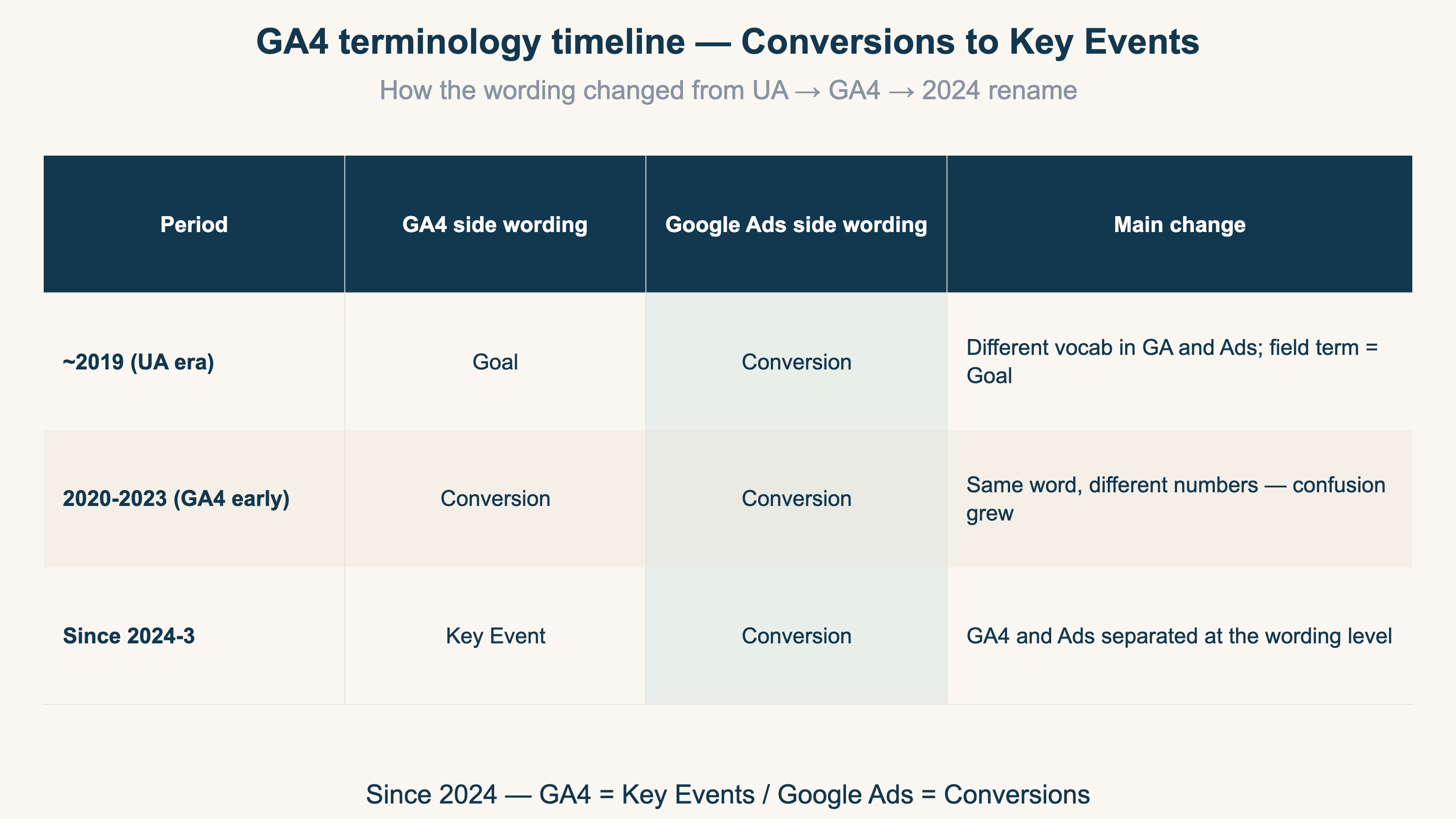
In legacy GA (Universal Analytics), important actions on a site were called "Goals." When GA4 rollout began in 2020, Google retired the word "Goal" and unified everything under "Conversions." But this created a new problem — GA4's "Conversions" and Google Ads's "Conversions" referred to different numbers under the same name. GA4 counted on-site events, while Google Ads counted ad-attributed outcomes. When the two were placed side by side, the "the numbers don't match" support tickets piled up fast.
The March 2024 rename to "Key Events"#
To untangle this, Google renamed GA4's "Conversions" to "Key Events" in March 2024, leaving "Conversions" exclusively for Google Ads[1].
GA4 from 2024 onward sits on a two-layer structure. Inside GA4, the important user actions are "Key Events." When linked to Google Ads, those same fires get imported as "Ads Conversions." Same purchase event, two labels: "Key Event" in GA4, "Conversion" in Google Ads[2].
2. What actually changed, and what did not — using the new wording in practice#
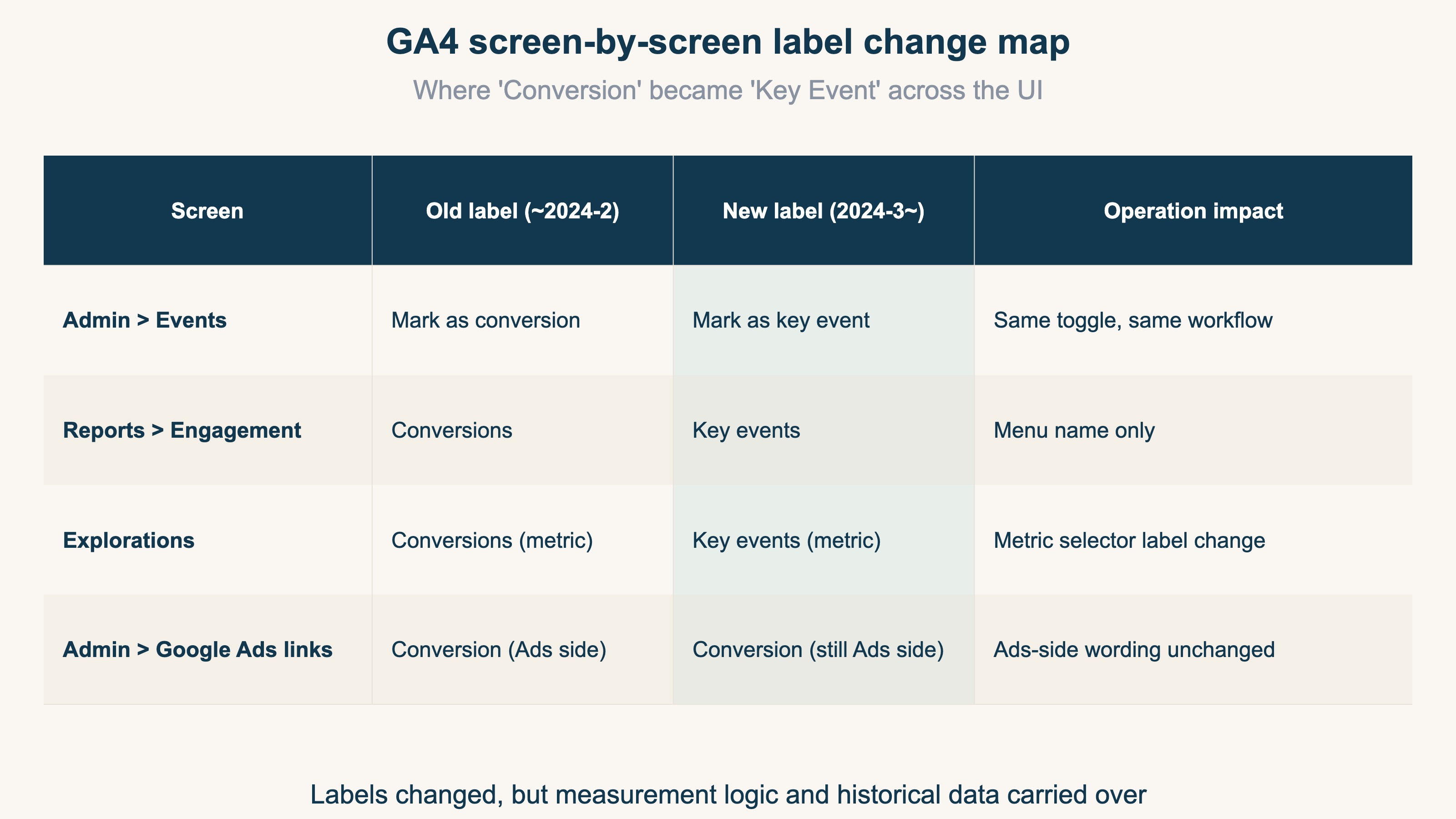
When people hear "rename," they usually brace for a full reconfiguration. In practice, only the labels and report names changed — the measurement logic and historical data are intact.
Where the labels changed#
Three places in the GA4 UI had "Conversion" replaced with "Key Event":
- Admin > Events > Mark as key event (was "Mark as conversion")
- Reports > Engagement > Key events (was the "Conversions" report)
- Explorations: metric picker now shows "Key events" (was "Conversions")
Event names themselves (purchase, sign_up, etc.) and Google Ads link settings did not change. The clean mental model is: "Labels changed, measurement logic stayed."
Old settings auto-migrate — 3 things to check#
For accounts that had GA4 conversions configured before March 2024, the old conversion events were automatically carried over as Key Events. No reconfiguration is required, but it's worth a 3-point sanity check:
- Admin > Key events: are all your previous conversion events listed? (count matches)
- Historical reports: do the numbers continue through the rename window without a gap?
- Google Ads side "Conversions": are they still configured independently? Ads conversions remain a separate setup
The third one trips people up the most. Marking an event as a Key Event in GA4 alone does not feed Google Ads automated bidding — for ad operations, you still need to set up "Conversions" on the Google Ads side as a separate step[2][3].
3. Key event count alone cannot drive investment decisions — the revenue lens#
From an ad-investment decision standpoint, key event counts alone don't answer the question of "where should the next dollar go" — there's a structural ceiling.
Key events are "likelihood signals"#
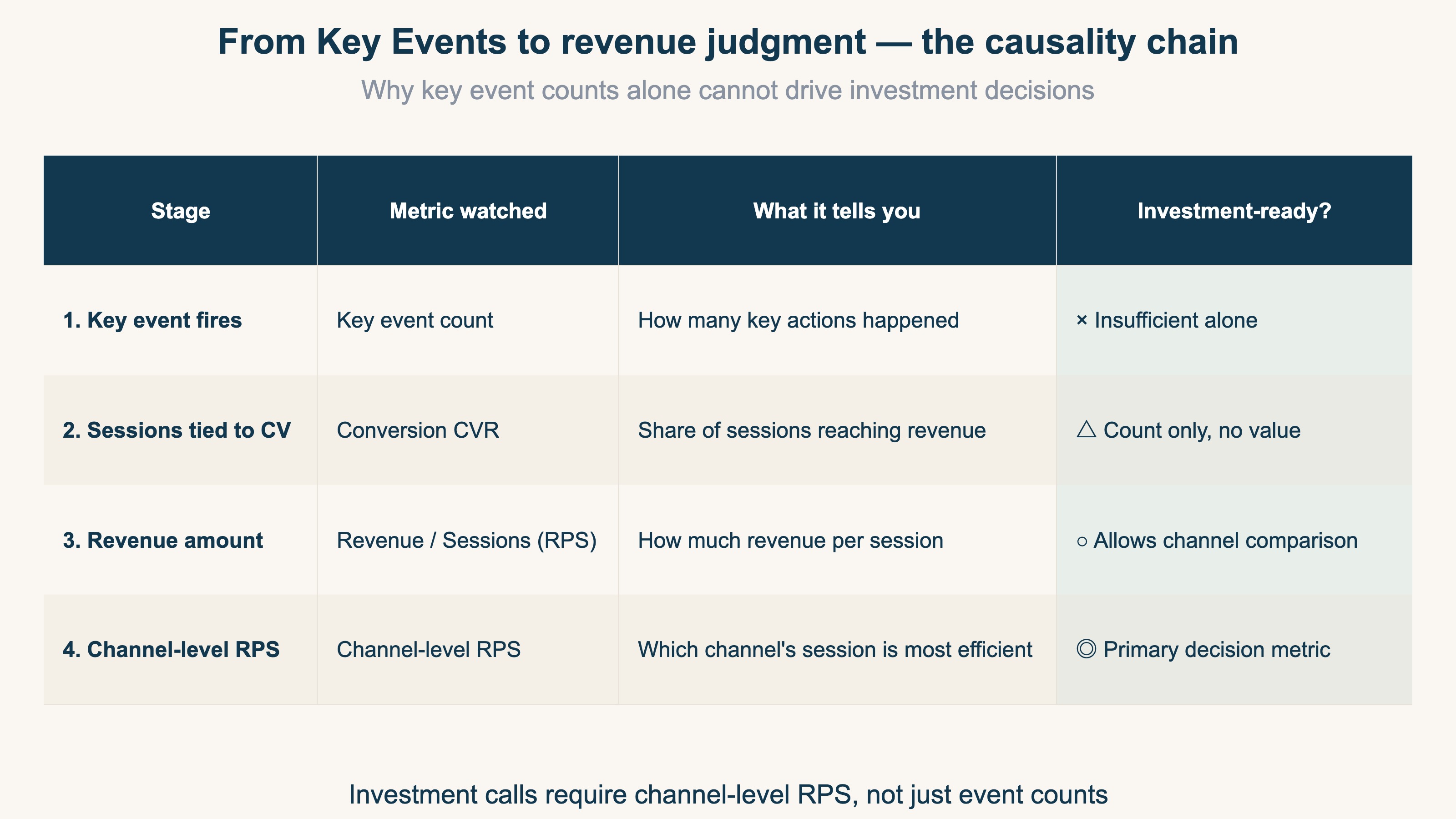
A Key Event in GA4 is a signal that a user moved closer to purchase or sign-up. add_to_cart, begin_checkout, purchase — any of them can be marked as a Key Event. "1,200 key events fired this month" tells you how many high-intent actions happened, but it does not tell you which ad channel drove them, or how much revenue they translated to.
In real ad operations the recurring questions are:
- How many key events did Meta vs Google ads each generate?
- Of those, how many were tied to sessions that produced revenue?
- When you normalize by revenue-per-session (RPS), which channel is most efficient?
Key event count answers the first question, but not the other two.
Decompose with RPS / AOV / CVR for investment decisions#
Budget calls require pulling sessions in front of key events and revenue behind them into one view. The base equation:
Revenue = Sessions × CVR × AOV (RPS = Revenue ÷ Sessions = CVR × AOV)
As covered in the ROAS complete guide, ROAS or CVR alone hides cases where you're hitting volume but losing on order value. Conversely, only chasing AOV uplifts can drop CVR and shrink overall revenue. Comparing revenue-per-session (RPS) across channels is what reveals which channel's session is actually monetizing best (How RPS is calculated).
Key event count tells you "how many fires." The "where should the next dollar go" answer lives in revenue-per-session. Use GA4 Key Events as the starting line, but make the budget call on channel-level RPS — that's the move that turns analytics basics into investment decisions.
FAQ#
Q1. I can't find "Mark as conversion" in the GA4 UI anymore — has the setup workflow changed?
Only the label has changed to "Mark as key event." The workflow is the same: Admin > Events, then toggle on "Mark as key event" for the relevant event row[1].
Q2. Did my UA (Universal Analytics) "Goals" get migrated to Key Events automatically?
No. Universal Analytics Goals require manual reconfiguration when migrating to GA4. The 2024 rename only auto-migrated "GA4 Conversions → Key Events." UA→GA4 is a separate exercise. Part 2 of this series, GA4 Events vs Sessions, walks through GA4's overall measurement model.
RevenueScope solution
Bottom line: RevenueScope surfaces what sits beyond the "key-event count": how much revenue each conversion actually drove. Counting events alone can't support an investment decision. RevenueScope centers on revenue per session (RPS) and lines up, by channel and by page, which conversions are actually earning.
It outputs revenue, sessions, RPS, AOV, and CVR — not gross margin or LTV. It complements GA4 rather than replacing it, and connects read-only, so the key events you've set up keep working as-is.
See which ads actually drive revenue, at a glance
Free up to 5,000 sessions/month, AI connection included. No credit card required. Up and running in 5 minutes.
References#
- Google Analytics Help About key events
- Google Analytics Help Differences between key events and conversions
- Google Ads Help Import key events from Google Analytics as conversions in Google Ads
- Google Analytics Help About events in GA4