
A high bounce rate drops your ranking—hear that, and do you start bolting related links onto your articles or rebuilding pages? Bounce rate is the share of people who arrive at your site, look at only the first page, and leave without doing anything. When this number is high, plenty of people brace themselves: "Google will think less of the page and my ranking will fall."
The short answer first: bounce rate itself is not considered a direct cause of lower rankings. And the cost you should really watch is on the revenue side, not the ranking side. Why bounce rate and rankings get talked about together, why a bounce isn't necessarily a failure, and where the real cost of a bounce shows up—let's take them in order.
Contents
This article in brief#
- Bounce rate itself is not considered a direct ranking factor. Google publishes the systems it uses to rank pages, and bounce rate and Google Analytics data are not among them. A top page may show a low bounce rate, but that's a correlation, not a cause—lowering bounce rate doesn't raise ranking.
- A bounce isn't necessarily a failure. Checking a phone number, getting the answer from an article, buying on one page—many bounces mean the goal was met, and depending on a page's role there are "good bounces" and "bad bounces."
- The cost bounce rate should really show you is revenue, not ranking. Some channels sell well despite a high bounce rate, and some sell poorly despite a low one. Only when you overlay the revenue lens does the place that actually needs fixing become clear.
1. Does bounce rate lower your Google ranking?#
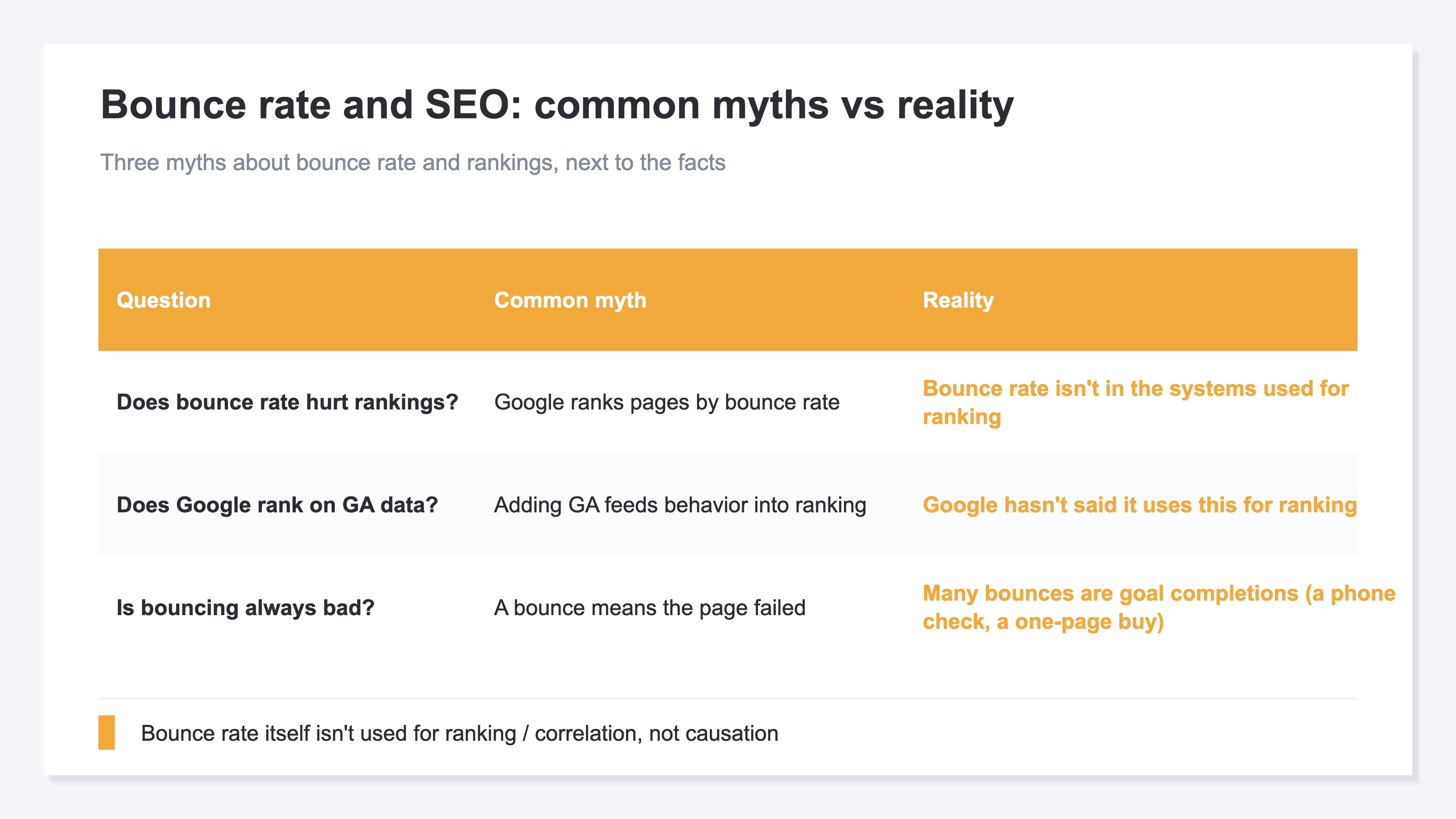
To lead with the conclusion: bounce rate itself is not considered a direct cause of lower rankings. First, let's untangle why this misunderstanding arises.
Google publishes the main systems it uses to decide rankings. What's on that list are things like the relevance, reliability, and usability of content—bounce rate and Google Analytics behavioral data are not included [1]. In other words, Google does not say it uses bounce rate for ranking. The idea that "installing GA feeds your behavioral data into the evaluation" isn't officially backed up either.
So why does it sometimes feel like "high bounce rate, low ranking"? Because a good page tends to rank well in search and, at the same time, satisfies readers so it bounces less—there's a common cause behind both. Even when ranking and bounce rate appear to move together, that's a correlation, not a case of ranking rising because bounce rate fell. Mistake this, and you wander into the detour of chasing bounce rate for the sake of rankings.
By the way, the metric most often confused with bounce rate is exit rate. They look alike, but they're counted differently and mean different things. We sort out the difference in Bounce rate vs. exit rate, so if the terms themselves are tripping you up, read that first and the rest here will be easier to follow. If the terms lined up in GA4 are hard to parse in the first place, see also Before you feed GA4 terms you don't understand to an AI.
2. Why a bounce isn't always bad#
To lead with the conclusion: a bounce isn't necessarily a failure—depending on the page's role, it can be a sign the goal was met.
Say someone comes to look up a store's phone number, confirms it, and calls right away—that's a "good bounce," business done on one page. Someone who comes to research something, reads the article, gets the answer, and leaves satisfied is the same. Helpful articles in particular tend to raise bounce rate the more crisply they answer the question. GA4 defines bounce rate as the share of sessions that weren't engaged, so a person who got the answer and left satisfied is counted as a bounce [2]. The proof that you delivered the answer in full shows up as a high bounce rate.
Lately, traffic that arrives after reading an AI's answer is another entry point where this "answered on the spot" pattern happens easily. Because the AI has already answered to some degree, a high share of people are satisfied on one page and leave. We cover a real example of this high-bounce-yet-doing-its-job traffic in AI traffic bounces more, and misses the landing page.
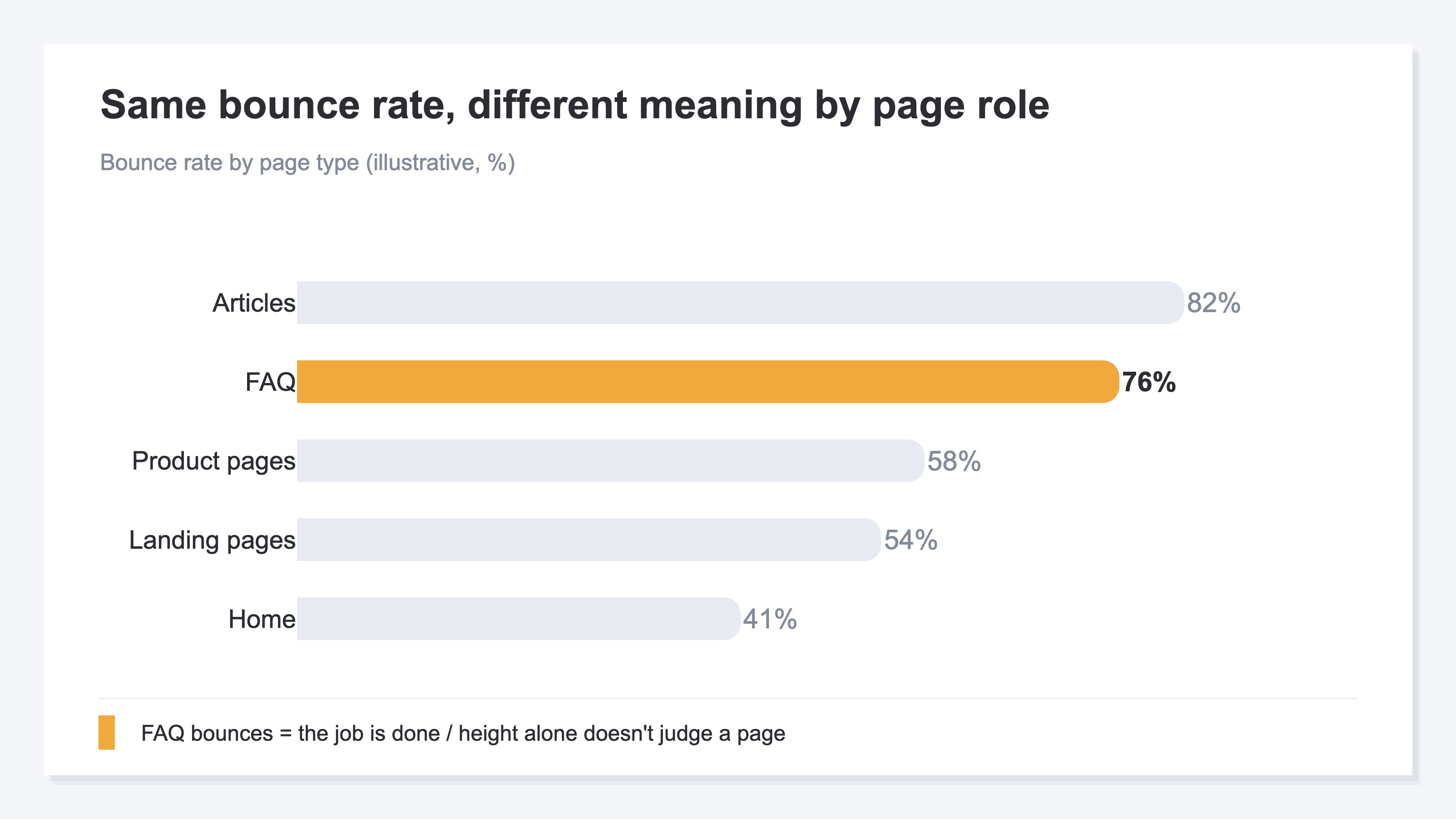
The figure above lines up a rough sense of bounce rate by page type. Articles and FAQs run high; top pages and product pages run low. The important point here is that treating a high article bounce rate as a problem in itself is meaningless. Articles play the acquisition role of answering research questions, so a lot of bouncing is, if anything, natural. Line up only the highs and lows and think "let's fix the pages with high bounce rates first," and you judge pages with different roles by the same yardstick. What a bounce rate means can only be read together with what the page exists for.
3. The real cost of a bounce is revenue, not rankings#
To lead with the conclusion: what you should really watch in bounce rate isn't the effect on ranking, it's how much revenue you're leaving on the table.
Once you step away from ranking worries, the next thing to look at is the money. What helps here is a view called RPS—revenue per session (revenue per visit). At the same bounce rate, a channel whose visitors buy a lot and one whose visitors barely buy mean completely different things for the business. Line up bounce rate alone and that gap stays invisible. Note that when this article says "organic search," it means non-ad traffic arriving through search engines like Google Search or Yahoo! Search; in the figures that follow, we represent it with Google Search.
Say the highest bounce rate belongs to your organic-search articles. On the numbers alone, that looks like "the worst page." But articles are the entry point for acquisition, and some of those people browse on and buy on another day. Meanwhile there are channels with a low bounce rate that do browse around yet barely turn into revenue. Bounce rate, a single number, lines up this "high-bounce buyer" and "low-bounce non-buyer" as if they mean the same thing.
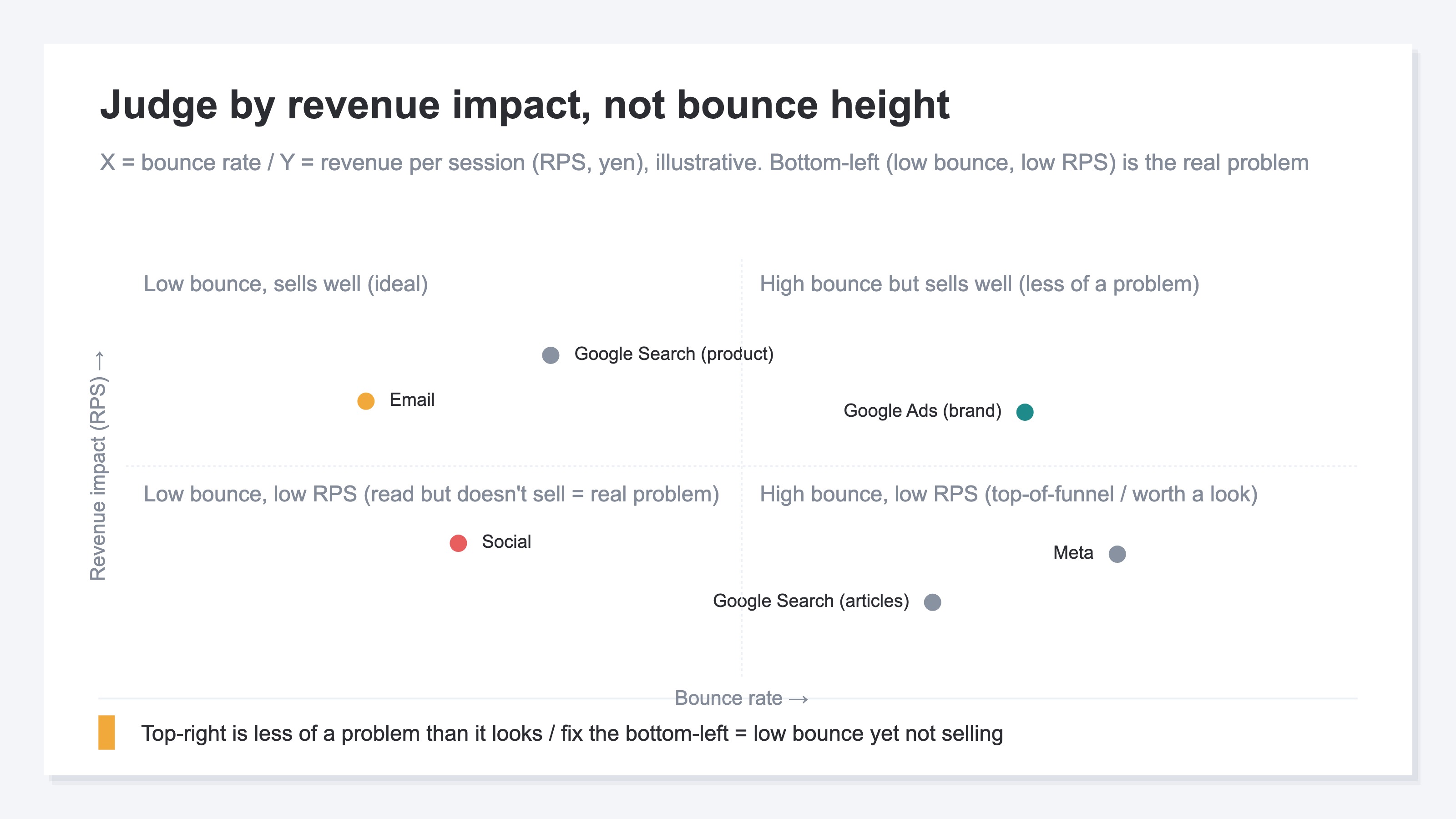
The figure above re-places channels with bounce rate on the horizontal axis and RPS on the vertical. The upper right (high bounce yet sells well) is less of a problem than it looks. What deserves attention, instead, is the lower left—channels with a low bounce rate but low RPS too. They browse around yet don't buy. The very fact that bounce rate is low makes the problem harder to see. The channels to protect and the channels that actually need work aren't decided by how high the bounce rate is; they separate only once you overlay revenue.
Used this way, bounce rate works better for the business as a number that reflects "where you're leaving revenue on the table" than "whether ranking will drop." We also lay out how to grasp your site's current position by the numbers, with revenue as the axis, in Is my site growing? Four numbers tell you.
RevenueScope solution
When you want to look at bounce rate through the revenue lens, you keep hitting the same wall. GA4 will calculate bounce rate per channel, but it won't show, on the same screen, how much revenue that channel generates per session (RPS). So you can't tell from the numbers alone whether a high bounce rate is a problem or the result of a job well done. Matching revenue to each channel by hand is simple in concept, but redone every time it becomes heavy work.
RevenueScope automates that manual work. It shows the bounce rate for each channel alongside the revenue per session (RPS). Because you can compare them on the same screen, you can sort on the spot whether a high bounce rate is "less of a problem than it looks" or "really leaving revenue on the table." The below is one example on a fictional site using sample data (a cosmetics EC store). Ask an AI assistant like ChatGPT through RS's MCP, "Is a channel with a high bounce rate a problem?" and this is what comes back.
| Channel | Bounce rate | RPS (yen) | Verdict |
|---|---|---|---|
| Google Ads (brand) | 72% | 186 | Less of a problem than it looks — one-page, instant decision |
| Google Search (articles) | 81% | 42 | Leave as is — acquisition role. A research bounce is an article's lot |
| Social | 45% | 18 | Needs work — browses around yet doesn't buy |
| 38% | 220 | Healthy |
What stands out in this table is that Google Search articles (81%)—which look like the worst on bounce rate alone—are doing their job as the entry point for acquisition, while the one that actually needs work is Social (45%), which has the lowest bounce rate. Social has the lowest RPS at ¥18: it browses around yet generates no revenue. The low bounce rate was making this shortfall hard to see. Only when you overlay revenue side by side do the channels to leave alone and the channels to fix separate.
What RevenueScope shows goes as far as your current position: the bounce rate and revenue efficiency (RPS) for each channel, side by side. From there you can choose your next move—which traffic to protect and where to fix—by the numbers, not by gut. You can check the actual side-by-side screen in the demo.
FAQ#
Frequently asked questions#
Q. If my bounce rate is high, will my Google ranking drop?
A. Bounce rate itself is not considered a direct cause of lower rankings. Google publishes the systems it uses to rank pages, and bounce rate and Google Analytics data are not among them, nor does Google say it uses them for ranking. A top page may show a low bounce rate, but that's a correlation—good pages lead to both a high ranking and a low bounce—not a cause where lowering bounce rate raises ranking.
Q. My article pages have a high bounce rate—should I fix them?
A. Bounce rate alone can't tell you. Articles are the acquisition entry point for answering research questions; the more fully they deliver the answer, the higher the bounce rate tends to go, and that's a natural state in itself. What to look at is how that page or traffic connects to revenue. If a channel sells well despite a high bounce rate, leaving it as is is fine, whereas a channel that doesn't sell despite a low bounce rate is worth fixing first.
Q. To see bounce rate's effect on revenue, what should I compare?
A. Show bounce rate and revenue per session (RPS) by channel. Look at these two on the same screen and you can separate the "high-bounce yet sells well" channels from the "low-bounce yet doesn't sell" ones. GA4 gives you bounce rate but doesn't line up revenue efficiency by channel on the same screen, so that matching becomes manual work. Lining that up automatically is the role of RevenueScope.
Conclusion#
The worry that a high bounce rate drops your SEO ranking is, in most cases, overblown. Bounce rate itself is not considered a direct cause of lower rankings, and Google doesn't say it uses it for ranking. A top page may show a low bounce rate, but that's a correlation, not a cause. Chasing bounce rate for the sake of rankings tends to be a detour.
On top of that, the real cost of a bounce shows up on the revenue side, not the ranking side. A bounce isn't necessarily bad—checking a phone number, getting an instant answer from an article—many bounces met their goal. So what to look at isn't the height of the bounce rate itself, it's how much revenue that channel generates. Only when you line up bounce rate and revenue per session do the channels to protect and the channels to fix separate. Start by re-examining the bounce rate of the page you're most worried about—not with ranking fears, but paired with "how much revenue it's generating there."
See which ads actually drive revenue, at a glance
Free up to 5,000 sessions/month, AI analyst included. No credit card required. Up and running in 5 minutes.