Your video ad's view count has risen, but site visits and purchases have not. If you remake the video based only on the view count, you may work on the wrong part of the path. This article divides the journey from impression to revenue into four stages and explains when to check Google Ads and when to check data from your own site.
Contents
TL;DR#
- TrueView views and site visits are different metrics
- Check the journey from impression to revenue as four separate intervals
- Use Google Ads for impressions, views, and clicks, and your own site's data for sessions and revenue
- Do not treat a simple difference between adjacent figures as a number of people who left
1. A TrueView View Is Not a Site Visit#
An increase in TrueView views alone does not tell you how many people reached your site.
In Google Ads, a TrueView view counts when someone watches enough of an ad. For a skippable in-stream ad, the main threshold is 30 seconds. If the ad is shorter than 30 seconds, watching it to the end counts as a view[1].
Watch time is not the only condition, however. If the viewer clicks an element such as a custom external link or card, Google Ads counts both a TrueView view and a click[1]. For an in-feed video ad, clicking the thumbnail and moving to the video watch page counts as a TrueView view but not as a click[1].
The relationship between a “view” and a “click” therefore changes with the ad format. These metrics are not a simple nested funnel in which some viewers proceed to click in sequence.
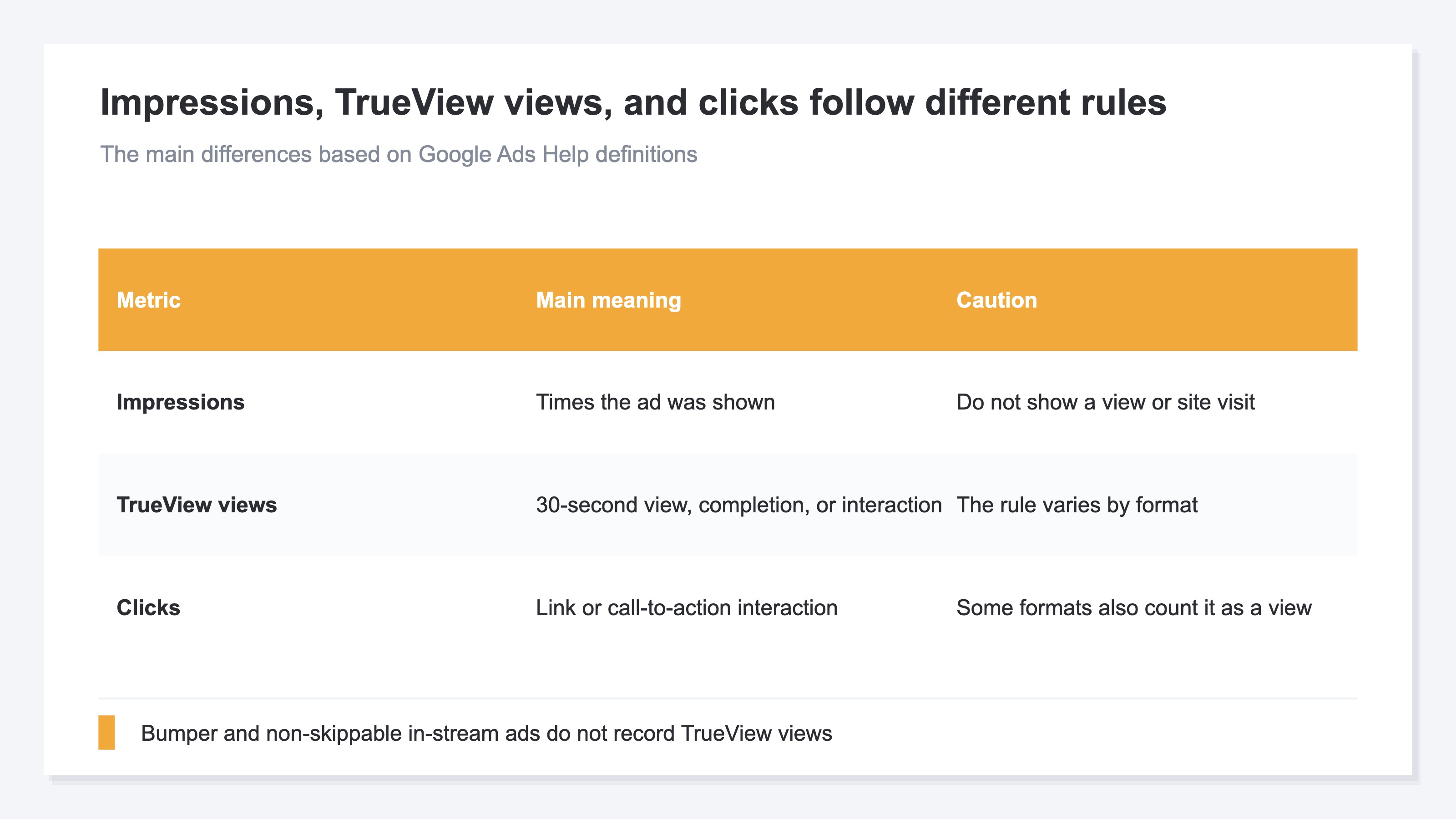
Google Ads defines the TrueView view rate as TrueView views divided by impressions[1]. The rate can help you assess the opening of the video and its fit with the audience. If the goal is to drive traffic to a site, Google also identifies click-through rate as a useful metric to prioritize[2].
A high view rate does not guarantee more site visits when the click-through rate is low. Conversely, a higher click-through rate does not guarantee that sessions will rise after the landing. Video ad measurement requires checking each adjacent pair of metrics one stage at a time.
2. Divide the Path from Impression to Revenue into Four Stages#
The useful unit of analysis is not the five metrics themselves, but the four intervals between them.
The four stages below are a framework for comparing ad formats in which TrueView views are recorded under the same conditions. Bumper ads and non-skippable in-stream ads do not record TrueView views, so the stage from impression to TrueView view does not apply to those formats[1].
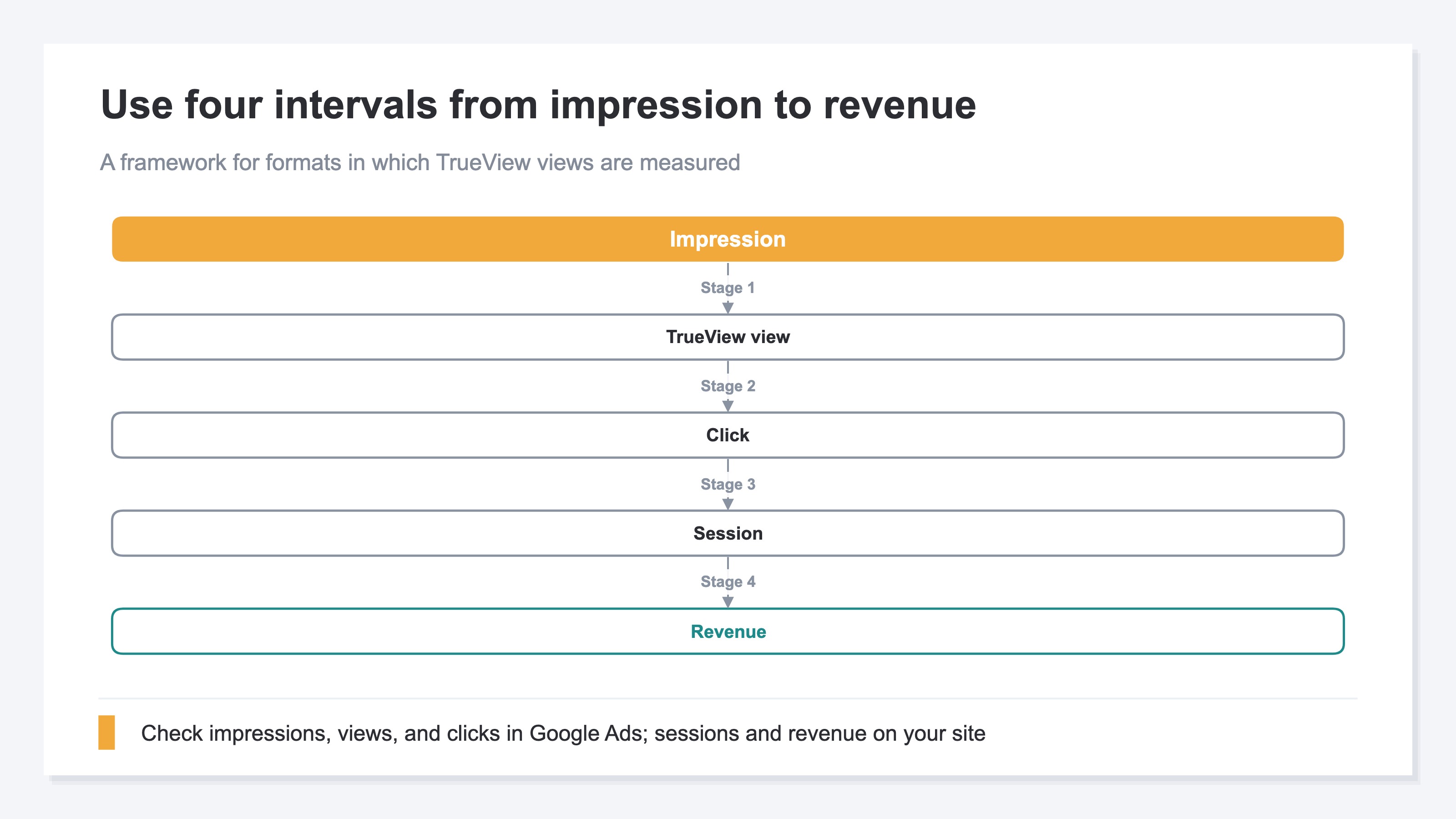
Stage 1: Impression to TrueView View#
Check impressions and the TrueView view rate in Google Ads. If this stage shows the largest shift, possible causes include the video's opening, the ad format, and audience settings. Google recommends testing shorter videos, multiple ads, the opening section, and changes to the call to action[2].
Stage 2: TrueView View to Click#
Check clicks and click-through rate in Google Ads. If the view rate is high but only the click-through rate is low, people are watching the video but have little reason to move to the site. Check whether the destination's offer matches the guidance given in the video.
Stage 3: Click to Session#
This is the boundary between Google Ads and your own site's measurement. A session is a period in which a user interacts with a website or app. In Google Analytics, a session starts when a page is viewed while no session is active and, by default, ends after 30 minutes of inactivity[3].
If someone leaves before the page opens, Google Ads can record a click without a session ever starting. If a UTM parameter or gclid disappears during a redirect, the visit may still be recorded but not classified as an ad session. For the technical checks after a click, see why Google Ads clicks and GA4 sessions do not match.
Stage 4: Session to Revenue#
On your own site, check ad-attributed sessions, revenue, and Revenue Per Session (RPS). RPS shows the average revenue generated by one session. If sessions increase but revenue does not, inspect the product, price, and purchase path on the landing page rather than assuming the video is the problem.
Separating these four stages tells you whether to revise the video, fix the link and measurement, or improve the destination.
3. Change Where You Look at the Stage with the Largest Shift#
Do not assume that a large simple difference between two metrics is a count of people who left.
Consider a fictional YouTube ad campaign. Over 30 days, it records 160,000 impressions, 3,600 TrueView views, 240 clicks, 190 sessions classified as coming from the ad, and ¥570,000 in revenue.
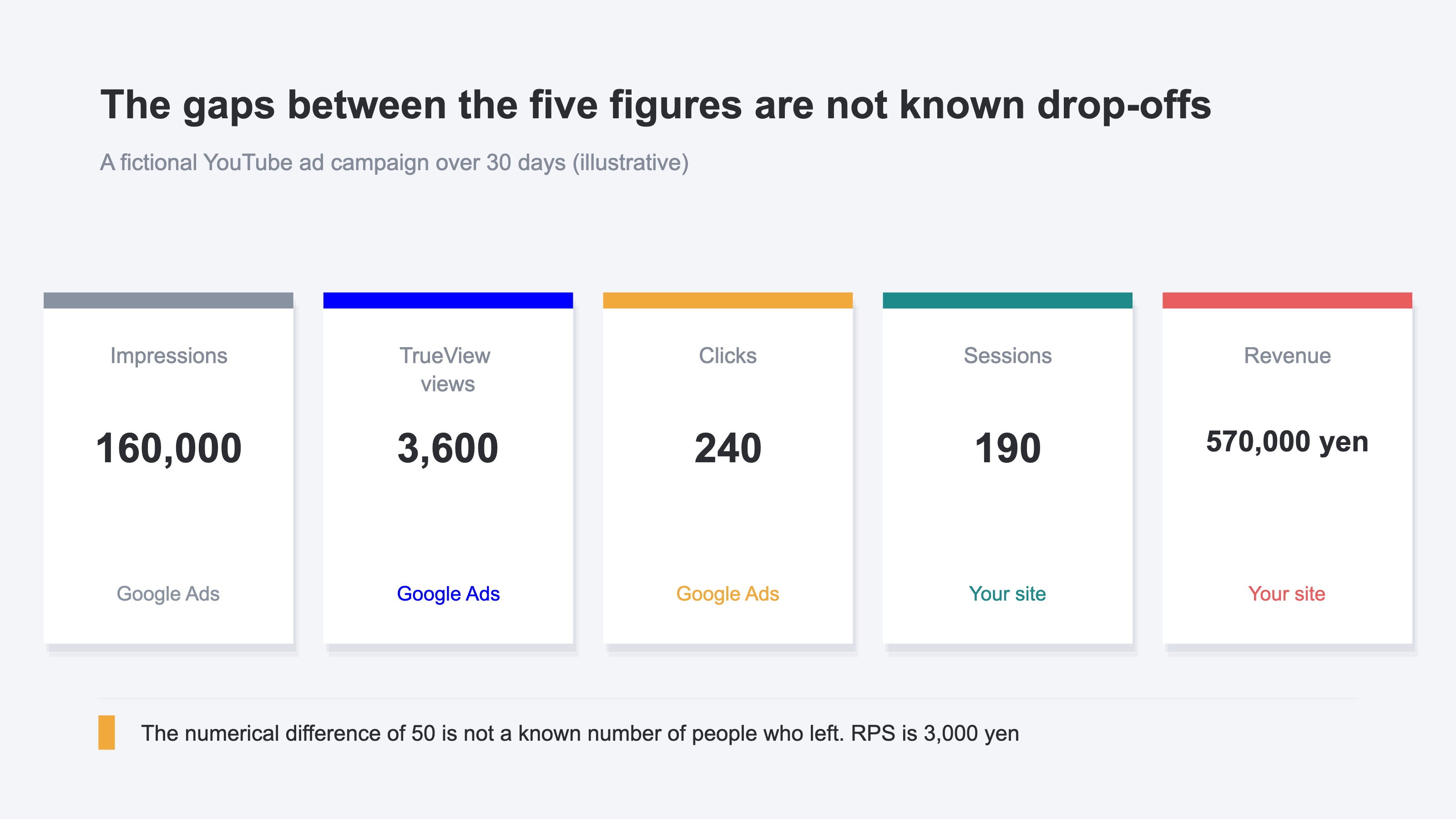
The ratio of impressions to TrueView views is 2.25%. If that stage alone has dropped sharply from the previous month, check the video's opening and the audience in Google Ads. The ratio of TrueView views to clicks is 6.7%, but it is not a progression rate for the same people. Depending on the ad format, a click itself may be included in the TrueView view count.
The difference between 240 clicks and 190 sessions is 50. You cannot conclude that 50 people left before opening the page. The figure may combine repeated clicks by the same person, exits before the page opens, a measurement tag that did not fire, and missing parameters. The two metrics also come from different sources: clicks from Google Ads and sessions from your own site.
Finally, 190 sessions produced ¥570,000 in revenue, so RPS is ¥3,000. Revenue is present at this stage, so stopping the campaign based on click volume alone would be premature. Compare RPS with another campaign over the same period to decide whether the campaign still deserves budget.
The question is not how many people a simple difference appears to represent. It is which interval changed most when compared with the previous month or another campaign.
4. Record Both Measurement Sources over the Same Period#
To make repeatable comparisons, record Google Ads data and your own site's data as separate sources.
The following fields are a useful starting point.
| Stage | Figures to record | Source | Main area to inspect |
|---|---|---|---|
| 1 | Impressions, TrueView views, view rate | Google Ads | Video opening, ad format, audience |
| 2 | Clicks, click-through rate | Google Ads | Call to action, match with destination |
| 3 | Sessions | Your own site | Page load, redirects, UTM, measurement tag |
| 4 | Revenue, RPS | Your own site | Product, price, purchase path |
Record the period, campaign name, and ad format as well. The condition for a TrueView view varies by ad format, and bumper ads and non-skippable in-stream ads do not record TrueView views. Comparing only aggregate totals with the previous month will not isolate a cause.
UTM parameters identify traffic in the URL from the ad to the site. Put the platform in utm_source and the campaign in utm_campaign. If you change a name during delivery, your site-side data will count it as a different campaign, so keep the spelling fixed while the campaign is running.
If Stages 1 and 2 are low, inspect the video and delivery settings in Google Ads. If only Stage 3 is low, continue with why ad clicks can produce zero sessions and how to configure UTM campaign parameters. If Stage 4 is low, inspect sessions and revenue by channel and utm_campaign.
Creating this record once is not difficult. The work compounds when every new campaign requires the same aggregation. On your own site's side in particular, matching sessions with revenue by campaign remains a recurring monthly task.
RevenueScope solution
Use Google Ads to check impressions, TrueView views, and clicks. Use RevenueScope to check sessions, revenue, and RPS after visitors land on the site. For the click-to-session stage, compare the two systems over the same period and with the same campaign name.
Fictional e-commerce site, 30-day video campaigns (illustrative)
| utm_campaign | Sessions | Revenue | RPS |
|---|---|---|---|
| video_product_30s | 420 | ¥840,000 | ¥2,000 |
| video_short_10s | 680 | ¥610,000 | ¥897 |
| video_brand_15s | 190 | ¥380,000 | ¥2,000 |
An example to illustrate how to read the table. The site name and rounded figures are fictional. The CTA leads to the sample store's sample data, which updates daily, so the figures shown there will differ.
video_short_10s has the most sessions. Its RPS, however, is ¥897, less than half that of the other two campaigns. View rate and click-through rate alone do not reveal this difference. By following the measurement through to post-landing revenue, you avoid allocating the next budget by session volume alone.
RevenueScope handles data recorded after someone lands on the site. Check video impressions, TrueView views, and watch time in Google Ads. RevenueScope also does not use first_touch to attribute a non-click video view back to the video ad. It keeps video viewing separate from post-landing sessions, allowing you to assess sessions, revenue, and RPS continuously by channel and utm_campaign.
FAQ#
Frequently Asked Questions#
Q. Do More TrueView Views Lead to More Site Visits?
A. A higher TrueView view count does not guarantee more site visits. TrueView views and clicks are different metrics. If the goal is site traffic, check click-through rate and click volume alongside the view rate.
Q. Is the Difference Between Impressions and Revenue the Number of People Who Left?
A. No. Impressions, views, clicks, and sessions have different counting rules and sources. They can also include repeated actions by the same person, so do not treat a simple difference as a headcount.
Q. Can RevenueScope Show YouTube Ad View Counts?
A. Check view counts in Google Ads. RevenueScope shows sessions, revenue, and RPS after visitors land on the site, grouped by channel or utm_campaign.
Q. Where Should I Start When Clicks and Sessions Do Not Match?
A. First align the period and campaign name. Then check the destination page load, redirects, UTM parameters, and measurement tag. For the full sequence, see why Google Ads clicks and GA4 sessions do not match.
Summary#
Measure video ads in four stages: impression to TrueView view, TrueView view to click, click to session, and session to revenue. Use Google Ads from impressions through clicks, compare Google Ads with your own site's data from clicks to sessions, and use your site-side data from sessions to revenue.
These four stages are not a funnel in which the same people simply decrease in number. Depending on the ad format, a click may also count as a TrueView view, and the measurement source changes between clicks and sessions. Do not treat a simple difference as the number of people who left. Instead, compare the stages with the previous month or another campaign and find the interval with the largest shift.
If view rate is the problem, inspect the video and audience. If click-through rate is the problem, inspect the call to action. For sessions, inspect the landing and measurement setup; for RPS, inspect the product and purchase path. This sequence helps you choose the next action from the stage closest to revenue instead of stopping a video ad based on view count alone.
See which ads actually drive revenue, at a glance
Free up to 5,000 sessions/month, AI analyst included. No credit card required. Up and running in 5 minutes.