The ROAS in TikTok Ads Manager does not match the revenue you total up on your own site. One reason is that the range of touchpoints counted as a result differs from platform to platform. Start by confirming what TikTok includes as a result, then look at why a gap remains even after the windows are aligned.
Contents
TL;DR#
- TikTok Ads has three attribution types: click, an engaged view of at least 6 seconds, and a view
- TikTok's help states that conversions from an ad watched for at least 6 seconds are included in the Conversions column
- Google Ads help defines view-through conversions as reporting-only
- Aligning the window settings on both screens still leaves a difference in purchase counts
- Decide allocation from revenue measured on your own site, a figure that does not move when a platform setting changes
1. TikTok Ad Results Include Purchases That Were Never Clicked#
TikTok Ads has three attribution types, and which of them enter the Conversions column is decided by the ad group settings.
Attribution is the mechanism that decides which ad a purchase is credited to. ROAS is the ratio of revenue produced to the amount spent on advertising.
In TikTok Ads Manager, a window can be set for each of click-through attribution (CTA), engaged view-through attribution (EVTA), and view-through attribution (VTA). The range you can choose from, however, is described differently in the help page that lists the windows and in the help page dedicated to EVTA[1][2]. The former is also a page placed inside an explanation of app measurement. Rather than settling on either set of values, what matters here is not the length of the window but which touchpoints enter the result.
CTA credits a purchase that occurs after the ad was clicked. VTA measures a conversion that occurs within the applicable window after the ad was viewed but not clicked at the time[3].
EVTA sits at the center of this. TikTok's help defines it as follows[2].
assigns credit to an ad when a user watches at least 6 seconds of the ad or the full duration for videos shorter than 6 seconds before converting
The same help page is equally explicit about where those conversions land: "EVTA conversions are included in the Conversions column based on your defined attribution settings during the campaign creation process"[2]. In other words, a setting exists under which a purchase is counted as a result on the strength of a 6-second view alone, with no click from the buyer. EVTA is available for three objectives: app promotion, lead generation, and sales[2].
Check the settings screen to see what is active on your own ad group. TikTok Ads Manager also offers custom columns that break results down into VTA, CTA, and EVTA[2]. Read the three as a single ROAS without separating them, and purchases counted from a 6-second view stay mixed in.
2. Whether a Purchase Without a Click Counts Differs by Platform#
The word "conversion" is shared, but whether a purchase made without a click enters the headline column differs from platform to platform.
Google Ads help defines view-through conversions as reporting-only. They are not included in the Conversions column, and appear only in the View-through conversions column and the All conversions column[4]. Google Ads lists three exceptions: Performance Max campaigns based on store goals, App campaigns, and Demand Gen campaigns[4].
On the measurement window, Google Ads help gives no fixed number of days. It goes no further than stating that the recommended default window can differ depending on the type of conversion being tracked[5].
For website and in-store conversions, Meta lists three standard attribution settings[6]. Click-through is one or seven days from a link click. View-through is one day from an impression, and engaged-view is one day from a click other than a link click. For video ads, engaged-view also covers a video played for at least five seconds[6].
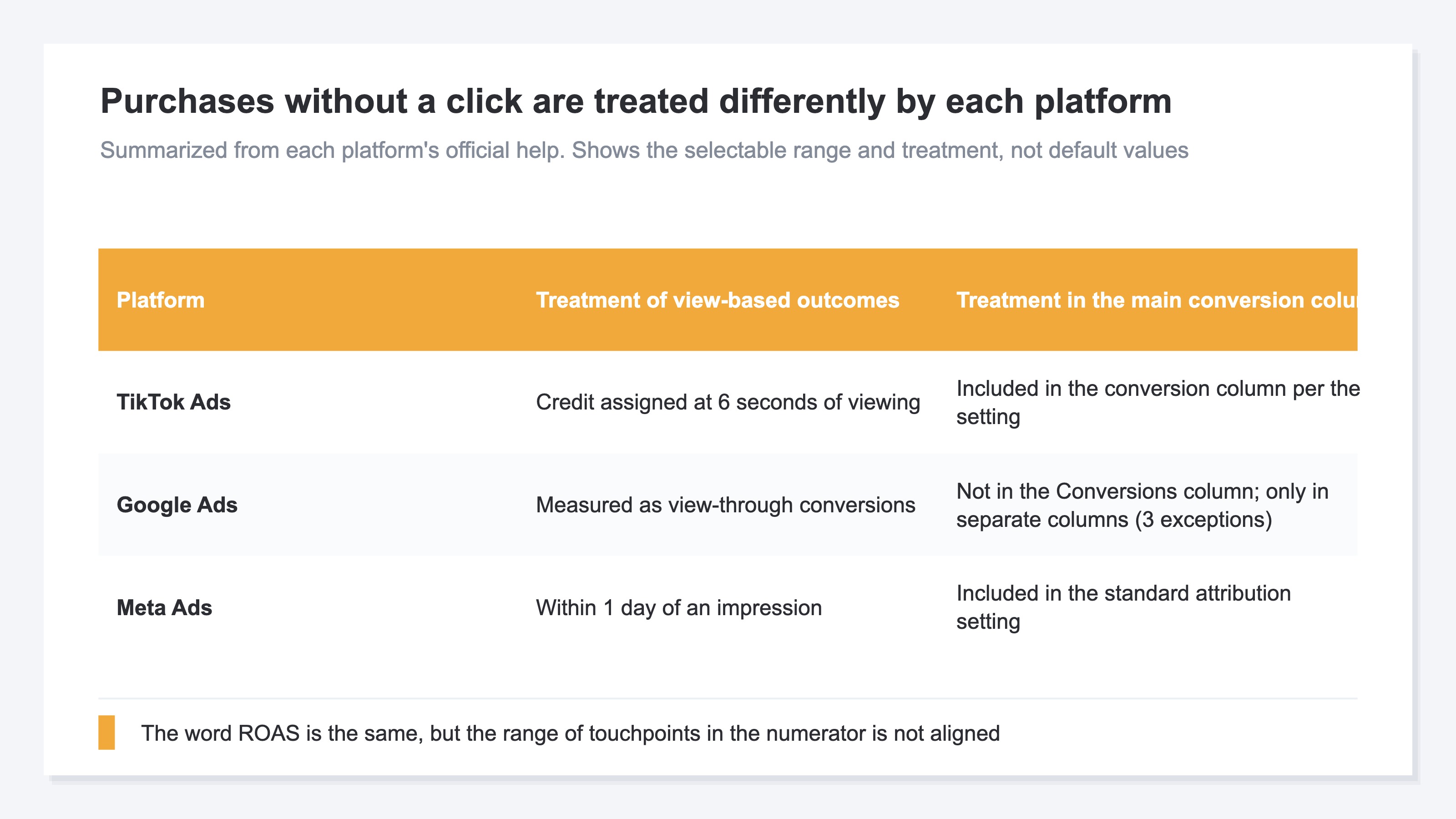
The moment three platforms' ROAS figures are placed in one table, the range of touchpoints inside the numerator no longer matches. Measuring display ads again with view-through excluded covers the general procedure for separating results that came through a view. The gap between Meta's Advantage+ and view-through is about the degree of automation, with view-through serving as the explanatory material.
3. Aligning the Attribution Windows Does Not Remove the Gap#
Matching the window settings does not make the difference disappear, because the two figures were counting different things to begin with.
There is no answer to the task of choosing which one to believe. The ROAS in the ad platform and the revenue on your own site are each calculated correctly within their own definitions. What has to be decided is not which is right, but which figure next month's allocation will be judged with.
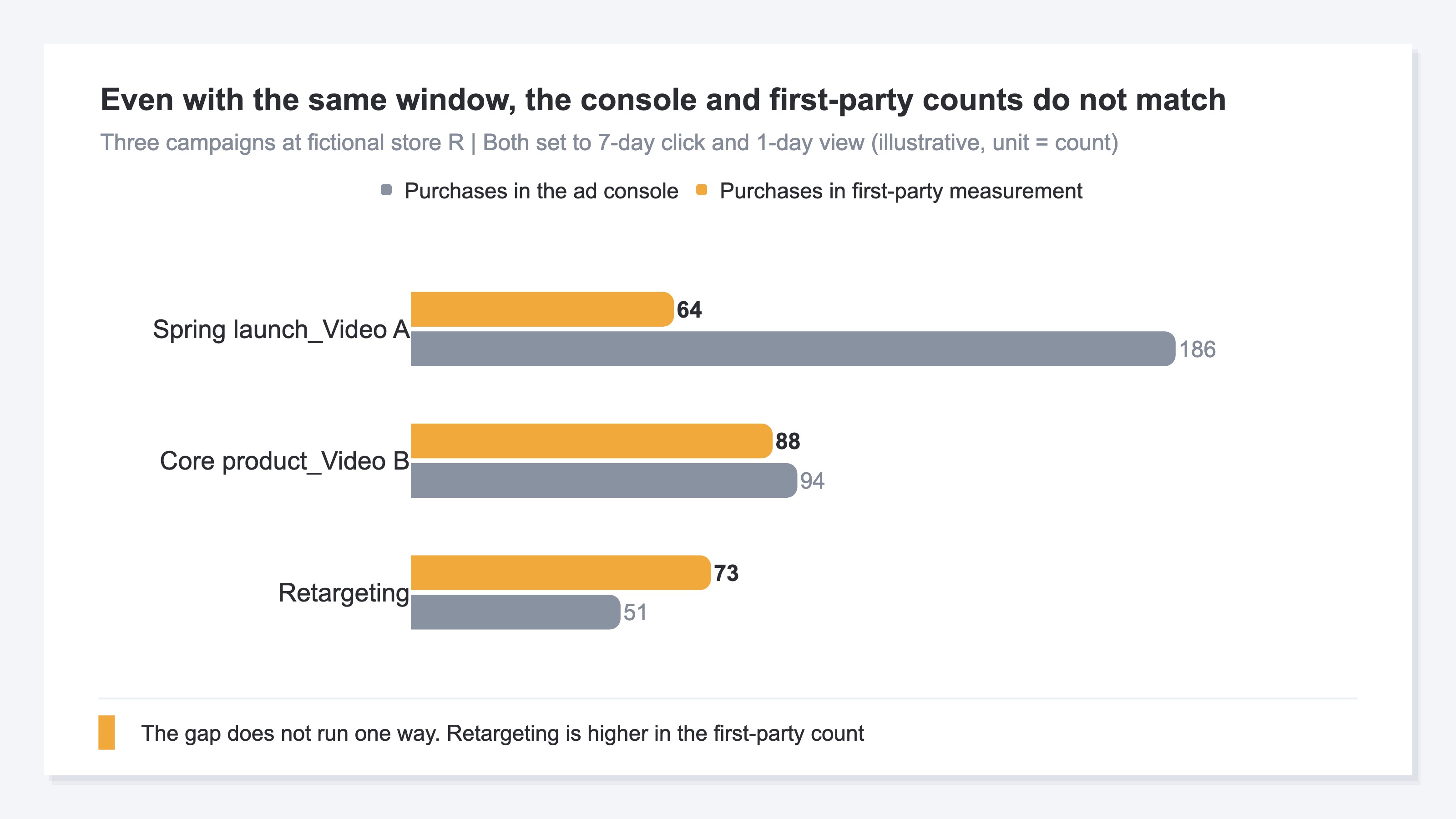
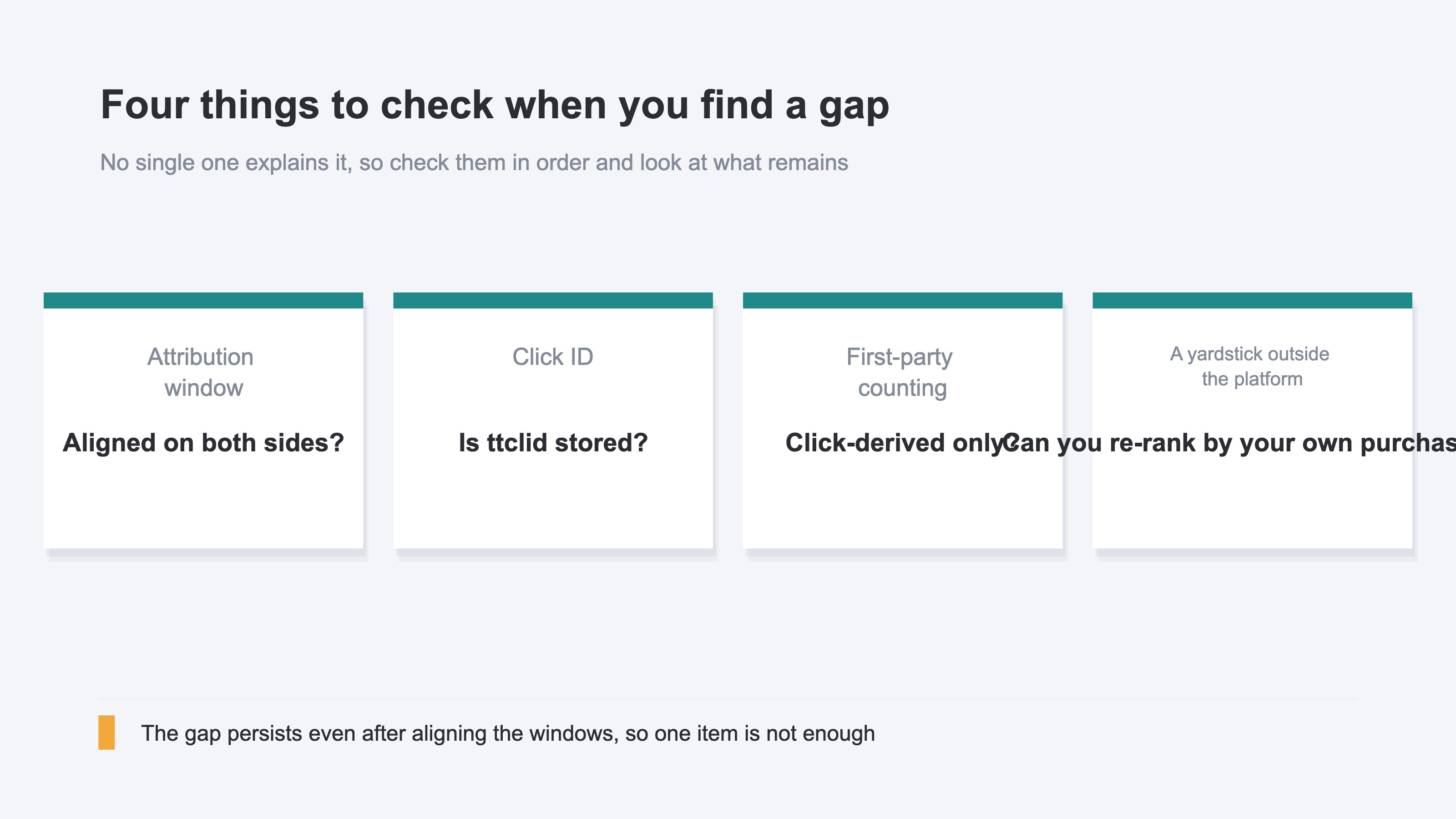
Set both TikTok and your own measurement tool to a 7-day click and 1-day view window, and purchase counts can still differ by close to a factor of three. Aligning the settings is necessary work, but it does not close the gap on its own. There are three reasons.
The first is that the platform fills in conversions it could not observe with an estimate. This is not specific to TikTok; advertisers report the same behavior on other platforms. The second is that your own aggregation covers only purchases that came from a click, and additionally removes duplicates across channels. The third is that unless the click ID attached to the landing URL is stored — for TikTok Ads, a value called ttclid — an ad and a purchase cannot be reconnected afterwards.
The gap does not run in one direction only. Revenue can be arriving while the Conversions figure in the ad platform sits at zero for several days. Read it uniformly as "the platform over-counts" and you end up pausing delivery that should have been left running.
Settings are not only a matter of counting, either. In its guidance on app measurement, TikTok addresses the case where VTA conversions are suddenly turned off: performance may fluctuate significantly for two to three weeks while the system adapts to the new signal source[3]. A setting is both a method of counting results and an input to delivery optimization.
The gap between an agency report and your own data covers the same mechanism with the agency's reporting as its subject.
4. Fix the Revenue You Decide With to One Figure From Your Own Site#
Rather than reconciling the two figures, settle on one figure whose value does not move when a platform setting changes.
Attribution that is 100% accurate does not exist in the current measurement environment. Start from that premise and the work shifts from "verifying which one is correct" to "choosing which figure next month's allocation is decided with".
Three moves are available at no cost. Each is simple in concept, and heavy in the keeping up.
Store the click ID. TikTok Ads attaches ttclid to the landing URL, so storing it lets you reconnect ads and purchases afterwards. The storage mechanism is yours to build, and you have to keep operating it to know it has not broken.
Run a geo split test. Create regions where the ads run and regions where they do not, and look at the difference in revenue. Reaching a conclusion takes two to four weeks.
Compare MER, the ratio of revenue to total advertising spend. Look at the overall ratio before and after pausing delivery on TikTok. Measuring requires pausing delivery, and the revenue given up during the pause does not come back.
The conclusion that a platform's figures are the platform's own declaration, so you should also aggregate on your side, is general. We covered it in why the CV count in your ad platform does not match the CV count in GA4. What is specific to TikTok is that the difference arises from a concrete threshold of 6 seconds.
Bringing the unit of judgement down to the campaign can also change the picture. The campaign with the most conversions in the ad platform and the campaign with the most landing revenue on your own site can swap places. Splitting the three types out with custom columns is still a breakdown inside the platform's own measurement.
A geo split test takes two to four weeks, and the comparison that pauses delivery cannot recover the revenue for that period. The day you decide next month's allocation arrives before either conclusion does.
RevenueScope solution
RevenueScope aggregates purchases that landed on your own site and displays revenue and RPS by channel and by campaign. RPS is the revenue produced per session. Change a setting in the ad platform and this figure does not move.
Results by TikTok Ads campaign for a fictional cosmetics store (illustrative)
| Campaign | Sessions | Revenue | RPS |
|---|---|---|---|
| Spring launch, video A | 4,200 | ¥0 | ¥0 |
| Spring launch, video B | 1,300 | ¥780,000 | ¥600 |
| Evergreen retargeting | 900 | ¥450,000 | ¥500 |
Note: this table was constructed for the explanation. The demo screen holds sample data for a fictional store that changes daily, so its figures will not match this table.
Spring launch video A has the most sessions and ¥0 in revenue. The volume of visits collected and the volume of visits that reached a purchase do not line up. The next place to move budget is spring launch video B, which produced ¥780,000 from under a third of the sessions. If views of at least 6 seconds have been accumulating against video A in the ad platform, the same campaign is being rated in opposite directions on the two screens.
At the channel level, RevenueScope can also calculate ROAS from measured revenue. Advertising spend is entered through a form by year, month, and channel, or uploaded in bulk as a CSV. TikTok Ads is among the 14 channels that can be entered. RevenueScope also picks up the ttclid attached to the landing URL automatically, and uses it to classify TikTok Ads traffic that arrives without UTM parameters. The UTM side of the setup is covered in the official guide to utm_source for TikTok and LinkedIn.
Conversion counts and conversion values shown in the ad platform are checked in TikTok Ads Manager. What RevenueScope calculates is revenue based on purchases that occurred on your own site, and how it is distributed. Because the definition is fixed to one, the decision to raise or cut next month's budget can be finished the same day.
FAQ#
Frequently Asked Questions#
Q. Is TikTok Ads ROAS high because the numbers are inflated?
A. It is not inflation. The range of touchpoints included in the result is different. TikTok's help states that conversions from an ad watched for at least 6 seconds are included in the Conversions column[2]. Within that definition, the calculation is correct.
Q. If I turn EVTA off, will the figures match my own aggregation?
A. Not necessarily. The platform's estimated fill-in, your own click-only aggregation and de-duplication, and missing click IDs all remain.
Q. Does the same thing happen with Google Ads and Meta Ads?
A. The three platforms handle it differently. Google Ads help defines view-through conversions as reporting-only and excludes them from the Conversions column[4]. Meta places a view-through window of one day from an impression among its standard attribution settings[6].
Q. The Conversions figure stays at zero, but purchases really are happening. How should I treat that?
A. The gap runs in both directions. Check revenue on your own site first, and avoid deciding to pause delivery on the ad platform's count alone.
Summary#
One reason TikTok Ads ROAS and the revenue on your own site do not match is the range of touchpoints included in the result. TikTok separates click, a view of at least 6 seconds, and a view into three distinct attribution types.
The word "conversion" is shared, but purchases made without a click are handled differently by each platform. Google Ads defines them as reporting-only, and Meta places a view-through window of one day from an impression among its standard settings.
Aligning the window settings still leaves a difference. That is why the material for deciding allocation should be fixed outside the platforms. Revenue calculated from purchases that landed on your own site does not change when a setting is changed on the platform side.
See which ads actually drive revenue, at a glance
Free up to 5,000 sessions/month, AI analyst included. No credit card required. Up and running in 5 minutes.
References#
- [1] TikTok for Business "About the attribution window on TikTok Ads Manager" (2025)
- [2] TikTok for Business "About Engaged View-through Attribution" (2025)
- [3] TikTok for Business "About View-through Attribution (VTA)" (2025)
- [4] Google Ads Help "About view-through conversions" (2026)
- [5] Google Ads Help "View-through conversion window: Definition" (2026)
- [6] Meta Business Help Center "About attribution models and attribution settings" (2026)