For an online store, what day and what hour to send a sale announcement or a newsletter is a guessing game. The stock answer is Tuesday at 10, but that is an average of other companies, not the hour people buy at your store. This article lays out, in order, how to decide the hour mail gets opened and the hour people buy, working from your own revenue by day and by hour.
Contents
TL;DR#
- Stock advice like Tuesday at 10 is an average the email platforms collected, and the platforms do not agree with each other
- Traffic counts sit at close to the same level across days and across hours, yet revenue per visit swings about 4x by hour and about 2.6x by day (sample data example)
- There are two things to decide: the day the sale starts, and the hour the announcement email goes out
- Do not build a cross-tab of day by hour. Read each axis on its own and overlay them in your head
- Email reads strong when you measure it as revenue per send, and that one send is worth aiming at the hours your store earns in
1. Tuesday at 10 Is Somebody Else's Average#
Stock sending advice, of the Tuesday at 10 is the answer kind, is not your store's data. It is some other company's average.
The email platforms publish the best day and hour to send every year. Their answers do not agree with each other. HubSpot's research puts the best-responding day at Tuesday and the hour between 9am and noon[1]. Omnisend reports that opens and clicks run highest on Tuesday, while actual purchases run highest on Friday[2]. Narrowed to a single time slot, the strongest performer was Friday at 7am[2].
GetResponse says the difference between days is slight, and points to the early morning, 4am to 6am, and the evening, 5pm to 7pm, as the good hours[3]. Brevo sets Tuesday or Thursday, 10am to 3pm, as its baseline, and opens its article by admitting that asking three marketers gets you three answers[4].
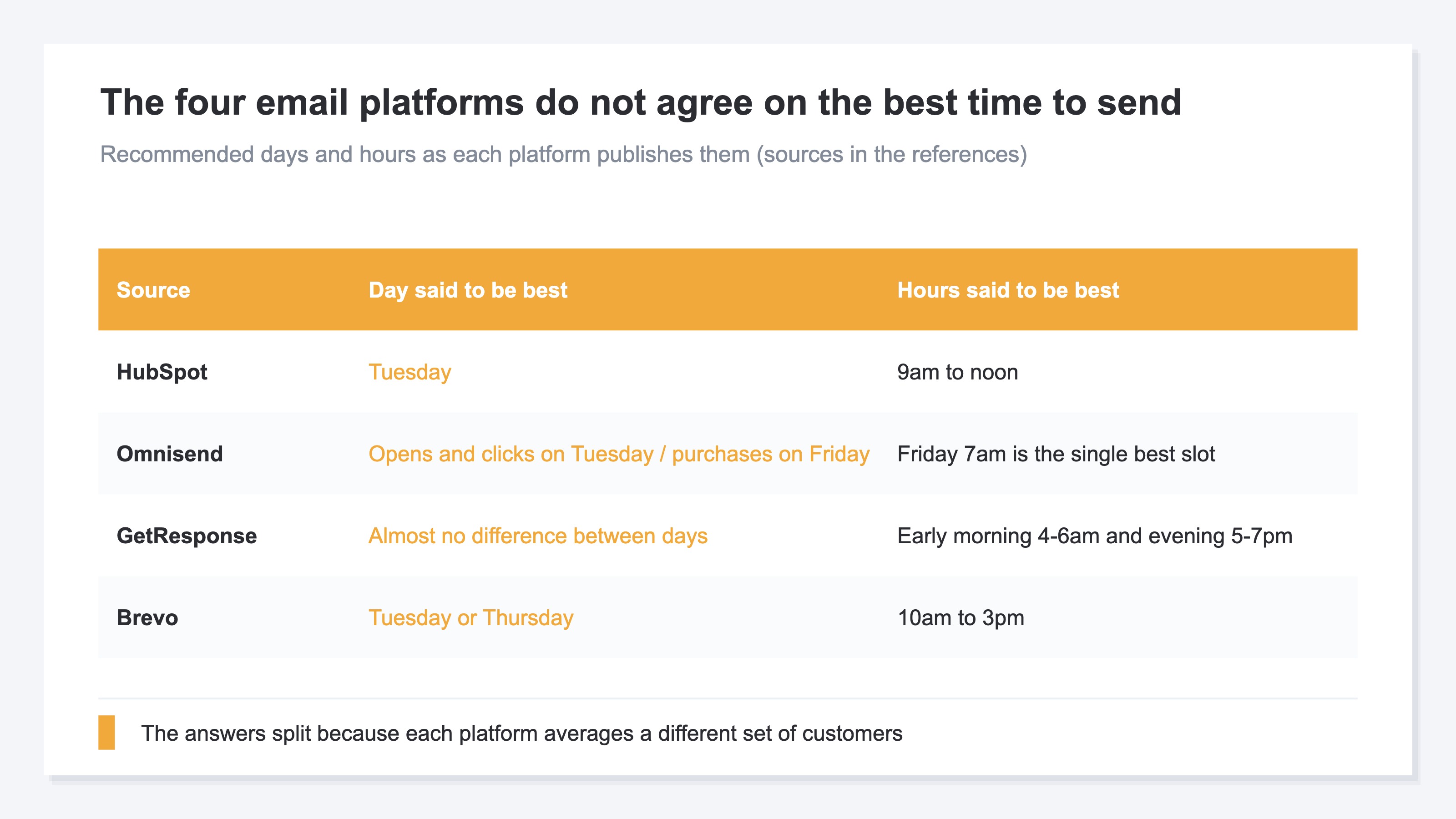
Lined up this way, the good day splits into Tuesday, Friday and no real difference, and the good hour scatters across morning, early morning and evening. The reason is simple: each platform collected a different set of customers and a different set of data. These studies are useful as a starting point. They are not your customers' numbers.
There is a second point that matters. As Omnisend's result shows, the hour that gets opens and the hour that gets purchases are not necessarily the same. Which is why the announcement hour has to be decided by overlaying the two.
2. Traffic Is Flat but the Earning Hours Differ by 4x#
Traffic counts sit at close to the same level across days and across hours, yet revenue per visit swings about 4x by hour and about 2.6x by day.
The axis to decide on is revenue per session (RPS). RPS is the figure for how much revenue one visit produced on average, and you get it by dividing revenue by sessions, the number of visits. The metric itself is covered in revenue per session as a metric, with the formula and how to get it in GA4.
That revenue forms peaks by day and by hour at all, and how to find those peaks, is covered in find your sales peaks by day and hour. This article narrows to how you put those peaks to work in deciding when to send an announcement.
Below are figures from the last 30 days of a fictional site with sample data (a sample cosmetics store). Session counts show no large peak whether you read them by day or by hour. Between the busiest and the quietest day the ratio is about 1.5x, and by hour the spread is smaller still — traffic is close to flat.
RPS, though, forms clear peaks. By hour, the top-earning band is about 4.1x the lowest-earning band. By day, the top-earning day is about 2.6x the lowest-earning day. The same number of visits produces revenue that differs several times over depending on the hour and the day.
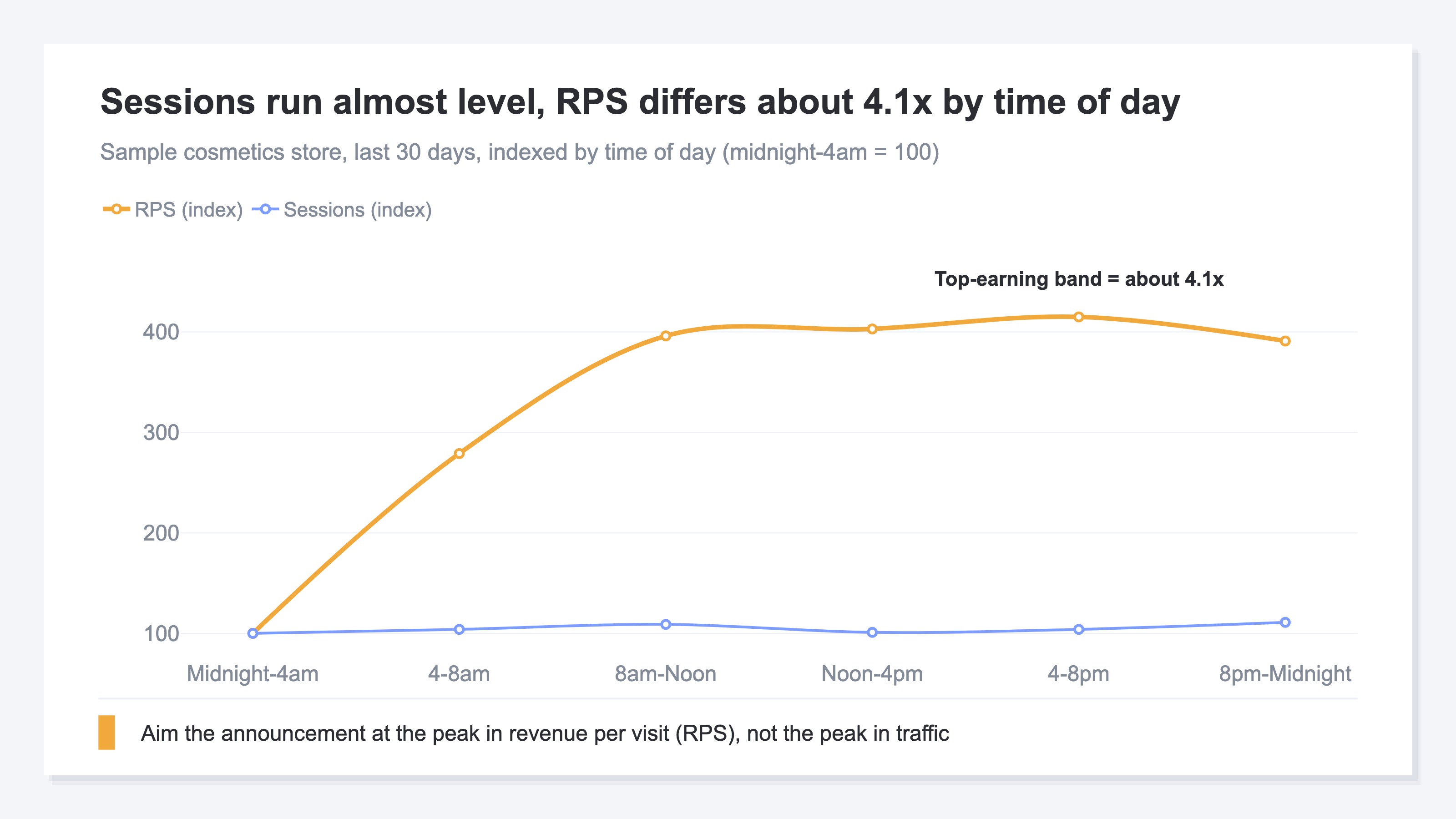
These are figures from a fictional site with sample data, and the multiples themselves differ from store to store. But the shape — the traffic peak and the revenue peak sit apart — holds for a great many ecommerce sites. So what matters is not memorising these multiples; it is running the same cut on your own store and confirming which days and hours earn.
If the rule had been send it when traffic is high, the announcement would have been aimed at an hour where people arrive but rarely buy.
3. Set the Sale Start by Day and the Email by Hour#
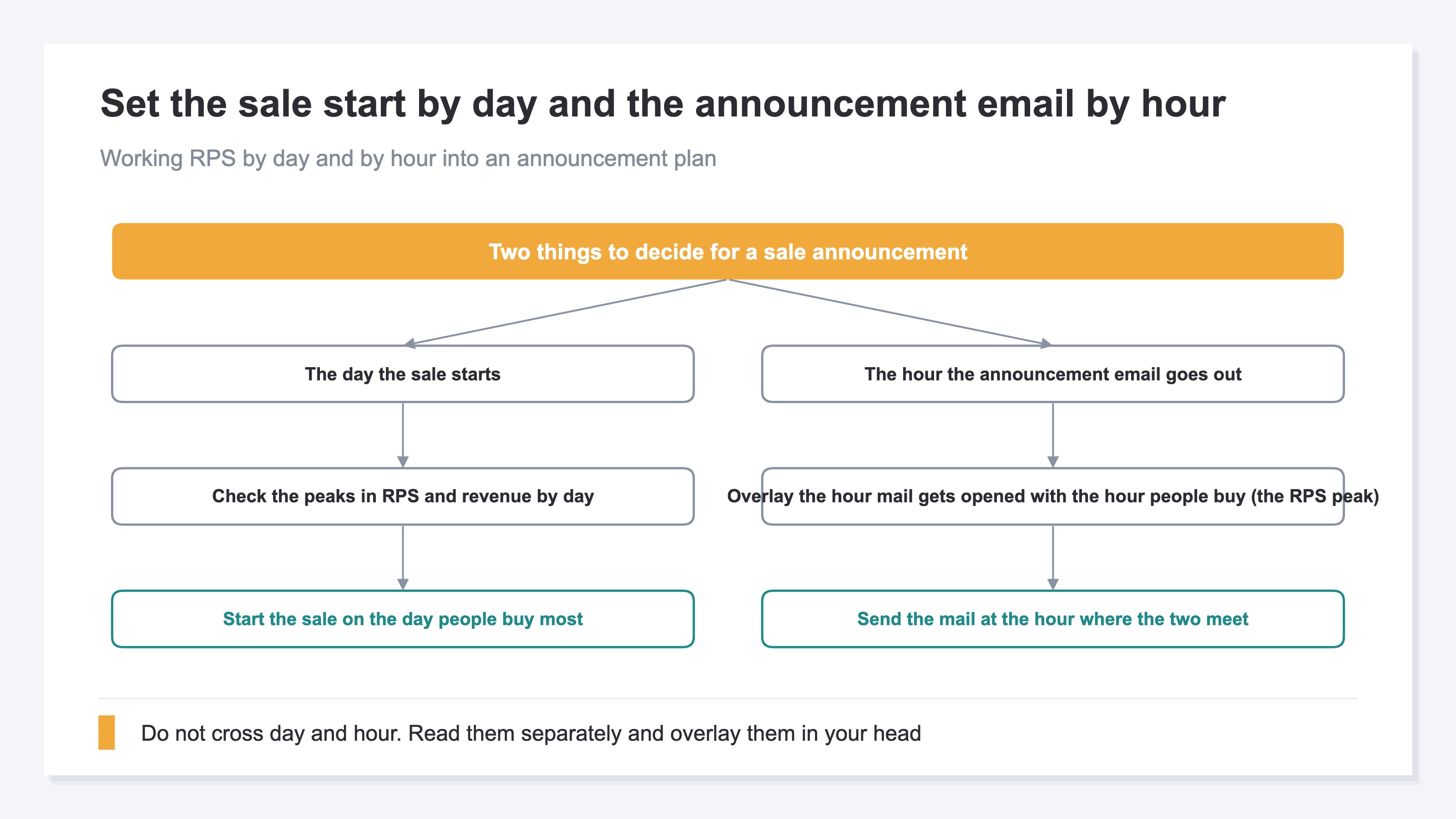
There are only two things to decide: the day the sale starts, and the hour the announcement email goes out.
Set the sale start day to the day people buy most at your store. Lay the sale itself over the day where RPS and revenue run highest. That means picking the day visitors purchase on.
Set the announcement email hour by overlaying the hour mail gets opened and the hour people buy. The hour mail gets opened is the band where a send is likely to be read. The hour people buy is the band where RPS is high. Pick a band where those two sit close together, and the mail gets read and bought from in one move.
One decision to make up front: do not build a fine-grained cross-tab of day by hour, of the Friday evening kind. Read the day peaks on the day axis, read the hour peaks on the hour axis, and overlay them in your head as Friday is strong, evening is strong. The finer you cut the cells, the fewer orders sit in each one, and the judgement gets pulled around by the scatter of a handful of them. Holding each axis and overlaying is the steadier way to decide an announcement.
One audience fits announcements especially well: customers who have already bought once. Returning customers already know the product and the store, so a single announcement is enough to move them. Benchmarks for the returning share are covered in ecommerce repeat customer rate benchmarks. New and returning customers respond differently, so splitting what the announcement says works too. That split is covered in detail in splitting revenue by new versus returning. Follow-up announcements to people who left items sitting in the cart also change in response depending on the hour they land. What that looks like is covered in where revenue slips on cart abandonment.
Email is a channel that tends to be taken lightly next to advertising. Read by the revenue one send produces, the assessment changes. Mail that reaches existing customers directly is not unusual in running above advertising on revenue per send. Which is exactly why aiming that one send at the hours your store earns in is worth the effort.
RevenueScope solution
By this point the shape is visible: put the sale start on the day people buy, and put the announcement email on the hour where opens and purchases meet. What is left is how to get hold of those earning days and earning hours accurately, for your own store. GA4 will show the tendency of visit counts by time of day. What appears there is the peak in session counts, not the peak in revenue per visit (RPS). With GA4's exploration you can tie revenue to time of day and assemble the view yourself. Reassembling it for every sale is laborious, and the setup breaks easily.
RevenueScope automates that work of getting hold of the peaks. By day and by hour, sessions, revenue per visit (RPS) and revenue can be checked on one screen (figures shown are demo data). Not only when traffic is high, but when purchases happen, side by side in the same view.
Display example by day (one example, illustrative, fictional figures)
| Day | Sessions | RPS | Revenue |
|---|---|---|---|
| Mon | 190 | ¥170 | ¥32,300 |
| Tue | 160 | ¥250 | ¥40,000 |
| Wed | 150 | ¥210 | ¥31,500 |
| Thu | 140 | ¥130 | ¥18,200 |
| Fri | 135 | ¥340 | ¥45,900 |
| Sat | 130 | ¥210 | ¥27,300 |
| Sun | 170 | ¥235 | ¥39,950 |
Display example by hour (one example, illustrative, fictional figures). Time of day is shown in six four-hour bands.
| Time of day | Sessions | RPS | Revenue |
|---|---|---|---|
| Midnight–4am | 170 | ¥80 | ¥13,600 |
| 4–8am | 175 | ¥190 | ¥33,250 |
| 8am–Noon | 185 | ¥270 | ¥49,950 |
| Noon–4pm | 170 | ¥250 | ¥42,500 |
| 4–8pm | 175 | ¥290 | ¥50,750 |
| 8pm–Midnight | 190 | ¥240 | ¥45,600 |
Using these two tables means dropping the figures into the announcement plan. On the day table, the day where revenue and RPS run highest becomes the sale start day. In this example that is Friday. On the hour table, the band where RPS runs highest becomes the announcement email send hour. In this example that is the evening band, 4–8pm. Traffic runs highest on Monday and late at night, but RPS is not high there. Deciding on head count alone could have sent the announcement out late on a Monday night and left the Friday evening where people actually buy until later.
RevenueScope supplies the material for deciding, on revenue, which day and which hour to aim an announcement at.
What RevenueScope displays is two separate axes: the day peaks and the hour peaks. Crossings like Friday evening, and change against the prior period, are not shown on this screen. You overlay the two tables in your head and decide the announcement day and hour. That misses less than building out a fine-grained crossing.
FAQ#
Frequently asked questions#
Q. If we send at the stock Tuesday at 10, are we safe?
A. That default send time is not a guarantee for your store. Tuesday at 10 is an average the email platforms collected, and it is not necessarily the hour people buy at your store. The platforms do not agree with each other either, and the hour with the most opens comes out separately from the hour with the most purchases. Reading your own store's revenue by day and by hour first, then deciding from there, is the reliable route.
Q. Would it not be more accurate to cross day and hour, as in Friday evening?
A. A crossed table looks finer grained, but each cell holds fewer orders, so it gets pulled around by the scatter of a few. For a sale announcement, holding the day people buy most and the hour people buy most on their own axes, then overlaying Friday by evening in your head, misses less.
Q. Should the announcement email and the sale start be lined up on the same day and the same hour?
A. Better to treat them separately. Put the sale start on the day people buy most, and put the announcement email send on the hour that gets opened and also gets purchases. The start day and the announcement hour are decided for different reasons, so there is no need to force them together.
Summary#
For an online store, a sale announcement tends to get lined up with a stock answer like Tuesday at 10. But that is an average across the email platforms, and the platforms do not agree with each other. The day and the hour people buy at your store can only be found in your own data.
In the sample data, session counts ran almost level across days and across hours. Even so, revenue per visit moved about 4x by hour and about 2.6x by day. The traffic peak and the revenue peak land at different times. So what to read is not head count but the peaks in revenue per visit (RPS).
What to do: put the sale start on the day people buy most, and put the announcement email send on the hour that gets opened and also gets purchases. Do not cross day and hour; read them separately and overlay them in your head. That turns the same effort into an announcement more likely to reach revenue.
See which ads actually drive revenue, at a glance
Free up to 5,000 sessions/month, AI analyst included. No credit card required. Up and running in 5 minutes.