Right after launching something, you check your phone every twenty minutes, refresh analytics, and wonder why the world isn't beating down your door yet. Sound familiar? It's a relatable feeling, but there's one problem with that kind of monitoring — you do nothing after looking. Watched without a plan, realtime numbers are just fuel for anxiety. But limited to the moments when there's a move you can make right after looking, realtime becomes one of ecommerce's sharpest tools. This article narrows those moments down to three.
Table of contents
TL;DR#
-
Realtime numbers watched without a plan are anxiety fuel. They're worth opening only when a move follows
-
Three such moments: right after a send or launch / during a sale / when something feels off
-
Day-to-day revenue decisions belong to daily and weekly reports. Living in the realtime view wastes your time
-
"Revenue stuck at zero" or "a surge with no sales" means suspect breakage or bots before celebrating or panicking
1. Watching vs deciding#
Bottom line: if no action can follow what you see, there's no reason to open the realtime view.
GA4's Realtime report shows users, sources, and events from the last 30 minutes [1]. Since standard reports lag behind, this screen is the only window into "now." The problem is that most people use it for no decision at all. The twenty-minute refresh ritual from the opening is exactly that — looking with no move available. That's not analysis; it's an anxiety ritual.
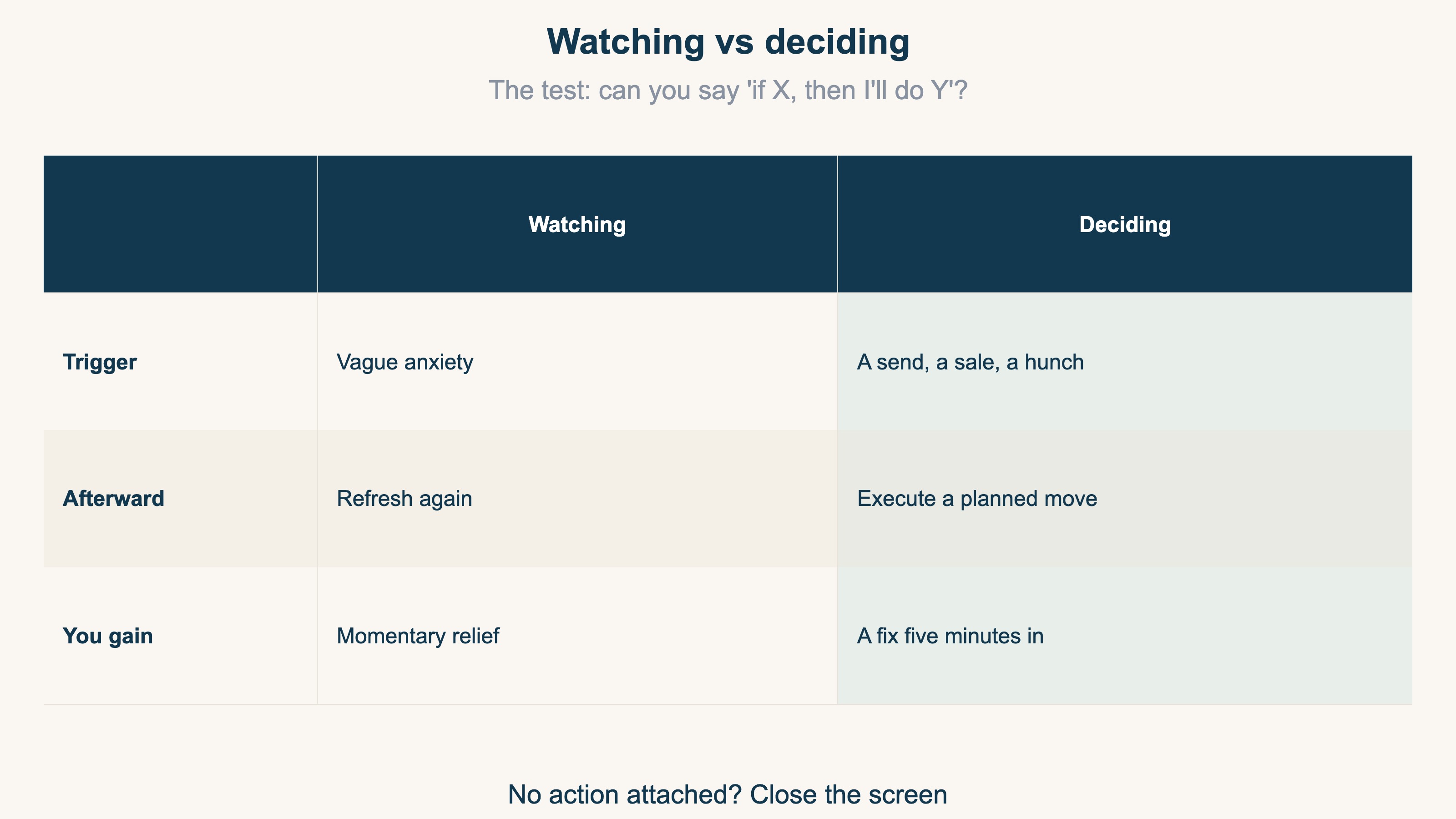
The test is simple: if you can say "if the number is X, I'll do Y," you're deciding. If you can't, you're watching. And in ecommerce practice, the moments where a real "Y" exists boil down to three.
2. Moment 1: the 30 minutes after a send or launch#
Bottom line: the first 30 minutes are an inspection window — did the right people land on the right page?
Right after a newsletter send, a product launch, or a social post is when realtime works hardest. What you check is not sophisticated:
- Is traffic arriving? — A send with no visits means broken links or delivery failure. Check the email tool now
- Are they landing on the intended page? — Wrong landing page means a mislinked URL. Swap it now
- Is the source recorded correctly? — Catch a missing UTM (the label that records where a visit came from) in this window and you protect all the data that follows
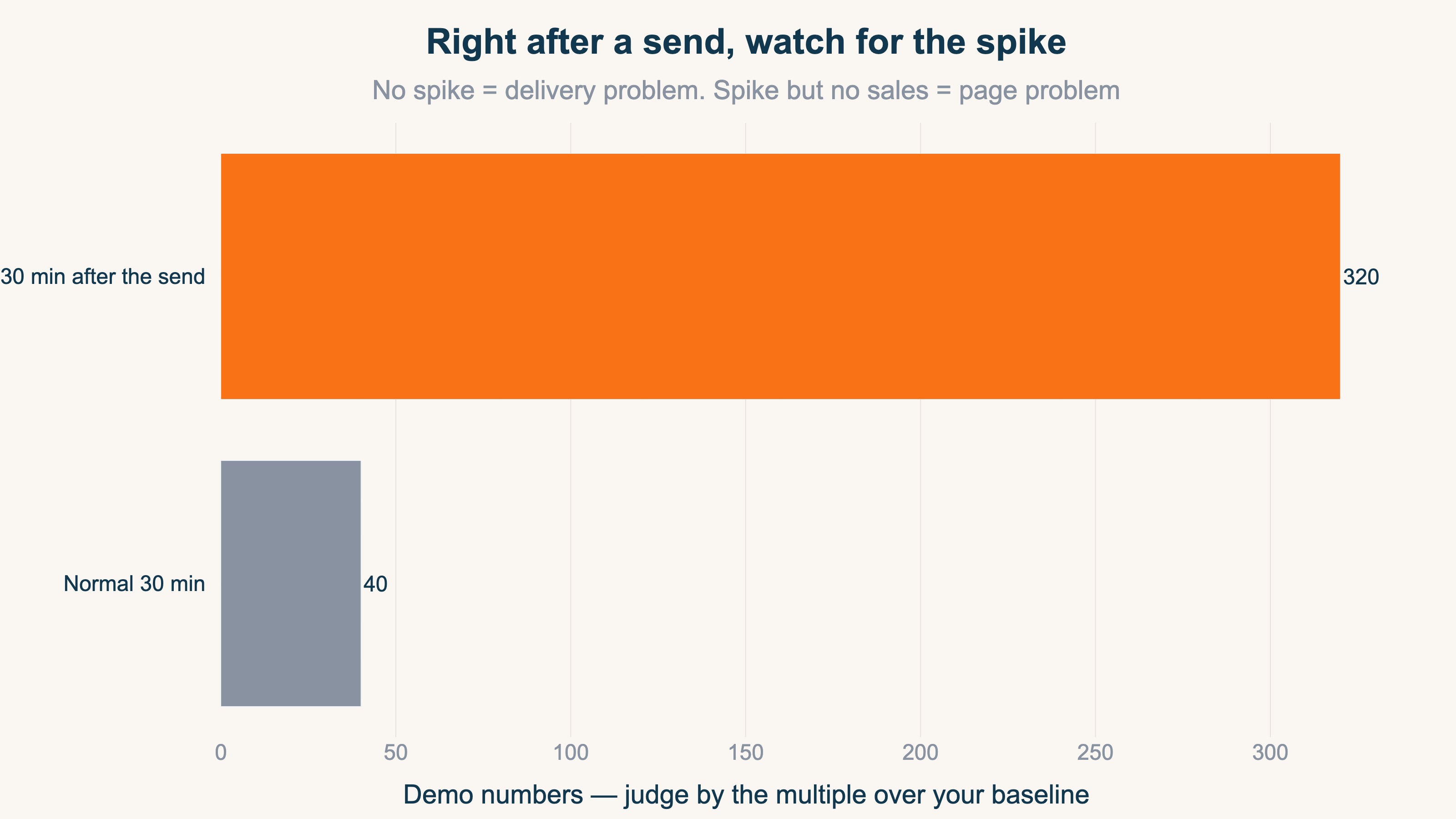
If your store normally sees 40 sessions per 30 minutes, a send should raise a spike several times that (the figure above is a demo). No spike = a delivery problem. A spike without sales = a page problem. The first 30 minutes separate the two. Mistakes will happen either way — the value is turning "noticed next morning" into "noticed five minutes in."
3. Moment 2: mid-sale and mid-campaign#
Bottom line: during a sale, there are real moves you can make on the spot — which is what turns realtime into a decision tool.
Flash sales and weekend campaigns create in-the-moment options that don't exist on a normal day:
- The ramp-up angle — first-hour visits and purchases far below plan → decide on extra promotion or wider targeting the same day
- Skewed bestsellers — orders piling onto one item → set limits or push alternatives before stock runs out
- Carts vs purchases — carts growing but purchases flat → check coupon codes and checkout errors on the spot
For how far to push budget into a hot channel, the ceiling logic in More Ad Spend Doesn't Always Mean More Profit applies. Post-sale retrospectives work fine on daily data — realtime's job is only the "while it's happening" window.
4. Moment 3: catching "something's off" early#
Bottom line: the earlier you notice an anomaly, the smaller the damage. As insurance you open when something feels wrong, realtime pays for itself.
Seasoned operators rarely trust a single number. They run GA4 as a second yardstick and keep an eye on the delta between metrics at all times, which surfaces anomalies early. A business can lose its revenue overnight — and when that happens, the thing that matters most is whether you noticed in time. Response speed is determined by noticing speed.
The "something's off" signals realtime can catch:
- Traffic flowing but purchase events stuck at zero — possibly broken purchase tracking, not poor sales. Checkup steps: Is Your Ad Conversion Tracking Broken? A Five-Minute Checkup
- An unnatural visitor surge with zero revenue — suspect bots (automated, non-human traffic) or a misfired campaign. See What Is Bot Traffic?
- Checkout events stopping cold at a certain time — cart or server trouble. Noticing fast minimizes lost sales
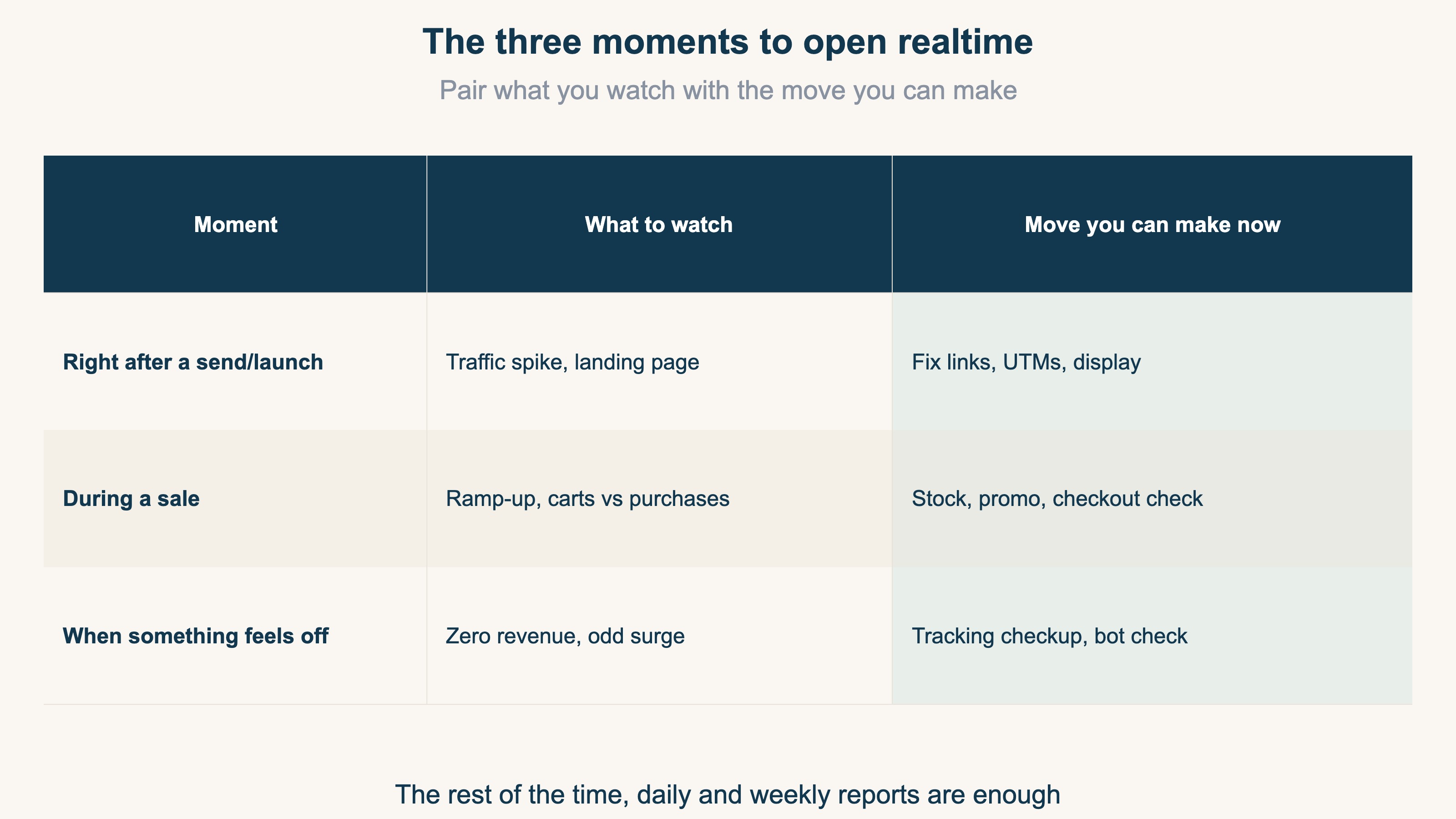
Day-to-day revenue decisions belong to daily and weekly reports (How to Read GA4 Reports: Ecommerce Needs Just Three). Realtime doesn't replace them — it's a separate tool you open at three moments only.
RevenueScope solution
Bottom line: the moments when visits, cart adds, and purchases happen — on one live screen.
GA4's realtime is capable, but assembling "current visitors, cart adds, purchases, and revenue right now" onto one screen takes setup. RevenueScope ships a realtime view built for ecommerce from the start: who's on the site now, cart adds as they happen, purchases as they land, and the revenue ticking up — streaming in the moment they occur.
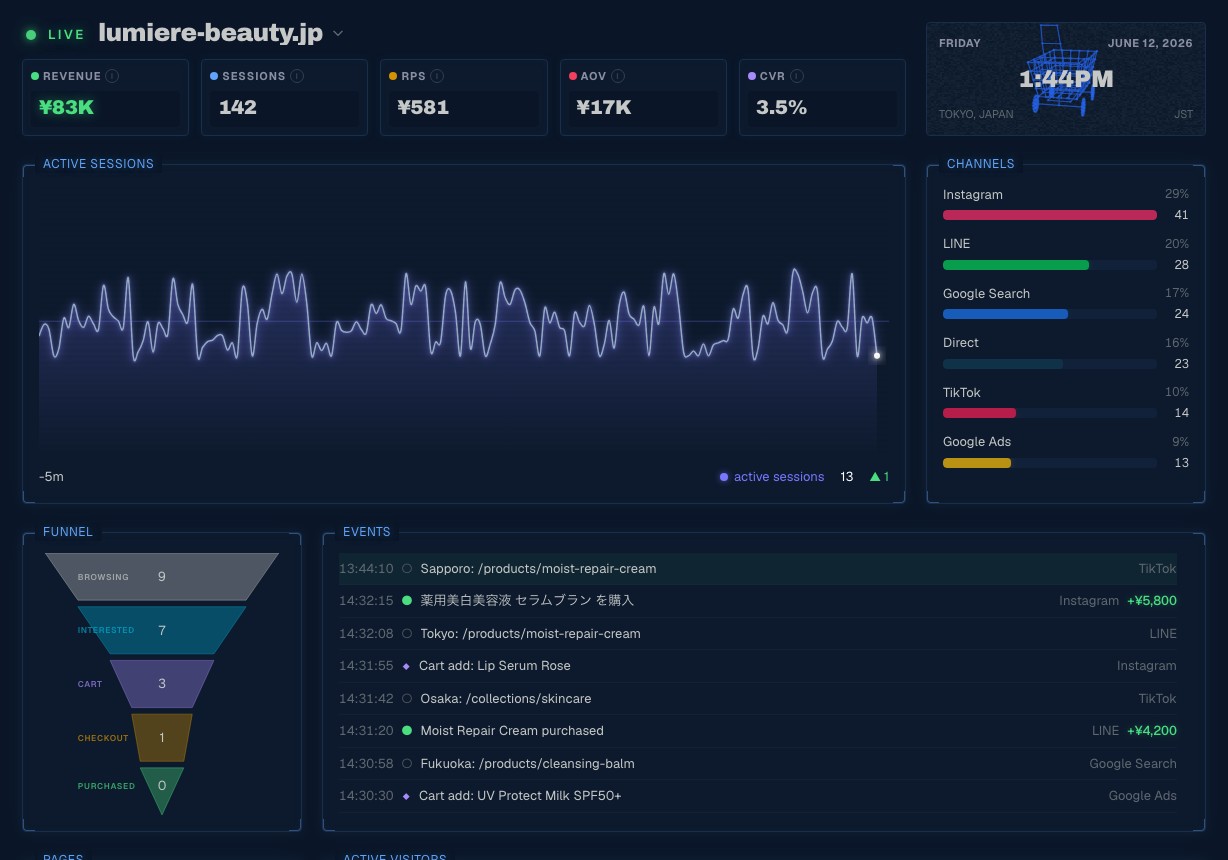
In the screen above (demo data), beneath the live revenue, session, and RPS meters, a timestamped event feed streams visits from across the country, Instagram-attributed cart adds, and purchases as they land (+5,800 yen) — with the channel breakdown and the browse-to-cart-to-purchase funnel on the same screen. This is precisely the tool for the three moments: confirm the post-send spike, watch carts versus purchases mid-sale, and if traffic flows while purchase events never appear, that's your moment-3 signal — no waiting for reports to aggregate.
FAQ#
Q1. Can GA4's Realtime show purchases?
Yes. The Realtime report's event counts include the purchase event [1]. For moment-1 inspections right after a send, GA4 Realtime is a perfectly good place to start.
Q2. How often should I check realtime?
On a normal day: never. Open it at the three moments — right after a send or launch, during a sale, and when something feels off. Outside those, monitoring produces no decisions, just like the twenty-minute refresh ritual.
Q3. Realtime mostly shows my own visits.
In a small store, you and your staff stand out. Exclude your own IP address from measurement so the three moments aren't judged through noise. See the test-order FAQ in Is Your Ad Conversion Tracking Broken? as well.
Summary#
- Realtime numbers without an action plan are just watching. Open the view only when you can say "if X, then Y"
- Moment 1, after a send or launch: inspect traffic, landing, and tracking. Turn "next morning" into "five minutes in"
- Moment 2, mid-sale: judge the ramp-up, stock skew, and carts-vs-purchases while you can still act
- Moment 3, anomalies: zero-revenue streaks and odd surges mean breakage or bots first. Early noticing keeps the damage small
See which ads actually drive revenue, at a glance
Free up to 5,000 sessions/month, AI connection included. No credit card required. Up and running in 5 minutes.