During the Meta Ads learning phase, Meta presents about 50 “results” as a guideline for stability. But a result does not always mean a purchase. This article explains how to check learning status in Meta Ads Manager while evaluating revenue separately on your own site.
Contents
TL;DR#
-
About 50 results do not mean 50 purchases
What counts as a result depends on the campaign objective and settings
-
Check learning stability and revenue on your own site separately
Meta Ads Manager alone does not complete the revenue assessment
-
Do not draw a conclusion from a few days of movement after a significant edit
Separate the periods before and after the change, then observe Meta results and site revenue independently
1. About 50 Results Do Not Mean 50 Purchases#
The key point is that Meta defines a “result” according to the campaign objective and settings.
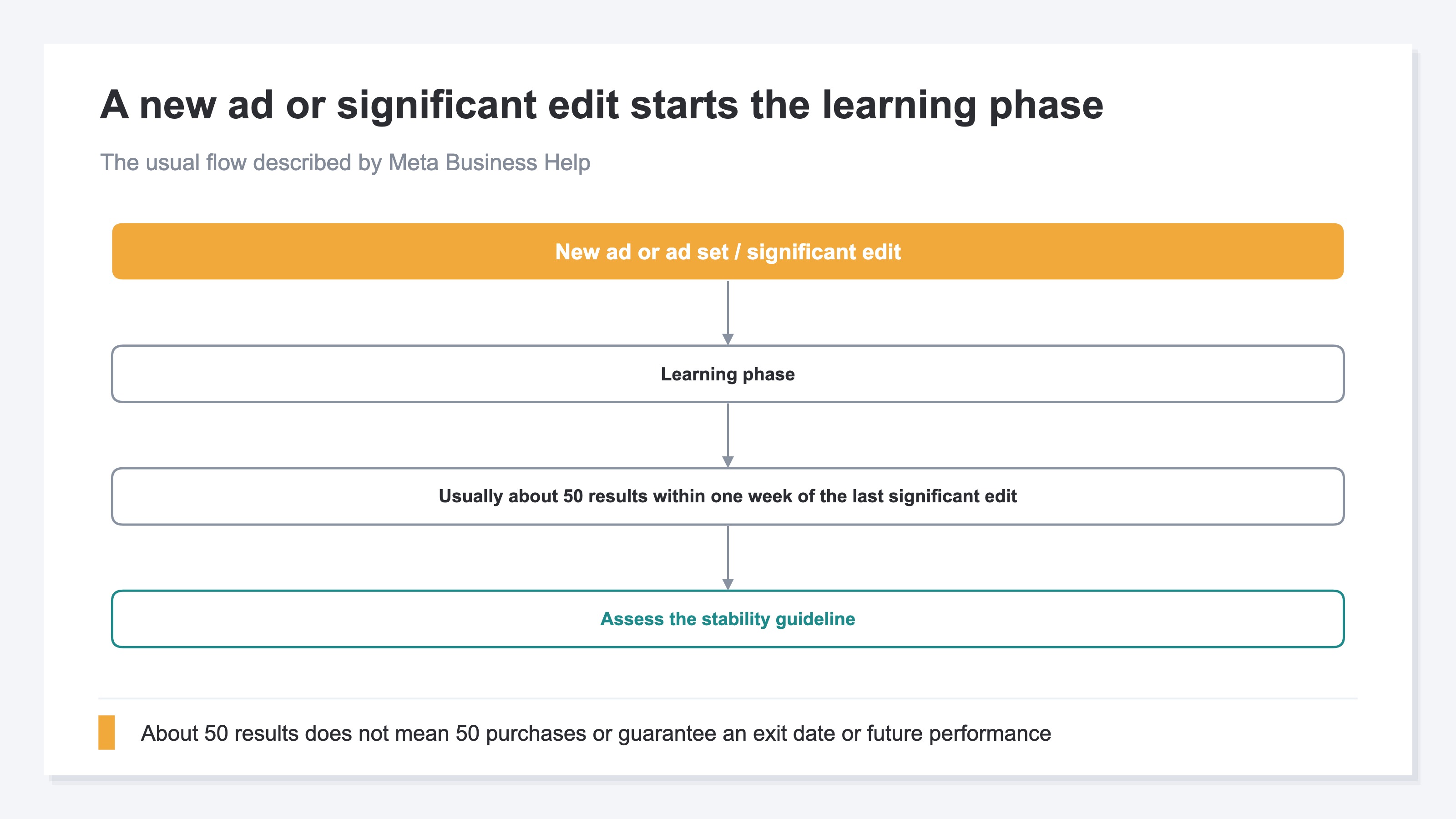
Meta explains that a new ad or ad set enters the learning phase when delivery begins. A significant edit to an ad set or ad can also restart learning[1]. During this phase, the delivery system is learning which people and placements are most likely to produce the selected outcome.
Meta also provides a guideline for reaching a more stable state. An ad set generally exits the learning phase after getting about 50 results within one week of the last significant edit[1]. Both “50 results” and “one week” are part of that guideline. Reaching 50 results does not guarantee that the phase will end on that same day.
A common mistake is to read “results” as “purchases.” Meta Business Help defines results as the number of times an ad achieved an outcome based on the objective and settings selected[2].
If the objective is link clicks, for example, the result is a click. If app installs are selected, an install is the result. Even when purchase is the optimization outcome, you still need to confirm which event was selected and under what conditions it is sent to Meta.
Therefore, 50 results in Ads Manager does not necessarily mean that 50 purchases occurred. First, check the ad set’s optimization event and the definition of the Results column. Then check how many purchases and how much revenue were recorded on your own site.
For the general reasons that platform and first-party conversion counts differ, see why Ads Manager and GA4 conversion counts do not match. Purchases credited after an ad view can also involve Meta view-through attribution. The learning phase itself, however, does not directly create a conversion-count discrepancy.
2. Separate Learning Stability From Site Revenue#
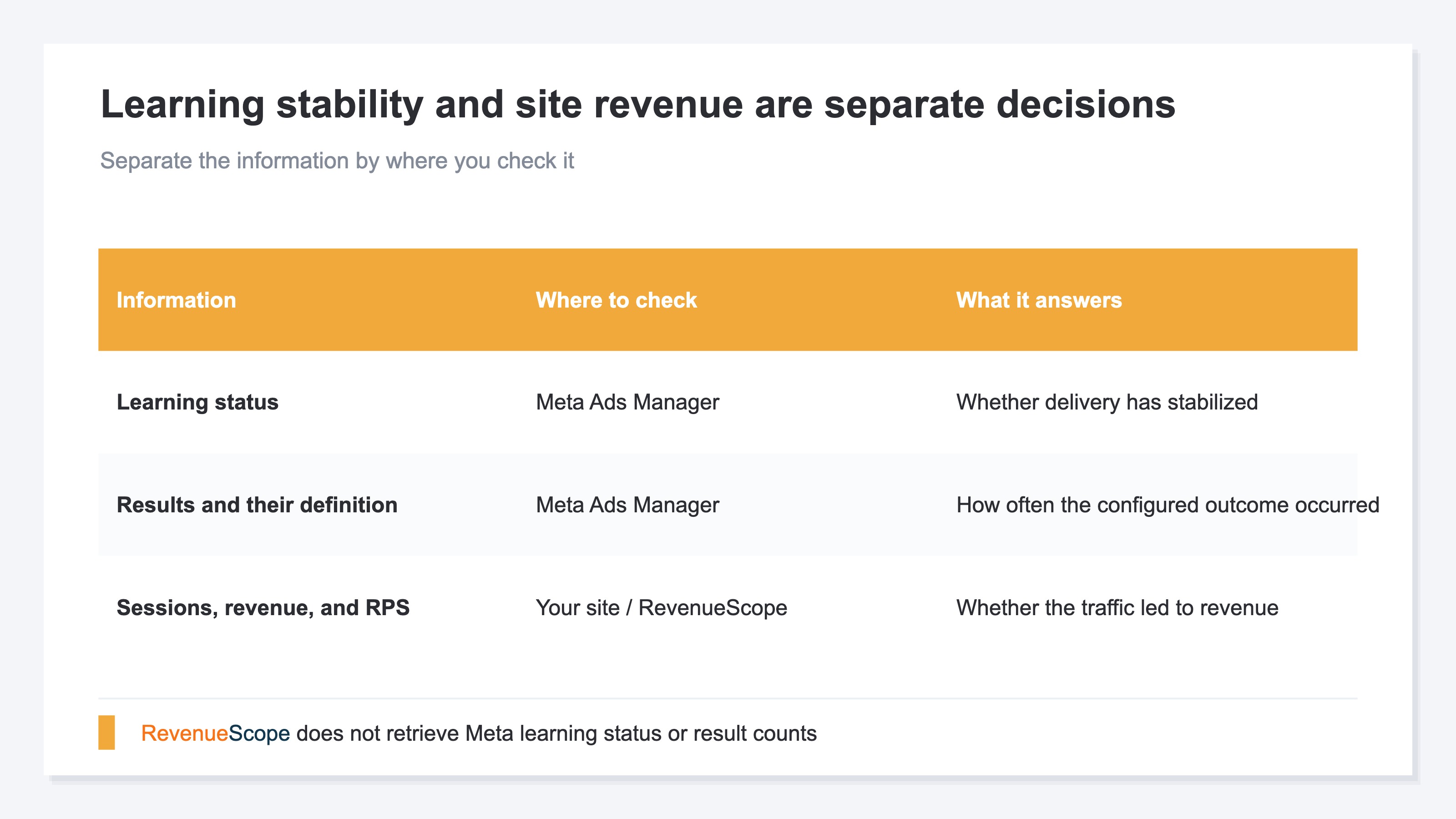
Check learning status in Meta, and check purchases and revenue on your own site.
Exiting the learning phase indicates that delivery evaluation has become more stable. It does not show that an ad has become profitable for the business. Conversely, purchases and revenue can occur while an ad set is still learning. Learning completion and profitability are separate decisions.
In Meta Ads Manager, check at least these three points:
- Whether the ad set is learning or has completed the learning phase
- Which outcome the Results column counts
- Which event is selected for optimization
On your own site, check purchase count and revenue over a period of the same length. If results increase while revenue does not, clicks or pre-purchase actions such as add-to-cart events may be increasing without more sales. Even with the same number of purchases, revenue can rise when higher-priced products sell. The Results column alone cannot reveal this difference.
Suppose an ad set’s results increase from 45 to 62 over seven days. If revenue on the site falls from ¥180,000 to ¥120,000 over the same period, “results increased, so the campaign succeeded” is not a sound conclusion. The reverse is also possible: results may decline slightly while a higher average order value raises revenue. These are fictional figures for illustration.
The comparison periods must also match. Comparing Meta’s most recent seven days with the site’s most recent 30 days mixes in differences such as weekdays and sale periods. If you select the fixed “last 7 days” period in RevenueScope, use the same last 7 days in Meta.
The point is not to dismiss platform data. Meta’s result count shows how often the delivery system generated the configured outcome. Site revenue shows how much purchase value the online store generated. Because the two figures answer different questions, neither should be used alone.
The mechanism by which attribution settings change reported numbers is also covered in the attribution lookback window.
3. Do Not Decide Based on a Few Days After a Significant Edit#
After a significant edit, avoid rebuilding the ad because of movement over only a few days.
Meta explains that performance during the learning phase is not necessarily indicative of future performance[1]. A significant edit may also cause an ad set to reenter the learning phase[1]. If you change the budget, audience, or creative whenever one day's result count falls below the previous day's, you may keep returning delivery to a state that has not yet stabilized.
This does not mean “change nothing for one week.” Fix an incorrect URL, an out-of-stock product, or an obvious measurement problem promptly. There is no need to postpone changes required by the business. What matters is recording why the change was necessary and defining the period used to assess performance afterward.
In its Meta Horizon advertising documentation, Meta Developers recommends applying multiple necessary changes together so that the campaign does not repeatedly reenter the learning phase[3]. The same Horizon-specific document also notes the tradeoff: when changes are bundled, it becomes harder to identify which individual change affected performance[3]. This guidance comes from documentation for Meta Horizon app campaigns, so it should not be treated as a universal rule for every Meta campaign.
In practice, record what changed and when. Afterward, compare fixed periods of the same length in Meta and on your site. The following fictional example uses the fixed “last 7 days” period. Because Meta results and site revenue use different units, the two raw values are not added or treated as one series.
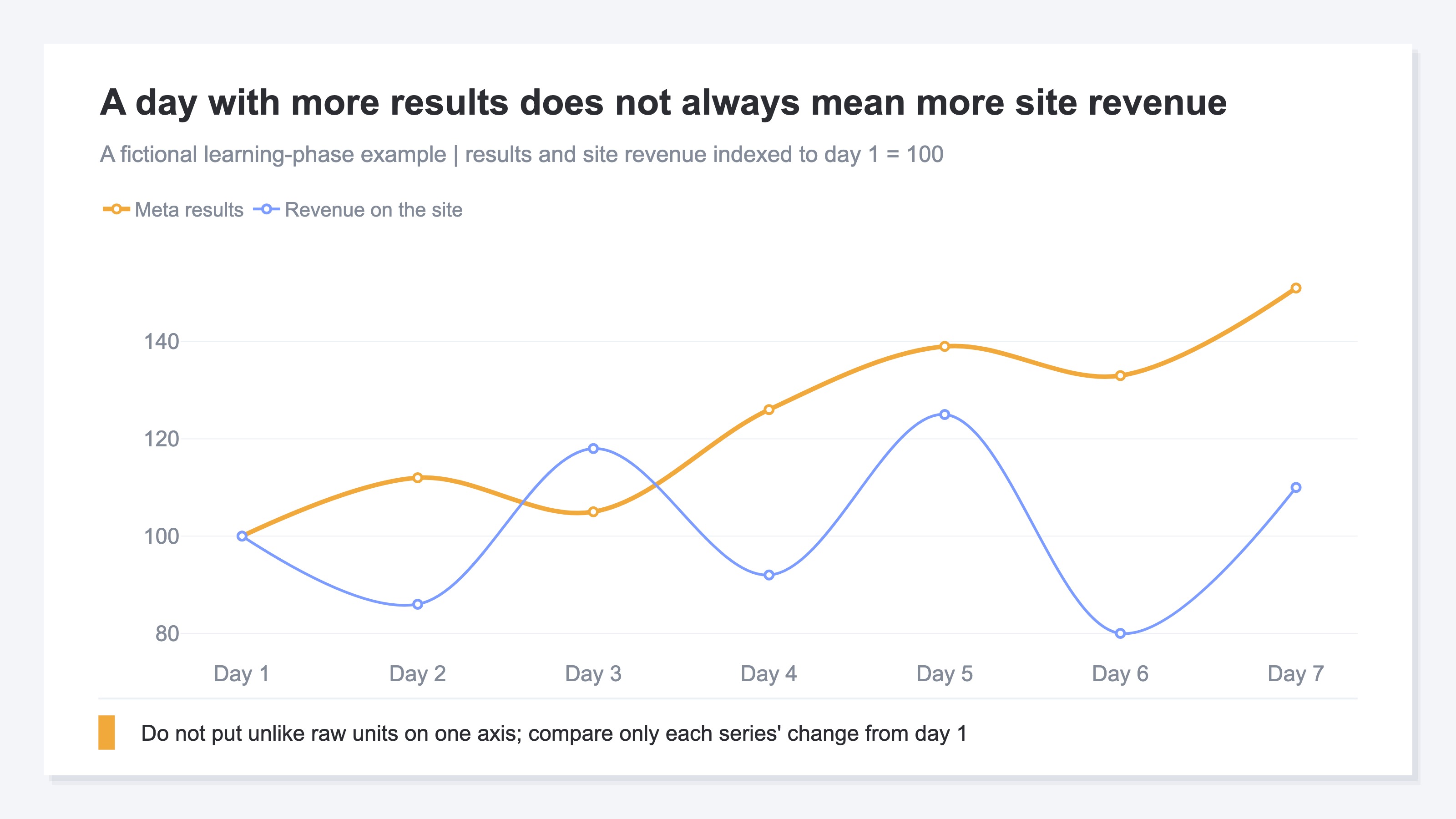
The chart avoids comparing two unlike raw units on the same axis by setting each series to 100 on day 1. Results trend upward with daily fluctuations, but site revenue does not move in the same direction every day. Even on a day when both rise, the learning process cannot be assumed to have directly caused the revenue difference. Sales promotions, weekdays, average order value, inventory, and other conditions may also change.
The same idea of separating periods before and after a change applies when assessing revenue after changing a Google Ads bidding target. Check the platform state, then use revenue measured on your own site as a separate decision criterion.
RevenueScope solution
Meta Ads Manager's result count does not show which campaign led to revenue on your own site. An order-management screen shows total sales but not the acquisition source. The missing answer is not one more platform metric; it is site revenue by utm_campaign.
RevenueScope does not retrieve Meta Ads Manager learning status or result counts. It does not retrieve optimization events either, so check all three items in Meta Ads Manager.
RevenueScope connects sessions measured on your site with revenue and displays revenue and RPS for the Meta channel and each utm_campaign. RPS means revenue per session: revenue divided by the number of sessions.
An example using Meta traffic over the same 7 days for a fictional online store
| utm_campaign | Sessions | Revenue | RPS |
|---|---|---|---|
| new_product | 500 | ¥150,000 | ¥300 |
| retargeting | 500 | ¥225,000 | ¥450 |
| seasonal_sale | 500 | ¥40,000 | ¥80 |
These figures are fictional examples created for explanation, not data from a real store.
All three campaigns have 500 sessions. Even so, revenue ranges from ¥40,000 to ¥225,000, while RPS ranges from ¥80 to ¥450. Equal traffic can produce different revenue outcomes, so Meta's result count alone cannot evaluate the campaigns.
The check has two steps. First, use Meta Ads Manager to confirm learning status, the definition of a result, and the optimization event. Second, use RevenueScope to select a fixed period such as “last 7 days” and check revenue for the Meta channel and each utm_campaign. This separates the question of whether Meta’s result count increased from the question of whether traffic from Meta produced revenue.
If you register advertising costs in RevenueScope, costs can be entered by year, month, and channel. You can use a form or CSV. This feature does not accept Meta result counts and does not automatically determine learning status.
FAQ#
Frequently Asked Questions#
Q. Does about 50 results mean that I need 50 purchases?
A. In Meta Ads, that depends on which outcome the campaign is configured to count. A Meta result is an outcome counted according to the campaign objective and settings[2]. Check the optimization event selected for the ad set and the definition of the Results column.
Q. Does the learning phase always end once an ad set reaches 50 results?
A. Meta Business Help describes about 50 results within one week of the last significant edit as the usual guideline[1]. It does not guarantee an exit date or future performance.
Q. Should I avoid changing an ad while it is learning?
A. Necessary fixes should not be avoided. A significant edit may, however, restart the learning phase[1]. Record the reason and time of the change, then assess a separate fixed period after it.
Q. Can RevenueScope alone compare Meta learning status with site revenue?
A. No. Check learning status, result counts, and optimization events in Meta Ads Manager. In RevenueScope, select a fixed period such as “last 7 days” and check sessions, revenue, and RPS for the Meta channel and each utm_campaign.
Summary#
About 50 “results” during the Meta Ads learning phase do not mean 50 purchases. The selected campaign objective and settings determine what counts as a result. The usual guideline of about 50 results within one week of the last significant edit does not guarantee when learning will end or what future performance will be.
Check learning status and the definition of a result in Meta Ads Manager. Check purchase count and revenue on your own site over a fixed period of the same length. Keeping the two separate avoids evaluating an ad solely because its result count increased.
After a significant edit, do not rebuild the ad based only on movement over a few days. Compare matching fixed periods in Meta and on your site, and observe result counts and revenue independently. Use learning status as one input for advertising decisions, while basing the final business assessment on revenue measured on your own site.
See which ads actually drive revenue, at a glance
Free up to 5,000 sessions/month, AI analyst included. No credit card required. Up and running in 5 minutes.