"Which search keyword brings in the most revenue?" Any EC operator wants that number at some point. Yet open GA4 and the answer isn't there. Connect Google Search Console and you can see the search terms, but no revenue rides along with them. This isn't a gap in your setup — it's structural, rooted in how GA4 and Google Search Console are built. This article unpacks why per-keyword revenue stays invisible, then lays out a realistic way to get close to it.
Contents
TL;DR#
-
GA4 doesn't hold revenue at the search-keyword level
The units GA4 tracks are pages and channels. It simply wasn't designed to hold the search-query unit of "which term brought someone in, and how much they bought."
-
Connecting Google Search Console still won't attach revenue
The integration makes search terms visible, but what Google Search Console returns stops at clicks, impressions, CTR, and position. Conversions and revenue aren't included, by design.
-
Even matching by hand won't split revenue per keyword
A single page shows for many search terms. With no basis for allocating a page's revenue across those terms, a manual split only introduces distortion; it can't be done accurately.
-
Re-ranking keywords by revenue efficiency changes your move
Look at clicks alone and you'll pick the wrong page to rewrite. Sort instead by estimated revenue per keyword and its change vs. the prior period, and the rising and falling terms stand out, so you know where to invest.
1. What "No Per-Keyword Revenue" Actually Means#
Bottom line: Open GA4 and per-keyword revenue isn't there. GA4 holds its numbers at the page and channel level; it was never designed to hold the search-query unit of "which term brought someone in, and how much they bought."
Many EC managers go looking for "revenue by search keyword" inside GA4 and come up empty, puzzled. Understandably so. GA4's reports give you revenue "by landing page" and revenue "by source/medium." You can follow revenue down to the page or the channel — but not down to the search term. That's the snag.
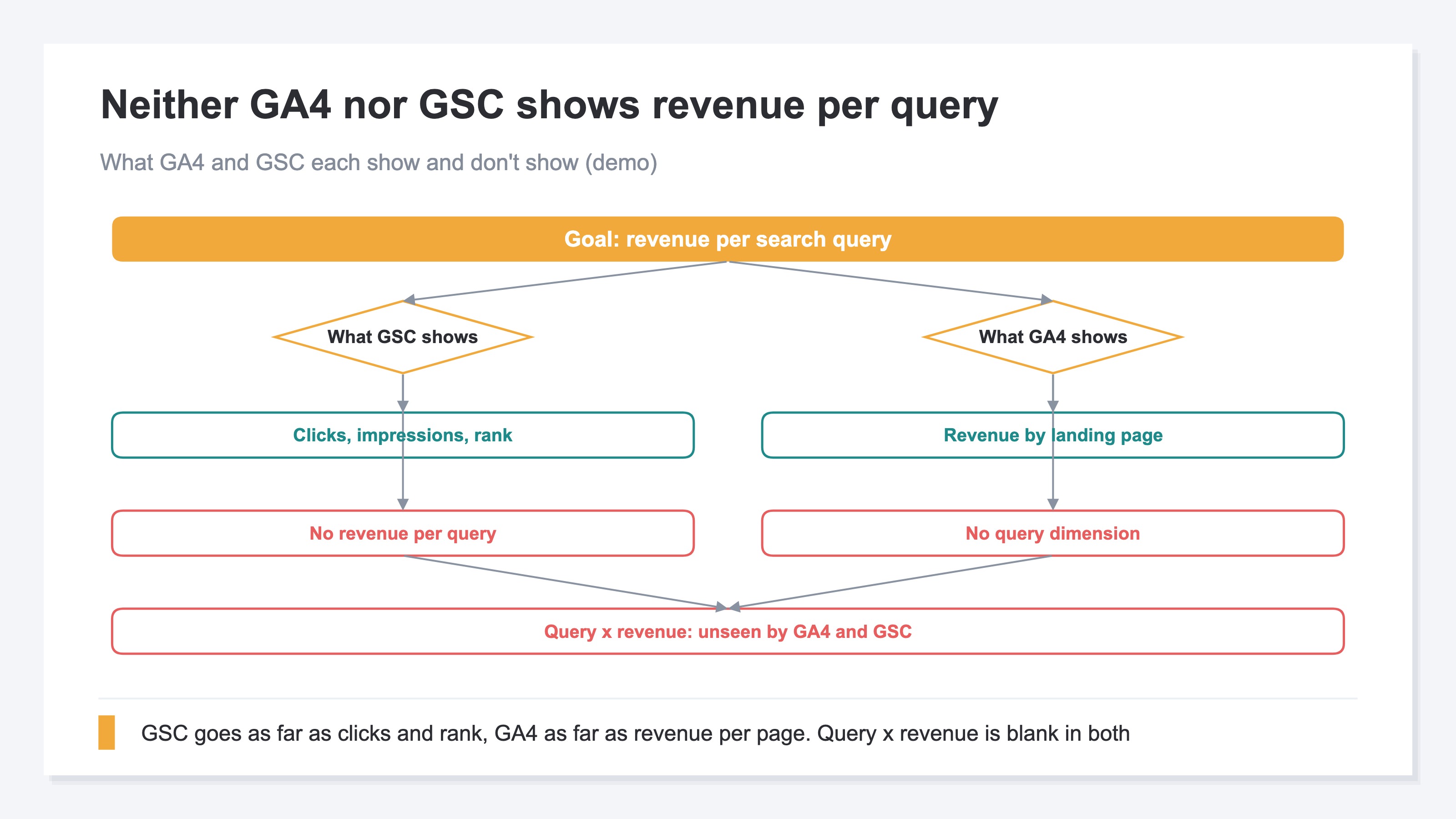
The reason is simple. Today's search engines don't pass the term someone searched to your analytics tag. So no search-query field ever lands in a GA4 event. GA4 can record the purchase event, but the information tying it to a search term never reaches GA4 in the first place. This isn't about using GA4 better — it's about the range of data that arrives. The same "structurally absent" limit shows up on the attribution side too (the limits of GA4's attribution report).
2. Why Connecting GSC Still Cannot Reach Per-Keyword Revenue#
Bottom line: Connect Google Search Console (GSC) to GA4 and search queries become visible, but no revenue comes with them. GA4 and Google Search Console are separate collections of data, and the standard features don't join the two at the revenue level. What Google Search Console returns stops at clicks, impressions, CTR, and position.
Plenty of people figure connecting GA4 and Google Search Console will solve it. And in fact, once connected, you get reports that include search queries [1]. But this integration is handled as data separate from GA4's own events; it isn't built to let you multiply Google Search Console's metrics against GA4's revenue inside one table [2]. The integration adds "visibility into search terms" — it doesn't create "revenue per search term."
Google Search Console itself simply doesn't hold revenue. The Performance report is built around four axes — clicks, impressions, CTR, and average position — and conversions or amounts aren't part of that design [3]. So no matter how deep you dig into Google Search Console, the furthest you reach is "how many times it was clicked," and you stop just short of "how much revenue that click became." This integration has other known blind spots too, like discrepancies and gaps in click counts [4]. As an aside, the reason GA4 session counts and Google Search Console click counts don't match comes from a different cause (anonymization on the click side, differences in how things are counted), and that's covered in why Google Search Console clicks and sessions don't match. The question of missing revenue around AI search is gathered in the GSC AI-search report and its revenue blind spot.
3. The Manual Workaround, and Where It Breaks Down#
Bottom line: Match Google Search Console's per-term data against GA4's per-landing-page revenue by hand, and it looks like you can get close. But this won't give you accurate per-keyword revenue. A single page shows for many search terms, so there's no basis for allocating a page's revenue across them.
The approach is tempting to picture like this: pull "which terms this page showed for" from Google Search Console, pull "how much this page sold" from GA4, and match the two on the page. At the page level, you really can tie them by hand this far. The trouble starts after that.
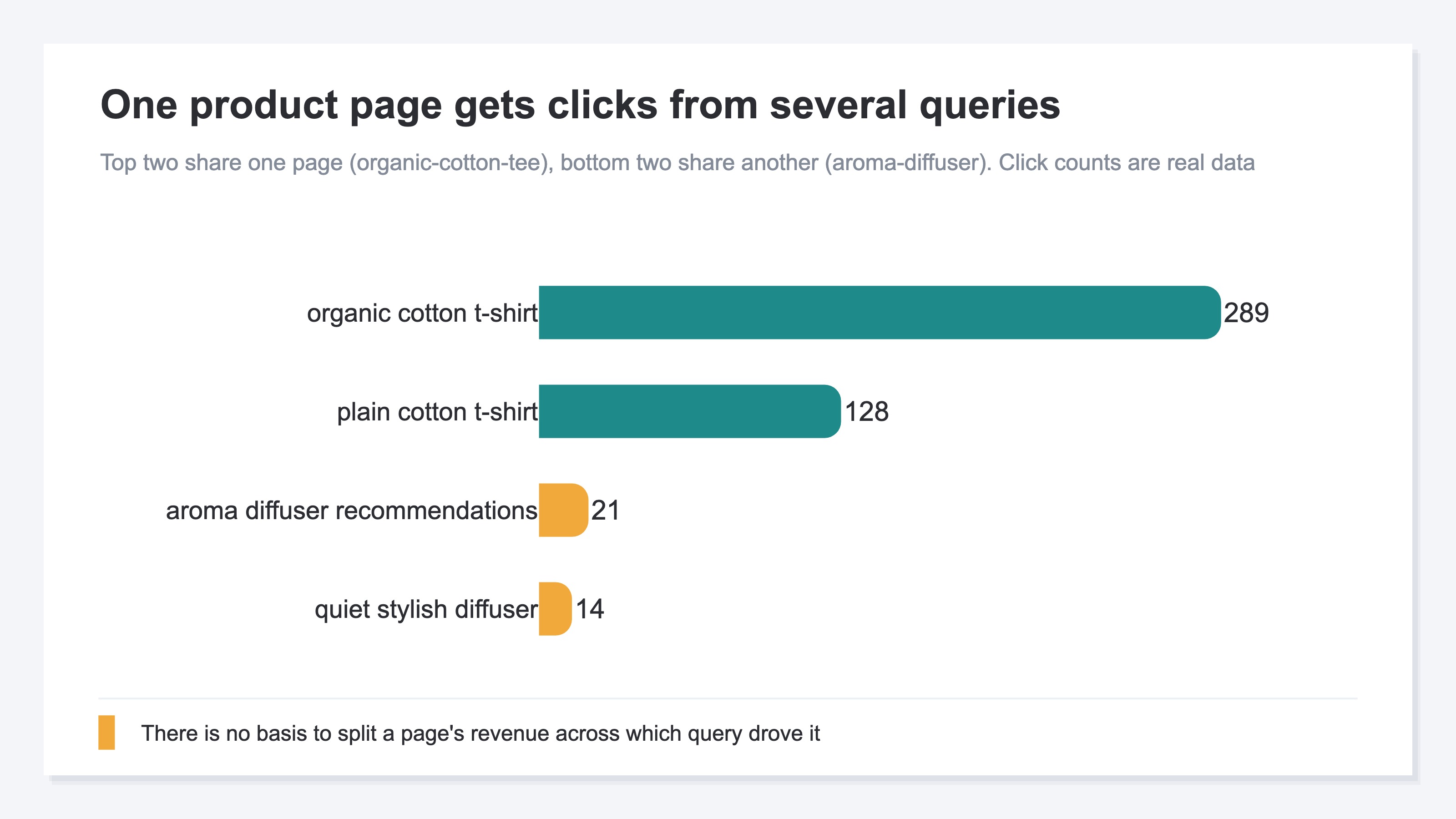
A single product page usually collects clicks from several search terms. Someone lands on the same page whether they searched "organic cotton t-shirt" or "white cotton t-shirt," and so on. So there's no basis for deciding how much of that page's revenue to assign to which term. You can do a rough approximation — split it evenly by share of clicks — but that's an assumption with no connection to your actual revenue structure. And it's manual work every time, redone whenever the month rolls over.
The important part: this isn't a "you're not doing it right" problem, it's a can't-be-split-structurally problem. The data arrives only down to the page, yet you're trying to break its contents down to the term — so however carefully you work, you're stacking assumption on assumption. The more you do by hand, the more accurate it looks, when in fact the distortion is growing. That's the most easily missed part of this whole exercise.
RevenueScope helps
Bottom line: RevenueScope puts estimated revenue per search keyword on one screen, with the change vs. the prior period. Rather than allocating revenue to pages, it multiplies RPS (revenue per visit) via organic search by each term's click count to approximate revenue per keyword. So you can set rewrite and investment priorities by revenue efficiency, not by click count.
Here's how it works. First it derives the RPS for organic search overall, then multiplies that by each search term's clicks to approximate revenue per term. Because no arbitrary allocation to pages sits in the middle, you can re-rank "which search terms drive revenue" on an efficiency axis. Here's what that actually looks like, with sample-store data.
Sample store: estimated revenue and change vs. prior period, by search query (30 days)
| Search query | Clicks | Estimated revenue (JPY) | Clicks vs. prior period | Revenue vs. prior period |
|---|---|---|---|---|
| オーガニックコットン tシャツ (organic cotton t-shirt) | 289 | 102,830 | −31.5% | −15.9% |
| 本革 財布 ハンドメイド (handmade genuine-leather wallet) | 205 | 72,941 | −18.3% | +0.3% |
| 陶器 マグカップ セット (ceramic mug set) | 74 | 26,330 | +54.2% | +89.3% |
| オーガニックコットン とは (what is organic cotton) | 59 | 20,993 | +63.9% | +101.3% |
Figures from a fictional store with sample data (RevenueScope demo). Estimated revenue = organic-search RPS × clicks, a conservative (under-leaning) approximation; Google Search only.
Read this table by clicks alone and you'll misjudge. The most-clicked term, "organic cotton t-shirt" (289 clicks), looks at a glance like the most important. But its revenue is down, at −15.9%. Meanwhile the lower-click "ceramic mug set" (74 clicks) is up +89.3% in revenue, and "what is organic cotton" is up +101.3%. Decide "let's rewrite the t-shirt page first" off click count alone, and you push the rising terms to the back of the line. Re-rank by revenue efficiency, and your move changes.
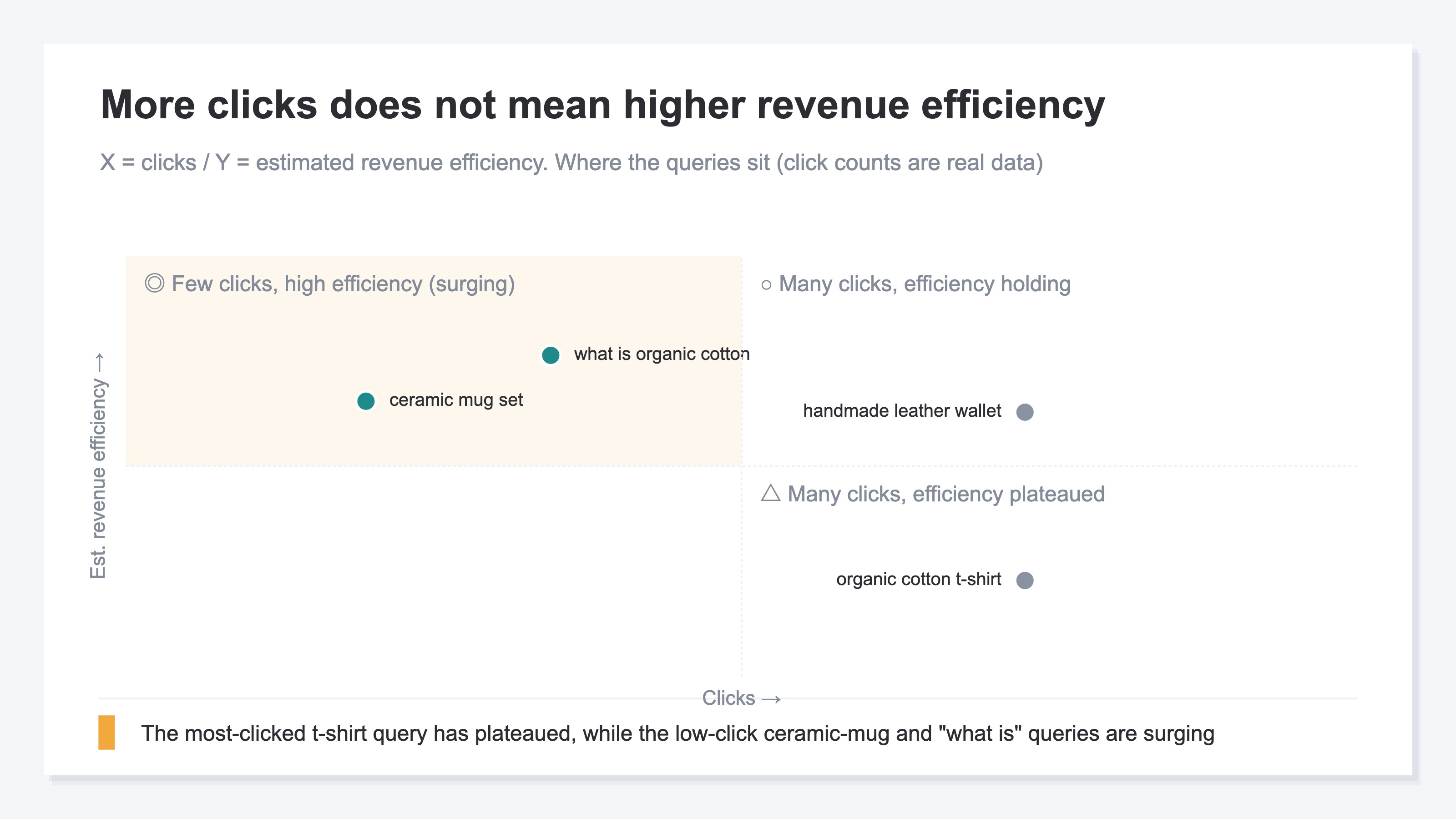
What RevenueScope produces is estimated revenue from "organic-search RPS × clicks." Because it leans conservative (under-estimating), you can read it as a floor — "this much revenue is coming in, at minimum." It covers Google Search, and the numbers land within about two to three days. RevenueScope fills in the "revenue efficiency per term" that GA4 structurally can't produce, focused on revenue via organic search rather than gross margin or LTV, and puts it on one screen. Its job is to make "which search terms drive revenue" visible on an efficiency axis.
Once you can see estimated revenue, prioritizing which terms to tackle first is explored in choosing striking-distance keywords by revenue, and the underlying idea of RPS is dug into in an introduction to RPS (revenue per visit).
FAQ#
Q. If I connect GA4 and Google Search Console, can I see revenue by search keyword?
A. No. Connecting does give you reports that include search queries, but what you see there stops at clicks, impressions, CTR, and position. Because Google Search Console itself is designed without revenue, no amount of digging into the integration gets you past "how much revenue that search term became" — you stop just short of it.
Q. Can't I just match GSC's per-term data against GA4's per-page revenue by hand?
A. You can match down to the page level, but you can't split from there to per-keyword revenue. A single page shows for many search terms, so there's no basis for how much of that page's revenue to assign to each. You can do a rough approximation like splitting it evenly, but that's an assumption unrelated to your actual revenue structure, and it's manual work every time.
Q. Should I treat RevenueScope's "estimated revenue" as confirmed revenue?
A. Treat it as an estimate. It's a conservative (under-leaning) estimate of RPS via organic search multiplied by that term's clicks, so you can read it as a floor — "this much revenue is coming in, at minimum." It covers Google Search, and reflects within about two to three days. Use it as a gauge for comparing, on an efficiency axis, which search terms look likely to drive revenue, and for setting rewrite and investment priorities.
Summary#
Per-keyword revenue isn't there when you open GA4. GA4 has no search-query unit, and connecting Google Search Console only gets you as far as clicks, impressions, and position — revenue doesn't ride along. Try to match it by hand, and because a single page shows for many search terms, there's no basis for splitting a page's revenue across them. This isn't a shortfall of effort; it's structural, because the data stops at the page level. That's exactly why RevenueScope puts estimated revenue per keyword on one screen via organic-search RPS × clicks, so you can set rewrite and investment priorities by revenue efficiency rather than click count. Start on the sample site and see how estimated revenue per search term, with its change vs. the prior period, lines up.
See which ads actually drive revenue, at a glance
Free up to 5,000 sessions/month, AI connection included. No credit card required. Up and running in 5 minutes.
References#
- [1] Analytics Help "[GA4] Reports that include Google Search Console queries" (2026)
- [2] Analytics Help "[GA4] About the Google Search Console integration" (2026)
- [3] Google Search Console Help "Performance report" (2026)
- [4] crux-lab "Four blind spots of the Google Search Console–GA4 integration" (2026)