"Traffic is up, but new customers aren't growing the way I'd hoped." Search traffic climbs, yet it doesn't quite feel like it's landing — recognize that? Much of the reason is in what the added searches are made of. Total clicks in Google Search Console (GSC, the free tool for seeing impressions and clicks in search) can rise without new customers rising. That's because much of the increase is branded search — people looking you up by name, i.e. return visits from people who already know you. This article lays out how to measure SEO's real power to bring in new customers, by removing branded search and reading by the revenue of non-branded search.
Contents
TL;DR#
- When search traffic grows but new customers don't, it's usually because most of the increase is branded search. Searching your own name is a return visit from someone who already knows you — not a new discovery.
- To measure whether SEO is bringing in new customers, remove the branded searches for your name and look at non-branded queries alone. This split isn't something a tool does for you automatically; it's a call you make.
- Line up non-branded queries by estimated revenue and change vs. the prior period, and the terms winning new customers stand apart from the ones fading. Look at clicks alone and you'll miss the terms that are climbing.
- Neither GA4 nor Google Search Console reports revenue per term, but organic-search RPS (revenue per visit) × clicks gets you close to an estimate. RevenueScope puts that estimated revenue, its change vs. the prior period, and your striking-distance terms on one screen.
1. Why Traffic Rises but New Customers Don't#
When total clicks in Google Search Console rise but new customers don't, it's because most of the increase is branded search. Branded search means people looking up your name or your product names — mostly return visits from people who already know you. So traffic can grow while the number of new customers barely moves.
"Search traffic is up from last month." Open Google Search Console, see total clicks climbing, and it feels like your SEO is finally paying off. Yet new sales and new inquiries have barely moved. This mismatch is a common one.
The cause is what's inside those added clicks. Search splits into two broad kinds. One is branded search, where people look you up by name; the other is non-branded search, where they search by product or by the problem they're trying to solve. People who arrive through branded search already know you — from an ad, word of mouth, or an earlier visit. That's not traffic that newly discovered you; it's traffic that came back.
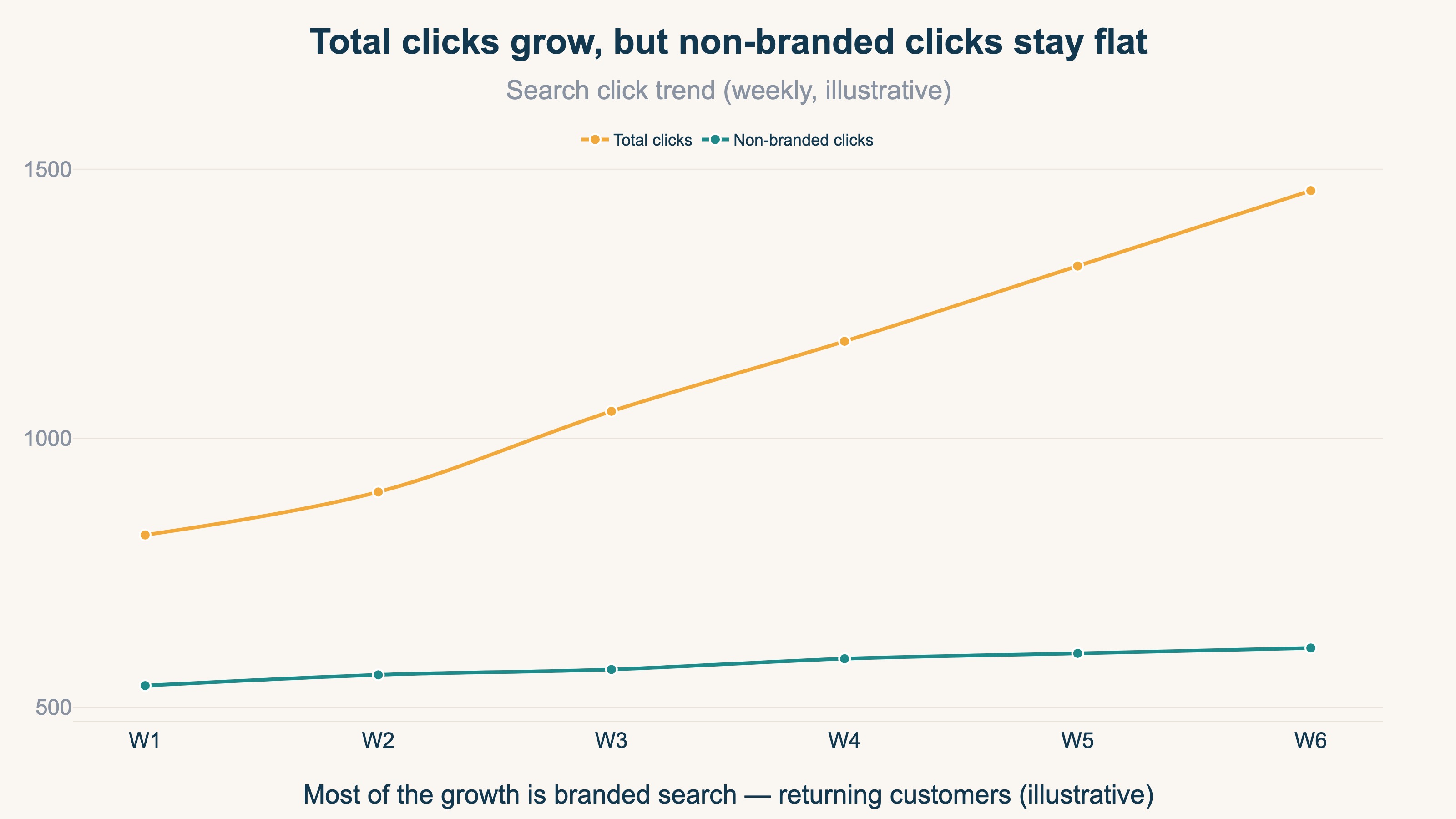
Look at total clicks only, and you read the two as one lump that simply "went up." A rise in branded search often traces back to things that have nothing to do with SEO — your name appearing on TV or social media, existing customers returning. Misreading a click increase for the wrong reason comes up again in rankings held steady but clicks fell. If you want to measure SEO's power to bring in new customers, the first step is to separate out branded search.
2. Reading Branded and Non-Branded Search Separately#
Branded and non-branded search differ in both how people search and what it means. Branded search is a return visit from an existing customer looking you up by name; non-branded search is a prospect discovering you through a product or a problem. Without splitting the two, SEO's power to win new customers stays hidden.
Telling them apart is simple. If a search term contains your brand name, your store name, or a product name unique to you, it's branded search — terms like "[your brand] shop" or "[your brand] online store." Non-branded search, by contrast, is when people search with a generic product name or a problem, like "organic cotton t-shirt" or "handmade genuine-leather wallet." Open the Performance report in Google Search Console and you can check clicks, impressions, and average position for each search term [1][2]. Whether a term is branded or non-branded is something you decide by looking down that list of terms.
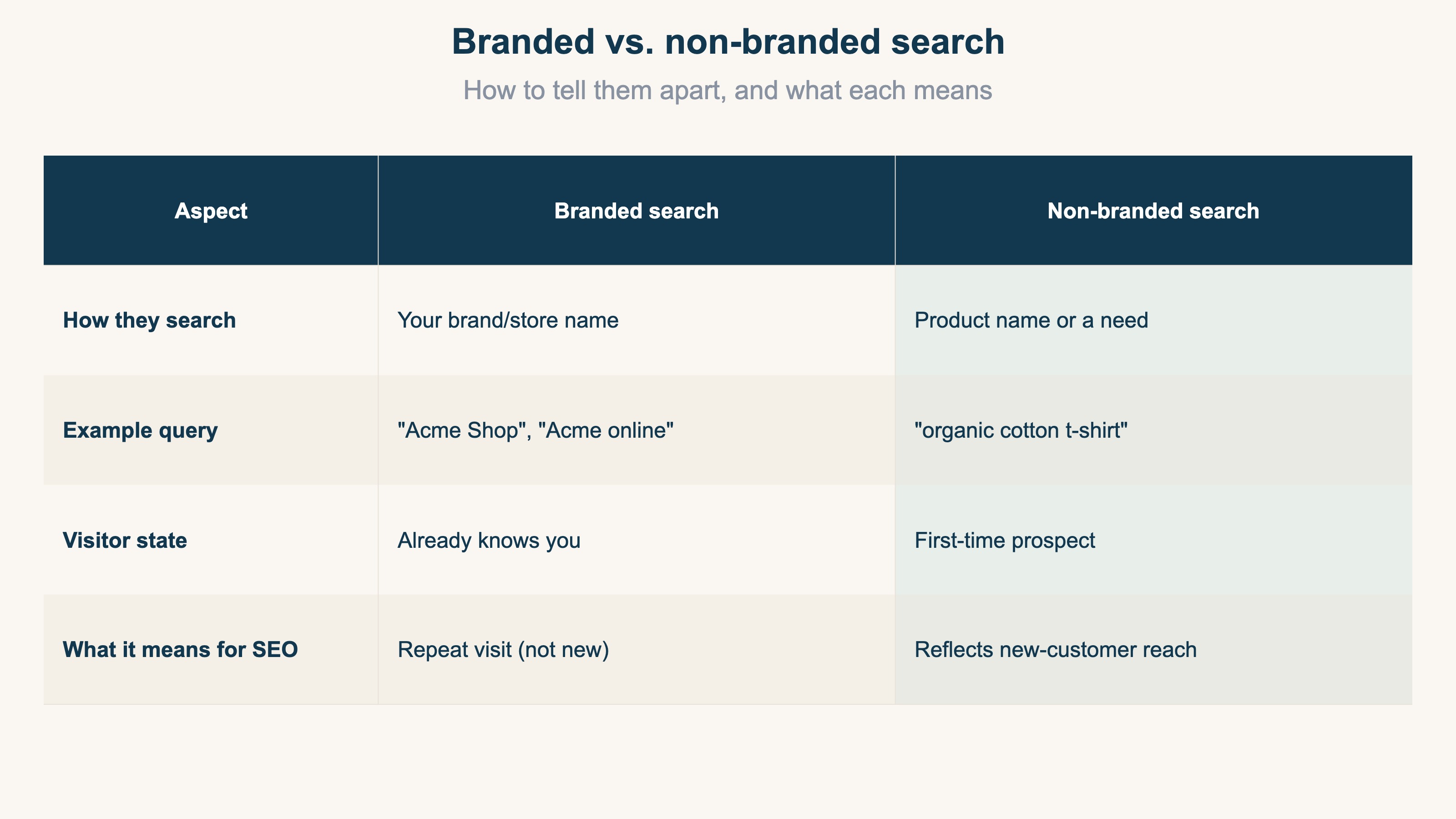
What matters is who does this splitting. RevenueScope surfaces the data for each query, but it has no feature that automatically judges which terms are branded and which are not. Removing the terms that contain your brand name as branded is your own job — or the job of the AI you're working with. Nobody knows your own name better than you, so it's natural for a person to make this call. The non-branded searches that remain, once you've taken the brand terms out, are the entry points for the new prospects SEO has brought in.
3. Non-Branded Estimated Revenue Is the Real SEO Strength#
You can measure SEO's power to bring in new customers by the estimated revenue of non-branded search. Remove branded search, look at the estimated revenue and prior-period change of the non-branded queries that remain, and you can tell whether you're earning from new discovery or merely picking up demand that was already there.
Here we bring in the idea of "estimated revenue." How much each term sold is something neither GA4 nor Google Search Console reports, by design. Connect Google Search Console to GA4 and the search queries become visible [3], but revenue per term doesn't ride along. Why it's structurally invisible, and how multiplying RPS via organic search by clicks gets you close to estimated revenue per term, is covered in a separate article, why you can't see revenue by search keyword. This article picks up where that one left off: we take the estimated revenue you've produced, split it into branded and non-branded, and go on to measure real SEO strength.
There are two lenses for reading it. The first is the revenue lens: order the non-branded queries from highest estimated revenue down, and you see the ranking of terms that are winning new customers. The second is the acquisition lens: a page with a high share of branded search is one where raising your ranking is unlikely to bring more new customers, because it's a page where existing customers return by name.
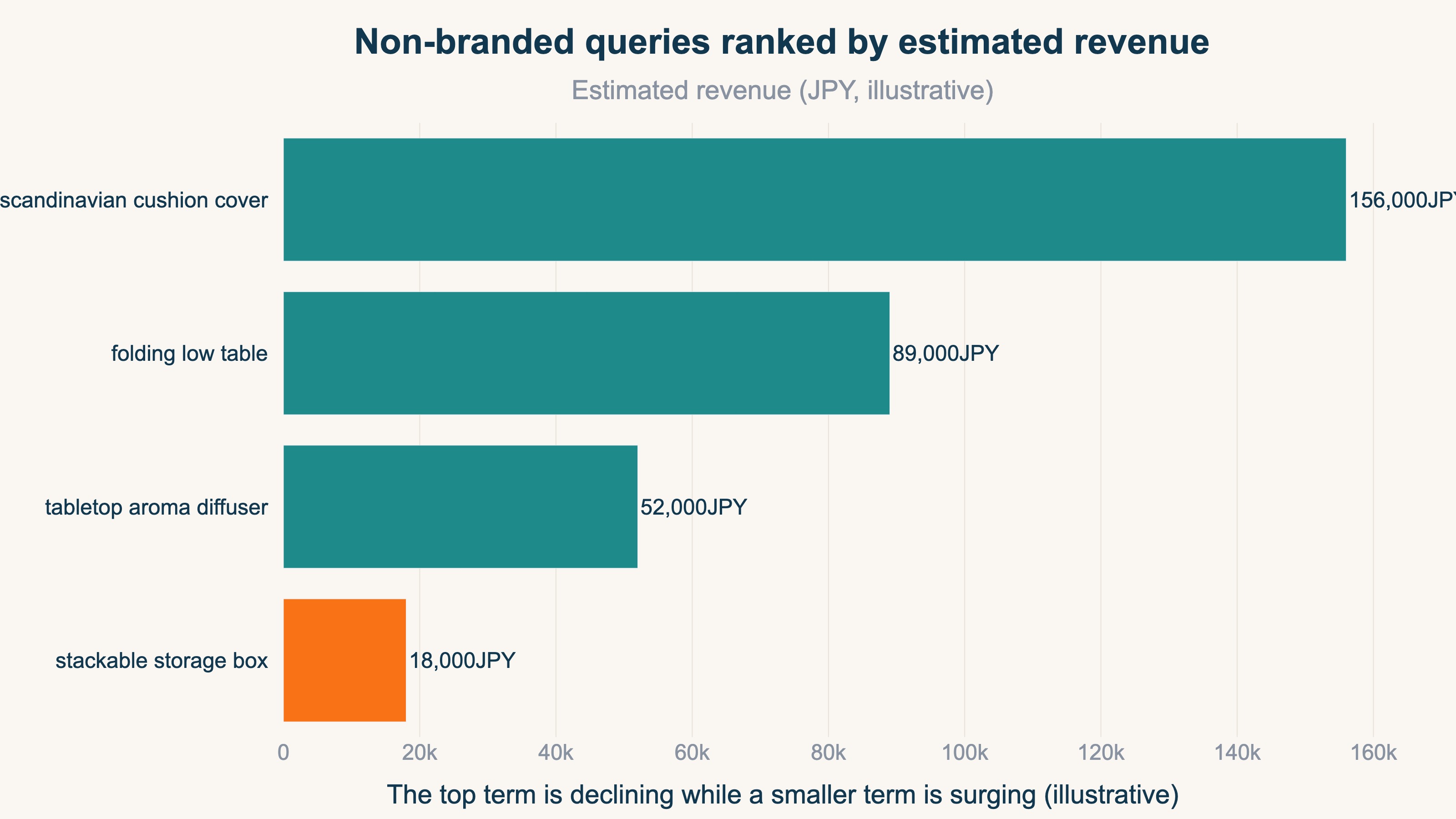
Up to here, you can actually do it in Google Search Console alone. Eyeballing the Performance report to drop the terms that contain your brand name, then looking over the non-branded terms — that much is free, and it's worth doing once. Where it breaks down is beyond that point. Putting an estimated revenue figure on each non-branded query, ordering them highest to lowest, and then tracking the change vs. the prior period every week: do that by hand and you're dealing with dozens to hundreds of terms, redone every time the month turns over. And with no basis for how to derive the amounts in the first place, the manual approach stalls. This is where eyeballing hits its limit.
RevenueScope helps
RevenueScope puts the estimated revenue and prior-period change for each search query on one screen, and lists the terms that are one step from top rankings (striking distance) as well. Once you remove the branded searches for your name, the estimated revenue of the non-branded queries that remain becomes, directly, your SEO strength at winning new customers.
Here's how it works. Ask RevenueScope how your search keywords are performing, and it returns clicks, estimated revenue, and prior-period change for each query. Estimated revenue is an approximation — RPS via organic search multiplied by that term's clicks. Here's what that actually returns, with sample-store data.
Sample store: estimated revenue and change vs. prior period, by search query (30 days)
| Search query | Clicks | Estimated revenue (JPY) | Revenue vs. prior period |
|---|---|---|---|
| demo-shop 通販 (demo-shop online store) | 273 | 108,533 | +7.5% |
| オーガニックコットン tシャツ (organic cotton t-shirt) | 248 | 98,594 | −15.2% |
| 本革 財布 ハンドメイド (handmade genuine-leather wallet) | 182 | 72,355 | +5.8% |
| 人気 雑貨 ランキング (popular goods ranking) | 115 | 45,719 | +7.8% |
| 陶器 マグカップ セット (ceramic mug set) | 69 | 27,431 | +108.9% |
| オーガニックコットン とは (what is organic cotton) | 55 | 21,866 | +116.1% |
Figures from a fictional store with sample data (RevenueScope demo). Estimated revenue = organic-search RPS × clicks, a conservative approximation; Google Search only.
The top row here, "demo-shop 通販," is branded search — someone looking up your store by name. RevenueScope doesn't automatically flag this as branded. Removing this one row, which contains your brand name, as branded is your job. Look only at the non-branded queries that remain, and the picture changes.
The non-branded term with the most clicks and the highest estimated revenue is "organic cotton t-shirt" (248 clicks, an estimated ¥98,594). Yet its revenue is down −15.2% vs. the prior period — a sign that your main engine for winning new customers is weakening. Meanwhile the ones climbing are still-small terms like "ceramic mug set" (+108.9%) and "what is organic cotton" (+116.1%). Had you looked only at the branded-inclusive total, the top row "demo-shop 通販" was healthy at +7.5%, and you'd have misread SEO as doing just fine. Take branded out, and your move is clear: fix the main non-branded term, and grow the small, fast-rising non-branded ones.
On the same screen, RevenueScope also surfaces the non-branded queries that are one step from top rankings (striking distance), ordered by the size of the estimated-revenue opportunity. For example, "aroma diffuser recommendations" sits around position 7 today, and lifting it to position 3 could bring a large increase in clicks. Which non-branded term to tackle first is explored in choosing striking-distance keywords by revenue, and how much your search traffic contributes to overall revenue is dug into in measuring the revenue contribution of organic search.
RevenueScope's estimated revenue is a solid approximation from "organic-search RPS × clicks," and it specializes in Google organic search. Google Search Console's clicks and your own channel's session counts are separate data sources, so the figures won't match — by design — for reasons covered in why Google Search Console clicks and sessions don't match. Splitting branded from non-branded, as noted above, is something you do; what RevenueScope takes off your hands is the heavy part that follows — estimating the amount for each non-branded query and tracking the change vs. the prior period. It keeps the numbers focused on revenue-based estimated revenue, RPS, prior-period change, and the striking-distance terms, and puts them on one screen, so simply by removing branded search yourself, you can read your real strength.
FAQ#
Frequently asked questions#
Q. How do I tell branded and non-branded search apart?
A. If a search term contains your brand name, store name, or a product name unique to you, it's branded search; if it's a generic product name or a problem, it's non-branded. Since you're the one making the call, the reliable approach is to decide your list of brand terms up front and remove any query that contains them as branded. A tool won't sort them for you automatically, so this is a human decision.
Q. Why remove branded search to measure real SEO strength?
A. People who arrive through branded search already know you and are searching by name. That's not traffic SEO newly brought in; it's traffic that came back. If you want to know SEO's power to win new customers, taking out this existing-customer share and reading by the estimated revenue of non-branded search gets you closest to real strength.
Q. How should I use RevenueScope's estimated revenue?
A. It's a solid approximation — RPS via organic search multiplied by clicks — for Google organic search, catching up within about two to three days. Use it to compare which non-branded queries are driving revenue and to prioritize which terms to fix and which to grow. Track it alongside prior-period change each week and it reads directly as SEO's real strength at winning new customers.
Summary#
When search traffic grows but new customers don't, it's because most of the increase is branded search — return visits from people who already know you. To know whether SEO is truly bringing in new customers, you need to remove the branded searches for your name and read by the estimated revenue of the non-branded searches that remain. Neither GA4 nor Google Search Console can report revenue per term by design, but organic-search RPS × clicks gets you close to an estimate. RevenueScope puts that estimated revenue and its prior-period change on one screen and surfaces the striking-distance terms too, so simply by removing branded search yourself, you can see your strength at winning new customers and your next move. Start on the sample site and see how estimated revenue lines up for your non-branded queries.
See which ads actually drive revenue, at a glance
Free up to 2,000 sessions/month, AI connection included. No credit card required. Up and running in 5 minutes.