Paste your sales data into ChatGPT to analyze it, and the same question comes back with a different answer each time. It's a common way to get stuck. The cause isn't that pasting is a chore. It's that the very numbers the AI reads change with every paste, so the ground under your judgment moves. This article splits why the answer drifts into three paths, and works through — with a sample store's data — how to hand the numbers over so the ground holds still.
Contents
TL;DR#
-
The answer changes every time not from effort, but because the ground moves every time
Same question, but if the period, columns, and freshness of what you paste differ a little, the AI reads different numbers and returns a different conclusion
-
There are three paths that drift with every paste
A misread period, a forgotten or missing column, and freshness decaying from the moment you paste. None can be closed by hand
-
Even careful re-pasting won't stop the wobble
Turn it into a template, and as long as the work of lining it up each time stays with a person, a slip eventually gets through no matter how careful you are
-
Connect, and the same question returns the same answer
It reads the first-party data as of the moment you ask, so the ground under your judgment is fixed. The AI's interpretation is something a person checks at the end
1. Why "It Drifts Every Time" Isn't About Effort#
Bottom line: With paste-based analysis, the reason the answer changes every time isn't the effort of pasting. It's that the very numbers the AI reads change with each paste, so the ground under your judgment moves. That's why the same question ends up conflicting with what it said before.
You paste a sales CSV into ChatGPT and ask, "Which channel is working this month?" The next week you paste again and ask the same thing. But the answer that comes back differs from before — sometimes it's the opposite. Plenty of people wrestle with exactly this discrepancy: the same question, yet change the account or the period and you get the opposite answer. What troubles you isn't the effort — it's that you no longer know which answer to trust.
The AI answers looking only at the numbers pasted at that moment [1]. It doesn't remember what you pasted last time, and it can't tell whether the table you pasted is current. If the range a person pasted "meaning last month" is off by a few days, the AI computes on those numbers as-is and returns a plausible conclusion. So every time, the numbers that form the ground shift a little. When the ground moves, the judgment resting on it moves too. This isn't a problem of speed or effort — it's a problem of reproducibility. The basic promise, that the same question returns the same answer, has broken. For how to actually ask so the AI reads your numbers, we give examples in the first step in EC AI is connecting your own data.
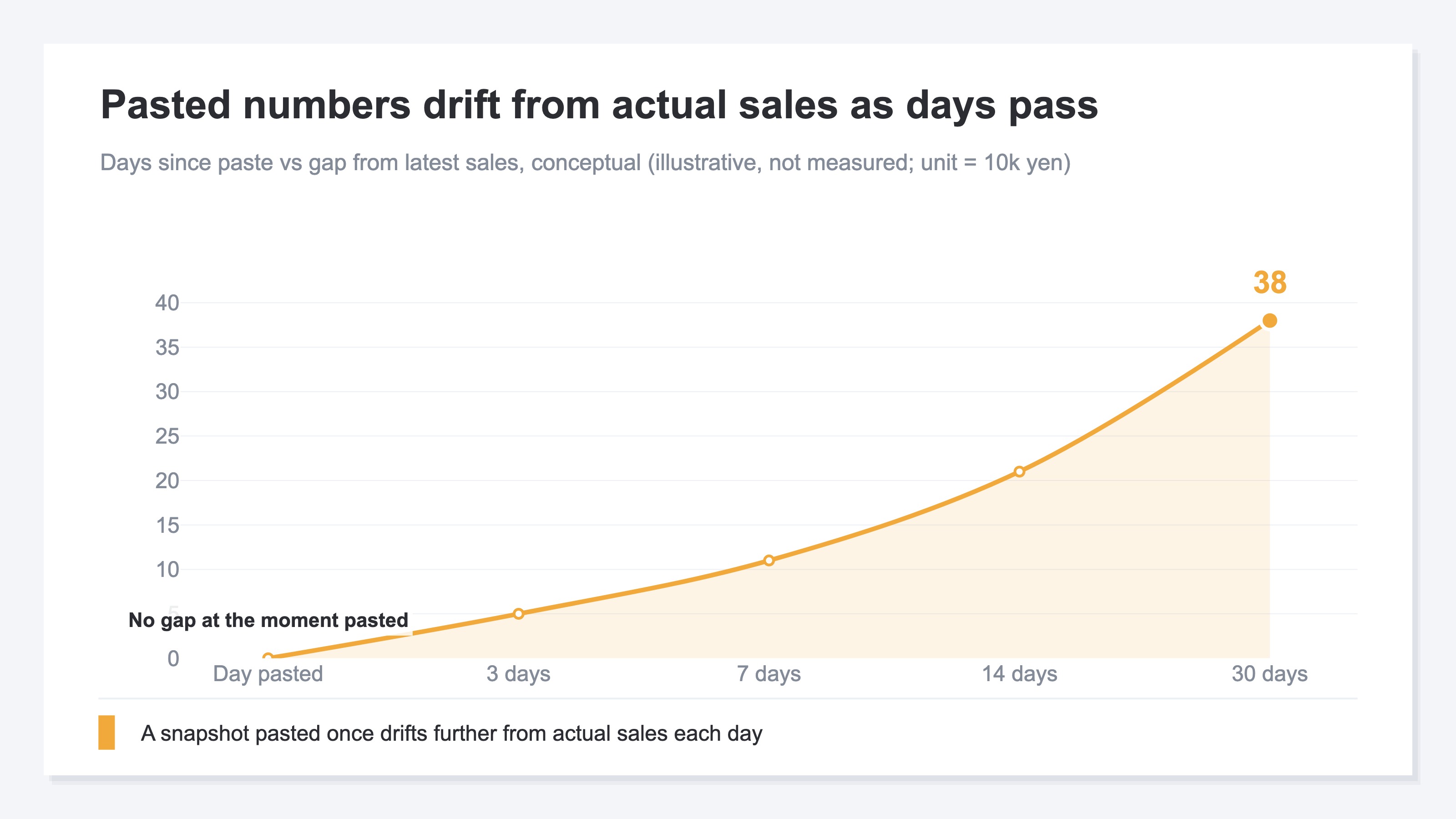
What matters is this: the more the answer wobbles, the less you can use it to decide. Ask three times and get three answers, and you're back to a person agonizing over which one to base an investment on. However fast it reads, if the numbers differ every read, the judgment doesn't move forward.
2. The Three Paths That Drift With Every Paste#
Bottom line: The paths where the answer drifts fall into three. A misread period, a forgotten or missing column, and freshness decaying from the moment you paste. None of them disappear with willpower or care — they remain, structurally, in manual work.
The first is a misread period. You meant to paste last month, but it was actually off by a few days. Last month and this month treated the cutoff date differently. These small slips happen every time, in the screen operations before you paste. The AI doesn't notice the slip and computes on the range it was handed. For the same question — "last month's sales" — a different pasted range gives a different answer.
The second is a forgotten or missing column. You pasted revenue and sessions but forgot the channel breakdown. Last time it was five columns, this time four. Copying from a spreadsheet, you can't track the column order or a gap by eye. When a column is missing, the AI fills the gap with the numbers that remain. How it fills isn't always the same. This isn't about attention. As long as it's manual work to line up columns, gaps remain structurally.
The third is decaying freshness. What you pasted is a photo from the moment you pasted. Even sales you connected today freeze in time the instant you paste them. The next day the actual numbers have moved, but what the AI sees is still yesterday's photo. You think you're judging on the latest, while you keep feeding it one old snapshot.
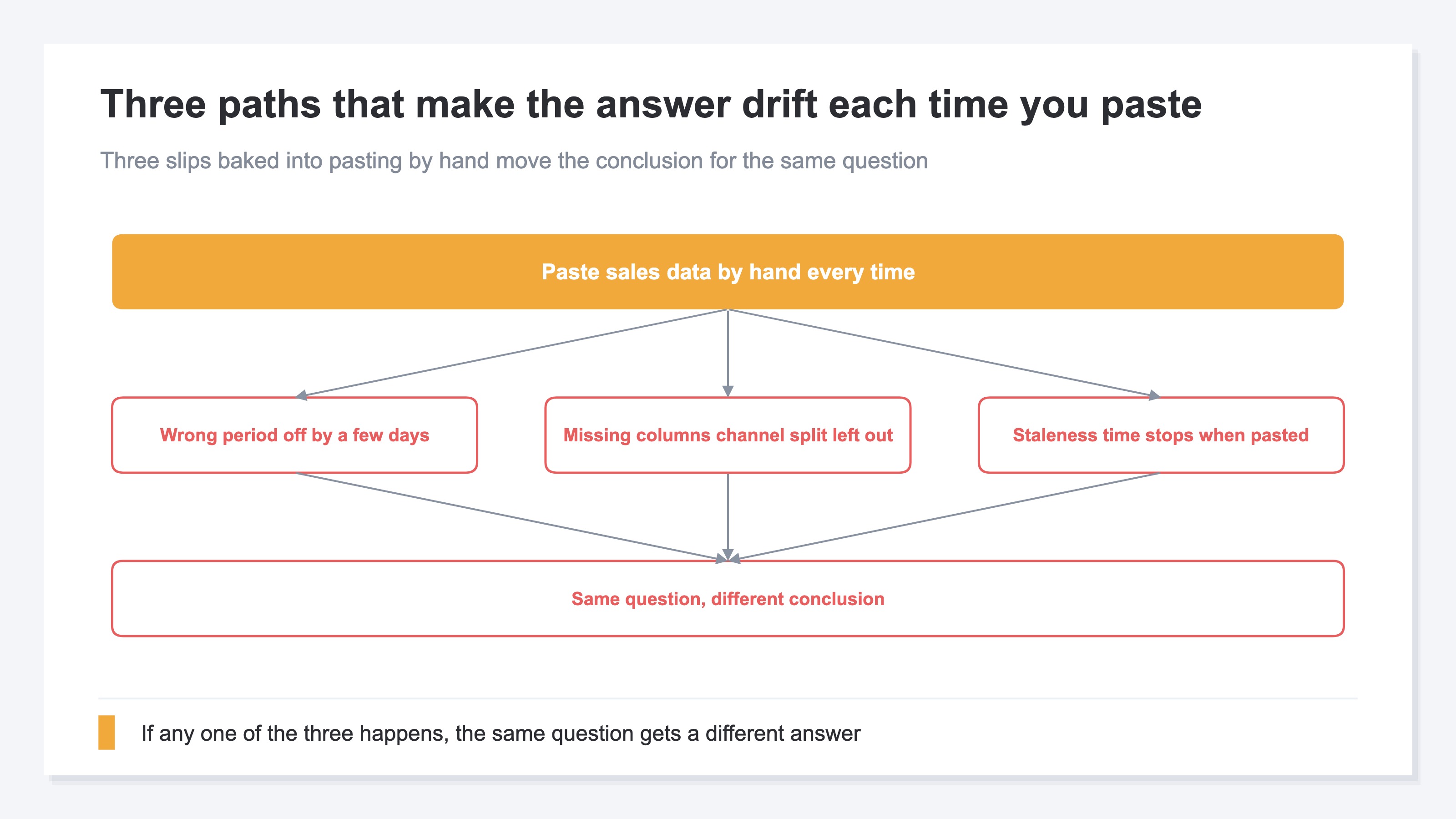
Any one of these three, and the answer drifts. And all three are built into the very practice of pasting. So even if "I'll be careful this time" cuts it down for a moment, as long as you keep it up every time, it shows its face again, on probability.
3. Why Careful Re-pasting Doesn't Fix It#
Bottom line: Build a template and re-paste carefully, and the wobble still doesn't vanish. As long as the work of lining it up each time stays in human hands, a slip eventually gets through no matter how careful you are. Polishing the procedure and fixing the ground are two different things.
You can work to raise pasting accuracy. Template the period spec, decide the column order, look it over once before pasting. These reduce the number of slips somewhat. But only reduce — not to zero. Repeat the same steps across channels every month, and one slip in ten remains. Asking human work to be "every time, perfectly, the same range" is a stretch. Care matters, but care can't guarantee reproducibility.
There's one more catch in the very practice of pasting: the resistance to dropping raw sales and customer numbers straight into a chat input box. In fact, some prefer not to paste raw customer data into a prompt and to lean on a more contained approach. The more carefully you re-paste, the more times you paste and the more data you paste. Polishing the procedure only strengthens that resistance. How to handle numbers safely, read-only, is laid out in why AI can read your data without being able to rewrite it.
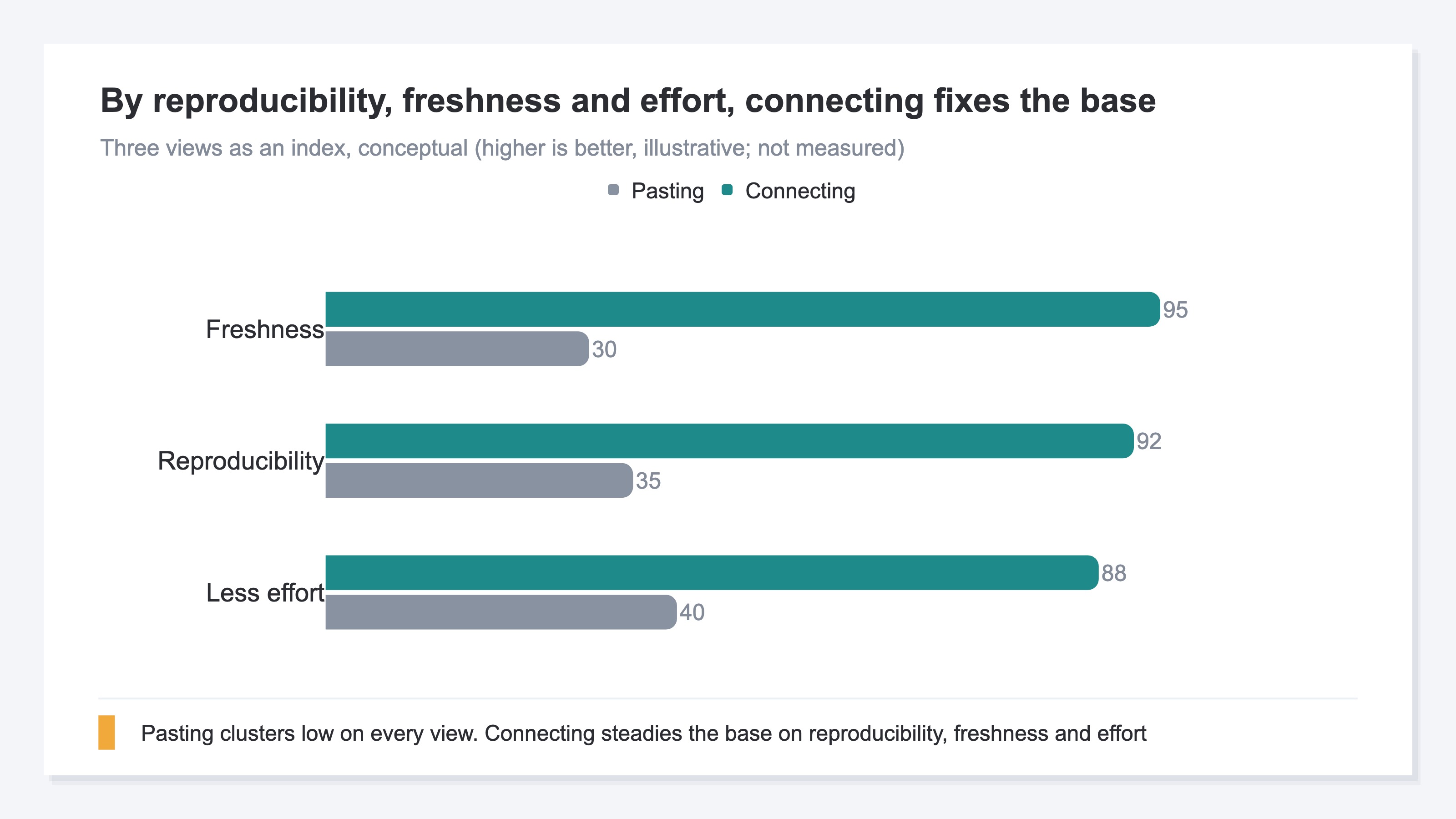
To sum up so far: pasting isn't "hard to think through" — it's a practice where the work of lining things up each time is heavy, and gaps remain structurally. Polishing the procedure helps at the margins, but the wobble of the ground itself sits outside the procedure. To fix the ground, you have to take the work of lining up each time out of human hands.
RevenueScope's solution
Bottom line: RevenueScope connects your store's numbers from ChatGPT or Claude, read-only, so the AI reads the first-party data as of the moment it asks. Drop the pasting practice, and the work of lining up each time disappears — you get a ground where the same question returns the same answer.
Connect RevenueScope to your AI client, and the AI reads your store's numbers directly to answer [2][3]. No hard setup, no SQL. You just ask, "Which channel is working for us?" It's read-only, so there's no worry the AI rewrites your data. Instead of pasting, you connect and let it read. That difference closes, all at once, the three paths from Section 2: the period is specified on the data side, so misreads are less likely; the columns are whatever range you connected, so nothing gets forgotten; and it reads the numbers as of the moment you ask, so the photo never goes stale. The full picture of how to connect is in the first step: connect your store's data to AI.
One more point: connecting is not the same as training. A read-only connection only lets the AI read the numbers — it doesn't use your data to train the model. That difference is covered in AI is something to "connect" smartly, not to "train".
Here's how it actually looks, with a sample store's data. Ask the same question today or tomorrow, and because what it reads is the same first-party data, the table it returns has the same shape.
Sample store: revenue by channel (30 days)
| Channel | Sessions | Revenue (JPY) | RPS (JPY) |
|---|---|---|---|
| Google Search | 262 | 108,558 | 414 |
| Direct | 160 | 89,487 | 559 |
| Meta | 141 | 15,633 | 110 |
| Google Ads | 129 | 27,839 | 215 |
Sample store: AI-assistant referrals (30 days)
| AI Source | Sessions | Revenue (JPY) | RPS (JPY) |
|---|---|---|---|
| Claude | 8 | 12,088 | 1,511 |
| Gemini | 24 | 33,188 | 1,383 |
| Copilot | 10 | 9,424 | 942 |
| Perplexity | 43 | 11,510 | 268 |
| ChatGPT | 70 | 4,702 | 67 |
Figures from a fictional store with sample data (RevenueScope demo). RPS is revenue per session; RevenueScope specializes in revenue-based metrics. AI-assistant referrals from ChatGPT, Claude, Perplexity, Gemini, and Copilot are each returned as their own channel.
With pasting, this table was a photo from the moment you pasted. Connected, every time you throw the same question it reads the first-party data as of that moment and returns it. Because the ground is fixed, even if you stack a follow-up — "compared with last month, which channel's RPS grew?" — the premise doesn't waver. Only once the entry point to judgment is stable can you move on to discussing the next move.
RevenueScope specializes in revenue-based metrics and the breakdown by channel, reading the first-party data as of the moment you ask. Because the ground is fixed, what you do from there is a call you make on stable numbers. AI-referred traffic is traced by referrer and returned as its own channel — ChatGPT, Claude, Perplexity, Gemini, and Copilot each on their own line. Letting go of the work of lining up each time and building a ground where the same question returns the same answer — that much you can move on from today. How far paste-based analysis reaches for ads is laid out in the limits of analyzing ad data with ChatGPT.
FAQ#
Q. When you stop pasting, what changes most?
A. The same question starts returning the same answer. With pasting, the period, columns, and freshness differ a little each time, so the ground under your judgment moves every time. Connect read-only, and the AI reads the first-party data as of the moment you ask, so the ground is fixed. More than speed, this reproducibility is the essence.
Q. Can't I prevent the drift by templating and pasting carefully?
A. You can reduce it, but not to zero. As long as you line it up by hand across channels every month, a misread period or a missing column remains on probability. It's not that the thinking is hard — it's that repeating "perfectly the same range every time" is heavy for a person. To fix the ground, you have to move that work out of your hands.
Q. If I connect, won't the AI rewrite my data on its own?
A. It's read-only, so no rewriting happens. The AI only reads the numbers and answers. Unlike pasting raw customer data into a chat, you can lean on a more contained way of connecting. The details of the mechanism are in why AI can read your data without being able to rewrite it.
Summary#
Why pasting sales data into AI changes the answer every time isn't the effort of pasting. It's that the numbers the AI reads change with each paste, so the ground under your judgment moves. The paths that drift are three: a misread period, a forgotten or missing column, and freshness decaying from the moment you paste. All remain structurally in manual work, so even careful re-pasting lets gaps recur on probability. Connect read-only, and the AI reads the first-party data as of the moment you ask, giving you a ground where the same question returns the same answer. What you gain isn't less pasting effort — it's that the judgments you make on top no longer waver. The interpretation after connecting, a person checks at the end.
See which ads actually drive revenue, at a glance
Free up to 2,000 sessions/month, AI connection included. No credit card required. Up and running in 5 minutes.