When Google's spam update (an update to the spam policies, commonly called a spam update) drops your search rankings, most people reflexively launch into rebuilding the whole site. But fix every page at once without even a clue as to the cause, and your limited effort runs out first. Worse, an indiscriminate overhaul can actually pull your standing down further. What you need right after a drop isn't a full rebuild, nor simply waiting — it's a priority: of the pages that dropped, which one to fix first.
How to find which pages dropped is laid out separately in How to find content that lost rankings. This article picks up from there — once you know which pages dropped, how to decide the order to fix them. To put the conclusion first: the order isn't most-clicks-first, it's largest-revenue-lost-first. We'll walk through why click order and revenue-impact order diverge, and how to steer limited effort toward the pages that carried revenue.
Table of contents
Key takeaways#
- Even when Google's spam update drops your rankings, they don't come back on their own. Google says recovery can take several months and may wait for a reassessment at the next update. There's no instant fix — which is exactly why where you spend limited effort matters.
- You shouldn't fix every dropped page uniformly. The revenue you lost is concentrated in a few pages, so starting with the pages that lost the most revenue changes how much you can win back for the same effort. On the premise that not everything returns, steer effort toward the pages that carried revenue.
- The order to fix isn't most-clicks-first, it's most-revenue-lost-first. Google Search Console gives you clicks and impressions, but you can't tell how much revenue a page lost. A page with few clicks but a high order value can be the one with the biggest impact on revenue.
1. What the June spam update actually did#
First, fix your bearings with facts only. According to the Google Search Status Dashboard, the June 2026 update to the spam policies finished rolling out in late June (around the 24th–26th). As of this article (July 15), roughly three weeks have passed since then. Reranking continues for a while after the rollout, with a lag before things settle.
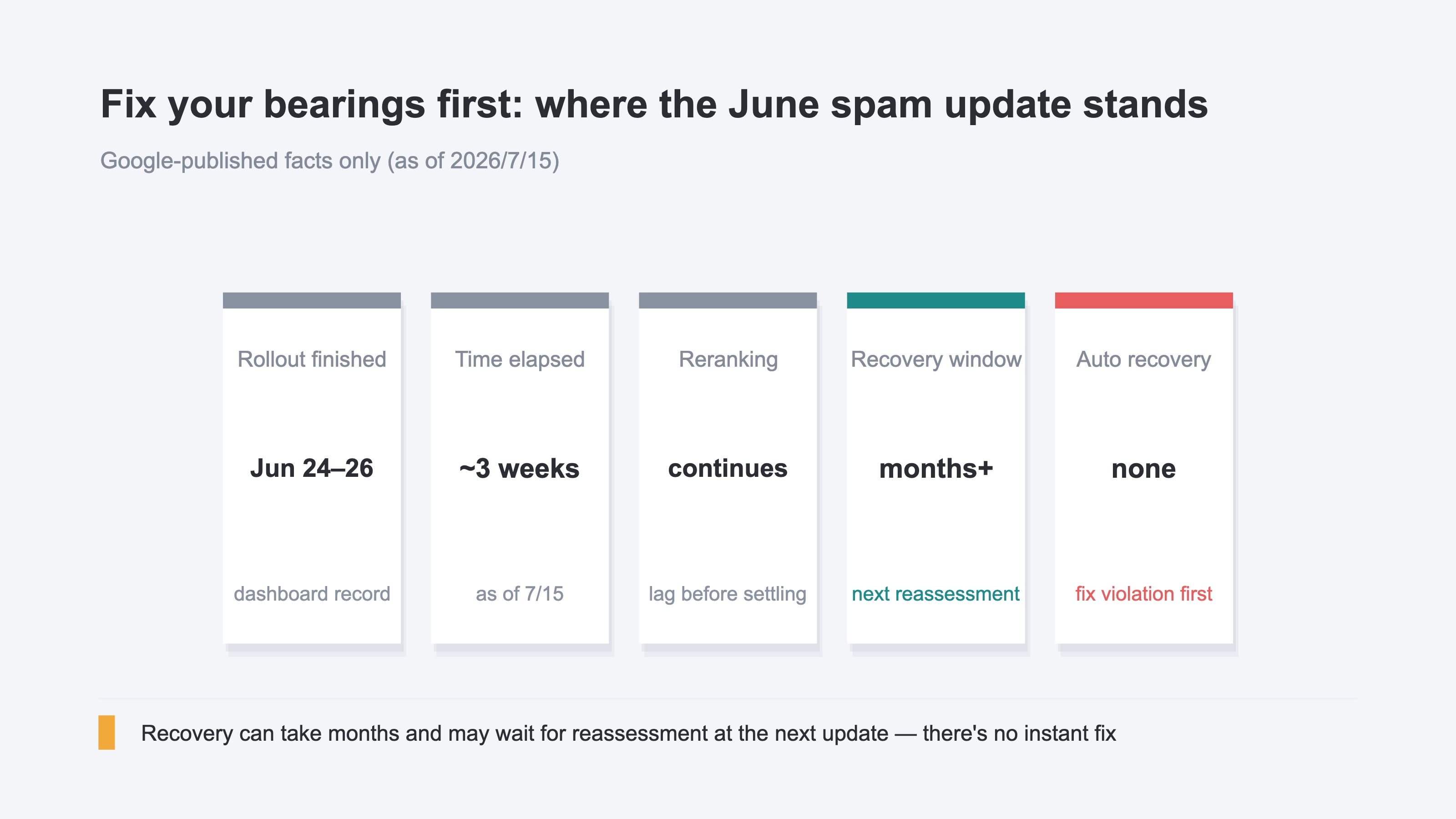
Here, two things are worth separating out. One is the recovery timeline. Google clearly states that regaining an evaluation lowered by an update can take several months, and may wait for reassessment at the next core or spam update. In other words, this isn't the kind of thing where you fix it today and it returns tomorrow. You should brace yourself against any method promising an instant fix.
The other is a boundary: diagnosing "why it dropped" can't be handed off to a tool. Which spam-policy item you tripped, which page's construction was the problem — identifying and correcting the violation is manual work of holding your site against the guidelines. RevenueScope, introduced later, can show how much revenue you lost from the ranking drop, but it won't diagnose why you dropped. Split the roles — cause-finding by hand, fix-order by data — and you'll avoid panicking. Precisely because recovery takes time, you want to spend those months on the pages that move the needle.
2. Why "fix every page uniformly" doesn't hold up#
The most common move after a drop is rebuilding the whole site. Sometimes a "just rebrand every month" order comes down from a boss or executive. But try to fix every page with the same energy, and you need effort proportional to your page count — you run out before you reach the pages that matter. On top of that, Google doesn't recommend sweeping, indiscriminate overhauls, and a blind rebuild can shake your evaluation instead.
There's a second, more practical reason. The revenue lost to a ranking drop isn't spread evenly across the dropped pages. It's concentrated in a handful. When one or two pages — the ones entered via high-purchase-intent searches, leading to high-order-value products — drop, most of the lost revenue clusters right there. Many of the remaining pages, even with lower rankings, did little damage to the business.
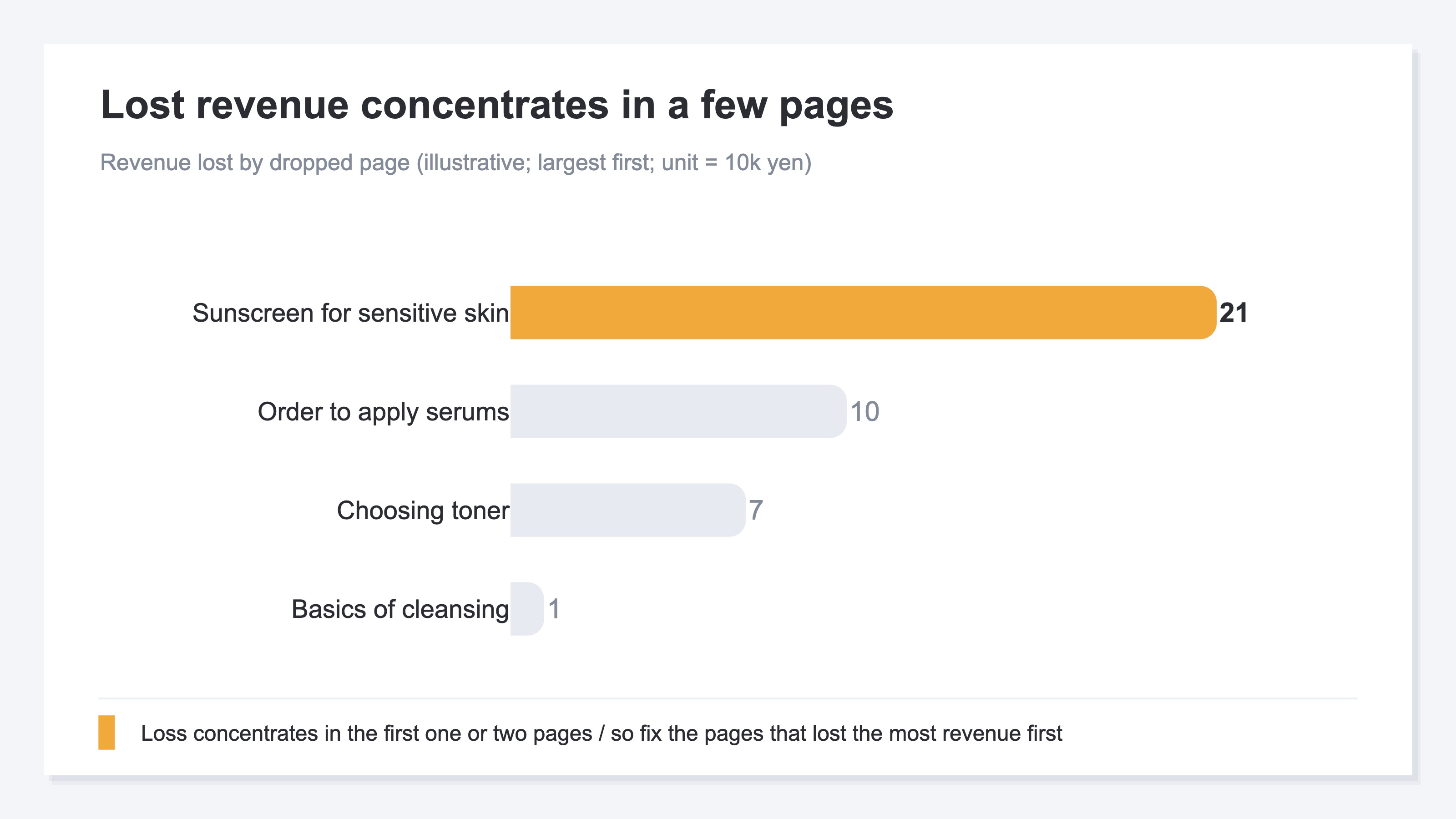
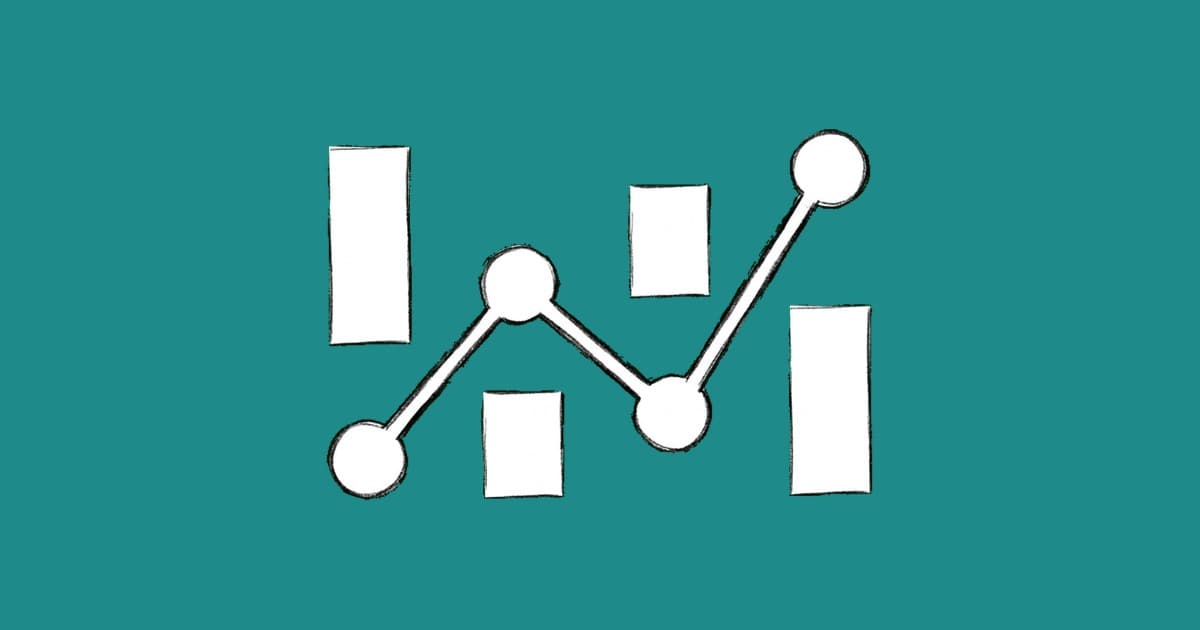
The chart above is an illustration of dropped pages sorted by revenue lost, largest first. The bars concentrate in the first few pages; the rest are short. This concentration is exactly the case for dropping "fix everything uniformly" and setting a priority. If effort is finite and lost revenue is concentrated, there's one answer: fix the pages that lost the most revenue first.
Here a bit of resolve is needed. Not every dropped page returns to its original rank. Since it waits on Google's reassessment, some pages won't come back. That's all the more reason to steer effort toward the pages worth reviving — the ones that were earning revenue. Conversely, old low-quality pages that never contributed revenue may be healthier to clear out than to polish on this occasion. That judgment is covered in Three conditions for deleting old content. Not trying to handle every page is the first step to protecting limited effort.
3. Re-sort by revenue lost#
So how, concretely, do you order pages by revenue lost the most? This is where many people stumble. The moment you drop, you open Google Search Console — but what's there is clicks, impressions, and position, not "how much revenue this drop cost." So the handy substitute is to fix from the top in order of the biggest click loss. It's the most natural move that completes for free, and it's also the trap.
Because most-clicks order and revenue-lost order don't match. A page that gathers plenty of clicks but only leads to low-order-value products, versus a page with few clicks that connects directly to high-order-value products — here, the page that lost the most clicks often turns out to be barely hurting in revenue. Fix from the top by click order, and the page that lost the most revenue gets pushed back, dropping your recovery efficiency.
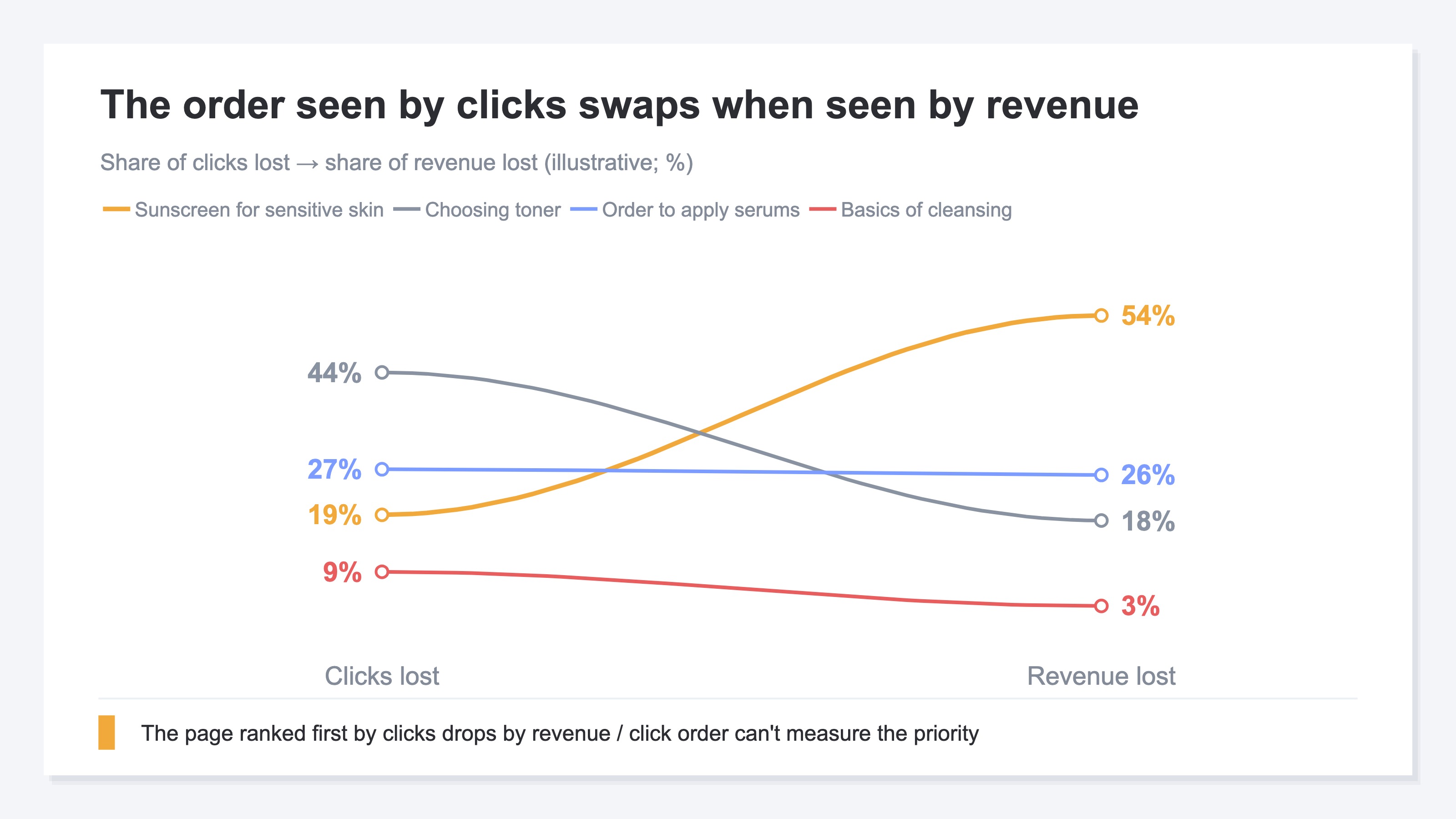
The chart above is an illustration linking the order seen by clicks lost (left) with the order seen by revenue lost (right). The lines cross sharply. The page ranked first by clicks moves toward the bottom by revenue. A high-order-value page that was unremarkable by clicks moves to the top by revenue. This swap is the crux: click order can't measure the priority.
So what you need is to re-sort the dropped pages by revenue lost. But Google Search Console structurally shows clicks at most, so matching revenue requires manually tying per-page purchase data together — a tally you redo across dozens of pages every time. Simple in idea, heavy in operation. The neighboring question of which article to rewrite first is covered in Deciding rewrite priority by revenue, but for spam-update recovery too, the axis that works is the same: order of revenue lost.
RevenueScope's solution
In recovering from a ranking drop, what you keep hitting in the end is the same wall. You can find the dropped pages, but which of them lost the most revenue can't be told from a Google Search Console screen that only shows clicks. You end up redoing the revenue-matching tally by hand every time.
RevenueScope solves this manual work. It overlays the landed revenue generated with a page as the entry point (the amount ultimately purchased after entering from that page) with the month-over-month move in clicks, making it possible to sort the dropped pages by revenue impact, largest first. Below is an illustrative example of that reordering using a cosmetics EC's demo data.
| Dropped page | Clicks (MoM) | Landed revenue (yen) | Rank by clicks | Rank by revenue |
|---|---|---|---|---|
| /blog/sunscreen-sensitive-skin | −180 | 214,000 | 3rd | 1st |
| /blog/serum-application-order | −260 | 96,000 | 2nd | 2nd |
| /blog/toner-guide-beginners | −420 | 68,000 | 1st | 3rd |
| /blog/cleansing-basics | −90 | 12,000 | 4th | 4th |
The notable thing in this table is that /blog/toner-guide-beginners, which lost the most clicks, is only 3rd in revenue. Conversely, /blog/sunscreen-sensitive-skin — 3rd in click loss — is top by landed revenue lost. Fix from the top by click order and this high-order-value page would have been pushed back. Only by re-sorting by revenue does the first page to defend become clear.
Identifying and correcting the spam-policy violation stays manual work of holding it against the guidelines. What RevenueScope handles is providing the material for the priority call — from which page to start so the revenue you win back is greatest. Even if recovery takes months, you can spend those months on the highest-revenue pages. Steering limited effort toward the pages that carry revenue is of a piece with deciding price by where the profit sits (see: Rethinking EC pricing by revenue). You can see the actual re-sorting screen in the demo.
FAQ#
Q1. Will rankings dropped by a spam update return right away once I fix them?
Not right away. Google states that recovering an evaluation lowered by an update can take several months and may wait for reassessment at the next update. There's no instant fix, so it's practical to spend those months correcting the pages that lost the most revenue. Rather than rushing to fix every page at once, work through the ones that move the needle in order.
Q2. Isn't fixing in order of biggest click loss in Google Search Console enough?
Click order diverges from revenue-lost order. The page that lost the most clicks is often barely hurting in revenue. Google Search Console shows only clicks and impressions, not how much revenue a page lost. Only by re-sorting by revenue does the first high-order-value page to defend come into view.
Q3. Can a tool tell me why my ranking dropped?
Diagnosing the cause can't be handed off to a tool. Identifying and correcting which spam-policy item you tripped is manual work of holding your site against the guidelines. What a tool can help with is the ordering — from which page to start so the revenue you win back is greatest. Split it: cause by hand, order by data.
Summary#
Even when Google's spam update drops your rankings, they don't return automatically. Recovery can take several months and may wait for the next reassessment — accept that timeline, and where you spend limited effort becomes the fork in recovery. A reflexive full overhaul eats your effort first and can shake your evaluation instead.
The revenue you lost is concentrated in a few pages. So the order to fix isn't most-clicks-first, it's most-revenue-lost-first. Since Google Search Console shows only clicks, you miss the swap where a page with few clicks but a high order value is the one with the biggest impact on revenue. On the premise that not everything returns, fix from the pages that earn revenue. Cause-finding by hand, fix-order by data. Start by re-examining one dropped page not by clicks but by "the revenue that page lost." The page to defend settles into an order you can stand behind, not a hunch.
See which ads actually drive revenue, at a glance
Free up to 5,000 sessions/month, AI analyst included. No credit card required. Up and running in 5 minutes.