Shopify is deprecating storefront script tags. October 1, 2026 and March 1, 2027 stop different things, and until the replacement is in place there is a window where the old tag and its replacement both load. What moves is not the orders. It is the measured numbers.
Contents
TL;DR#
- On August 24, 2026, Shopify announced the deprecation of storefront script tags
- What stops on October 1, 2026 is creation and updates, and existing tags keep loading until March 1, 2027
- During the migration the old tag and its replacement both load, and the documentation says analytics events can be double-counted
- The replacement stays off until the store turns it on, and nothing appears on screen when a tag stops loading
- The only signal is how sessions by channel and orders in the admin changed before and after the migration
1. Only Creation and Updates Stop in October#
October 1, 2026 is not the day the measurement tags you already have stop loading. Two things stop that day: apps creating script tags, and apps updating them[1]. Existing tags keep loading until March 1, 2027[1]. Reading the list and deleting from it stay available until that date. Whatever script tags are left no longer run, so deleting them is not required[2].
What gets confusing is telling this apart from the purchase confirmation side. The documentation says storefronts are the last place script tags still run[2].
Storefronts are the last place script tags still run. They already stopped working on the Order status page.
Order status page script tags follow a separate, earlier schedule. They stopped loading on August 28, 2025 for Plus stores and on August 26, 2026 for everyone else[3]. Much of the commentary written in Japanese is about that schedule.
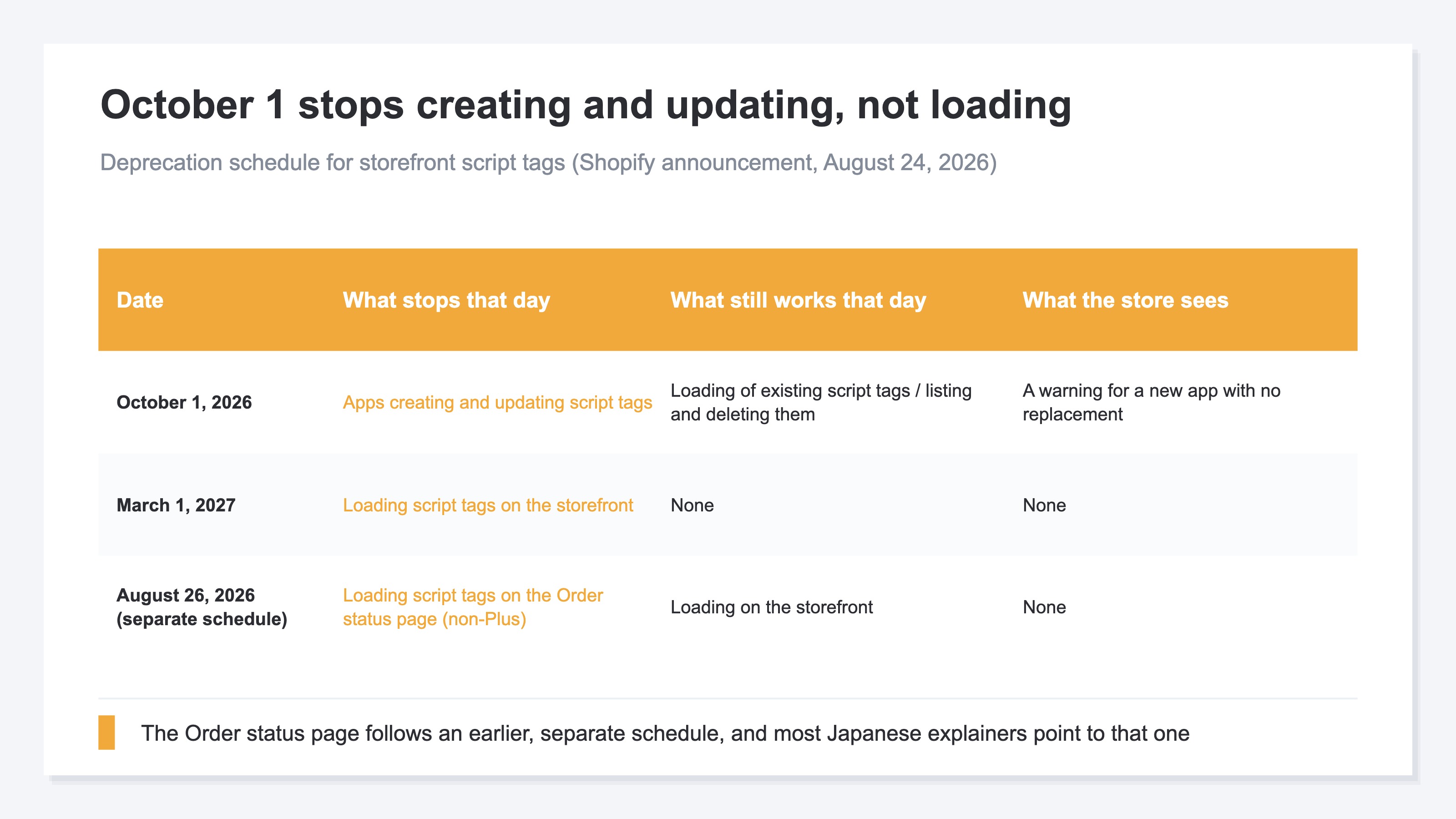
The replacements split by purpose: app embed blocks for loading JavaScript, web pixels for measurement and conversions[1]. Web pixels run in a sandbox, so anything that depends on reading or writing the DOM is out of reach[4].
The first move tends to be hunting for the tags that will stop loading, but what you are hunting for changes with the date. The first move is to separate the three dates. Measurement setup itself is covered in the GA4 ecommerce setup checklist.
2. The Window Where the Old Tag and Its Replacement Both Load#
Until the replacement is in place, the old script tag and its replacement can both load on the same page. The script loads twice, and the event is counted twice[2].
Until then, a script tag and its replacement running at the same time will load your script twice, which can double-count analytics events or render your app's UI twice.
This does not cover the purchase event. Order status page tags already stopped loading[3], so what moves is the sessions, page views and add-to-cart events that occur on product pages and in the cart.
In this article, numbers from measurement tags loaded through a Shopify app (ad pixels, heatmaps, analytics) are called app-side measurement. Numbers from tags installed through the theme or through GTM are site-side measurement.
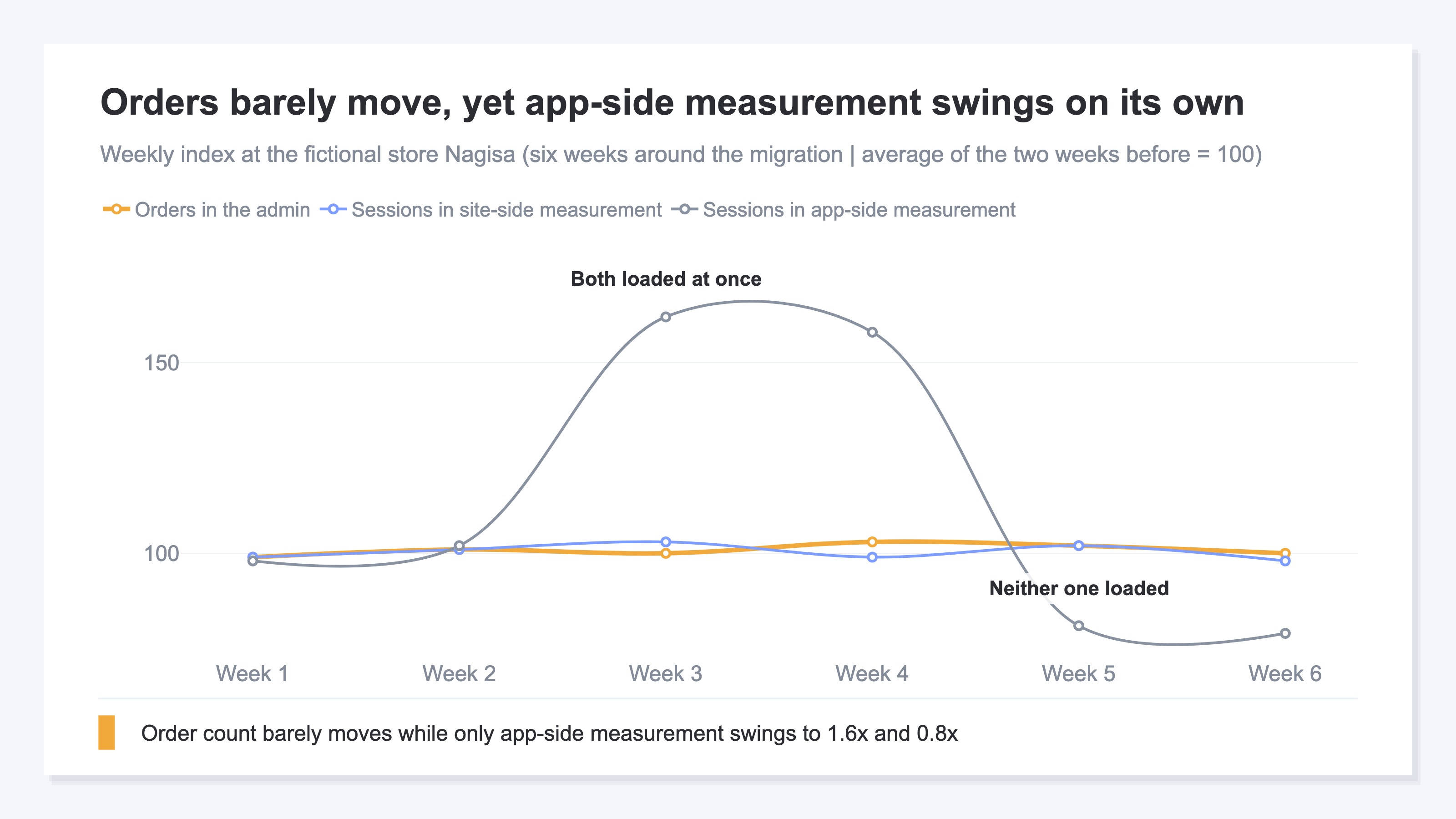
In weeks 3 and 4, app-side sessions index at 162 and 158, around 1.6x the two-week average before the migration. In weeks 5 and 6 they fall to 81 and 79, around 0.8x. Over the same weeks, orders in the order management screen and site-side sessions stay in the 98 to 103 range.
What actually sold did not change. Double counting inflates sessions, which on paper pushes CVR (the share of visits that end in a purchase) and RPS (revenue per session) down. Missing data shrinks the denominator, which on paper pushes them up. Allocate ad spend from app-side measurement alone and you back the wrong channel.
What happens around transaction_id is in purchases double-counted in GTM. The gap between the measurement side and the order management screen is in why GA4 revenue does not match Shopify.
3. Missing Data Starts With No Signal#
The replacement app embed block stays inactive until the store turns it on in the theme editor[2].
App embed blocks are inactive until an app user turns them on, so don't delete a script tag until you've confirmed that its replacement is running.
There is no way for an app to turn these on across existing stores in bulk. A Shopify employee answered as much on the official developer community[5].
there's no programmatic way to enable them for existing users
The last move of the migration stays with the store, by hand.
Turning It On After a Theme Switch#
App embed blocks are enabled per theme, so publishing a different theme leaves them off on that theme[2]. For stores that swap themes each season, the enablement check comes back every time.
The Warning on Newly Installed Apps#
From October 1, 2026, installing a new app that uses script tags shows a dismissible warning banner[2]. The announcement says it appears when the app you install has no replacement, and it does not say it appears for apps already installed.
What a store can check on its own is limited. The announcement names only apps that create script tags with a display_scope of online_store[1]. A script tag with a display_scope of all also keeps loading on the storefront until March 1, 2027, so it is treated the same way[3]. Which of your apps that covers cannot be determined from the official material. In practice, checking means asking each app's provider, one at a time. The idea is simple, and the work repeats once per app.
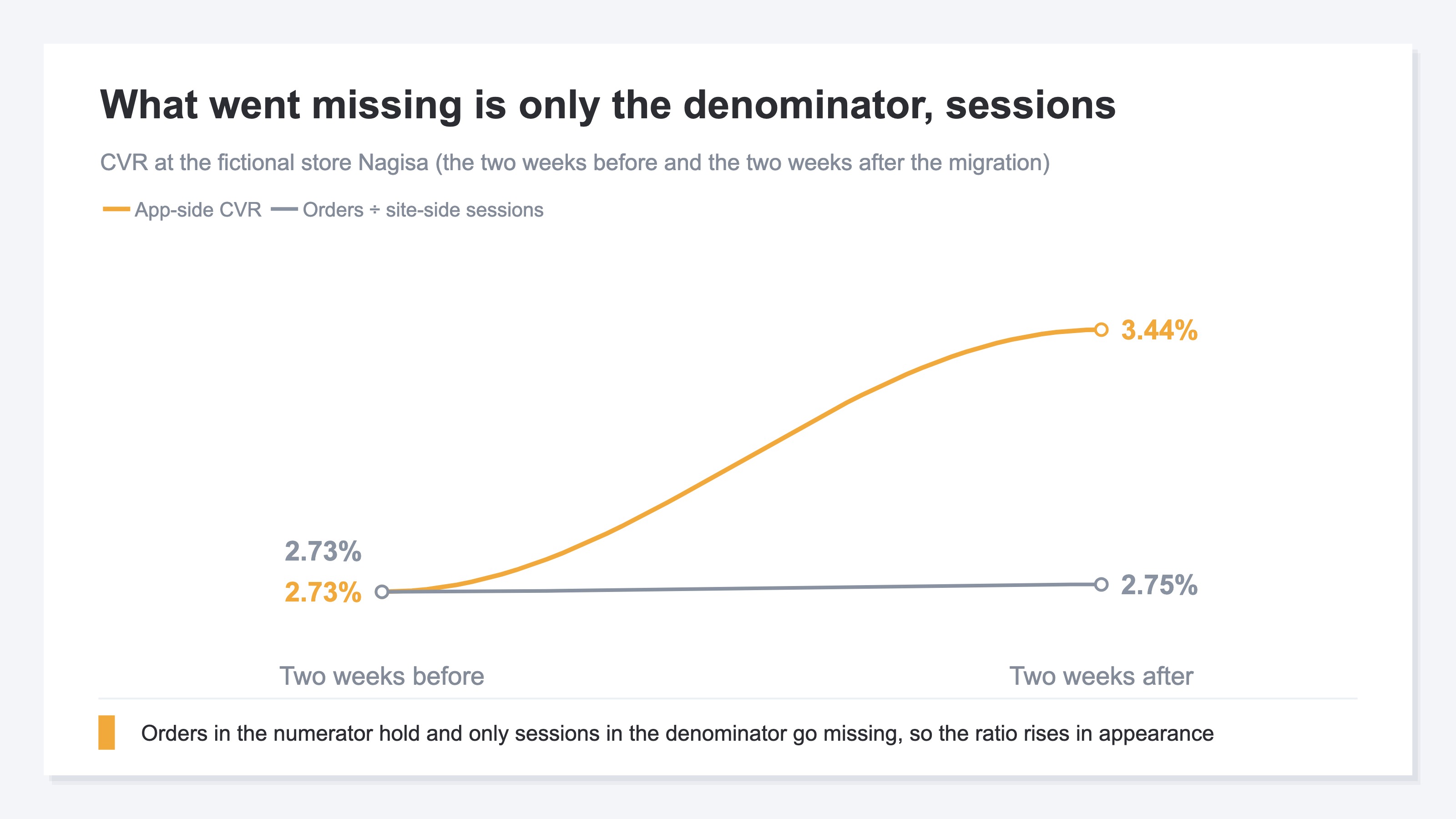
Purchase confirmation page script tags stopped on the earlier schedule and are not part of this deprecation[3]. When the app-side record of a purchase survives through another path, the only thing that goes missing is the denominator: sessions. At the fictional store Nagisa, app-side CVR rises from 2.73% to 3.44%, while orders ÷ site-side sessions read 2.73% and 2.75%. How to compare before and after on the same terms is in carrying measurement across a cart migration.
A script tag that stopped loading appears nowhere in the store admin. The app stays installed and stays in the list. The place where you can notice it is sessions by channel and orders in the admin, before and after the migration.
RevenueScope solution
What RevenueScope provides is a state where before and after the migration can be pulled on the same terms. Measurement tags are installed in the theme's theme.liquid or through GTM, and Shopify app script tags are not used. A tag placed on the theme side runs on a path separate from an app's script tag, which makes it a baseline series for comparing before and after on the same terms.
Give it a period and it shows sessions by channel (human visits, with bots excluded). Specify the period before and the period after, and you get two results on the same basis. The channel breakdown is a snapshot of the period you specify, and the period-over-period comparison is attached to the site-wide KPIs.
Purchase counts and revenue appear in the same table at stores where the purchase event flows into the dataLayer on the same page. Whether that arrangement holds on Shopify's purchase confirmation page is not something we can say today.
Asked through MCP, an AI assistant returns this by channel. The figures are written out for the fictional store Nagisa.
Two weeks before the migration
| Channel | Sessions |
|---|---|
| Google search | 4,000 |
| Direct | 2,000 |
| 1,000 | |
| Referral | 1,000 |
| Total | 8,000 |
Two weeks after the migration
| Channel | Sessions |
|---|---|
| Google search | 4,000 |
| Direct | 1,900 |
| 1,050 | |
| Referral | 1,050 |
| Total | 8,000 |
Orders in the order management screen read 218 and 220 over the same two weeks. Those two come from the store admin, not from RevenueScope.
Note: the figures belong to the fictional store Nagisa, placed here for explanation and rounded. The demo screen is built on the sample store's data, rebuilt daily, so the order of channels does not match this table.
Sessions are 8,000 and 8,000, and orders in the admin 218 and 220, so the differences sit around 1%. Over the same six weeks, only app-side measurement swings to 1.6x and 0.8x. Put the side with the smaller difference at the base, and you can narrow it down: what is swinging is the measurement, not the traffic.
The next move is to ask the providers of the app-side measurement tags that changed over that period. RevenueScope shows which channel opened a gap and when, which is the material for narrowing the inquiry down to one. What happens on the referrer side is covered in Shopify referrers full of (none).
FAQ#
Frequently asked questions#
Q. Once October 1, 2026 passes, do the measurement tags we already have stop loading right away?
A. No, the existing tags keep loading. What stops on October 1 is creation and updates[1]. Existing script tags keep loading until March 1, 2027[2].
Q. Can a store find out on its own which apps are affected?
A. The announcement names only apps that create script tags with a display_scope of online_store[1]. A script tag with a display_scope of all also keeps loading on the storefront until March 1, 2027, so it is treated the same way[3]. Which of your apps that covers cannot be determined from the official material, so it comes down to asking each app's provider.
Q. Can the numbers recorded during the migration be corrected afterwards?
A. There is no mechanism for restoring double-counted values to what they should have been. What you can do is take that window out of your decisions and compare before and after on the same terms. Allocate ad spend from the series with the smaller difference.
Summary#
What stops on October 1, 2026 is creation and updates, and existing script tags keep loading until March 1, 2027[1]. The order status page follows a separate, earlier schedule, so separate the targets before you read commentary about it[3].
During the migration the old tag and its replacement both load, and events are counted twice[2]. If the replacement does not land in time, measurement goes missing instead. Neither changes the actual orders, and neither raises an error in the admin. The signal is how sessions by channel and orders in the admin changed before and after.
See which ads actually drive revenue, at a glance
Free up to 5,000 sessions/month, AI connection included. No credit card required. Up and running in 5 minutes.
References#
- [1] Shopify "Script tags are deprecated and will stop running on March 1, 2027" (2026)
- [2] Shopify "Storefront script tags" (2026)
- [3] Shopify "Order status script tags" (2026)
- [4] Shopify "About web pixels" (2026)
- [5] Shopify Developer Community "Deprecation: Script tags will stop running on March 1, 2027" (2026)