Referrals from domains you don't recognize are climbing, and sessions are the only thing going up. There is something to settle before you go looking for an exclusion list. This article covers how to judge whether a visit is real from the substance of the visit rather than the name of the referrer, and the order in which to remove them.
Contents
TL;DR#
-
The name of the referrer does not decide whether a visit is real
New bots appear every day, so a list of domains can't keep up
-
Judge in two stages: behavior, then distribution
Look at dwell, pages per session and whether a purchase happened, then check whether three shifts landed in the same period
-
When you remove them, play the moves you can undo first
Report-side filters can be put back. The referral exclusion setting doesn't repair past reports. Country-level blocking takes real visits down with it
1. Two Paths That Bring Unfamiliar Referrers#
Unfamiliar referrers split into traffic that really reaches the site and traffic that leaves a record without ever arriving. There is one place to look to tell them apart: whether the pageviews tied to that referrer are attached to pages that actually exist.
The first kind is crawlers and scrapers genuinely opening pages. The measurement tag fires, and the server-side access log holds a request at the same timestamp. The visit is real; it simply has no intention of buying.
The second kind is what gets called a ghost referral. GA4 also officially provides a path for sending events directly over HTTP requests[5]. Data is accepted without passing through a tag placed on a page, so measurement data can arrive even when no page was opened. In this type, the recorded page path doesn't exist on your site, or it's a URL you deleted years ago. Open the access log for the same timestamp and no matching request is there. The network-side blocking covered later works only on the first kind.
Thales reports that bots have come to account for more than half of the world's web traffic[4]. Unfamiliar referrers increasing is less an anomaly than the default state. How this throws channel evaluation off is covered in what bot traffic is.
2. The Domain Name Doesn't Decide It#
Some readers arrived here from a search for a referral spam domain list. To say it up front: this article does not carry a list. A list can't make the judgment.
New bots are born every day. Visits that carry no malice yet aren't human have increased too, such as AI agents that look at sites on a person's behalf. GA4 automatically excludes known bots and spiders, but what it identifies them with is a combination of Google research and a list maintained by the IAB[2]. Anything not on it isn't excluded. A list goes stale faster than it can be assembled.
So move the axis of judgment from the name to the behavior. Four things to look at: average dwell time, whether scrolling happened, pages viewed per session, and whether a purchase happened. A referrer that reaches a purchase is a real visit even if its name is unreadable. Conversely, if hundreds of visits in a row stay under a second and read one page before leaving, whether the domain is a famous one has nothing to do with it.
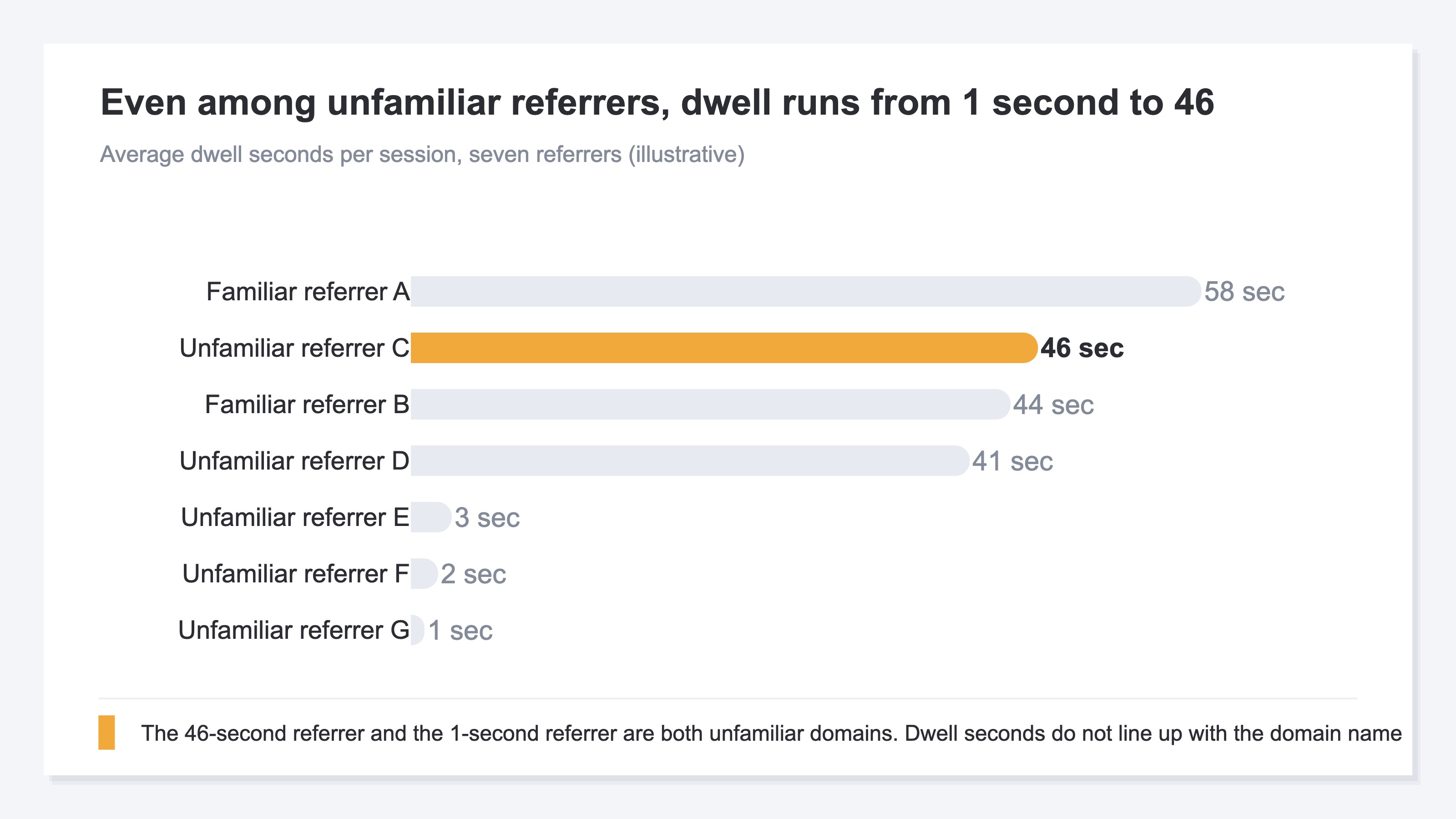
The nature of exclusion itself is worth noting too. Behavior metrics push real visits toward the suspicious side. The record left by someone on a 4G connection who waited eight seconds for the page and left is short on dwell with no further pages, the same shape as automated crawling. Visits over a VPN also look suspicious because they arrive in sequence from the same route. Hand the judgment to a single metric and it tips toward cutting these visits off. The procedure for verifying a spike by channel is laid out in traffic that suddenly spiked.
3. Judge by the Distribution, Not by One Visit#
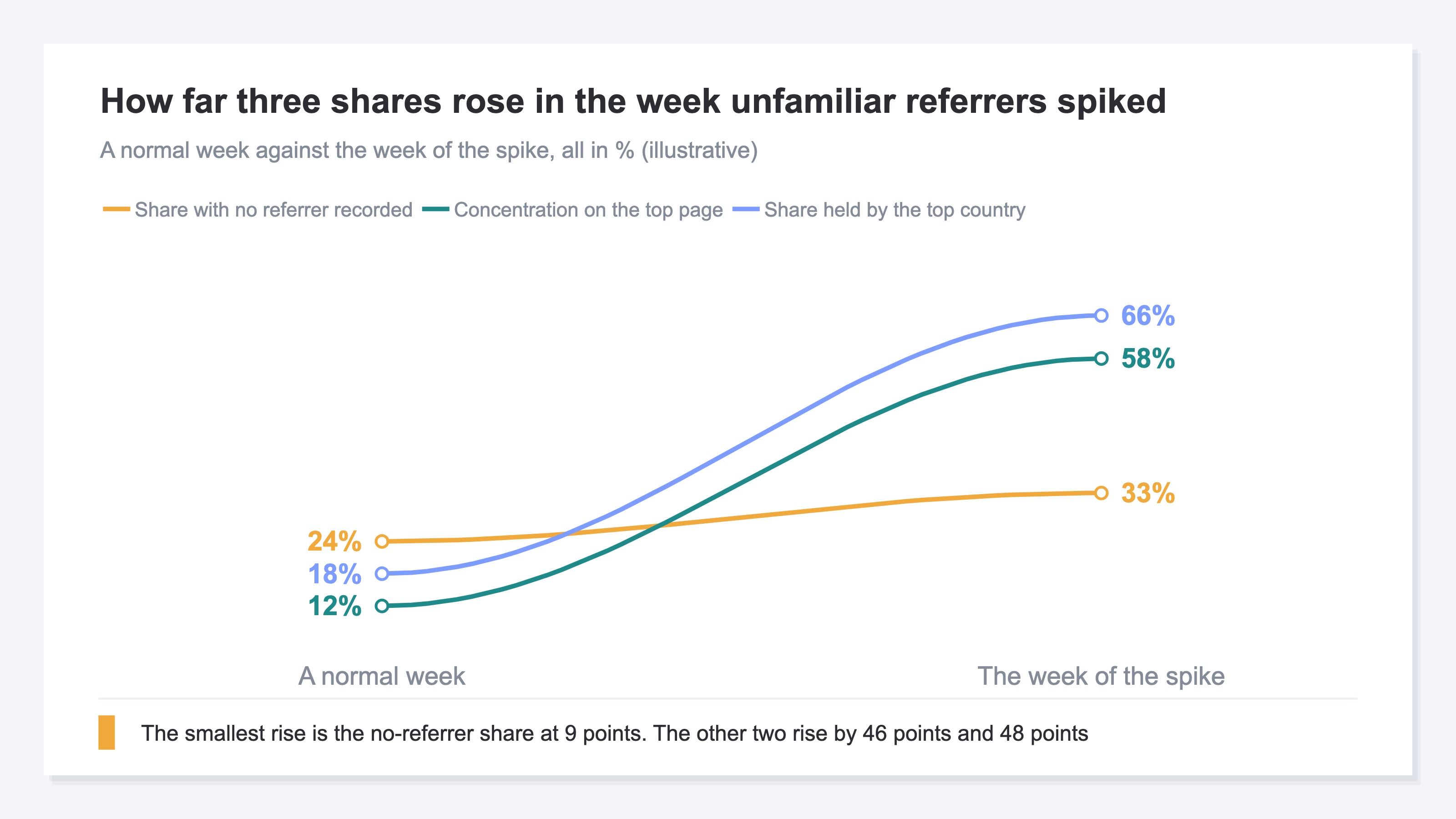
A shift in one distribution is not a judgment on its own. It carries meaning only when several land in the same period. There are three to look at.
First, whether the share of visits with no referrer recorded has moved away from its normal level. This share also rises from a missing measurement tag or from in-app browsers, though. The candidates are laid out in 5 causes behind GA4 "Direct / (none)".
Next, concentration on a specific URL. Most of the traffic gathers on a page you deleted years ago, or on a path you don't remember publishing. This too happens normally in a week when one article spreads on social.
And then a skew toward one country. A single country takes most of the traffic. For a store growing cross-border sales, that is the result itself. Reading country-level traffic against revenue is covered in whether overseas traffic turns into revenue.
All three, taken alone, explain themselves as ordinary variation.
4. Don't Get the Order of Removal Wrong#
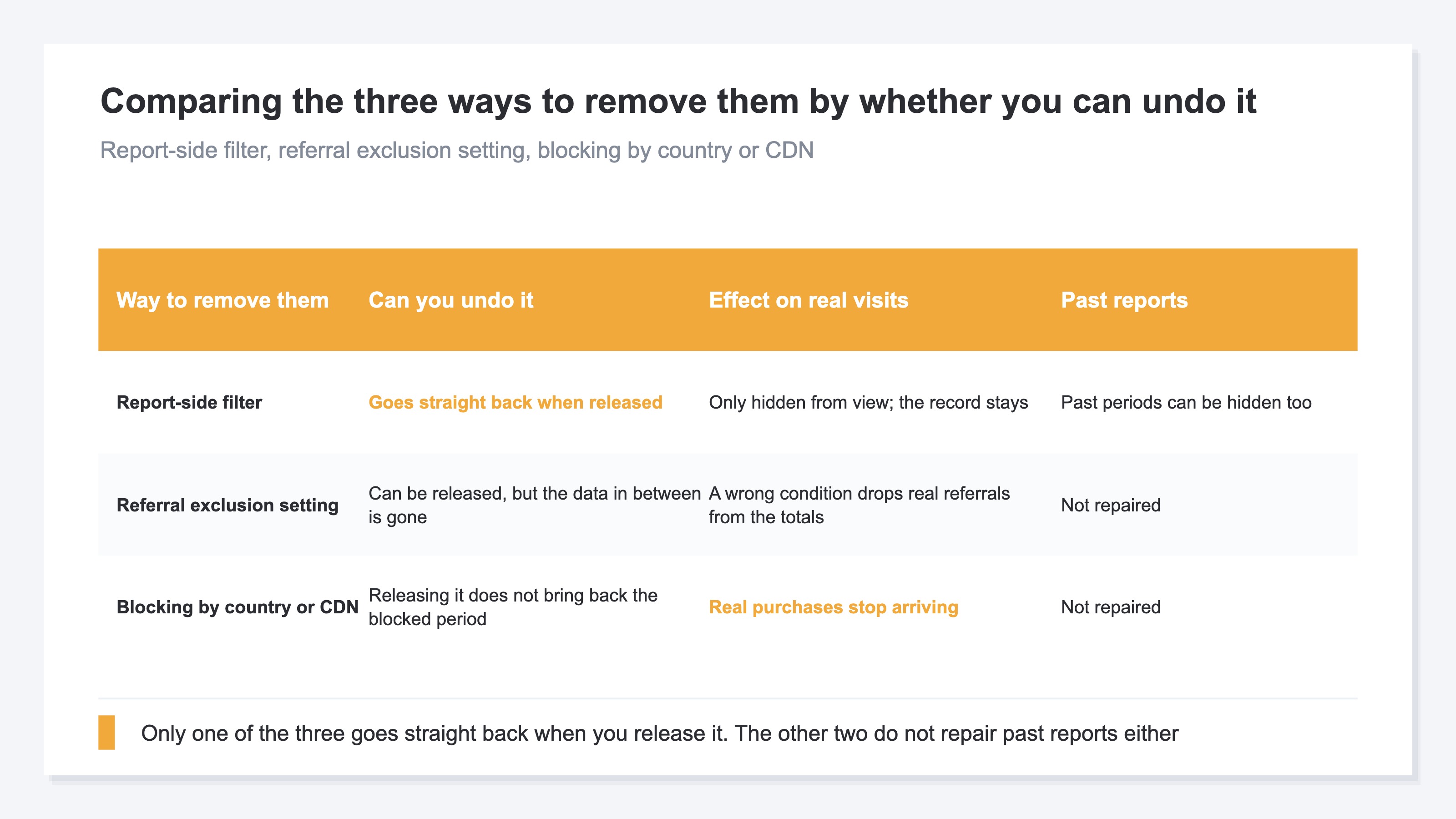
The order runs from the moves you can undo to the moves you cannot. Skip ahead and real visits disappear from the record along with the contamination.
The first move is a report-side filter. It only takes them out of what is displayed, so a wrong judgment goes back the moment you release it. Two limits. You add a condition every time another referrer appears, and nothing in the report records how many were taken out.
Next is the referral exclusion setting. Events matching the condition get ignore_referrer attached, and that referring URL drops out of referral traffic[1]. The visit itself isn't removed; it stops being counted as a referrer. And because the setting applies to data from the point the Google tag is running onward, contaminated past reports aren't repaired. The procedure itself is left to Google's official documentation[1].
There is also a setting called data filters, but it doesn't fit this purpose. It takes received events out of processing, and the effect is permanent. The kinds you can specify are three — developer, internal traffic and web hostname — and a referring domain cannot be one of the conditions[3].
Last is blocking at the country level or on the CDN. This one is irreversible and takes real visits with it for certain. Purchases from a blocked country stop appearing in the reports and in the revenue from the following month.
Leaving contamination in place costs more than dulled internal judgment. To the agency or business partner handed that report, the numbers can only read as broken.
Back to the three-series graph from earlier. Pull out the share of visits with no referrer on its own and the size of the rise sits inside the month-to-month noise. It was because all three moved apart in the same week that it could be called abnormal at all; for someone opening separate reports one after another, that week passed without incident. Judging simultaneity needs the three over the same period on the same screen, and once exclusion starts, how many were taken out joins them there.
RevenueScope solution
RevenueScope aggregates with the number of exclusions kept in place. For each channel it returns the session count left after bot judgment and the number excluded, on the same row. Revenue and RPS (revenue per session) sit on the same row too, and the denominator is sessions after exclusion. A channel that is nothing but bot judgment is kept as well, in the form of zero sessions with an exclusion count beside it.
Asking RevenueScope for fictional store A's traffic breakdown (illustrative)
| Channel | Sessions | Bot excluded | Revenue | RPS |
|---|---|---|---|---|
| Google search | 1,200 | 40 | ¥600,000 | ¥500 |
| Direct | 400 | 20 | ¥80,000 | ¥200 |
| Referral | 30 | 480 | ¥0 | ¥0 |
Note: the table above is one example for explanation. What the demo screen loads is the sample data of the sample store (refreshed daily), so both the exclusion counts and the amounts change from day to day.
What makes this case worth reading is the Referral line. Sessions judged human come to 30, and the 480 behind them were excluded as bots. Revenue and RPS are both ¥0. What does the work is not the ¥0 but the 480 sitting next to it. The reason for the ¥0 is not that nothing sold but that almost no humans came, and that explanation holds inside the same row. Had a report-side filter hidden Referral, that 480 would have gone out of sight along with it.
The next move is two things. Use this row as it stands to explain the situation to a third party, and make next month's budget decision on post-exclusion RPS (¥500 for Google search and ¥200 for Direct). Invalid clicks, on the side where ad spend is charged, run on a different mechanism. The difference is laid out in invalid click filtering versus bot exclusion.
FAQ#
Frequently asked questions#
Q. Is there a list of referral spam domains somewhere?
A. Volunteer-maintained lists exist. New ones appear every day, though, so starting from a list means never catching up. Judge on dwell, pages per session and whether a purchase happened, and keep the list as reference only.
Q. If I set up referral exclusion, will past reports be repaired too?
A. They won't. The setting applies to data from the point the Google tag is running onward[1]. For the contaminated period, take it out of the display with a report-side filter, or take it out of the comparison.
Q. I hear GA4 excludes bots automatically. Isn't that enough?
A. GA4 does automatically filter bots and spiders it already recognizes. But identification is a combination of Google research and the IAB's list, and there is no way to check how much was excluded either[2]. How much is still getting through before it lands on a list is judged outside this setting.
Summary#
When unfamiliar referrers increase, entering through a list of domain names means never catching up. New bots appear every day and a known list always trails behind. Start the judgment with dwell, pages per session and whether a purchase happened, then check whether a swing toward visits with no referrer, concentration on a specific URL and a skew toward one country landed in the same period.
When you remove them, play the moves you can undo first. The referral exclusion setting works only on data from that point onward and doesn't repair the past. Country-level blocking takes real visits with it. Keep a record of how many were taken out and the numbers left after the contamination is gone can be explained to people other than yourself.
See which ads actually drive revenue, at a glance
Free up to 2,000 sessions/month, AI connection included. No credit card required. Up and running in 5 minutes.