Impressions in Google Search Console jumped last week and clicks barely moved. That result is not a reason to suspect your titles right away. Sometimes what grew is only the set of queries being counted, and a rewrite is a move that runs in exactly the opposite direction.
Contents
TL;DR#
- An impression spike splits three ways: exposure that genuinely grew, follow-up questions inside Google's AI Mode, and impressions on keywords you were never targeting
- Clicks, impressions and position from AI Mode are included in the ordinary Search performance report, and the AI Mode portion cannot be pulled out on its own
- A follow-up question is counted as a new query. Impressions pile up while clicks don't, so CTR falls
- What the generative AI performance report gives you stops at impressions for AI Overviews and AI Mode
- Whether the added exposure became revenue appears in neither report
1. When Only Impressions Grow and Clicks Stay Flat#
The same sentence — "impressions suddenly went up" — splits into three causes. The first thing to check is not CTR but the raw click count.
The straightforward case is exposure genuinely increasing. Your position rose, or you started appearing on keywords that had never shown you before. Clicks follow with a lag here, so CTR doesn't collapse badly.
The awkward case is Google's AI Mode. When questions stack up inside a single conversation, only the impression side gets piled on. The mechanism is covered in the next section.
Last is the case of appearing on keywords you weren't targeting. When your site shows up on research queries far from your product names, impressions rise, but those readers are not arriving to buy. Clicks don't grow, and when they do they don't carry through to a purchase.
Which of the three you are looking at cannot be told from the CTR figure. CTR is clicks divided by impressions, so when the denominator grows it falls even though you did nothing to the article. Start the hunt for a cause from a fallen CTR and it always ends up being a conversation about titles and headings.
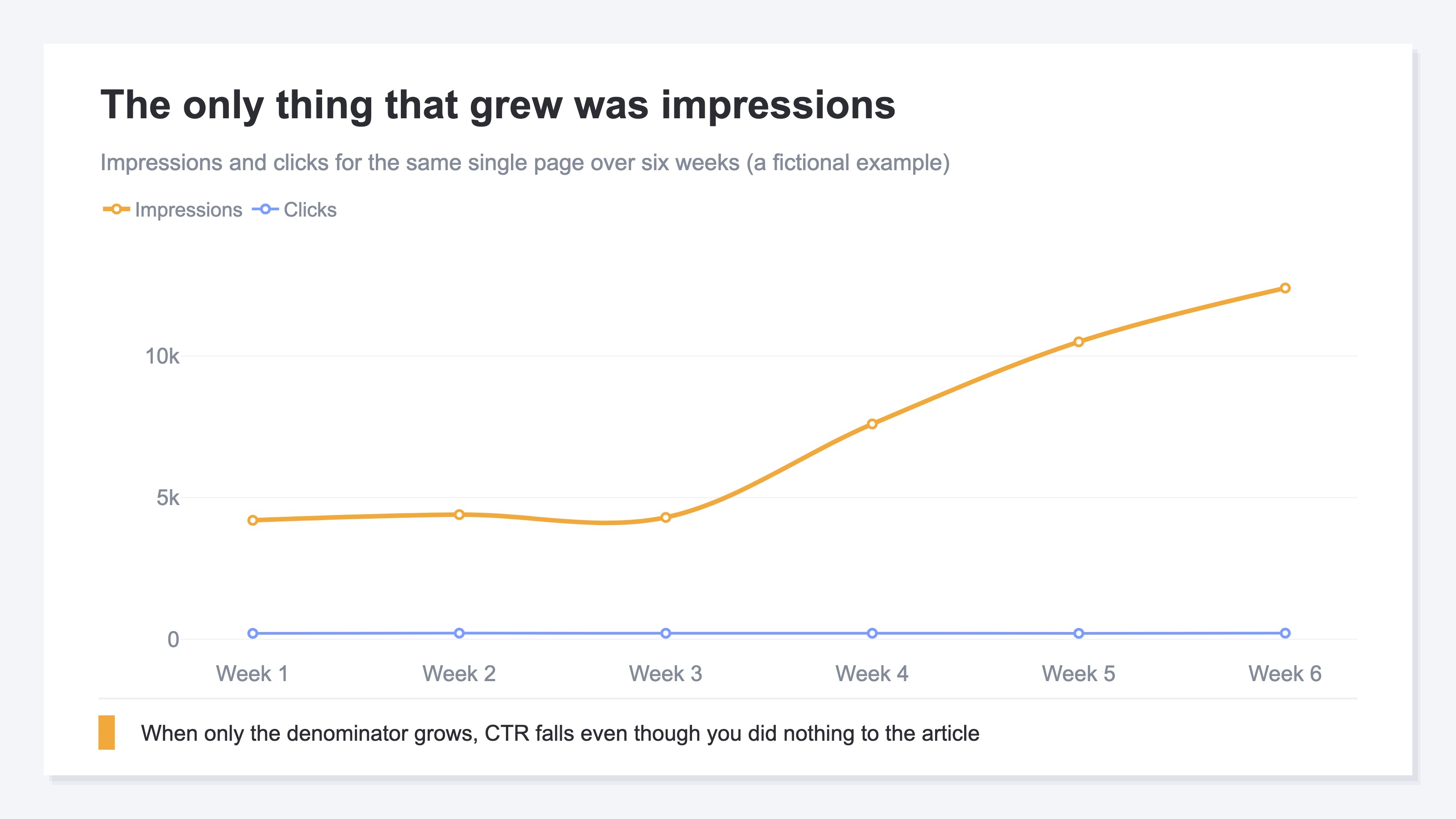
Laid out as a fictional example, the pattern looks like this. Impressions grow from 4,200 to 12,400 — close to 3x in three weeks — while clicks stay between 205 and 215. CTR falls from 5.0% to 1.7%. With two lines on the chart it is immediately clear that what moved was the denominator, not the numerator. Watching the single CTR line, you cannot make that distinction.
There is also a symptom around AI search that runs the other way. A link that is never shown is never counted as an impression, so the side where the number looks smaller than it feels is covered in Why AI Mode impressions are lower than you expect. Looking too high and looking too low are both AI Mode stories, but the causes are different.
2. Google's AI Mode Data Is Merged Into the Regular Report#
The numbers from AI Mode are not a separate report — they sit inside the Search performance report you already have open. Google's help documents how AI Mode is counted. Clicking a link to an external page in AI Mode counts as a click. Standard impression rules apply to impressions. Position in AI Mode follows the same methodology as a Google Search results page[1]. Clicks and position do not appear in a separate AI Mode slot; they blend into the numbers of the keywords you already had.
What matters is how follow-up questions are treated, and the help puts it this way.
If a user asks a follow-up question within AI Mode, they are essentially performing a new query. All impression, position, and click data in the new response are counted as coming from this new user query[2]
Even when it is one reader continuing one conversation, every stacked question adds the impressions of a new query. Clicks, meanwhile, count only the number of times that reader actually pressed a link. The denominator grows with the number of turns while the numerator stays at the number of presses. That is what the fall in CTR really is.
So open the generative AI performance report and separate them there? That move stops partway. The report is still being rolled out to a subset of owners, and some properties don't see it at all. When you can open it, what it includes is impressions for AI Overviews and AI Mode[3]. Click information and position information are not there. On top of that, the report includes data from the Web search type in the Performance report (Search results)[4]. The figures in the two reports are not something you add together — one is a part of the other.
How to read the generative AI performance report itself is covered in Reading GSC's AI search report.
Put together: no table anywhere shows you clicks that came from AI Mode. In the regular report they are merged into your existing keywords; in the generative AI performance report the data stops at impressions. You can confirm that impressions rose, yet how many of them came from AI Mode stays out of reach, at a grain that never matches.
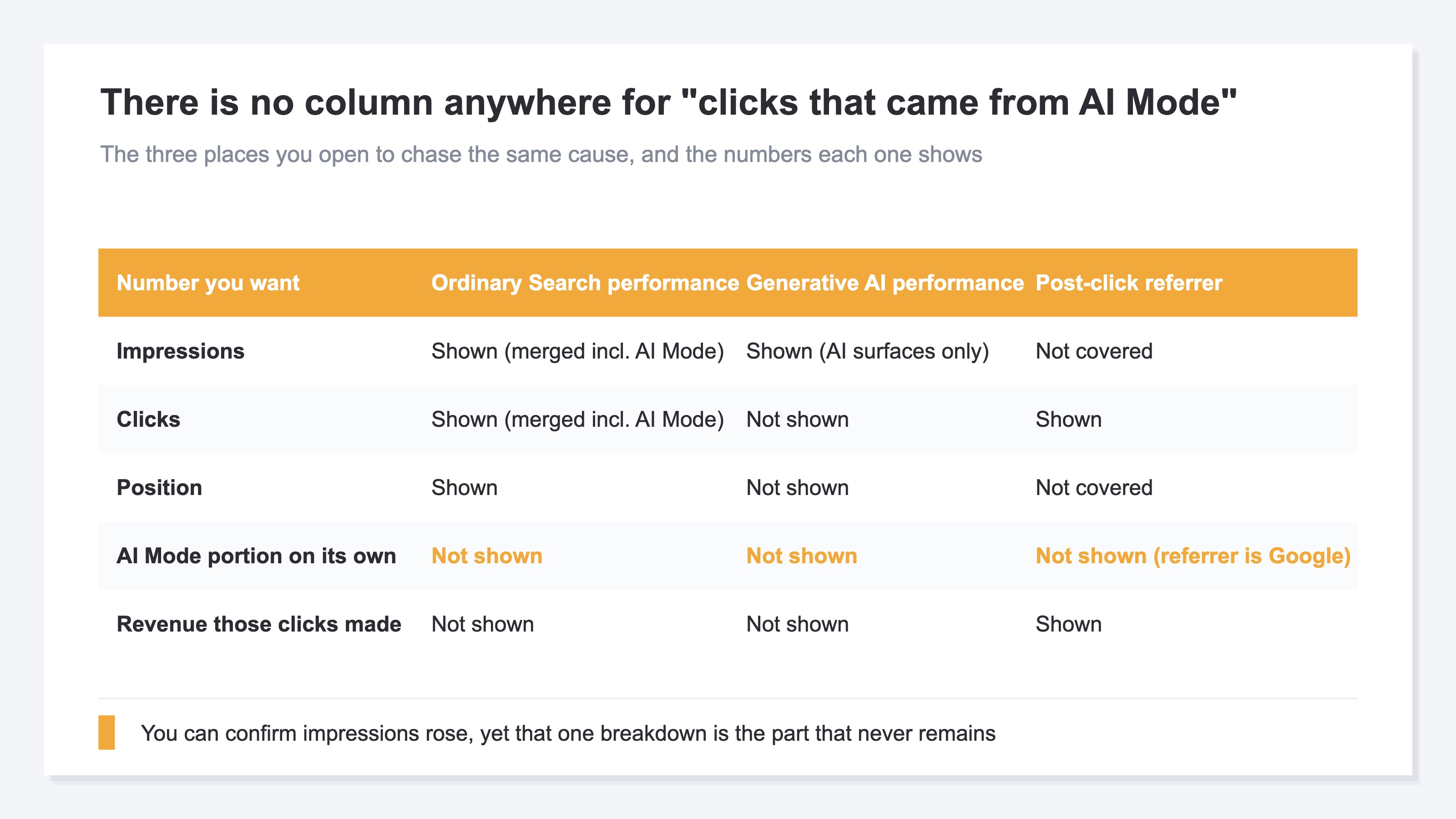
What the table leaves empty is the AI Mode portion pulled out on its own. On the side after the click — the visits that reached your site — a breakdown is available. Split by referrer, and AI assistants like ChatGPT and Claude can be confirmed as their own separate figure. A click from AI Mode carries Google as its referrer, so in that split it lands in the Google search row. The breakdown of impressions and the breakdown of arrivals are different numbers living in different places.
3. Read a CTR Drop as Your Own Failure and the Fix Goes Backwards#
The fact that CTR fell, on its own, does not settle whether things went well or badly.
CTR = Clicks ÷ Impressions
If impressions triple and clicks stay at 210, CTR is a third of what it was. Read that number as "the title is weak" and the next action is already decided. You rewrite the headings and the intro of a page whose position is rising, then look at CTR again the following week. The denominator doesn't shrink, so CTR doesn't come back. It doesn't come back, so you rewrite once more.
What breaks here is the page you rewrote. A heading that was already taking clicks got to that shape for a reason. When the cause of the number sits on the denominator and you edit the numerator, the only thing that changes is the part that was working.
The move swings to the opposite pole: defend, or fix. What decides it is not CTR but the raw click count and the position. If clicks hold around 210 and position hasn't dropped, that page is not weak. The ratio only looks different by the amount impressions grew. If the raw click count has fallen, on the other hand, this is not a story about a ratio — you are genuinely losing traffic.
If you land on the falling-clicks side, the order to fix in is in Impressions but no clicks: fix in order of revenue. When position is unchanged and only clicks fall, it matters whether readers stayed inside the AI's answer or whether you were cited and chosen. Same rank, fewer clicks covers how to tell those apart.
In internal reporting, putting this distinction first gets you done sooner. Present "CTR dropped to 1.7%" and the discussion of causes drifts toward titles. Present "impressions tripled, clicks flat, position unchanged" and everyone can share that what to check next is what's inside the added exposure.
4. Check the Impression Growth Against Revenue#
Take a fictional Store L example and split the 8,200 added impressions by keyword.
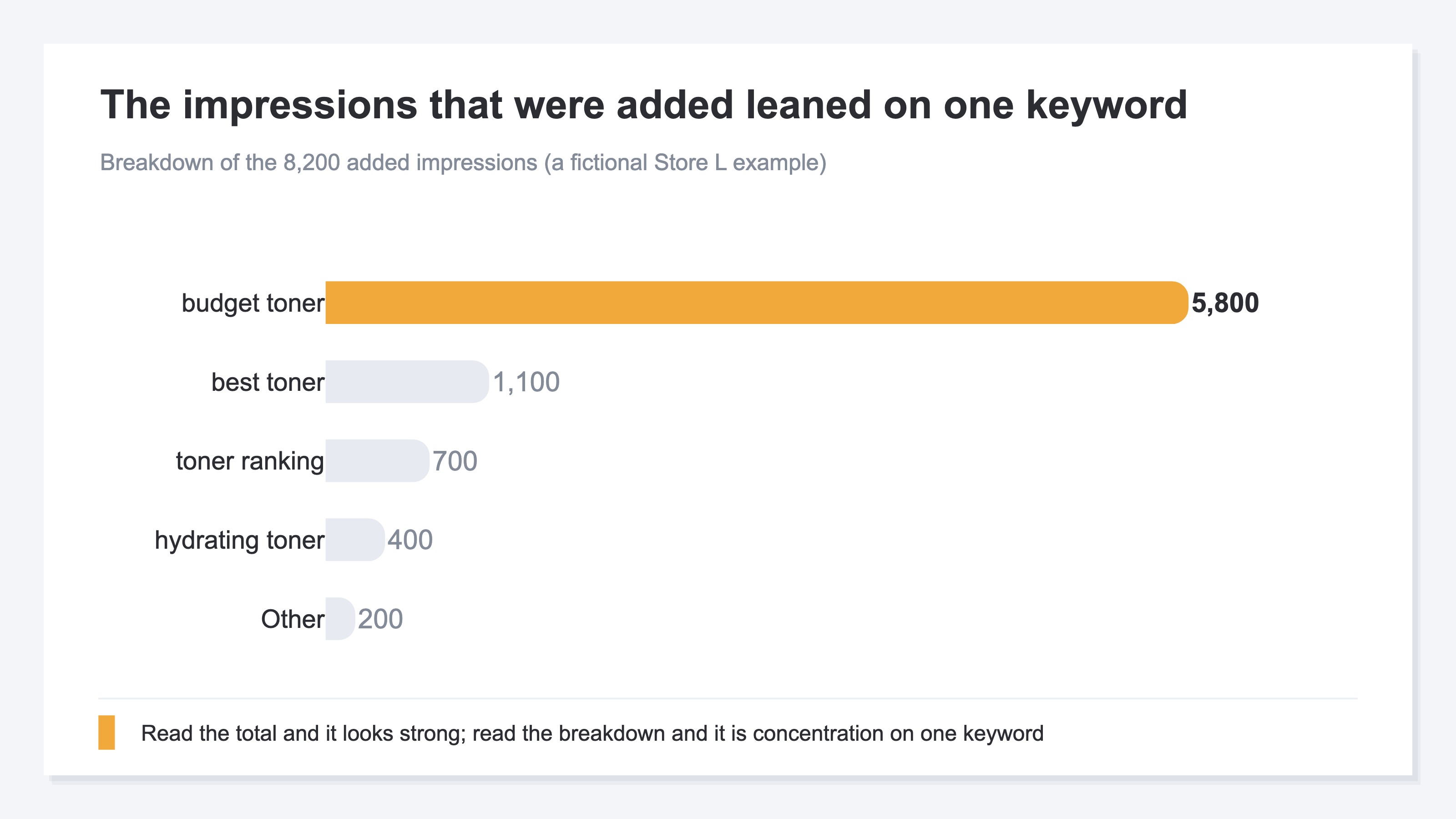
5,800 of them, 71% of the whole, leaned on the single keyword "budget toner." The rest scatter small, at 1,100, 700 and 400. Read only the impression total and it looks strong; what it actually is, is concentration on one keyword.
Once the pattern is visible, what to check next is decided too. The one concentrated keyword may just be impressions piling up as conversations stack. It may also be that more readers are going through to a purchase. In the first case there is nothing to defend; in the second it is the first row you defend.
The information that decision needs, though, isn't in hand. You know impressions down to the increase, and you know clicks. How much revenue those clicks became appears in neither the Search performance report nor the generative AI performance report. That exposure tripled and whether revenue rose are numbers you confirm separately.
What to treat as evidence of growth before revenue exists is covered in Four numbers to watch when you can't tell if your site is growing. Put impressions in the role of growth metric and you end up counting the part that grows with the number of conversation turns as a result.
Compare the two reports and you can sort out how much of this is an impressions story. Even then, the question of whether the added exposure became revenue stays without an answer whichever report you open.
RevenueScope solution
In the chart above, the keyword holding 71% of the increase was "budget toner." Nobody has been able to confirm, from impressions and clicks alone, that it leads on revenue too.
Impressions, clicks and estimated revenue for each search keyword are displayed in one table. RevenueScope takes the keyword-level data from Google Search Console and adds estimated revenue, derived from revenue measured on the site itself, along with a comparison against the prior period. Estimated revenue is a rough figure: revenue per search session multiplied by the click count.
Over MCP this check takes a single question. Ask from ChatGPT or Claude — "are the keywords whose impressions grew turning into revenue?" — and the AI reads the Google Search Console data and the revenue data together and returns it in the shape of the table below. This is the fictional Store L example.
| Keyword | Impressions | Clicks | Estimated revenue | Revenue vs. prior period |
|---|---|---|---|---|
| budget toner | 12,000 | 200 | ¥20,000 | +4% |
| what is toner | 8,000 | 130 | ¥10,000 | +2% |
| how to use moisturizer | 5,000 | 180 | ¥50,000 | -3% |
| toner for sensitive skin | 3,000 | 150 | ¥240,000 | +18% |
Note: the table above is a teaching example built on fictional Store L (illustrative). The demo screen behind the link reads the sample store's sample data, refreshed daily, so both the keywords and the amounts there will be different from these. What to read here is not the amounts themselves but the shape — a revenue column sitting next to impressions.
Note that this table lines up keywords across the whole site, a different grain from the "same single page" impressions in the chart earlier. Of the ¥320,000 in total estimated revenue, ¥240,000 comes from "toner for sensitive skin." "Budget toner," carrying 4× the impressions, brings ¥20,000. Where impressions concentrate and where revenue concentrates sit on different keywords. This is not a table saying things are going well — it is a table showing dependence on one keyword.
The next move splits in two. Hold "toner for sensitive skin" without touching its position or its headings, and set things up so you notice the week its prior-period comparison falls. Leave "budget toner" as it is, adding no new work even as its impressions grow. Decide it the other way round and you spend the time of the keyword that makes revenue on the keyword that doesn't.
The prior-period column does the same job. If estimated revenue is up against the prior period in the week impressions grew, the added exposure most likely reached a purchase. If impressions alone grew and the comparison is unchanged, what grew was the number of conversation turns.
FAQ#
Frequently asked questions#
Q. Isn't it a good thing that impressions went up?
A. Sometimes it is, and sometimes it is only appearance. What decides it is the raw click count. If clicks rose along with impressions, the exposure is real. When impressions alone rise while clicks stay put, consider first that the set of queries being counted has grown — as it does with follow-up questions in AI Mode.
Q. Can I pull out just the impressions and clicks that came from AI Mode?
A. A click in AI Mode is counted as one click in the ordinary Search performance report. Position is calculated by the same methodology as a Google Search results page[1]. It blends into the numbers of the keywords you already had. What the generative AI performance report gives you stops at impressions for AI Overviews and AI Mode[3]. No table shows clicks that came from AI Mode.
Q. Do I add the generative AI performance report's figures to the ordinary report?
A. No. The generative AI performance report includes data from the Web search type in the Performance report (Search results)[4]. They are not two separate tallies — one is a part of the other. Total both sets of impressions in an internal document and you count the same exposure twice.
Q. Is it fine to leave a fallen CTR alone?
A. If the raw click count and the position haven't changed, there is nothing to do to that page at that point. What is worth doing is noting the date of the week impressions started to rise. Later you can explain internally that the denominator changed from that week. If the raw click count is falling, that is not a CTR story and you fix it in a different order.
Summary#
When impressions rise suddenly and clicks don't move, the cause splits between exposure that genuinely grew, follow-up questions in Google's AI Mode, and impressions on keywords you weren't targeting. Which one it is cannot be told from the CTR figure. When the denominator grows, CTR falls even though you did nothing to the article.
Follow-up questions are counted as a new query each time, so three turns in a conversation works out to three impressions added[2]. That is a restatement of the counting method in the official documentation, not a measured figure Google has published. For the same single reader, clicks still only rise by the number of presses.
Whether the added exposure became revenue is in neither the ordinary report nor the generative AI performance report. The basis for the decision is here. If the raw click count and the position haven't changed, that page is one to defend. If the raw click count has fallen, it is one to fix. And whether the added impressions reached revenue can only be settled once the estimated revenue column sits beside them.
See which ads actually drive revenue, at a glance
Free up to 5,000 sessions/month, AI connection included. No credit card required. Up and running in 5 minutes.
References#
- [1] Google Search Console Help "What are impressions, position, and clicks?" (2026)
- [2] Google Search Console Help "What are impressions, position, and clicks?" (2026)
- [3] Google Search Console Help "Generative AI performance report (Search)" (2026)
- [4] Google Search Console Help "Generative AI performance report (Search)" (2026)