
The data in GA4 disappears after 14 months. BigQuery lets you start for free. Are those the two reasons you have the export on the table? Search for it and you find the benefits and the setup steps, but not a way to judge whether your own site needs it. This article lays out where BigQuery genuinely earns its place, and where the line sits for the sites that can leave it unconnected, following Google's official specs.
Contents
TL;DR#
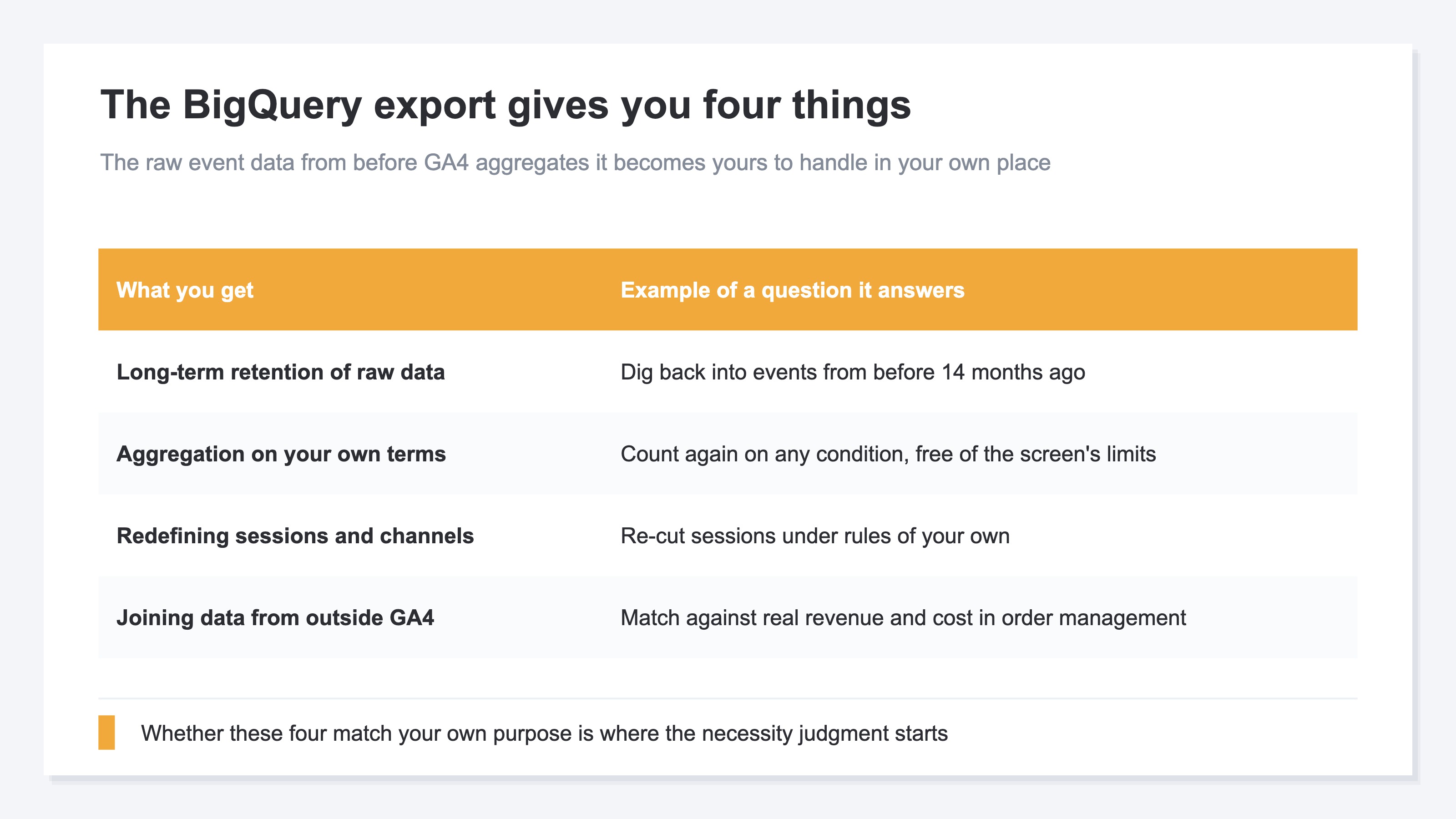
- What the BigQuery export gives you is an environment where the raw event data from before GA4 aggregates it can be handled with SQL. The contents are four things: long-term retention of raw data, aggregation on your own terms, redefining sessions and channels, and joining data from outside GA4
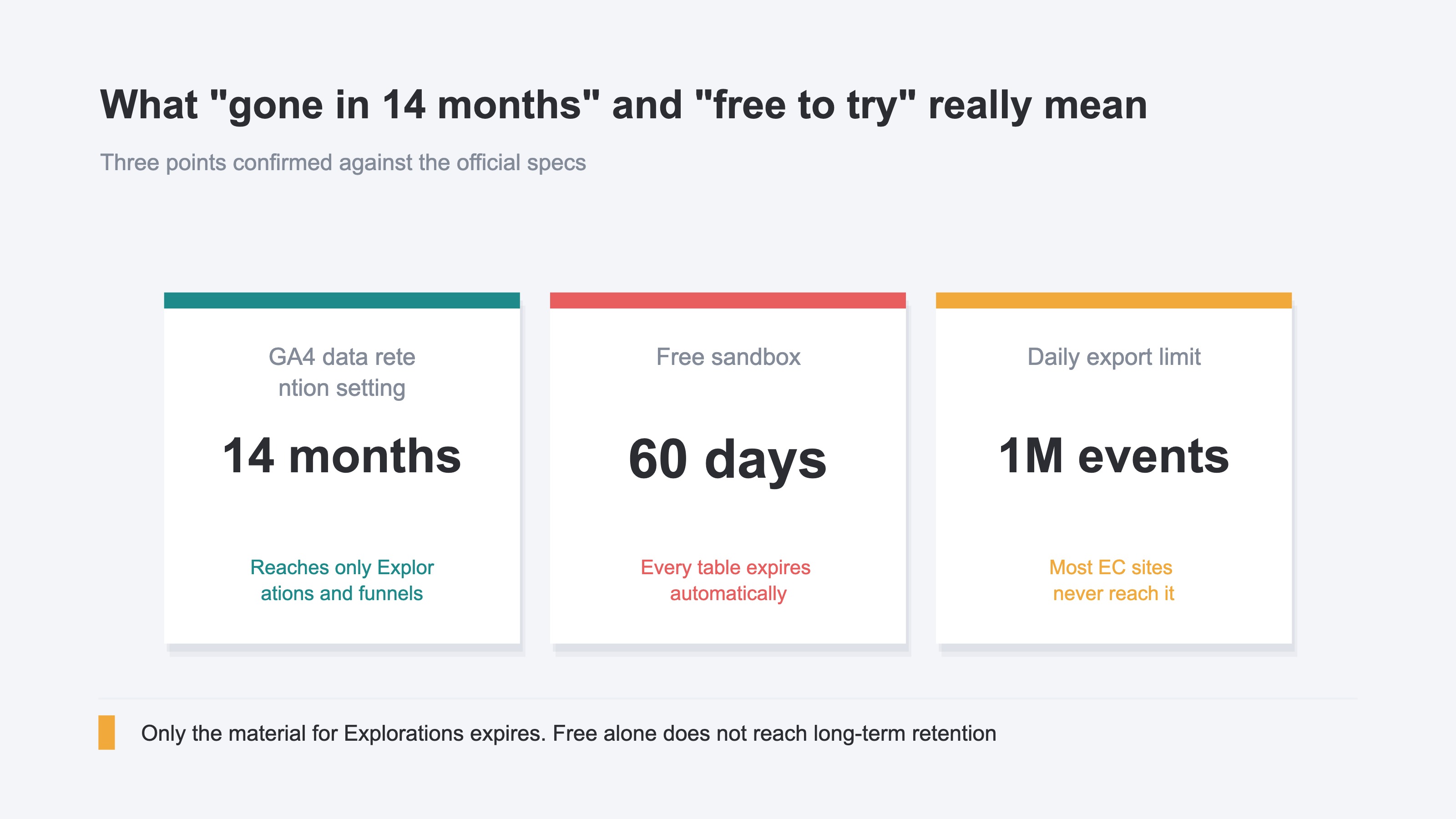
- The most common motive — everything disappears after 14 months — carries a misunderstanding. What GA4's data retention setting reaches is only Explorations and funnel reports, not the standard aggregate reports
- Free to try does not line up with long-term retention either. In the BigQuery sandbox, every table, view and partition expires automatically after 60 days
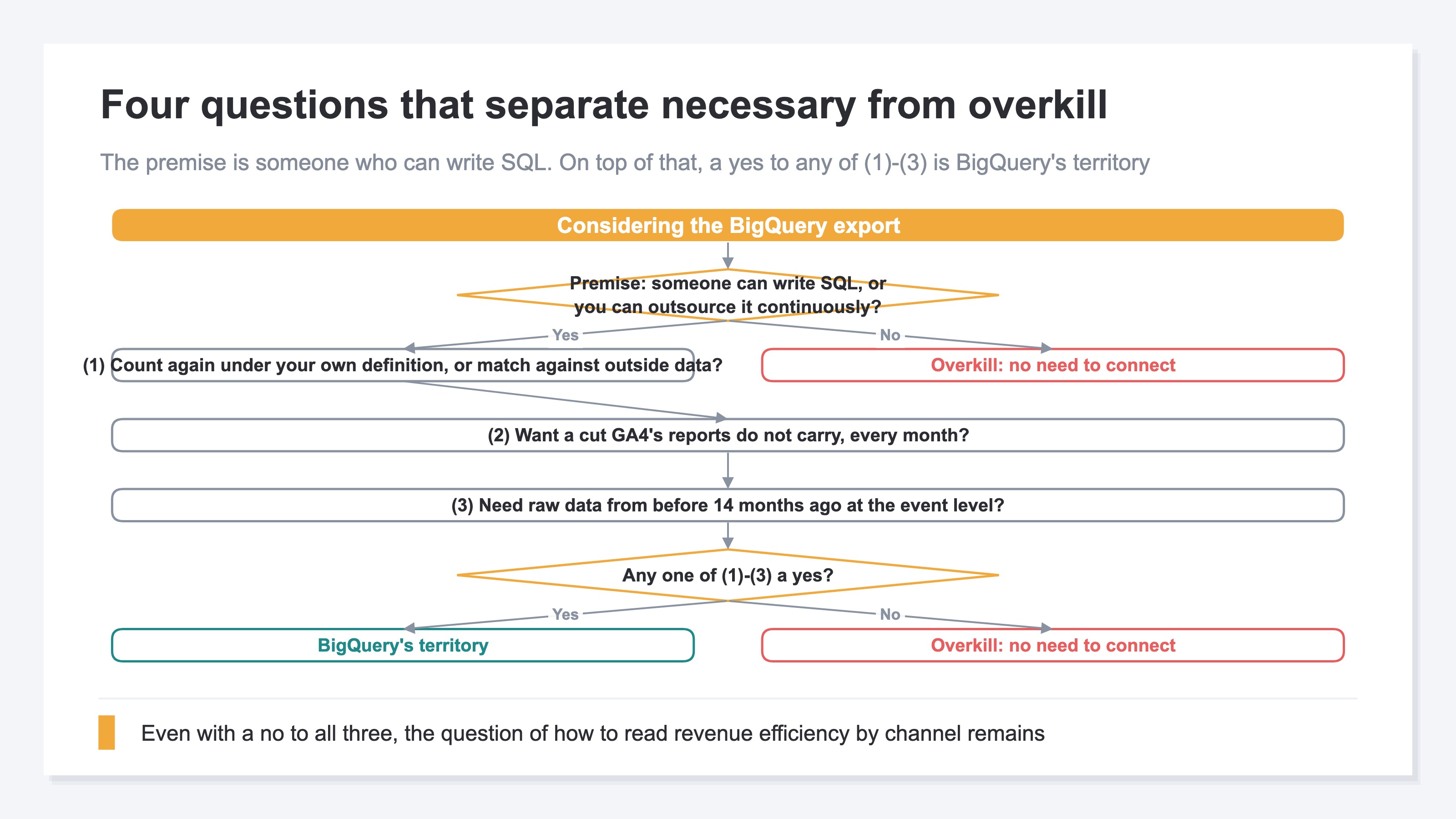
- Necessary or overkill splits on four questions. If none of them apply it is overkill, and after that the question of how to grasp revenue efficiency by channel still remains
1. What the BigQuery Export Actually Gives You#
What the BigQuery export gives you is not an extra feature inside the reporting screens. It is an environment where the raw event data from before GA4 aggregates it sits in a place of your own, to handle however you like.
What you get splits four ways#
Put plainly, it comes down to a single point: the data GA4 rounds off can sit in your own hands. The contents split four ways. The first is that the events you export accumulate in a store of your own, so you can dig back into any year later. Next, the constraint of choosing from the combinations of cuts (dimensions) and metrics GA4's screens offer comes off, and you can count again on whatever conditions you want.
The third is that the lines drawn around sessions and channels can be replaced with definitions of your own. GA4 breaks a session after a set period of inactivity and classifies referrers by a default rule, but with the raw data in hand you can change how those breaks are drawn. The last is that real revenue and cost from an order management system, or information from a customer management system — data that sits outside GA4 — can be matched up in the same place.
Where BigQuery genuinely earns its place#
Only when all four are in place do you reach the questions GA4's screens cannot answer. Take the path analysis of how many days and how many visits a buyer took from a first visit to a purchase. Or the case where you want to recompute revenue wholesale under a grouping of your own that differs from GA4's channel classification. The motive of setting your own attribution rule for revenue and comparing how the allocation shifts belongs here too (comparing four attribution models).
Another one that is easy to picture is when rows in a GA4 report get bundled into (other). Past the limit on how many rows can be displayed, individual pages and keywords get rounded into a single row, and the contents can no longer be checked from the screen. With the raw data in hand you can count in the state before that rounding happens. This is a fair representative case of BigQuery earning its place (why rows disappear into (other) in GA4).
2. The Reality Behind the 14-Month Limit and the Free Tier#
Read Google's official specs and the top two triggers for considering the export turn out to sit differently from what people assume.
The 14 months covers only the material for Explorations#
GA4's data retention period is chosen from two months or 14 months on a standard property. What that setting reaches, though, is only Explorations and funnel reports. The standard aggregate reports are not affected by it, including the case where you build a comparison inside a report[1].
So as long as you check sessions and revenue by channel in the standard reports, aggregates from before 14 months ago do not disappear from the screen. What reaches its expiry is the material for Explorations — the event-level detail you rearrange conditions on to dig into. Hurry on the premise that everything disappears after 14 months, and what you wanted to protect and what actually gets protected end up out of line.
The free sandbox expires after 60 days#
The other one is free to try. BigQuery has a sandbox, and you can start using it without setting up billing. In the sandbox, though, every table, view and partition — each a unit for holding data inside BigQuery — expires automatically after 60 days[3].
Connecting BigQuery for the sake of long-term retention, and then losing it after 60 days while it stays free. The goal and the means sit out of line. To reach long-term retention, a project with billing enabled is the premise. What is free to try reaches as far as confirming how the mechanism works; once you enter the stage of accumulating an asset, the terms change.
Volume limits do not become a problem for most ecommerce sites#
The daily BigQuery export on a standard property carries a limit of one million events per day[2]. Most small and mid-sized ecommerce sites are not at that scale. A situation where volume is the reason you cannot connect is unlikely to arise. Turned around, at that same scale a situation where volume is the reason you need to connect is just as unlikely.
Rebuilding what the GA4 screens leave out in Excel every month also comes up as an option. That heads in the direction of more repeated manual work, though, and gets harder to keep up as the months add on (stop re-aggregating GA4 in Excel).
3. Four Questions That Separate Necessary from Overkill#
Necessary or overkill splits on the following four questions. Answer the fourth one first. If that one is a no, there is no need to read the rest. It is overkill. If it is a yes, then a yes to any one of the first through the third puts you in BigQuery's territory, and a no to all three makes it overkill.
The four questions#
First. Do you want to count every event before a purchase again under a definition of your own, or match it against data outside GA4, such as an order management system? Rather than taking the sessions GA4 broke and the channels it classified as given, do you want to stack them back up under rules of your own, and match the revenue and cost that live outside GA4 in the same place?
Second. Do you want to see a cut that GA4's report screens do not carry, every month? For a one-off investigation, there are cases where checking in Explorations is faster. Whether you need it on a regular cycle is the dividing line.
Third. Do you need to hold raw data from before 14 months ago at the event level?
Fourth. Is there someone in-house who can write SQL (the query language for pulling data out), or can you outsource it continuously?
The fourth question is what decides it#
There is a reason for placing the fourth as the premise. Even if the first through the third all come back yes, without someone who can write SQL the data merely piles up at the far end of the connection and that is where it ends. BigQuery is an analysis foundation, not a finished report. Someone writes a query, and only then does an answer come out. How the measurement you need changes with the size of the business is laid out in your analytics change with your growth stage.
If you want to handle raw data with SQL of your own, that is BigQuery's territory. Even when you judge it overkill, though, the need to grasp revenue efficiency by channel — and how much bot traffic is mixed into it — remains. RevenueScope specializes in revenue-first RPS (revenue per session) by channel.
Once you decide to connect, the axis moves to cost#
If you satisfy the fourth and move ahead with the export, what you weigh next is not whether you need it but what it costs. BigQuery usage fees, the time of whoever writes the queries, maintenance once the connection is in place. That estimate is handled in the total cost of self-building versus RevenueScope. That article is about cost after you have decided to build; this one is the necessity judgment that comes before it.
RevenueScope solution
The problem that remains here is not filled by GA4's standard reports. Sessions and revenue are each computed, but there is no screen that puts revenue efficiency by channel in the lead role.
RevenueScope solves that problem. It displays sessions, revenue and RPS for each channel on a single screen. The figures are the ones left after visits judged to be bots have been excluded. There is no SQL to write.
Ask an AI assistant through MCP and this is what comes back#
| Channel | Sessions | Revenue | RPS |
|---|---|---|---|
| Google search | 4,820 | ¥1,446,000 | ¥300 |
| 640 | ¥384,000 | ¥600 | |
| Google Ads | 2,150 | ¥430,000 | ¥200 |
| Direct | 1,270 | ¥279,400 | ¥220 |
| 1,930 | ¥173,700 | ¥90 | |
| Unattributed | — | ¥168,000 | — |
An illustrative channel-efficiency comparison using sample data from a fictional site.
In this one example Google search has the most sessions, but on revenue per session email is 2× that. Working down the order of session counts sinks email to the bottom, and comparing on efficiency reverses the assessment. A decision about where to put the next round of investment gets its grounding for the first time from this comparison. Revenue that ties to no channel is displayed as Unattributed.
Connect further to ChatGPT or Claude through MCP, and asking which channel is working this month is enough — the AI reads the data directly and answers. The AI assistant route requires neither a complex setup nor SQL. It is read-only, so there is no worry about the data being rewritten.
FAQ#
Frequently asked questions#
Q. Does GA4 data really disappear after 14 months?
A. The standard aggregate reports do not disappear. What the data retention setting (two months or 14 months on a standard property) reaches is only Explorations and funnel reports[1]. Within the range of checking sessions and revenue by channel in the standard reports, no loss from expiry occurs.
Q. Can the free BigQuery sandbox hold data long term?
A. The free BigQuery sandbox cannot provide long-term retention. In the sandbox, every table, view and partition expires automatically after 60 days[3]. If long-term retention is the goal, a project with billing enabled is the premise. Treat free to try as reaching only as far as confirming how the mechanism works.
Q. If no one can write SQL, is there any point in connecting?
A. It is overkill. BigQuery is an analysis foundation, and reports do not come out simply because you connected it. Considering it once it is settled whether someone in-house can write it, or whether you can outsource continuously, is not too late. And if you want to start accumulating the data first, the free sandbox expires after 60 days.
Q. Once BigQuery is connected, does GA4 become unnecessary?
A. Connecting BigQuery does not make GA4 unnecessary. What flows into BigQuery are the events GA4 collected, and GA4 is the supply source. The export is not about standing something up in place of GA4 — it is about holding an environment where you dig to a grain GA4 does not put on the screen yourself.
Summary#
Whether you need the BigQuery export splits not on how many benefits it carries but on what you are connecting it for. Long-term retention of raw data, aggregation on your own terms, redefining sessions and channels, joining data from outside GA4. If your purpose falls inside those four and you can secure someone who can write SQL, that is BigQuery's territory. If either is missing and all you want is to grasp revenue and efficiency by channel, it is overkill. The two things that most often set it in motion — everything disappears after 14 months, and you can try it free — change their premise once you read the official specs. Start by answering the four questions and settling which side your own site is on.
See which ads actually drive revenue, at a glance
Free up to 5,000 sessions/month, AI analyst included. No credit card required. Up and running in 5 minutes.