"What is the GA4 event count?" "How is it different from the session count?" — when people start using GA4, these are the very first two metrics to trip them up. Both are "counting something," but they mean different things, are calculated differently, and are used for different decisions.
This article walks through what events and sessions actually count in GA4, how every behavior gets recorded as an event under GA4's design, and which metric to look at in which scenario. It is the second installment of the series "The Web analytics basics you were afraid to ask" (Part 1: Sessions vs Page Views vs Users).
But both event count and session count only answer "how many times it happened." Neither one tells you whether those counted actions actually produced revenue. This article covers the usage rules, then takes the next step: reading those counts as revenue efficiency (RPS, revenue per session) — the "which channel gets the next budget" question.
Table of Contents
TL;DR#
-
Event count = +1 per user action / Session count = number of
session_startevent firesPage views, scrolls, clicks — each user action is one event. Each visit is one session
-
In GA4, sessions and PVs are both recorded as "events" — events are the universal container
Unlike legacy GA, GA4 records every behavior in the same box called "event," which is why event count is typically larger than session count
-
Use sessions for traffic analysis, events for behavior analysis
"Where they came from" → sessions. "What they did" → events. Conversions are tracked as specific event types
-
But "more counts" does not mean "more revenue"
Which channel's sessions actually produced revenue is read not from counts but from RPS (revenue per session) — and that does not line up on one screen in standard GA4
1. GA4 events vs sessions: what is the difference#
Bottom line: Event count is "the total of every single action," session count is "the number of visits." In GA4, a session itself is counted as one event called session_start.
Event count is the total of every "1 user action = 1 event" recorded in GA4[1]. Page loads, scrolls, link clicks, add-to-cart actions — every behavior is recorded as an event.
The five most common automatic events are page_view (page load), scroll (90% scroll depth), click (outbound link click), first_visit (first-time visit), and session_start (visit start)[3].
Session count, on the other hand, is the count of "1 session = one continuous interaction" from arrival to leaving[2]. In GA4, the session count goes up by 1 every time a session_start event fires.
Session-end conditions:
- 30 minutes of inactivity ends the session automatically
- A new day (midnight) starts a fresh session
- Closing the browser ends the session
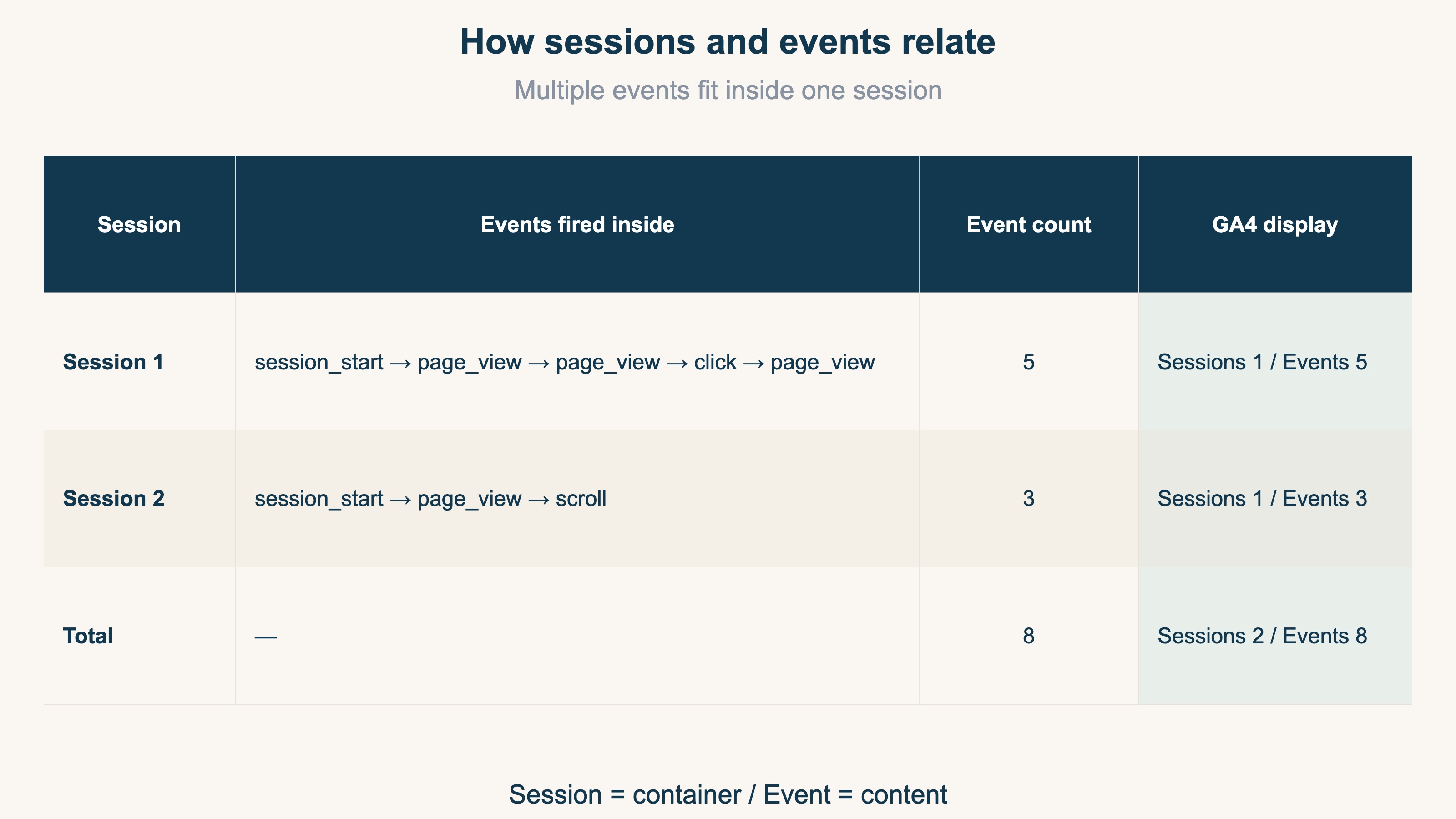
The relationship is session = container, event = content. Multiple events fit inside one session — when a user arrives (session_start), views a page (page_view), and scrolls (scroll), all of those events are bundled into one session.
"Session count = visitor count" is wrong. The same person visiting 5 times a day creates 5 sessions. Visitor count (UU) is a separate metric (see the Sessions vs PV vs UU breakdown).
2. Everything in GA4 is an event: why the numbers diverge#
Bottom line: GA4 records every behavior in one shared box called "event," so multiple events fall inside one session and event count is typically greater than session count.
The most important thing to grasp about GA4 is the design principle: every behavior is recorded as an event. Page views, add-to-cart actions, even arriving on the site (session start) — all of them are stored in a common box called "event"[4].
Session counts and PV counts are both, at the lowest level, just "the count of how often a specific event fired." Session count = session_start fire count, PV = page_view fire count, and so on. Sessions themselves are treated as a kind of event under this design.
The reason event count and session count differ is simple: multiple events fire inside one session. Here is a concrete example.
For 1 user with 3 visits, 5 page views, and 1 add-to-cart, the totals come to 9 events / 3 sessions. Event count is much larger, which is why the inequality "sessions ≤ events" always holds.
In real EC sites, 5–10 events per session is typical, and product-browse → add-to-cart → checkout flows can hit 15–20 events per session. For deeper custom event design see GA4 Event Setup Complete Guide.
3. Which metric to look at: usage guide by scenario#
Bottom line: Traffic = sessions, behavior = events, people = active users. But all three only answer "what happened" — "how much it sold" needs a different metric.
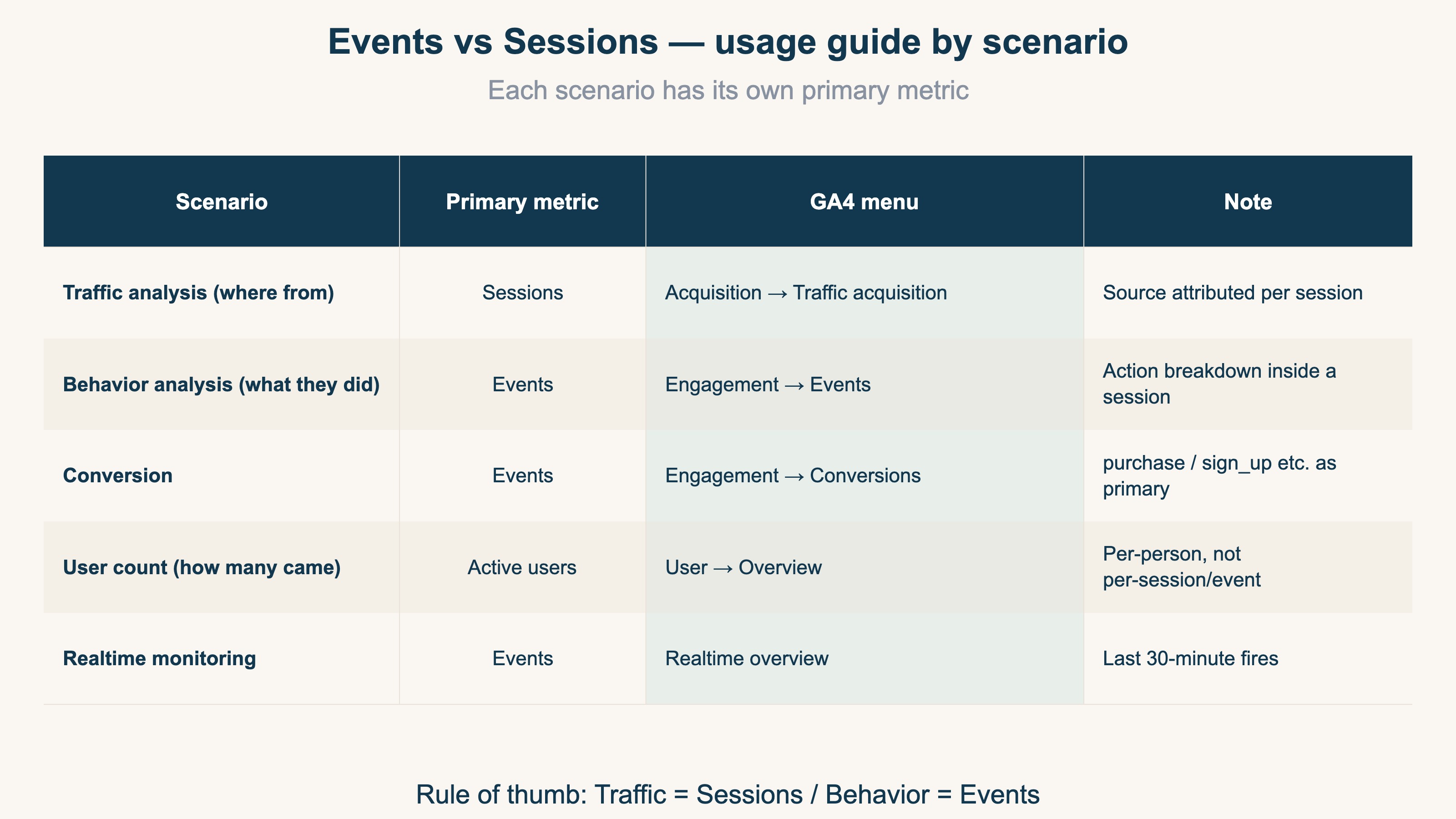
Whether to look at events or sessions depends on what you want to know.
The shortlist:
- Traffic analysis (where from) → Sessions. Check via "Acquisition → Traffic acquisition" by source / medium
- Behavior analysis (what they did) → Events. Check via "Engagement → Events" sorted by fire count
- Conversions → Events (= conversion events). Set
purchaseorsign_upas conversion events and check via the Conversions report
The rule of thumb: traffic = sessions, behavior = events. Memorize this and you'll know which GA4 screen to open. To count users (how many people came), look at neither sessions nor events but "Active users" (= UU) (GA4 EC Funnel Analysis Guide).
But this is where GA4's reach ends. Session count and event count only answer "how many times it happened." "How much it sold" lives on a different axis.
Worth spelling out: event count structurally cannot produce revenue. Event count measures "how many times," revenue is "how much money." No amount of summing counts turns into a currency figure, so there is no shortcut where you process event count somehow and out comes revenue. To see revenue efficiency you have to bring in a separate axis — RPS (revenue per session) (What is RPS, revenue per session).
And the tricky part: the channel with the most visits is not necessarily the one with the highest revenue efficiency. Below is a sample EC store's channel data, with traffic (sessions) and revenue efficiency (RPS) each shown as an index.
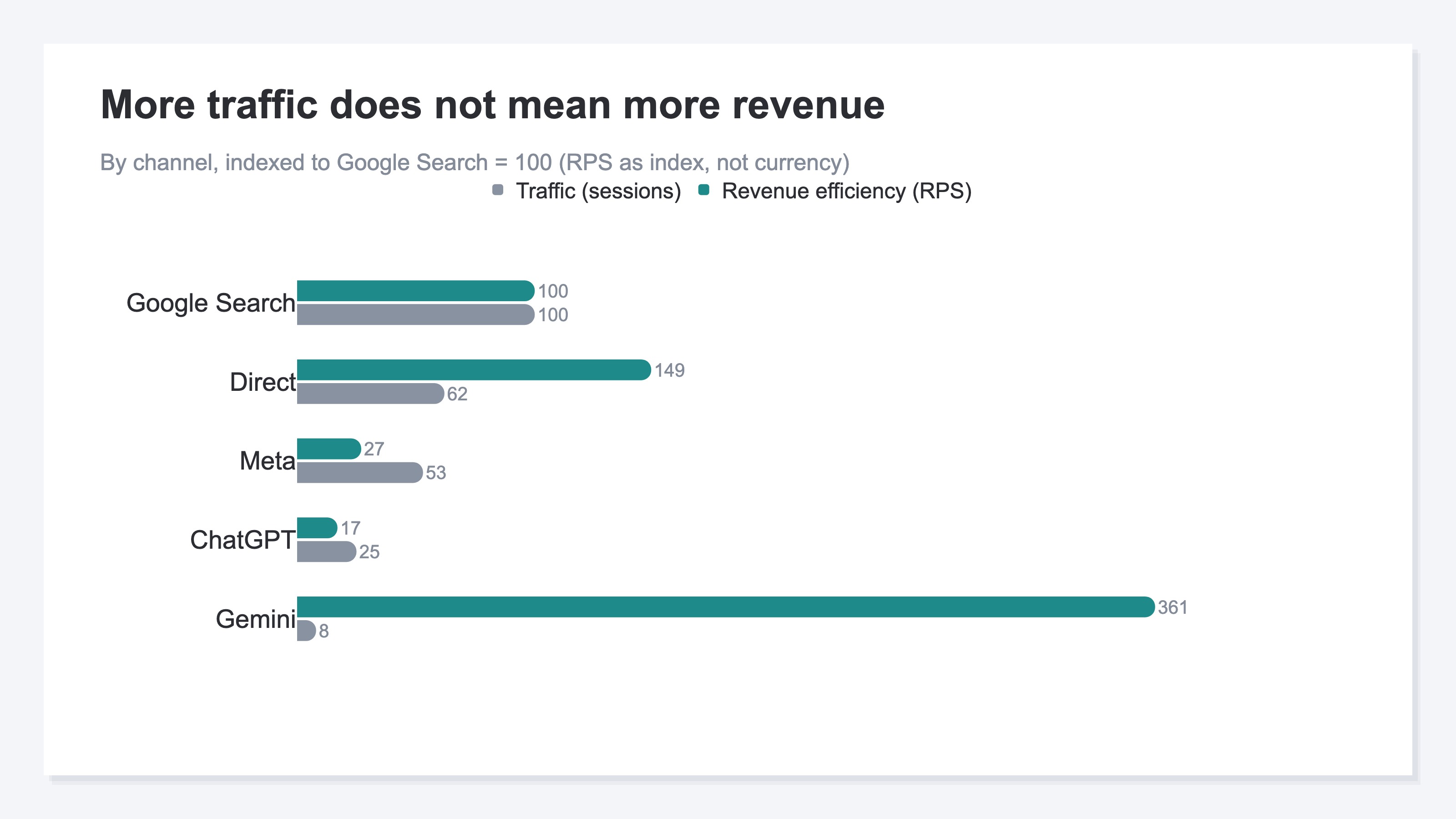
Google Search has the most traffic, yet lower-traffic channels like Direct and Gemini have higher RPS — the ranking flips. How much revenue those counts actually produced, channel by channel — comparing revenue efficiency — is structurally absent from every screen in GA4's standard reports. The acquisition report shows counts; the revenue report shows sales, on a different screen. The next chapter is about filling that gap.
RevenueScope solution
Bottom line: GA4 counts sessions accurately. But which channel's sessions sold efficiently — the number that starts your next budget decision — never lines up on one screen in standard GA4. RevenueScope fills that gap.
It helps to split the roles. Counting "how many times it happened" is GA4's job — GA4 measures both event count and session count accurately, and RevenueScope does not replace that. What RevenueScope adds is one screen that reads those counts as revenue (RPS). Measurement stays with GA4, the read-through is RevenueScope — a complementary relationship, and RevenueScope does not re-count events itself.
GA4's acquisition report shows session counts; its revenue report shows sales, on a separate screen. A view that puts each channel's RPS (revenue per session), AOV, and CVR side by side on one screen, with bots already excluded, does not exist in GA4's standard feature set. To see "did the counts turn into revenue," you have to rebuild the table by hand across channels every time.
RevenueScope replaces that manual work with a permanent view. Per channel, it gathers revenue per session (RPS), revenue, AOV, and CVR onto one screen. Because it is rooted in your own sales, you can tell which sessions sell efficiently without entering ad spend.
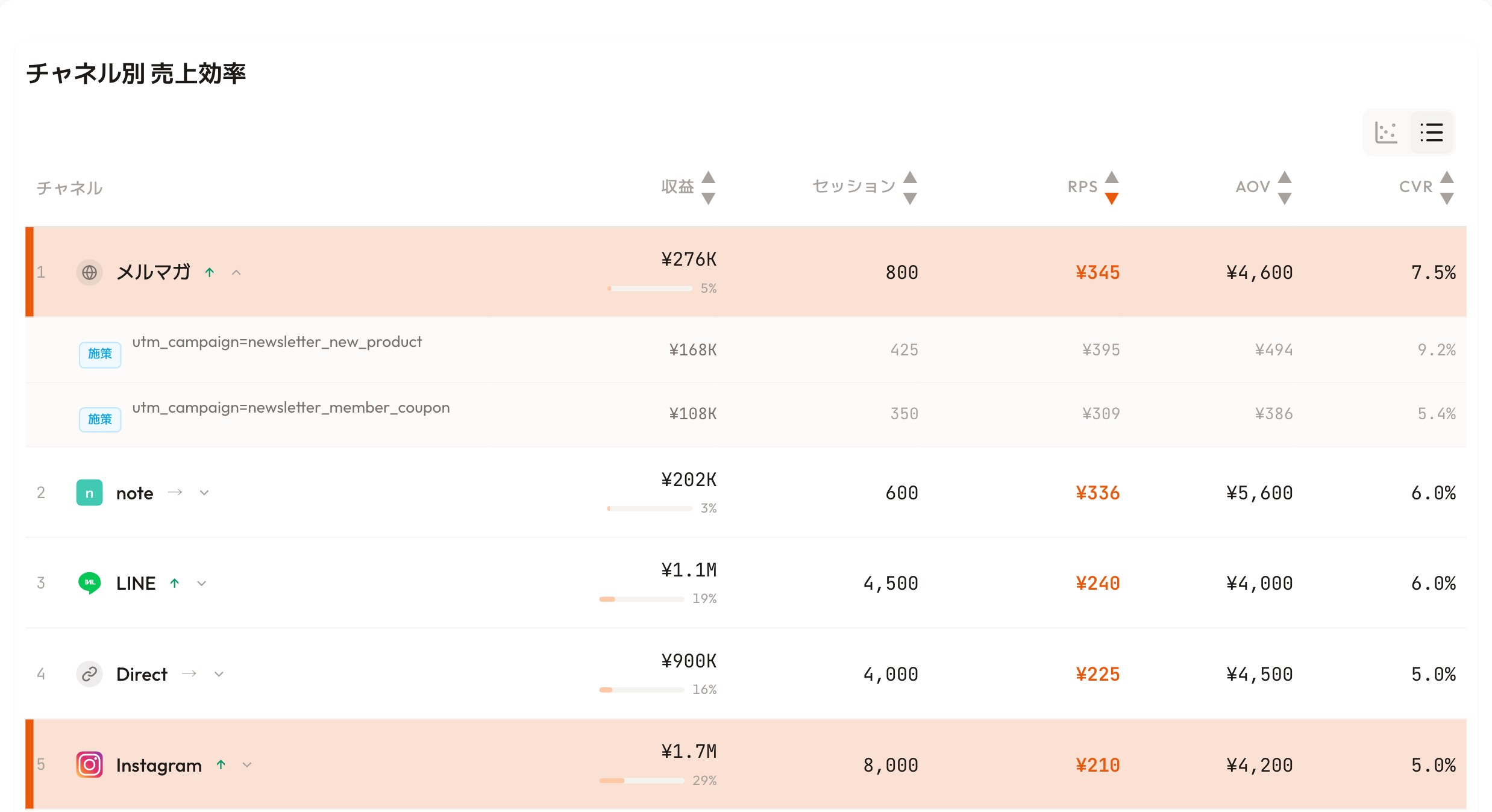
RevenueScope's dashboard (demo data shown). It gathers each channel's session count and the revenue those sessions produced (RPS) onto one screen.
Take the screen above. Instagram has the most sessions at 8,000. But by RPS (revenue per session), it's last at ¥210. The newsletter, with just 800 sessions, tops the list at ¥345. More sessions does not mean more contribution to revenue. And within the same channel, RPS shifts sharply once you split new vs returning customers. That gap — invisible when you only count — becomes legible once you tie sessions to revenue.
The dashboard is not the only way to see it. RevenueScope can also be called from AI (ChatGPT or Claude), so asking "break down revenue efficiency by channel" returns a table like this directly:
| Channel | Sessions | Revenue | RPS (revenue per session) |
|---|---|---|---|
| Google Search | 283 | ¥108,558 | ¥383 |
| Direct | 176 | ¥100,437 | ¥570 |
| Meta | 151 | ¥15,633 | ¥103 |
| Google Ads | 133 | ¥27,839 | ¥209 |
| ChatGPT | 72 | ¥4,702 | ¥65 |
| Gemini | 24 | ¥33,188 | ¥1,382 |
Actual get_breakdown (by channel) output from RevenueScope. Sample data, fictional site shown.
The same thing shows up here. Meta has the second-most sessions at 151, yet its RPS is near the bottom at ¥103. Gemini, with just 24 sessions, tops the list at ¥1,382. The ranking by count and the ranking by revenue efficiency do not match at all. Counting event count or session count alone never surfaces that gap.
GA4 counts sessions accurately. RevenueScope takes those counted sessions one step further, to "how much they sold." So when you decide which channel gets the next ad budget, you move at the deciding stage, not the counting stage. That's the next step toward turning measurement into a revenue judgment.
FAQ#
Q1. How is "event count" different from "click count" or "tap count" in GA4?
"Event count" is the total of all events. "Click count" is just the click event, "tap count" is the click event fired on mobile (taps are a kind of click). Both clicks and taps are subsets of event count.
Q2. Can event count and session count ever be equal?
Theoretically yes — only if the only event firing in every session is session_start (immediate bounces). In real life, page_view always fires at least once, so session count < event count is the steady state[5].
Q3. Where do I find the legacy GA "bounce rate" and "average session duration" in GA4?
GA4 replaces "bounce rate" with "engagement rate" (1 − engagement rate ≒ legacy bounce rate)[5]. "Average session duration" becomes "Average engagement time per session," visible under "Acquisition → Traffic acquisition." For unexpected direct/none spikes, see Why GA4 direct/none increases — root causes and fixes.
Q4. My event count is high but revenue isn't growing. Can I get revenue from event count?
There is no way to derive revenue directly from event count. Event count measures "how many times" an action happened; revenue is a currency figure. However high the count, it does not have to come from a channel with high revenue efficiency. To get closer to revenue, you need a separate axis from counts — RPS (revenue per session), compared channel by channel.
See which ads actually drive revenue, at a glance
Free up to 5,000 sessions/month, AI connection included. No credit card required. Up and running in 5 minutes.
References#
- Google Analytics Help: "About events"
- Google Analytics Help: "About sessions in Analytics"
- Google Analytics Help: "Automatically collected events"
- Google Analytics Help: "Recommended events"
- Google Analytics Help: "Engagement rate and bounce rate"